Web applications are at the core of the redefined nature of business operations brought about by the internet. Web-based applications are common, whether they be simple tools you use every day such as Google Docs and Trello, or more advanced enterprise systems with thousands of users, the need to develop web-based applications has never been greater. You want to create a web application and are a startup founder with a product idea, you need to digitize your operations, or you are a developer who is willing to work on a full project, this guide will tell you exactly how to build a web application, step by step, in 2026.
What is a Web App and Why Does it Matter?
A web application is a computer program that can be operated in a browser and is not installed on a computer. A web app is not just an informational page but rather interactive; unlike a static site, users can log in, enter data, receive personalized results, and execute actions in real time. Such web-based platforms as Slack, Notion, Shopify, Canva, and Gmail. They are not websites but complete products, software that runs in a browser, and that difference informs all your technical and design decisions.
Healthcare services are enabling patients to make appointments and access medical records. Fintech applications enable customers to make investments in real time. E-commerce platforms process millions of transactions daily, and users don’t download anything. If you want examples of web-based applications that support internal business operations, consider employee dashboards, CRMs, project management tools, and inventory tracking systems. These applications clearly serve specific operational needs rather than a broad consumer audience.
The most important reasons why businesses are investing in web apps in 2026 include:
- No installations needed users can use the app immediately via any browser on any device.
- Simple to update and maintain than native desktop or mobile applications.
- Reduced distribution expenses as there is no app store approval process involved.
- Scalable infrastructure that expands as you increase users without redeveloping infrastructure.
Read More: 10 Top Web Application Development Frameworks in 2026
Step 1: Identify Your Idea and Test It
Any successful web app begins with a well-identified problem. You must intensely know what you are solving, who, and why the current solutions are not working before you write a single line of code. A logistics company’s web application that manages a vehicle fleet differs significantly from what a freelance designer typically considers a browser-based app, and these differences shape every decision, from database design to user interface design. This approach ensures you define the problem clearly before applying technology, helping you avoid costly, unsuccessful projects that stall during development.
After defining the problem, just make sure you validate it and then you can spend not a single dollar on development. Interview at least 10-20 possible users. Research about your competitors. Examine reviews of other available tools to learn what people truly like and dislike about available solutions. Most novice builders skip validation, and that mistake causes many web applications to fail, not because they build them poorly, but because they solve problems no one urgently needs to address.
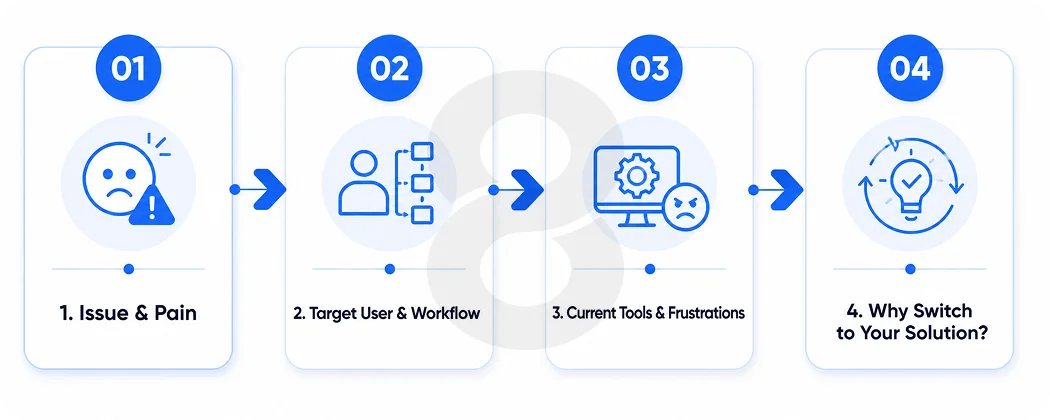
Preliminary questions to be answered:
- What is the particular issue that is addressed by your app, and how uncomfortable is it to users currently?
- What is the main target user and what does his/her daily workflow look like?
- What do they currently use and what do they hate about it?
- What would make them change to your solution and why?
Step 2: Plot Your Essential Features
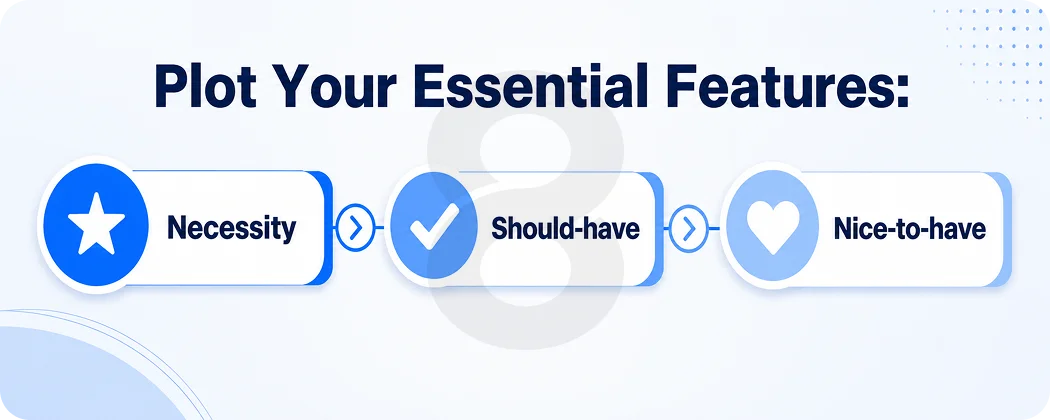
When your idea is proven, put it into a tangible feature list. The most common error most first-time builders make is attempting to get everything into version one, resulting in bloated schedules, overrun budgets, and delayed launches. Resist the temptation and work on your minimum viable product, the smallest possible version of your application that provides real value to real users. Airbnb started as a bare-bones room listing site. Dropbox started with a simple file syncing application that had no collaboration capabilities at all. Gmail opened its doors as an invite-only, limited-storage beta that only had a fraction of the features it has today.
Compose your features in three distinct buckets:
- Necessity: features that cannot be used at all in the absence of others like user authentication, core data input and basic output or results.
- Should-have: features that enhance the experience, but are not launch blockers, such as notifications, filters, search, or export options.
- Nice-to-have: capabilities that provide polish or extra value, such as third-party integrations, advanced analytics dashboards, or AI-driven recommendations.
Step 3: Select Your Tech Stack
Your tech stack is the set of programming languages, frameworks, databases, and tools to create your web app. The selection of an appropriate stack is based on the complexity of your app, the current capabilities of your team, your performance needs, and your future scalability needs. React is the most popular library in 2026 to use on the frontend, which is what users see and interact with. It is speedy, well-maintained, and contains an extensive ecosystem of components and tools. Angular is heavier and has a steep learning curve, whereas Vue.js is lighter and is appropriate in enterprise-scale applications with advanced state management requirements.
Teams use Node.js with Express for backend server code, database access, and API processing when they want a fully JavaScript-compatible stack. Teams leverage Python with Django or FastAPI for data-intensive applications or when integrating AI and machine learning. Developers typically choose PostgreSQL for structured relational data, while they use MongoDB for unstructured or document-based data. Assuming you are a non-technical founder creating a simpler web-based software example, no-code tools such as Bubble, Webflow, and Retool can get you to an MVP much faster without needing a full development team.
Technology stacks that are popular in 2026, by application type:
- Small projects: React + Node.js + PostgreSQL + Supabase to set up quickly and with minimal overhead.
- Python + FastAPI + PostgreSQL + AWS: data-heavy or AI-powered apps need to perform and be flexible.
- Enterprise platforms: Angular + Java Spring Boot + Oracle or SQL Server to comply and scale.
- No-code MVPs: Bubble or Webflow + Airtable or Xano when non-technical founders are testing an idea.
Read More: 40 Best Technology Stacks for Mobile App Development
Step 4: Architecture Design
You must have a vision of what your app looks like inside before you begin development. A majority of the modern web applications are client-server-based architecture, with the web-based frontend communicating with a backend server via APIs. The backend uses business logic to read or write to a database. Having this architecture correct initially eliminates the rewrites that are expensive later on and it is much easier to add features, absorb new developers and scale your infrastructure as your user base expands.
Create a basic architecture diagram with your main components and their connection. What is the first thing that the user will interact with? How does that evoke the backend? Where is the data stored and how it is retrieved? Which third-party services does your app integrate with payment processors, email providers, authentication providers, file storage providers, or analytics providers? The web-based applications that scaled well such as Notion and Linear invested early in clean and modular architecture that added new functionality easily without disrupting the existing functionality.
Step 5: Design Your UI and UX
This is not about how to make your app look good but how to make it work in a manner that it makes sense to the user to achieve their goal with the least hassle. This is particularly important in browser based applications where users would want to experience a smooth and fast interaction with a native like software. Begin with wireframes – basic, low-fidel drawings of every screen that chart user flows without being diverted by color or visual refinement. The aim here is simply to know what the user can see initially, what he or she can do and which direction each action takes him/her in the product.
After wireframes get the approval of your team or early users, proceed to high-fidelity mockups in a tool such as Figma. Specify your color palette, typography, spacing system and component library. Coherence in your UI will lessen mental burden to users and simplify the development process as components can be reused across various screens. In designing, you should always consider your example of a web based systems main use case is this something that users will be in all day everyday like a project management tool, or a short burst sort of thing like a scheduling app? The solution alters all that about your navigation framework to your notification plan.
- Principles of core UX to adhere to when designing:
- Place the main actions on the screen and accessible with a single or two clicks.
- Be consistent in spacing, typography and color to develop a visual hierarchy.
- Plan the worst-case scenario, i.e. sluggish Internet connection, minimal screen size, and initially new users who are unaccustomed to your product.
Step 6: Build Your Web App
It is in development that your plans come to life, and how you organize this stage will either see you deliver on time and within budget or go down the drain of endless setbacks. Most effective development teams of web apps develop in 2-week sprints, creating and testing small chunks of functionality instead of trying to develop everything before testing anything. Begin with your backend configure your database schema, create your core API endpoints and create your authentication system. When you have a solid backend foundation, your frontend developers can develop against actual data as opposed to dummy content, which will help avoid integration issues significantly down the line.
Git version control is essential irrespective of your team size. Solo developers can also enjoy a clean commit history and working in feature branches. Set up your development, staging, and production environments early so you always test in a realistic environment before anything reaches real users.
The biggest and most expensive development error that teams commit is by bypassing the staging environment and deploying untestable code straight to production, which diminishes user confidence the second something fails in front of a live crowd.
Best practices to follow during development:
- Develop modular, reusable code upfront to prevent agonizing refactoring as features grow.
- As you create API endpoints, document them, to keep the frontend and backend teams on track.
- Review the code of all pull requests to identify bugs and ensure the quality of the code.
Step 7: Thorough Pre-launch Testing
Testing is an activity that does not occur at the end of a phase; it is a continuous activity that occurs in parallel with development during the entire build. Functional testing is used to make sure that all features are operational as expected between browsers and screen sizes. Performance testing helps to detect bottlenecks in advance before they impact the actual users. Security testing identifies vulnerabilities in your authentication system, data preservation, and API endpoints. Cases of web-based applications released with unsolved security problems have incurred severe reputational losses that have taken years to overcome, and as such, security testing is one of the best returns on investment you can invest in before going live.
The best type of testing available is user acceptance testing, which is putting a functioning copy of the app in the hands of real users before launch. It always brings out usability problems that internal teams will not identify at all as they are too close to the product. Run a closed beta with 20 to 50 real users from your target audience, and monitor how they use the app, noting where they stall, get lost, or drop out of tasks. This approach reveals more about real user behavior than an internal review does.
Read More: What is QA Testing – Software Quality Assurance Guide
Step 8: Implement and Refine
The release of your web app is not the finish line but the starting line. Your initial draft will not be perfect, and that is not only a welcome but even a natural thing. All you need is for it to work, address the root cause of the issue of your target user, and provides you with an opportunity to build on it based on actual usage data. Install analytics on day one with analytics tools such as Google Analytics, Mixpanel, or PostHog to understand the flow of users throughout your app, where people fall off, and what they use the most.
Schedule the after-launch roadmap on a three-month basis. Look through your analytics, get feedback on users with in-app surveys or face-to-face interviews. And base your next set on features with the highest potential to keep users and make them happy. The most successful web-based systems today, Figma, Linear, and Notion, share one key trait: they release improvements regularly, listen closely to users, and treat their products as continuously evolving rather than ever finished.
Case Study: How 8ration Built Done Right Away

It’s always been a pain to find a decent home service guy. We were approached by Done Right Away with a vision to change it and we made it a reality; making it a full-scale web marketplace where trust is at the heart of every interaction.
The Problem
There is a trust gap in the home services sector. If a provider is skilled and licensed, homeowners are unable to check this. If there is no platform to back them, professionals have trouble with credibility building. Done Right Away wanted to join both sides, and 8ration was in charge of building the bridge.
What We Built
A responsive web platform across all devices, in 7 months and included:
- Puts homeowners and providers together in real time based on location, availability and service type
- No hidden charges, line item prices before any booking commitment, transparent quotes
- Live job tracking. updates from confirmation to completion to live arrival tracking to completion
- Schedule management, job requests, tracking income, and reputation building in provider dashboard
- Confirmed jobs only have verified reviews, so it’s a more genuine review
- Provide secure payments. hold-and-release processing that secures payment for both parties
The Results (Pilot Phase)
- 92% booking completion rate
- 500+ service professionals have been verified and onboarded.
- Yes, they offer a satisfactory level of service, with an average rating of 4.8/5 from homeowners.
- Developed in 7-months, available on all devices
The Takeaway
Done Right Away didn’t need another service directory; it needed a platform based on accountability and transparency. That’s what 8ration provided.
Final Thoughts
It is more accessible than it has ever been to build a web app as custom as possible in 2026 because of established frameworks and managed clouds and potent no-code tools that have reduced the barrier to entry for non-technical founders. Accessibility is not easy. It takes clear thinking about the problem you are solving, disciplined prioritization of features, intelligent technology decisions, and an authentic interest in understanding your users through all parts of the process to be successful. This guide will help you follow the steps and be much better off than most of the teams that begin a build without a plan.