If you’ve ever tried to coordinate a meeting across four time zones, with someone who lives in Outlook and another person who only checks email at 11pm, you already know why this problem won’t die. Calendly is a multi hundred person company built on a feature that any of the big tech players could have shipped in a sprint. They didn’t. So here we are.
You’re probably reading this because you’re thinking about building your own appointment scheduling system. Maybe Calendly’s enterprise pricing finally crossed a line your CFO can’t stomach. Maybe you need scheduling tied to a workflow they don’t care about. Or maybe you just want to own the data and stop renting a piece of your stack from someone else.
Whatever the reason, this is the honest version. What to build. How the architecture actually looks. What the stack should be in 2026. And what it’ll really cost when you sit down with a developer who’s done this before.
Why People Still Want to Build Their Own Scheduling System
Calendly works. That’s the annoying part. But it doesn’t work for everyone, and the gaps are big enough that founders keep building competitors.
Cost is the loudest reason. Calendly Enterprise starts around $15,000 per year, and the per seat math gets ugly for teams over 50 people who only use a fraction of the features.
Branding is the next one. You can’t fully white label the booking experience without paying enterprise prices, and even then your link looks like a Calendly link to your customers.
Then there’s workflow fit. Vertical software for dentists, therapists, tutors, auto repair shops, lawyers, those all need scheduling tied to inventory, deposits, intake forms, and case notes. Generic schedulers can’t get specific enough without becoming a Frankenstein of Zapier hacks.
And the boring reason: ownership. If booking is the core action in your product, scheduling becomes part of your SaaS application development roadmap. You don’t want to be on hold with someone else’s support team when scheduling breaks on a Monday morning.
The market backs the demand too. Precedence Research has the market growing from around half a billion today to over $2 billion in the next decade. Plenty of room. Doesn’t mean it’s easy money. Calendly still owns the mindshare, and most of the new dollars flow to whoever shows up first in a Google search.
Core Features Your Appointment Scheduling System Needs
You don’t have to clone every Calendly feature on day one. You need the ones people open the app to use, plus a few that quietly drive retention.
Start with the booking page. It’s the front door of the whole product. Someone clicks a link, sees your availability, picks a slot, and gets a confirmation.
That whole flow has to feel instant or people bounce. Then add event types so a user can set up a 15 minute intro and a 60 minute strategy session without juggling separate links.
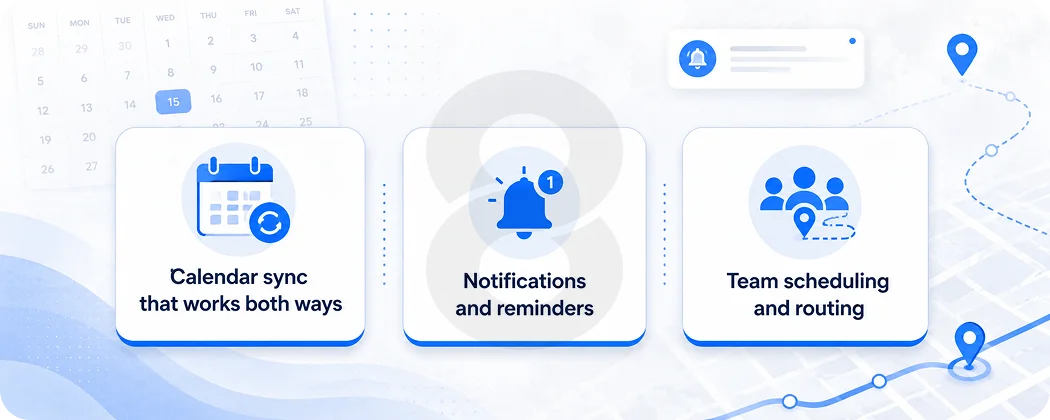
Calendar sync that works both ways
This is where most homemade schedulers quietly fall apart. Someone connects Google Calendar, thinks they’re protected from double bookings, and then a meeting they added on their phone takes three hours to show up because the system is polling instead of subscribing.
Real two way sync uses webhook subscriptions to push changes within seconds, supports recurrence rules, and handles time zones at the API level. Outlook integration through Microsoft Graph has its own quirks but follows the same pattern. Names Spark
Notifications and reminders
Reminders are quietly the most valuable feature, and the one most teams underinvest in. Automated reminder systems can deliver 30 to 70 percent reductions in missed appointments, and that’s often where customers actually see ROI.
Email is the floor. SMS adds another bump, especially for healthcare, beauty, and personal services. Both need timezone aware send logic so you’re not pinging someone at 4am their local time.
Team scheduling and routing
Round robin distributes incoming bookings across reps. Routing forms qualify visitors with a few questions, then send them to the right person.
Collective events check everyone’s calendar before showing slots. These features are what move a side project into something businesses will pay $20 per seat a month for.
Most of them can wait, though. Smart MVP development is about choosing which three or four features make the product useful enough to charge for, and shipping nothing else until customers ask.
Feature |
MVP |
Growth |
Enterprise |
|---|---|---|---|
| Single Booking Page | Yes | Yes | Yes |
| Google and Outlook Two-Way Sync | Yes | Yes | Yes |
| Email Confirmations and Reminders | Yes | Yes | Yes |
| Custom Event Types | Yes | Yes | Yes |
| Time Zone Detection | Yes | Yes | Yes |
| Embedded Booking Widget | Optional | Yes | Yes |
| SMS Reminders | No | Yes | Yes |
| Payment Collection via Stripe | No | Yes | Yes |
| Round Robin and Routing Forms | No | Yes | Yes |
| CRM Integrations (HubSpot, Salesforce) | No | Yes | Yes |
| SSO, SAML, Audit Logs | No | No | Yes |
| HIPAA Compliance | No | Optional | Yes |
The Architecture Under the Hood
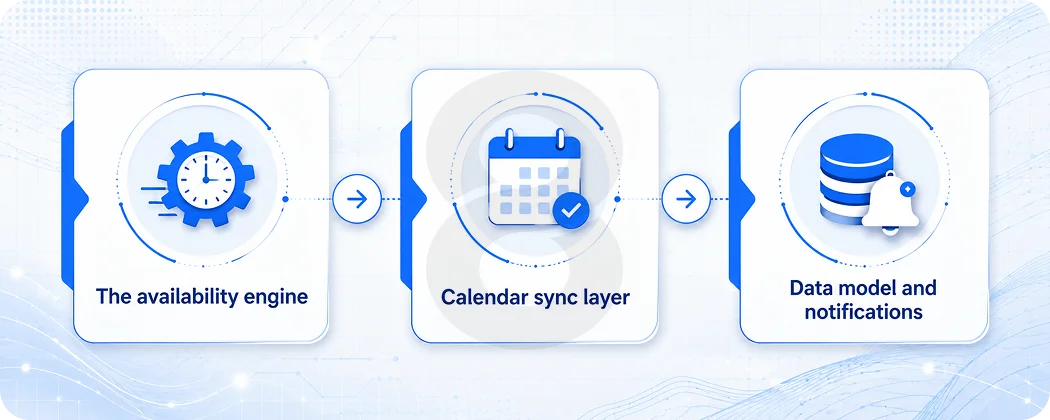
This is the part most founders glaze over. Don’t. An appointment scheduling system is a deceptively hard distributed system, and shortcuts here will cost you.
You’re storing events, syncing with external calendars, computing availability across rules and time zones, and firing notifications at the right moment. Each piece is fine alone. Stacked together they create edge cases that haunt your engineers for years.
The availability engine
This is the heart of the product. Given a user’s working hours, buffer rules, existing events on connected calendars, and event type constraints, it has to compute open slots fast enough that the booking page feels instant.
Calendly approaches this with a service oriented architecture being decomposed from an original Rails monolith, running on Google Cloud Platform with Kubernetes, Argo Workflows, NodeJS, React, PostgreSQL, and Redis. Most teams cache hot availability in Redis and recompute only when a calendar change event fires. builtin
Calendar sync layer
Two way sync between Google Calendar and Outlook lives or dies in this layer. Google’s webhook channels expire and need renewal. Microsoft Graph has its own subscription model.
Failed syncs cause double bookings, which destroy customer trust faster than any UX issue ever will. You need a sync worker queue, retry logic with exponential backoff, and conflict detection on every write.
Data model and notifications
A clean data model usually includes users, connected calendar accounts, event types, scheduled events, availability rules, and webhook subscriptions.
PostgreSQL handles relational data well and supports the time range queries you’ll lean on heavily. A queue (Sidekiq, BullMQ, or SQS depending on your stack) handles outbound reminders, and time zone aware scheduling matters here too.
Tech Stack Choices That Won’t Bite You Later
The boring stack is usually the right stack. You do not need a new language to ship this.
React with TypeScript on the frontend. Nobody’s getting fired for that choice in 2026. Add Next.js if your booking pages need to rank on Google. For the backend, Node with NestJS, Rails, or Django all do the job.
Don’t pick Go because a Hacker News thread told you it scales. If nobody on your team has shipped Go to production, you’re just buying yourself a slower MVP and a lonely on call rotation.
For data, PostgreSQL handles the relational core and the time range queries you’ll do constantly. Redis for caching availability and rate limiting your public endpoints. A queue system for notifications, sync workers, and webhooks. Pretty standard.
For mobile, you genuinely don’t need a native app at launch. Most scheduling traffic happens on the web, often from emails opened on phones.
When you do need mobile, the mobile app development decision between native and cross platform usually comes down to whether you need camera, biometrics, or push at a level Flutter and React Native can’t handle cleanly.
Layer |
Solo founder / MVP |
Series A team |
Enterprise scale |
| Frontend | Next.js + React | React + TypeScript | React with SSR + edge caching |
| Backend | Node.js + Express | NestJS or Rails | Microservices on Kubernetes |
| Database | Managed PostgreSQL | PostgreSQL + read replicas | PostgreSQL + Spanner or Cockroach |
| Cache | Redis | Redis Cluster | Redis + Memcached |
| Queue | BullMQ | Sidekiq or RabbitMQ | Kafka |
| Infra | Vercel + Railway | AWS or GCP managed | GCP or AWS with K8s |
| Auth | Clerk or Auth0 | Auth0 or in house | SAML, SSO, SCIM |
How Much It Costs to Build a Scheduling System Like Calendly in 2026
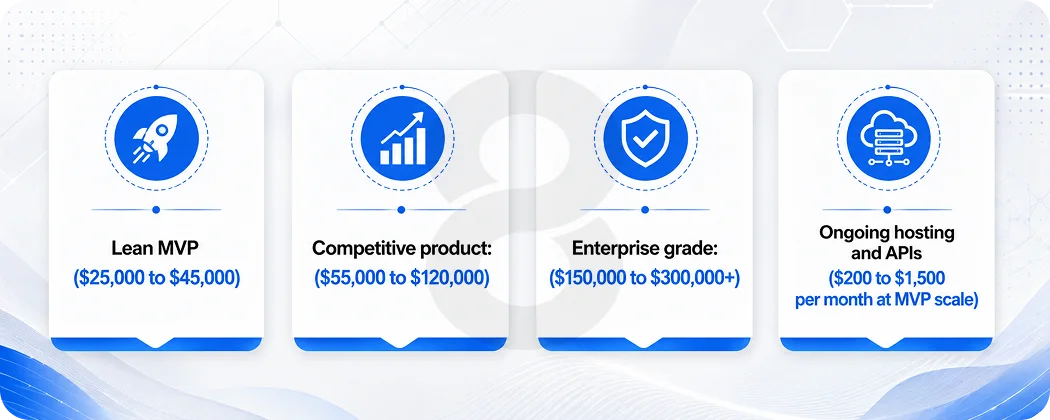
This is the part everyone scrolls to. So let’s just get specific.
The honest answer is that the budget depends on what version of Calendly you’re actually building. There are three rough tiers, and the gap between them is mostly about how many edge cases you’re willing to ship without.
The lean MVP
You want booking pages, Google Calendar sync, email reminders, time zone handling, and a basic admin. A solid offshore or nearshore team can ship this for roughly $25K to $45K in about three months. Add a mobile app at the same time and you’re closer to the top of that range, sometimes a little above.
That’s the cheapest version that actually works for real customers. Below it you’re either using a no code stack you’ll outgrow in six months, or you’re paying a single junior dev to vibe code through it and rewriting everything next year.
The version that competes for revenue
Now add round robin, SMS reminders, Stripe payments, a couple of CRM integrations, and an embeddable widget. This is the build that starts to look like a real product people will pay $15 to $20 a seat for.
Expect somewhere in the low six figures and four to six months of actual engineering time. Most independent estimates land in the same neighborhood, so if a vendor quotes you a third of that, ask what they’re not building.
The enterprise tier
HIPAA, SSO and SAML, audit logs, branded domains, real analytics dashboards, uptime guarantees. Once those words enter the room, you’re well into the mid six figures and looking at annual security audits on top. This is also where solo founders should stop and ask whether they actually need this version yet, because most don’t.
A few honest warnings from people who’ve watched estimates blow up. Salesforce integration sounds simple until you’re three weeks deep in their object model. Multi tenant data isolation is one of those things you either design for on day one or pay to fix later, never both. And HIPAA compliance isn’t a checkbox. It’s a posture, and it touches every part of the stack.
Hosting and third party APIs add a few hundred to a couple thousand a month early on, and that bill grows with you. It’s a footnote at MVP scale and a real line item by the time you have paying customers.
What Most Teams Miss When They Build This
A few things you only learn after shipping.
Time zones will humble you. UTC in the database. Convert at the edges. Test daylight saving transitions. Test with a user in New York booking a slot owned by someone in Sydney while the server runs in Virginia. That’s where the bugs hide.
Calendar sync drift is the silent killer. A user moves a meeting on their phone. Your webhook fires. Your worker takes 12 seconds to process. In that gap, someone books a slot that’s now taken. Build conflict detection or you’ll spend Saturdays writing apology emails.
Notifications fail quietly. Twilio rate limits you. Gmail flags reminders as spam. SendGrid throttles on sudden volume spikes. Bake retries and dead letter queues into the notification pipeline from day one, not when it’s already on fire.
And the booking page has to load instantly. Anything over 1.5 seconds and conversion drops sharply. Edge caching for public booking pages and aggressive frontend optimization aren’t optional. If you’re working with a partner on the build, a team that’s shipped real time apps before saves you from learning these lessons live.
Reliable web app development for calendar heavy products is the kind of work where experience compounds. You either already know Google’s webhook channel renewal pattern, or you find out the hard way when bookings stop syncing at 2am.
One last thing. The market gives you real signal here. Around 40 percent of all appointment bookings happen outside traditional business hours, and 73 percent of prospects who try to book after hours but hit a closed system never come back.
That’s why this category exists. Your scheduling product exists to capture the booking that would otherwise have died in a phone tag loop.
Read More: Top 10 CRM Software Platforms of 2026
Where 8ration Fits In
You can build a scheduling product with any team that’s shipped a real time app before. We’re one option. The real question, with us or anyone else, is whether they’ve already paid the dumb taxes. Google webhook channels that expire at 2am. Outlook 365 recurrence quirks that don’t show up in tutorials. Twilio rate limits that always seem to land on launch day.
That’s the work we’ve done across healthcare, marketplaces, and service businesses. So if you’re scoping a scheduling product, the conversation usually starts with what your customer is actually trying to book, which features can wait, and where the integrations quietly get expensive. We hand you a feature list and a timeline you can take to anyone, even if you end up building with someone else or hiring internally.
Honestly, if your in house team can handle this, that’s usually the better long term play. Agencies are useful for getting from zero to a working product. After that, the people who own the code day to day are the ones who keep it running at 3am on a Saturday. We’ll say that out loud even when it costs us the project.
If you want a second opinion on scope, a real cost breakdown, or help specifically with the calendar sync and availability engine parts where most builds quietly fall apart, that’s the kind of conversation worth having. No pressure either way.