You have almost certainly decided to build the app already. The pricing is the part that does not add up. Three studios read the same one page brief, came back forty thousand dollars apart, and none of them explained where the gap came from.
The spread almost never comes from the feature list. It comes from things nobody wrote into the proposal. How far back you support older iPhones. Whether you sell anything inside the app at all. And whether whoever builds it will still be around next spring when Apple changes the rules again, because Apple will change the rules again.
This guide is built around the decisions that cause that spread, ordered by how expensive each one is to reverse. If you read only two sections, read the one on Apple’s cut and the one on what it costs to stay on the App Store after launch. Those are the two that most guides skip and the two that wreck budgets.
What iOS App Development Involves in 2026
iOS app development is the work of building software for iPhone and iPad with Apple’s tools, then distributing it through a channel Apple controls end to end. That last clause is the commercially interesting one. On the web you own your stack, your checkout and your release schedule. On iOS you rent all three.
None of this has changed much in years. Swift is the language and Xcode is where you write it, which means somebody on the project needs a Mac. Interfaces get designed against Apple’s Human Interface Guidelines. Builds go up through App Store Connect, and every release, including the ones that fix a typo, waits for a reviewer to approve it. Apple sets the SDK you compile against, the age rating framework, the privacy disclosures you file and, for digital goods, the payment rail.
What changed is the pace. Apple now enforces a new minimum SDK every spring, has just pushed through its widest visual redesign in over a decade, and is midway through rewiring how apps talk to Siri. A guide written in 2023 will tell you iOS is the predictable platform. In 2026 that is no longer a safe assumption to build a budget on.
Should You Build for iOS First
The honest answer depends less on your product than on where your paying customers live and how they behave.
When iOS first is the right call
Money is the first filter. In the US, Canada, the UK, Australia and Japan, iOS users spend more per head than their share of installs would predict, so a smaller audience can still be the more valuable one. B2B in North America follows the same pattern for a duller reason: the corporate phone fleet is mostly iPhone, so that is what your buyers already have in their pockets.
Hardware is the second. If the product depends on camera work, health data or the secure enclave, or if you want an Apple Watch companion, starting on Apple’s side means fewer things break in ways nobody predicted.
When Android or the web wins
If your growth depends on India, Southeast Asia, Latin America or most of Africa, iOS first is a strategic error dressed up as a quality decision. Android carries the volume in those markets by a wide margin. The web also wins more often than founders expect, particularly for anything a user touches once a fortnight from a laptop. An app you have to install is a tax on adoption, and it needs a reason to exist.
When you should not build a native app yet
If nobody has yet proved they will come back to your product twice, an app will not fix that. Retention problems get louder on mobile, not quieter. A responsive web product or a lightweight MVP build will usually tell you the same thing for a fraction of the money, and you can move to native once the numbers justify the maintenance commitment.
The native versus cross platform question deserves more room than it gets here. If you are weighing Swift against React Native or Flutter, our cross platform app development guide works through the trade in detail.
The short version for this article: cross platform costs you day one access to new Apple APIs, makes conforming to Apple’s current design language harder, and puts a layer between you and the frameworks Apple is pushing everyone toward. Whether that matters depends entirely on how much of your product’s value sits in the interface.
The iOS Decisions You Cannot Cheaply Undo
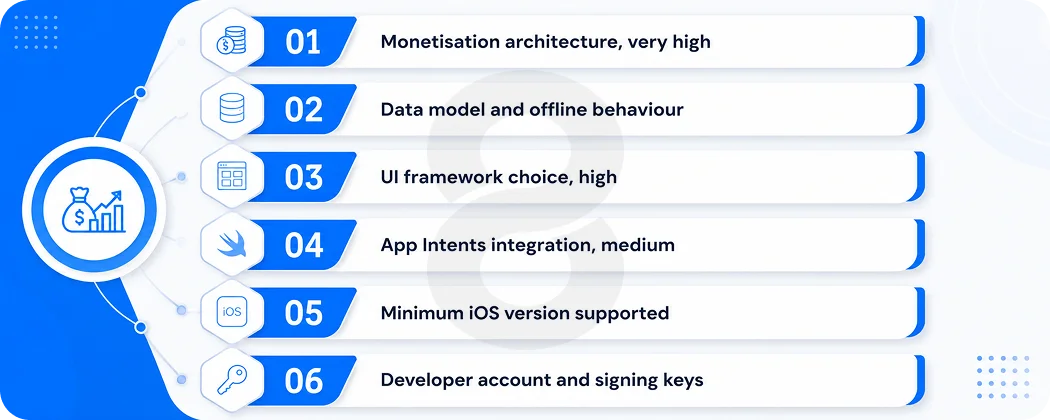
Every platform forces choices. iOS is unusual in how many of them are one way doors, because a third party enforces them and you cannot negotiate. On the web you can change your mind about a framework or a payment provider and ship the change on a Tuesday. On iOS several of these decisions calcify within weeks.
Ordering them by reversal cost is more useful to a business owner than ordering them by build sequence, because it tells you which conversations you have to win before the contract is signed and which ones can wait.
|
Decision |
Cost to reverse later | Decide by |
|
Monetisation architecture (Apple’s IAP, external checkout, or both) |
Very high. Touches backend, entitlements, accounting and pricing |
Before backend work starts |
|
Data model and offline behaviour |
Very high. Migrations on shipped apps are slow and risky |
Before the first sprint |
|
UI framework (SwiftUI, UIKit or mixed) |
High. Screen by screen rewrites, not a config change |
Before the first sprint |
|
Assistant and AI integration via App Intents |
Medium now, high once the app is large |
Architecture phase |
|
Minimum iOS version supported |
Cheap to raise, expensive to lower after launch |
Before design |
| Who holds the Apple Developer account and signing keys | Cheap to set up correctly, painful to unwind | Before the first upload |
Notice that the two most expensive items have nothing to do with which language you write in. That is the part most proposals get backwards.
Choosing Which iOS Versions to Support
This is the decision most teams get wrong first, usually because two different settings get confused with each other.
The SDK you build against and the iOS version you require from users are separate things. Apple mandates the first one. You choose the second. Compiling with the iOS 26 SDK does not mean your app stops working on an iPhone running iOS 18, as long as your deployment target is set lower and you guard the newer APIs properly. Plenty of teams have panicked about SDK deadlines and dropped users they never needed to drop.
Reaching further back costs you on three fronts. You need more physical test devices. You write conditional code around APIs that older builds do not have. And your QA hours scale with the device matrix instead of the feature list, which is the one that surprises people.
Apple publishes adoption figures in its developer documentation. Check them the week you make the call. Adoption numbers in blog posts, this one included, go stale within months of publication.
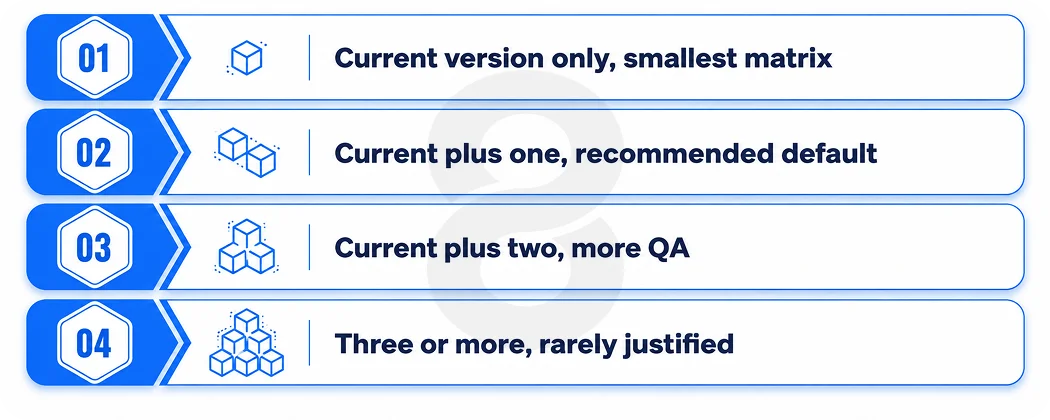
|
Deployment target |
What you gain | What it costs |
Typical fit |
|
Current version only |
Full access to the newest APIs and design components. Smallest QA matrix | Excludes users who delay updates, which is a real slice in enterprise fleets |
Internal tools, hardware companion apps, tightly controlled fleets |
|
Current plus one previous |
Near total reach with modest extra work | Some newer APIs need fallbacks | Most consumer and B2B apps. The default we recommend |
|
Current plus two previous |
Reaches users on older hardware and delayed upgrade cycles | Noticeably more QA, more conditional code, slower feature work |
Apps serving older demographics or price sensitive markets |
|
Three or more versions back |
Maximum reach on paper | Costs compound every release and the returns are usually small |
Rarely justified outside regulated or public sector deployments |
One practical note. Raising your minimum version after launch is easy technically and awkward commercially, because you are cutting off people who already installed the app. Lowering it after launch is worse. Pick deliberately at the start.
SwiftUI or UIKit for a New iOS App
Start new work in SwiftUI. This used to be a real fight and it mostly is not one anymore. SwiftUI has been production ready since iOS 17. It is also where Apple ships new interface APIs first now, which matters more than the framework comparison itself, because it decides how long you wait for anything Apple announces in June.
Most apps shipping today are SwiftUI with a few pockets of UIKit left in for complex gestures and heavily customised scrolling, where the lower level control is worth the extra code.
An app you already have is a different problem. A UIKit codebase that works is not debt, and rewriting it to modernise is a reliable way to spend three months delivering nothing a customer will notice. You can put SwiftUI screens into an existing UIKit navigation stack instead. The bridging works in both directions, Apple supports it, and it is the normal way established apps move over.
There is a hiring dimension here too. The pool of engineers who want to spend their career in UIKit is shrinking, and job specs that lead with it now attract fewer candidates. If you plan to grow an in house team, a SwiftUI first codebase is easier to staff. If you are working with an agency, ask which they default to and why, and be suspicious of anyone who answers without asking about your existing code.
How Apple’s Cut Works and Why the US Number Is Unsettled
Apple’s standard commission on digital goods sold inside an app is 30 percent. Two discounts cut against it. Developers earning under one million dollars a year in proceeds can enrol in the App Store small business program and pay 15 percent instead. Subscriptions also drop to 15 percent once a subscriber passes their first paid year.
Commission applies to digital goods and services consumed inside the app. It does not apply to physical products, real world services or advertising revenue. A logistics app charging for deliveries pays Apple nothing on those transactions. A meditation app selling a monthly subscription pays on every one.
The part that is still moving
Epic Games sued Apple in 2020 over exactly this. Apple largely won on the monopoly claims, but the court ordered it to stop preventing developers from pointing users at outside payment options. Apple complied by allowing external links and charging 27 percent on purchases made through them, which developers argued defeated the point. A US court agreed and found Apple in contempt in 2025.
In December 2025 the Ninth Circuit largely upheld that finding while saying Apple could still pursue some reasonable commission, and sent the question of what reasonable means back to the district court. In April 2026 it lifted a stay so that process could continue, and Apple has petitioned the Supreme Court to review the contempt order. The position in August 2026 is that US developers can link out with far fewer restrictions than before, and the rate Apple may charge on those link outs is undecided.
What to do about it is more concrete than it sounds. If a meaningful part of your revenue is digital, build the checkout so the payment rail is a configuration choice rather than a structural assumption. Teams that hardwired Apple’s in app purchase system into their entitlement logic spent 2025 rebuilding it. Teams that had an abstraction layer switched a flag. This is also why the monetisation decision sits at the top of the reversal cost table above.
What App Store Review Rejects
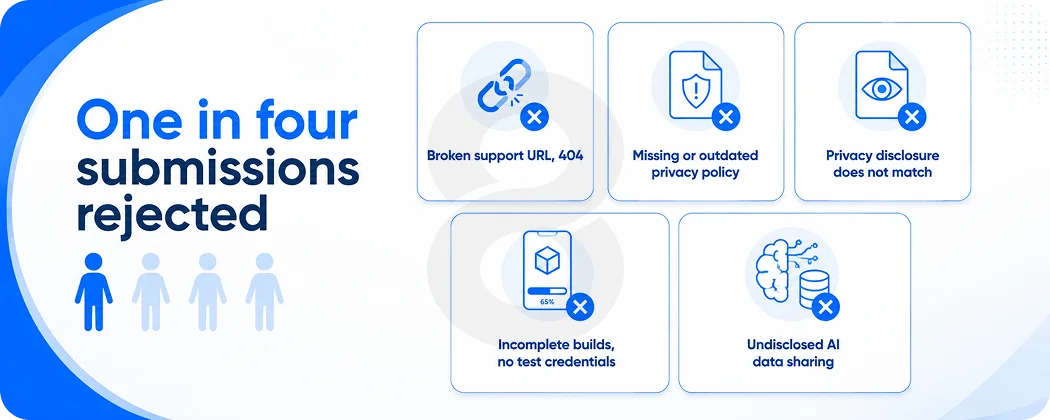
Every build you submit, including bug fixes, goes through review before it reaches users. Apple’s own App Store Transparency Report puts the scale of it plainly: of roughly 7.77 million submissions in the most recent reporting period, about 1.93 million were rejected. That is close to one in four.
Treated as an engineering problem this sounds alarming. Treated as a schedule problem it is manageable, because the same handful of causes account for most of it and nearly all of them are fixable in an afternoon once you know what they mean.
Compliance paperwork
Most rejections in the recent times have nothing to do with the app itself. Apple checks the support URL and finds a 404. Or the privacy policy link is dead, or points at a version written before the last two features shipped. Or the App Privacy disclosure says the app collects one thing and the app collects another. All three are paperwork. All three get caught constantly, usually by teams who assumed the engineering was the hard part.
Incomplete builds and reviewer access
Apple rejects anything that looks unfinished, including placeholder screens, dead buttons and demo content. The related trap is reviewer access. If your app needs a login, you must supply working test credentials, and someone should verify those credentials on the morning of submission rather than assuming they still work from three sprints ago.
Privacy and AI disclosure
This is the category growing fastest. Apps that send personal data to an outside AI service now need explicit user consent that names the provider and the data types involved, and AI generated content has to be identifiable as such. Any product wired to a third party model API needs a consent screen. Plenty of teams shipping AI features in 2025 discovered this through a rejection email.
Minimum functionality and copycat design
Guideline 4.2 catches apps that are effectively a repackaged website or a template with a new logo. Categories full of near identical products, such as prayer apps, calculators and basic utilities, get scrutinised harder. If your app does not do something a mobile browser cannot, expect friction.
How long review adds to your timeline
Most reviews complete inside a day or two, though first time developer accounts, complex apps and anything touching sensitive capabilities take longer. Metadata rejections can often be fixed by editing fields in App Store Connect and resubmitting the same build. Binary rejections need a new upload.
Arguing through the Resolution Center is usually slower than just fixing the issue, so plan a week of contingency around any hard launch date and read the App Store review guidelines during design rather than the night before you submit.
The Recurring Cost of Staying on the App Store
This is the section that gets left out of nearly every guide, and it is the one that catches finance teams off guard in year two.
Apple enforces a minimum SDK every spring. Since 28 April 2026, apps and games uploaded to App Store Connect must be built with Xcode 26 or later using an iOS 26 series SDK. Older builds are rejected automatically at upload. This is not a one off. It happens on an annual cadence and it will happen again next spring.
On its own that would be a build configuration change. What made the 2026 cycle expensive is what came with the SDK. Compiling against iOS 26 applies Apple’s new Liquid Glass design language to native interface components by default, which means an app that shipped in 2024 and has not been touched since cannot push a one line bug fix without first dealing with a visual overhaul nobody scoped. Teams that had let their app go dormant found the cheapest available action was suddenly a design project.
Three more recurring costs sit underneath that:
- Toolchain drag. Each Xcode release requires a recent macOS, so developer machines and CI runners need upgrading in step. Hosted build runners often lag the requirement by weeks, which is its own scramble.
- Dependency lag. Third party libraries do not all update on Apple’s schedule. One unmaintained package can hold a release hostage.
- Framework migrations. App Intents is now the required way Siri talks to your app and SiriKit is on a deprecation clock, so assistant integration has become an architectural commitment rather than a feature you bolt on later.
There is also the flat cost of the Apple Developer Program, which is 99 dollars a year and the least of your worries.
As a planning figure, we tell clients to reserve a fixed annual percentage of the original build cost for platform compliance alone, separate from any new feature work. Apps with heavy hardware integration, subscriptions or AI features sit at the higher end.
An app with no ongoing budget will not stay shippable, and the bill for catching up after two dormant years is larger than the maintenance would have been. This is what an app maintenance and support retainer is actually paying for, and it is worth pricing before you sign a build contract rather than after.
What an iOS App Costs to Build
Any number you read online is a range with the assumptions stripped out. The ranges below are the ones we quote against, and they assume a full product team rather than a single contractor, along with design, QA and a launch.
|
App type |
Typical build range | Timeline |
What pushes it up |
|
Focused MVP, one core flow, no payments |
$30,000 to $60,000 | 8 to 12 weeks |
Custom design work, offline support, hardware access |
|
Standard consumer app with accounts and content |
$60,000 to $150,000 | 3 to 6 months |
Subscriptions, real time features, third party integrations |
|
Marketplace, fintech or heavily integrated product |
$150,000 to $400,000 | 6 to 12 months |
Compliance, audit trails, multiple user roles, security review |
|
Enterprise platform or regulated deployment |
$400,000 and up | 9 months and beyond | SSO, legacy system integration, procurement and security sign off |
Four cost drivers are specific to iOS rather than software generally. Development machines have to be Macs, which is a real line item for an in house team. The QA device matrix widens with every older iOS version you support.
Conforming properly to Apple’s current design language is design work, not a checkbox. And StoreKit implementation for subscriptions is consistently underestimated, particularly the entitlement and restore logic that nobody demos but everybody files support tickets about.
Add a contingency for review. Not because rejection is likely to be catastrophic, but because a two day turnaround plus a fix plus a resubmission is a week you did not have on the launch calendar.
Who Should Own Your Apple Developer Account
This takes ten minutes to get right at the start and can cost months to fix later, which is why it earns its own section despite being short.
The Apple Developer Program account should be enrolled as an organisation in your company’s legal name, using your company’s D-U-N-S number, with the Account Holder role held by someone who works for you. Your agency gets Admin or Developer access inside that account. It does not get to be the account.
When an agency owns the account, everything your product depends on lives inside a container you do not control. Signing certificates, provisioning profiles, App Store Connect API keys, subscription configurations and the app’s entire review history sit on their side of the wall.
Apple does have an app transfer process, but it comes with conditions and it is a poor thing to discover mid dispute. Ask about this before you sign, and ask the same question about repository ownership while you are at it. A studio that gets defensive about either answer has told you something useful.
Hiring a Studio to Build Your iOS App
The useful filter is not a portfolio. Everyone’s portfolio looks good. What separates studios is whether they can answer the questions in this article without checking.
Ask what deployment target they would recommend for your audience, and make them explain the reasoning. Their answer on checkout matters more, since the US commission rate is still unresolved and you want to hear how they would structure it either way.
Ownership of the developer account is a separate question, and it is worth getting in writing. Then there is April. When the SDK floor moves, find out whether that work sits inside the contract or arrives as a separate invoice.
A studio that has shipped and maintained real iOS products will have opinions on all four. A studio that only builds and hands over will get vague around the third question.
At 8ration, our iOS app development team works this way because we maintain what we build. Discovery settles the reversible and irreversible decisions before the first sprint, the account and signing setup goes into your name at kickoff, and the annual SDK cycle is a scheduled item rather than a surprise invoice.
We work across interface design, quality assurance and long term maintenance, and we are equally happy telling a client that a native iOS build is not yet the right spend.
If you are still deciding between native and a shared codebase, or you want the numbers stress tested before you take them to a board, that conversation is worth having early.