Most messages that land in a procurement inbox ask for something the system already knows. Someone wants to know where their purchase order is, which supplier holds the laptop contract or why an invoice is on hold.
A procurement chatbot answers those questions inside Slack, Teams or the intranet by reading your ERP, contract repository and supplier records directly. Requesters stop waiting two days for a reply that takes ten seconds to look up, and buyers get those hours back.
Procurement leaders want this. A Gartner survey of 258 global respondents run in July 2024 found that 72% of procurement leaders are prioritizing the integration of generative AI into their strategies. The harder part is building a chatbot for procurement that people trust with real orders and real money.
Why Procurement Teams Are Building Chatbots Now
Generative AI changed what a procurement chatbot can read. Older bots matched keywords against a decision tree and failed the moment a requester phrased something differently. A large language model reads a contract clause, a policy PDF or a messy supplier email and answers in plain language. With retrieval and system integrations behind it, that answer points to live data instead of a guess.
The returns depend on how the technology is used. Deloitte’s 2025 Global Chief Procurement Officer Survey of more than 250 CPOs across 40 countries found that the group it calls Digital Masters achieved an average 2.8x return on GenAI investments. Followers saw 1.6x.
Gartner adds a warning. In a survey of 101 CPOs conducted in January and February 2026, only 36% said they were very confident in their ability to redesign roles and processes around AI. Gartner found that individual productivity gains from GenAI are not yet carrying through to team and enterprise outcomes. A chatbot bolted onto an unchanged process tends to land in exactly that gap. One that is designed around a specific workflow, with clear handoffs to buyers, has a better chance of moving team-level numbers.
Features Every Procurement Chatbot Needs
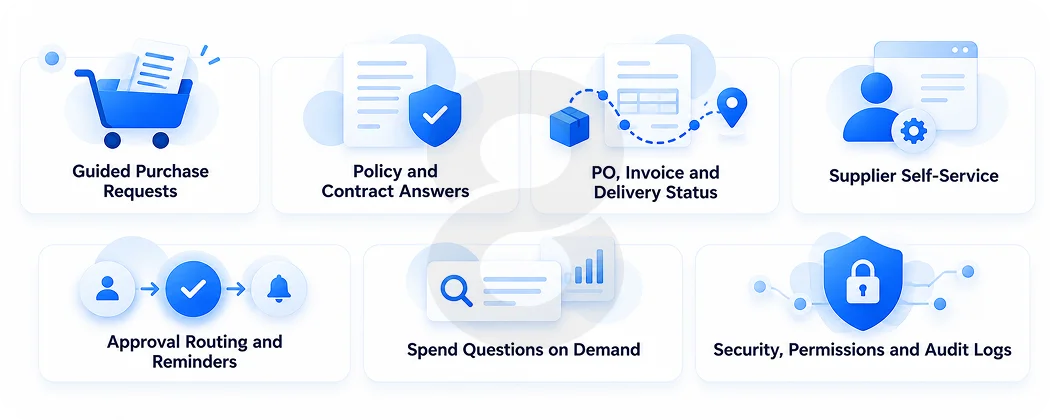
Requesters, buyers, approvers and suppliers each bring different questions to a procurement chatbot. These seven features answer the requests that fill procurement inboxes most often and add the controls that make answers safe to act on.
Guided Purchase Requests
A requester types “I need a new monitor for a new hire” and the chatbot asks the follow-up questions a buyer would ask: cost center, quantity, delivery address and whether a catalog item fits. It then creates the requisition in the procure-to-pay system or hands a pre-filled form to the requester. The point is to stop incomplete requests before they reach a buyer’s queue.
Policy and Contract Answers
Employees ask what spend threshold needs three quotes, or whether a supplier contract covers on-site support. The chatbot searches policy documents and contract records and answers with a citation to the clause. Citations let a buyer check the answer in seconds and give auditors a trail.
PO, Invoice and Delivery Status
Status questions are the easiest win because the answer already sits in the ERP. The chatbot pulls PO approval stage, goods receipt, invoice match status and payment date from the ERP and explains holds in plain words, for example a price mismatch between invoice and PO.
Supplier Self-Service
Suppliers ask about onboarding documents, payment dates and remittance details. A supplier-facing chatbot answers within strict data boundaries so each supplier sees only its own records. It can also collect missing tax or banking documents during onboarding.
Approval Routing and Reminders
The chatbot tells approvers what is waiting on them, summarizes the request and lets them approve inside the chat tool where your policy allows it. It nudges stalled approvals and escalates according to your delegation of authority.
Spend Questions on Demand
Category managers can ask “What did we spend with our top five IT suppliers last quarter?” and get an answer from the spend cube without opening a BI dashboard. This feature needs clean, classified spend data. Without it the answers will be wrong with confidence.
Security, Permissions and Audit Logs
Role-based access decides who sees prices, contract terms and supplier bank details. Every question, answer and action should be logged. Single sign-on, data residency and retention rules belong in the first design review, not the last one.
| Feature | Main users | Systems it reads or writes |
|---|---|---|
| Guided purchase requests | Employees | Procure-to-pay suite, item catalog, cost centers |
| Policy and contract answers | Employees, buyers | Policy library, contract repository |
| PO, invoice and delivery status | Employees, AP team | ERP purchasing and accounts payable modules |
| Supplier self-service | Suppliers | Supplier master data, payment records |
| Approval routing | Managers, finance | Workflow engine, delegation of authority matrix |
| Spend questions | Category managers | Spend analytics data |
| Audit logs | Compliance, IT | Logging and identity systems |
Rule-Based, AI and Agentic Chatbots Compared
The term procurement chatbot covers three different builds. A rule-based bot follows scripted menus. An AI chatbot uses a language model with retrieval over your documents and data. An agentic assistant goes a step further and completes multi-step tasks across systems with human approval at set points. Gartner names AI agents among the three generative AI advancements it expects to reshape procurement. We still recommend starting with retrieval and status lookups because they carry the lowest risk.
| Type | How it works | Best fit | Main limits |
|---|---|---|---|
| Rule-based | Decision trees and button menus | Fixed flows such as a supplier onboarding checklist | Breaks on free-text questions and needs manual updates for every policy change |
| AI chatbot | Language model with retrieval over documents and system data | Policy questions, contract lookups, status checks | Needs grounding and citations to avoid wrong answers |
| Agentic assistant | Model plans and executes steps through system APIs | Drafting requisitions, chasing approvals, triaging invoice exceptions | Needs strict permissions, approval checkpoints and more testing |
Teams that want a model to take actions on their behalf usually work with an agentic AI development partner once the read-only version has proven itself.
How to Build a Procurement Chatbot in Seven Steps
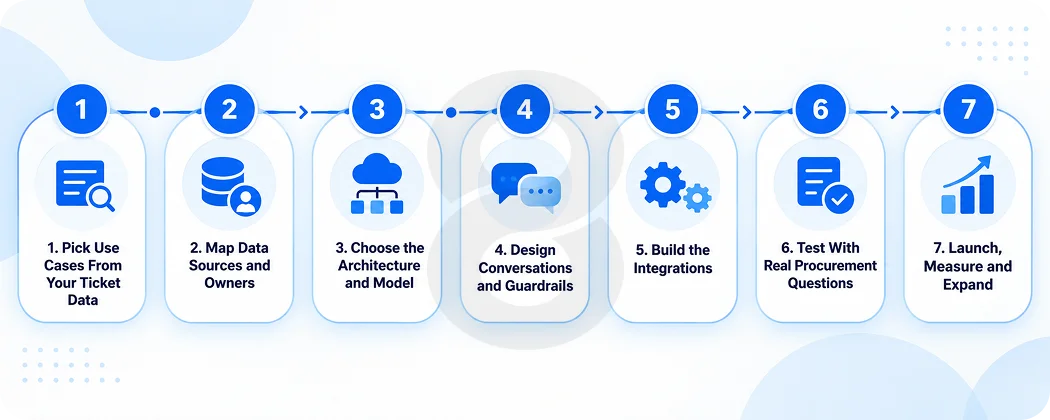
Seven steps take you from a ticket export to a live chatbot. Start with the questions your team answers most, connect the systems that hold the answers and expand once real users confirm accuracy.
1. Pick Use Cases From Your Ticket Data
Export three to six months of procurement mailbox and service desk tickets. Group them by intent and look for the handful that cover the largest share of volume, such as PO status, invoice holds and “which supplier do I use”. Choose two or three for the first release and write down how you will measure each, for example average time to answer or tickets deflected.
2. Map Data Sources and Owners
List every system the chatbot needs: ERP, procure-to-pay suite, contract lifecycle tool, supplier portal, policy library and the identity provider. Note the API available for each, who owns the data and how fresh it is. Stale contract metadata or duplicate supplier records will surface in the chatbot’s answers, so cleanup often belongs in this phase.
3. Choose the Architecture and Model
Most AI chatbot builds for procurement use retrieval-augmented generation. Documents are split, indexed in a vector store and pulled into the prompt at question time, while live data comes through API calls. You will choose between hosted model APIs and self-hosted open models based on data sensitivity, cost and latency. A team offering generative AI development can benchmark two or three models against your own questions before you commit.
4. Design Conversations and Guardrails
Write the flows for each use case, including what the bot asks when information is missing. Define what it must refuse, such as sharing another supplier’s pricing, and when it must hand off to a buyer. Require citations for every policy or contract answer. Decide the tone too. Procurement users want short, direct answers with a link to the source record.
5. Build the Integrations
The integration layer is where most of the engineering time goes. The chatbot needs secure, permission-aware connections to the ERP and procure-to-pay system, plus a connector for the chat channel your staff already use. Experienced system integration work matters here because one broken connection returns wrong order data to every user who asks.
6. Test With Real Procurement Questions
Build a test set of 200 or more real questions from your ticket export with the correct answers attached. Run every model and prompt change against it. Include adversarial cases such as a requester asking to bypass approval limits. Structured software testing catches regressions before users do. Then run a pilot with one business unit and have buyers review a sample of answers each week.
7. Launch, Measure and Expand
Roll out by department. Track answer accuracy, handoff rate, ticket volume and user ratings. Review the questions the bot failed and turn the frequent ones into new content or new integrations. Add features such as supplier self-service or approval actions only after the core use cases hold steady.
How Much Does a Procurement Chatbot Cost?
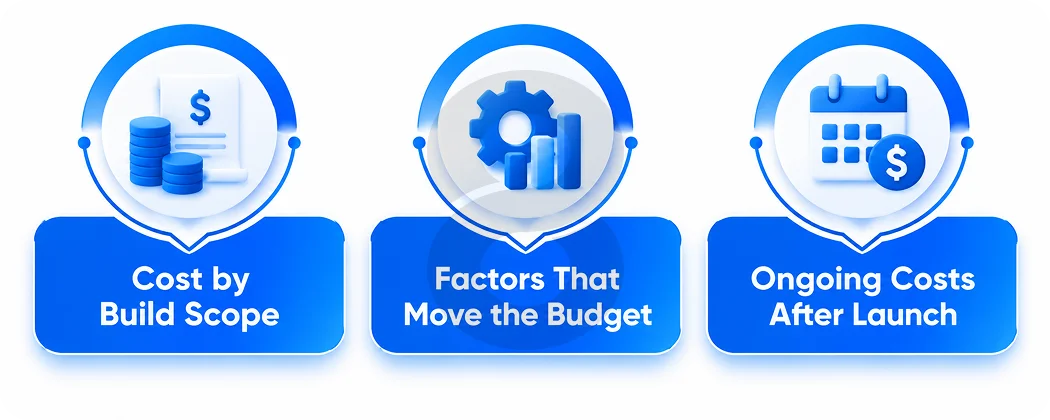
Cost depends on how many systems the chatbot touches and whether it only answers questions or also takes actions. Use the scope table to size a first release and plan for the running costs after launch.
Cost by Build Scope
The figures below are planning estimates for custom builds by an outside development team. They are not survey data. Your quote will depend on your systems, data quality and security requirements.
| Scope | What it includes | Estimated cost | Typical timeline |
|---|---|---|---|
| Pilot | AI chatbot over policy and contract documents in one chat channel, no live system writes | $15,000 to $40,000 | 6 to 10 weeks |
| Integrated AI chatbot | Retrieval plus live ERP and procure-to-pay lookups, role-based access, analytics dashboard | $40,000 to $120,000 | 3 to 5 months |
| Agentic assistant | Multi-step actions across systems, approval checkpoints, supplier-facing channel | $120,000 to $300,000 or more | 5 to 9 months |
Factors That Move the Budget
Integration count matters most. Each extra system adds connector work, permission mapping and test cases. Older on-premise ERPs without clean APIs cost more to connect than cloud suites. Data cleanup can add weeks if contracts are scanned PDFs or supplier records are duplicated. Security demands such as private model hosting, data residency or a full audit trail add infrastructure and review time. Language support and voice input widen the scope as well. Some teams pair the chatbot with AI-powered voice assistants for warehouse or field staff who cannot type.
Ongoing Costs After Launch
Running costs include model usage fees billed per token, vector database and cloud hosting, monitoring and regular content updates when policies or contracts change. Plan a maintenance budget for model upgrades and new integrations. Usage fees scale with conversation volume, so track cost per resolved question from the first month.
Mistakes That Stall Procurement Chatbot Projects
A chatbot that cannot see live data fails fast. A requester asks about an order once, gets a generic answer and goes back to email. Missing citations do slower damage: buyers cannot verify what the bot says, and compliance teams get nervous.
Ownership trips up projects too, especially when the chatbot sits with IT and nobody in procurement is accountable for it. Gartner’s 2026 finding that individual GenAI gains are not reaching team outcomes shows up here. Someone in procurement has to decide which tasks move to the bot, which stay with buyers and how the team’s workload changes.
Industry context matters too. A manufacturing software environment brings direct materials, MRP data and supplier quality records into scope. Logistics software environments add freight, carrier and delivery tracking questions.
How We Build Procurement Chatbots at 8ration
We are a software development company, and our AI team works on AI chatbot development, generative AI, agentic AI and voice assistants alongside system integration and software testing. On a procurement project that means one team handles the model layer, the ERP and procure-to-pay connectors and the test suite that checks answers against real tickets.
Our projects usually start with software consulting to review your ticket data, systems and security needs before any build begins. We hold ISO 9001 and ISO 27001 certifications, which matters to procurement and IT teams reviewing how a vendor handles supplier and pricing data.