
8ration’s app was losing users. The app was taking too long to load over 6 seconds, a threshold at which users are likely to abandon the app in a mobile world where experience is everything and anything that takes more than 3 seconds to load is a no. The pressure was real. This challenge highlighted the importance of how to improve app performance when experience directly impacts retention. The CTO’s directive was simple: increase app performance while leaving the business logic unchanged. No rewrites. No new architecture. Just intelligent tweaks. Why “No Rewrite” Was the Right Call. It’s tempting when the system is slow to “rewrite” core logic, but there are hidden costs:
- Time: Rewrites can take months or even years
- Risk: You’ll likely add new bugs while removing old ones
- Money: Development time is money; rewrites cost a lot
- Disruption: Developers get distracted from building new features
- Risk: You don’t really know if it will be faster
The better thing to do and what 8ration did is to find the bottlenecks that make the app slow and, ironically, just fix them. That’s the basis of how to speed up your app without rewriting it.
Step 1: Measure Everything Before Touching Anything
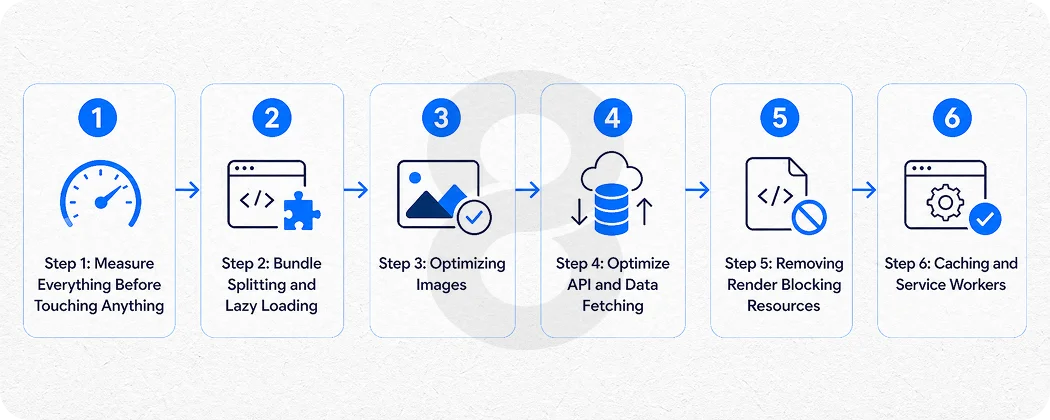
The first step in how to improve app performance was measurement. Before writing a single line of code, the team spent two weeks profiling everything: frontend, network, APIs, and real user behavior. Before the team started writing any code, they spent two weeks profiling the app:
- Frontend profiling with Chrome DevTools and Lighthouse
- Network waterfall to find blocking requests
- Distributed tracing to identify slow API requests
- Real User Monitoring (RUM) to see how real users were experiencing the site
- Bundle analysis to find what JavaScript was being downloaded
They found some interesting things. It wasn’t the business logic that was slow. It was coming from bloated JavaScript bundles downloaded on page load, non-optimized images not served with compression, blocking third-party scripts executed on page load, API requests being made one after another instead of in parallel, and a lack of proper caching on often-accessed data. Moral of the story: Don’t try to improve your app if you don’t know where time is being wasted.
Step 2: Bundle Splitting and Lazy Loading
The second biggest impact was on the delivery of the JavaScript. It bundled all the pages, all the features, and all the dependencies of the app together and delivered it to the user on the first request even if all they needed was the login page. 8ration split this up by:
- Splitting the bundle by route to only load the code for the current page
- Lazily loading large components (charts, text editors, data tables)
- Dropping unused old dependencies
- Using tree shaking to remove unused code
The impact of the bundle size improvements was dramatic. We reduced the initial JavaScript payload by 48%, Time to Interactive by more than 2 seconds, and First Contentful Paint on mobile devices by a considerable margin. This is a highly effective, underutilized performance improvement for apps, particularly in React, Vue or Angular apps where bundles tend to bloat over time.
Read More: How to Create an App: 8 Steps to Build an App in 2026
Step 3: Optimizing Images
The second problem was images. The app was serving uncompressed images in outdated formats (PNG and JPEG). Bad on mobile connections. The fix was systematic:
- Switched all images to WebP format 25-35% smaller than JPEG at the same quality
- Used responsive images (srcset) to serve smaller files to mobile devices
- Implemented lazy loading for “below the fold” images, so they didn’t load until use
- Configured a CDN to deliver images from locations near the user
- Set up a pipeline to automatically compress all new images
This work didn’t do anything to the business logic. It was all about the delivery. But the perceived performance was greatly improved; the application felt much faster because it was showing content sooner.
Read More: Mobile App Development Process – From Idea to Launch
Step 4: Optimize API and Data Fetching
The server wasn’t slow. The frontend was communicating with the backend in a slow way. The code was making multiple API requests – one after another. With 5 data sources to load, that’s 5 round-trip requests in a row. The fixes were clean and focused:
- Used Promise. all() to parallelize API calls so unrelated calls happened in parallel
- Added caching of the response for less-changing data user preferences, config, reference tables
- Implementing pagination and virtualization for long lists rather than load 500 rows, the app only loaded 20
- Added a stale-while-revalidate policy so users could see the old data immediately while the new data was fetched
- Added debouncing to search fields so that the API wasn’t hit with a request on every keystroke
This is all without changing the business logic of the backend. The data contracts stayed the same. The only difference was the order and strategy of data retrieval.
Read More: Mobile App Development Timeline: 2026 Guide
Step 5: Removing Render Blocking Resources
Time is of the essence. 8ration identified a few resources blocking the browser from rendering. External scripts (advertisements, live chat, A/B testing) were loaded in the <head>. Styles for things that weren’t needed when the page loaded were being preloaded. Web fonts were creating a flash of invisible text, making the app seem broken. The solutions were surgical:
- Loaded non-critical scripts with async or defer
- Inlined critical CSS and deferred the rest
- Employed font-display: swap to render fallback fonts immediately and load custom fonts in the background
- Removed and/or audited third-party scripts that weren’t providing clear value
- This alone improved the load time by more than 1.2 seconds
Step 6: Caching and Service Workers
The 8ration app didn’t have a caching strategy. Each time you visited, it re-downloaded assets. They implemented progressive caching:
- HTTP caching headers correctly set so static resources like JS, CSS and images were cached locally on the first visit
- Service Worker to cache the shell of the app, so the app was instantly available on subsequent visits
- Content hashing so assets versioned and caches invalidated automatically when deployed
- Network layer caching of API responses for public (impersonal) information
This made the app feel almost instantaneous to repeat users. The subjective speed increase was even more pronounced.
The Results: 60% Faster, Zero Core Logic Changed
The results of 8 weeks of optimization work were clear:
User Retention (Day 7) Points Up
No code rewrites. No architecture changes were made. No-one was added to the team or given a raise. They just identified wasted time and stopped doing it.
Read More: 10 Best No Code App Builders for 2026
What You Can Take Away
Here are the most practical tips to improving app performance, based on 8ration’s work:
- Measure, don’t guess, profile with Lighthouse, DevTools and RUM
- Bundle splitting, don’t load code that users don’t immediately need
- Optimize and lazy load images using WebP and srcsets
- Concurrent your API requests don’t make one request when you can make five
- Use a caching layer, browser headers, service workers and API caching
- Review third-party scripts each time you load a script; you tax the user
- Use font-display swap, don’t block on fonts
Final Thoughts
The 8ration story serves as a reminder that one needn’t start from scratch when tuning performance, which is a core idea behind how to improve app performance. In most cases, apps aren’t slow because they have a fundamentally flawed architecture but because they are littered with dozens of small inefficiencies, each one easy to dismiss, in aggregate crippling.
The skill of improving app performance is the skill of measurement, prioritization, and restraint. Know where your time goes. Stop the leaks. And don’t be tempted to tear down what needs tweaking. Users don’t care how pretty your code is. They care how fast the screen loads. And everything else will follow.