Most companies do not replace old software because it stops working. They replace it because it works just well enough to block everything else. A billing platform built decades ago can still post invoices every night. It cannot feed a mobile app, share clean data with a CRM or support an AI model without expensive workarounds.
Legacy to digital transformation moves that core logic and data onto modern architecture while the business keeps running. Done well, it cuts maintenance spend and closes security gaps. It also gives product teams a platform they can build on again. Done badly, it produces a costly second system that nobody trusts.
The cost of waiting is measurable. The U.S. Government Accountability Office reports that federal agencies spend about 80 percent of their IT budgets on operations and maintenance of existing IT. Private companies carry the same weight in a different form, as tech debt that eats into every new product budget.
What Outdated Systems Cost a Business That Keeps Them
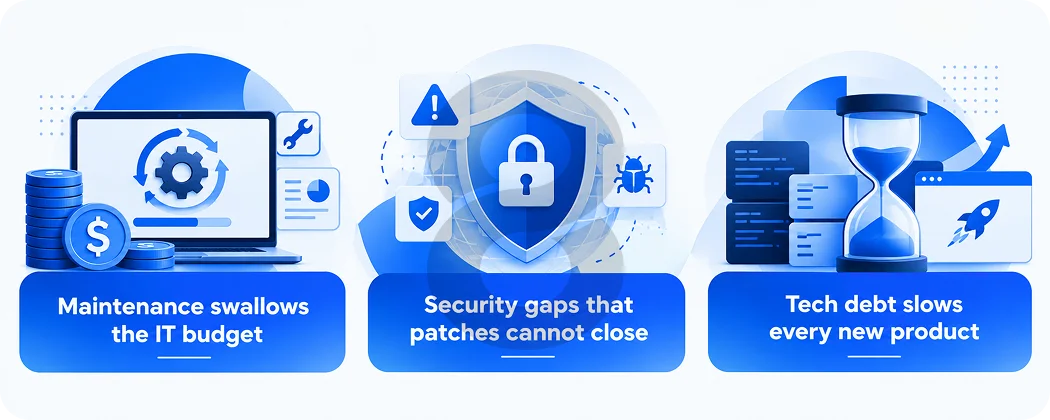
Old software rarely fails in one dramatic moment. It costs money, exposes data and slows product work a little more every quarter. The three costs below explain why leaders start legacy systems digital transformation projects.
Maintenance Swallows The IT Budget
The federal government offers the clearest public data. According to GAO report GAO-25-107795 the government spends more than $100 billion a year on IT and cyber investments. Agencies typically report that about 80 percent of that goes to operations and maintenance of existing IT.
GAO also flagged 11 legacy systems at 10 agencies as the ones most in need of modernization. Those systems ranged from about 23 to 60 years old and cost roughly $754 million a year to operate. Only three of the 11 had fully documented modernization plans. Six had partial plans and two had none.
Security Gaps That Patches Cannot Close
Seven of those 11 federal systems ran with known cybersecurity vulnerabilities that GAO says cannot be fixed without modernization. Four used unsupported hardware or software. Eight still relied on legacy languages such as COBOL and assembly code.
The pattern applies well beyond government. Once a vendor ends support for an operating system, database or framework, the security team loses its main source of fixes. Every month after that date the exposure grows.
Tech Debt Slows Every New Product
Legacy code also taxes future work. In a McKinsey survey of 50 CIOs at financial services and technology companies with revenue above $1 billion, respondents put tech debt at 20 to 40 percent of the value of their technology estate before depreciation. They said 10 to 20 percent of the budget meant for new products gets diverted to tech debt issues. Sixty percent reported that their tech debt had risen noticeably over the previous three years.
Those numbers describe money that should fund features but instead props up old code.
Signs Your Company Needs Digital Transformation For Legacy Software
Age alone does not make a system a problem. Some decades-old platforms run reliably at low cost and deserve to stay. The warning signs below show when an old system has started to cost more than it returns.
| Warning sign | What it looks like day to day | Business impact |
|---|---|---|
| Shrinking talent pool | Only one or two engineers understand the core code | Every resignation or long leave becomes an operational risk |
| Integration friction | New tools connect through CSV exports and manual re-entry | Data arrives late and carries errors |
| Vendor end of support | No patches for the operating system, database or framework | Open vulnerabilities and failed audits |
| Slow releases | Small changes need weeks of manual regression testing | Competitors ship features first |
| Desktop-only access | Staff and customers cannot use the system on mobile or the web | Lower adoption and more support tickets |
| Aging hardware | On-premise servers need parts that are hard to source | Capital spend that adds no new capability |
Two or more of these signs usually justify a formal assessment. A single sign such as slow releases can often be fixed with better tooling instead of a migration.
Seven Modernization Approaches For Legacy Systems
Most modernization plans sort each application into one of seven options, often called the 7 Rs. The right choice depends on how valuable the system is, how healthy its code is and how much change the business can absorb at once.
| Approach | What changes | Best fit | Effort and risk |
|---|---|---|---|
| Retire | The system is switched off and its data archived | Apps with duplicate features or very few users | Low |
| Retain | Nothing for now; the team revisits it later | Stable systems with no near-term pressure | Very low |
| Rehost (lift and shift) | The app moves to cloud infrastructure with no code changes | Fast exits from an expiring data center contract | Low to medium |
| Replatform | Small changes such as moving to a managed database | Apps that need better scaling without a rewrite | Medium |
| Repurchase | A SaaS product replaces the custom system | Common functions such as HR, email or ticketing | Medium |
| Refactor | Code is restructured and cleaned while behavior stays the same | Core apps with sound logic and messy code | Medium to high |
| Rearchitect or rebuild | The system is rebuilt on microservices or cloud-native design | Platforms that block new products or channels | High |
A real portfolio rarely uses just one approach. A retailer might retire an old reporting tool, rehost its inventory service and rebuild its customer-facing retail software in the same program.
For large core systems many teams use the strangler fig pattern. New services grow around the old application and take over one function at a time. Traffic shifts to each new service once it passes testing, and the legacy code shrinks until it can be switched off. The business never faces a single high-stakes cutover weekend.
A step-by-step roadmap for legacy to digital transformation
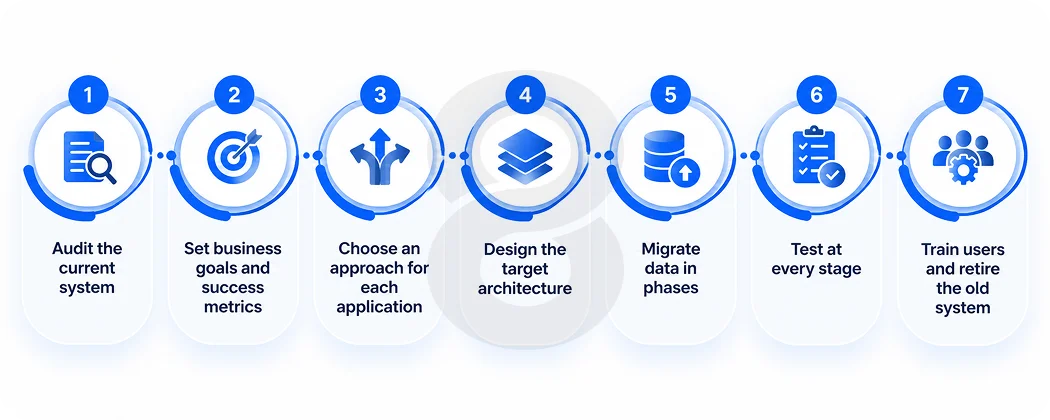
A modernization program succeeds when each phase has a clear owner, a measurable goal and a way to roll back. The seven steps below follow the order most migrations use, from first audit to final shutdown.
1. Audit the current system
Start with an inventory of applications, databases, integrations and scheduled jobs. Map how data moves between them. Interview the people who use the system daily, because many business rules live in their habits and in undocumented code rather than in any specification. A software consulting engagement at this stage often turns up dependencies nobody listed.
2. Set business goals and success metrics
Write down what the business needs from the new platform. Examples include faster release cycles, a date to shut down on-premise hardware or an API that partners can call. Attach a number to each goal so the team can prove progress later.
3. Choose an approach for each application
Apply the 7 Rs from the table above to every system in the inventory. Rank them by business value and technical risk. Low-risk wins such as retiring unused tools can fund and build confidence for the harder rebuilds.
4. Design the target architecture
Decide on hosting, service boundaries, data models, security controls and the APIs that connect everything. Good software design at this point prevents the new platform from turning into the next legacy system in ten years.
5. Migrate data in phases
Data migration causes more failed projects than code does. Cleanse duplicate and incomplete records first. Map every old field to its new home and run reconciliation reports after each batch. Keep the old and new systems running in parallel until their outputs match.
6. Test at every stage
Run regression tests against real transactions, then performance, security and user acceptance tests before each release. Independent software testing and QA catches the gaps between how the old system behaved and how the team assumed it behaved.
7. Train users and retire the old system
Train staff on the new workflows before cutover and keep a support channel open for the first weeks. Archive legacy data according to your retention rules. Then switch the old system off so it stops consuming budget.
Technologies That Power Digital Transformation For Legacy Platforms
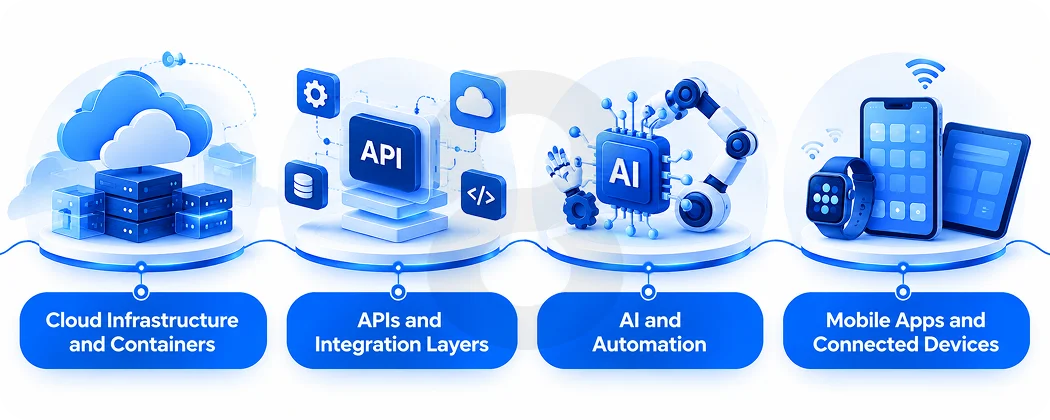
The right technology stack decides whether a modernized system stays flexible for years or ages quickly. These four groups of tools do most of the work in legacy-to-digital transformation projects today.
Cloud Infrastructure and Containers
Cloud hosting replaces fixed hardware with capacity that scales up and down on demand. Containers package each service with its dependencies so it runs the same way in testing and production. Together they let teams release small changes often instead of large changes rarely.
APIs and Integration Layers
An API layer lets old and new systems exchange data during the transition and keeps the architecture open afterward. Middleware and event streaming connect ERP, CRM platforms and payment systems without point-to-point scripts. 8ration’s software integration services cover this bridge work, which often decides whether a phased migration succeeds.
AI and Automation
Generative AI tools can help engineers read, document and translate old code, which shortens the audit phase. After migration, clean data and open APIs make AI features practical. Teams can add agentic AI development for workflow automation or generative AI development for search, summaries and support.
Mobile Apps and Connected Devices
Many legacy platforms were built for desktop terminals. A modern backend can serve field staff and customers through cross-platform app development that ships one codebase to iOS and Android. Plants running manufacturing software and fleets managed with logistics software can connect sensors and equipment through IoT app development once the core system exposes real-time data.
Risks in Digital Transformation Legacy Technology Projects
Every migration carries risk. Most failures trace back to a handful of predictable causes that careful planning can contain.
| Approach | What changes | Best fit | Effort and risk |
|---|---|---|---|
| Retire | The system is switched off and its data archived | Apps with duplicate features or very few users | Low |
| Retain | Nothing for now; the team revisits it later | Stable systems with no near-term pressure | Very low |
| Rehost (lift and shift) | The app moves to cloud infrastructure with no code changes | Fast exits from an expiring data center contract | Low to medium |
| Replatform | Small changes such as moving to a managed database | Apps that need better scaling without a rewrite | Medium |
| Repurchase | A SaaS product replaces the custom system | Common functions such as HR, email or ticketing | Medium |
| Refactor | Code is restructured and cleaned while behavior stays the same | Core apps with sound logic and messy code | Medium to high |
| Rearchitect or rebuild | The system is rebuilt on microservices or cloud-native design | Platforms that block new products or channels | High |
The first two risks deserve the most attention. Code can be rewritten twice if needed. Corrupted customer records or a lost pricing rule can damage trust in a way that no later release repairs.
What Drives the Cost of Digital Transformation for Legacy Software
No honest vendor can quote a modernization project before reviewing the system. Two companies with the same number of users can face very different bills. The factors below move the budget most.
| Cost factor | How it affects the budget |
|---|---|
| Codebase size and age | Larger and older code takes longer to analyze, especially in languages few engineers still know |
| Documentation quality | Missing documentation adds discovery time and raises testing effort |
| Data volume and quality | Dirty or duplicated data needs cleansing before any migration batch |
| Number of integrations | Each connected system needs mapping, rebuilding and testing |
| Chosen approach | Rehosting costs far less up front than a full rebuild but delivers fewer long-term gains |
| Compliance requirements | Rules such as HIPAA for healthcare software or PCI DSS for fintech software add security controls, audits and documentation |
| Parallel running period | Running old and new systems together adds hosting and support cost for its duration |
Phasing spreads the spend across budget cycles and lets early wins pay for later work. It also gives leadership a checkpoint after each phase to adjust scope.
How 8ration Supports Legacy Modernization Projects
8ration is a software development company that builds custom software, web platforms, mobile apps and AI solutions. Modernization work draws on several of its service lines at once. Consultants handle the audit and roadmap. Designers and engineers build the target architecture. The integration team connects old and new systems during the transition, and QA engineers test each release before it goes live.
The company also builds sector-specific platforms for finance, healthcare, logistics, manufacturing and retail, where legacy systems are common. Each of these fields carries its own compliance rules and data structures, so the migration plan changes with the industry.