You know that tired feeling when your team has already paid for the app, everyone has seen the demo, the investor deck has a shiny screen mockup in it, and still nobody can say whether real iPhone users will keep it on their home screen?
Yeah. That feeling.
A good iPhone mobile application development company should save you from that mess. A bad one will give you screens, sprints, invoices, vague updates, and a product that quietly dies after launch.
The problem is that most business owners don’t know what they’re buying. They ask for an app. The vendor says yes. Everyone smiles.
Then three months later the app is slow, the checkout feels awkward, Face ID was forgotten, App Store review finds a policy issue, and the backend starts sweating after the first small campaign.
That’s why choosing an iPhone app development company is less about finding people who can code and more about finding people who understand the actual iPhone experience.
It comes down to the little things, like how people tap, how they expect login to feel instant, how one annoying form field makes them leave, and how privacy prompts can kill trust before your app opens properly.
DataReportal says 5.83 billion people use mobile phones worldwide in 2026, and smartphones now make up about 89 percent of all mobile phones in use. Apple also reported that the App Store ecosystem supported $1.3 trillion in billings and sales in 2024.
This guide is written for founders, product managers, ecommerce teams, clinic owners, finance companies, logistics firms, and enterprise teams who need an iPhone app that survives real life.
What an iPhone Mobile Application Development Company Actually Does
An iPhone mobile application development company designs, builds, tests, launches, and supports apps made for iPhone users. That sounds simple. It isn’t.
A proper team handles product planning, iPhone app design, native iPhone app development, backend development, admin panels, analytics, security, testing, App Store submission, and long term support. The best teams also challenge weak ideas before those ideas become expensive code.
And honestly, that last part matters more than most people admit.
If you ask for ten features and five of them make the app slower, harder to use and more expensive to maintain, your developers should say that. Politely, sure. But clearly. A team that says yes to everything is often just protecting the invoice.
The right iPhone app developers help you answer boring but painful questions before development starts.
- Who is the first user?
- What action do we want them to complete?
- What happens if the internet connection drops?
- Will users log in with email, phone number, Face ID or social accounts?
- Does the app need Apple Pay?
- What data do we store?
- Who owns the code?
- What happens after App Store approval?
That is the real job. Code is only one part of it.
You can explore full mobile app development services if your product needs planning, app design, backend work, testing, and deployment under one process.
Benefits of Building for iPhone First
Choosing an iPhone first makes sense when your audience already uses iPhone or your product depends on trust, payments, design quality, and repeat use.
It is not always the cheapest route, but it gives the app a strong base when the product solves a real problem. iPhone users expect clean flows, fast response, secure access, and a polished experience.
A good iPhone mobile application development company builds around those expectations from the start.
Better User Expectations
iPhone users are used to polished interaction. They expect smooth scrolling, clean gestures, secure login, fast loading, clear privacy signals and screens that feel built for the device.
That sounds simple until someone tries to squeeze a web dashboard into an app and calls it finished. Users may not explain the problem in detail, but they feel it quickly. If the app feels clumsy, they trust the business less.
Stronger Revenue Potential
Many businesses see stronger conversion from iPhone users because payment flows, subscriptions and premium experiences feel natural on the device. That does not mean every app becomes profitable, and nobody should sell that fantasy with a straight face.
It means iPhone gives your product better conditions when the offer, user flow and timing make sense. The app still has to earn every tap, every signup and every payment.
Cleaner Security Foundation
Face ID, Keychain, Apple Pay, privacy permissions and controlled app distribution give secure app development a cleaner foundation. Your team still has to build properly because Apple will not save a weak backend, careless data handling or lazy architecture.
The tools are strong, but they only help when developers use them properly. For finance, healthcare and enterprise apps, this foundation can reduce risk and make users feel safer.
Better Brand Perception
A well made iPhone app makes your business feel more serious. A bad one does the opposite. People judge fast on mobile, sometimes too fast, but that is how users behave.
If the app looks cheap, loads slowly or feels confusing, users assume the business behind it is just as careless. Good device features help, but they cannot rescue a weak offer, confusing flow or slow backend.
iPhone App Benefits by Business Type:
Business |
Useful iPhone App Features |
Business Value |
|---|---|---|
| Ecommerce | Product search, Apple Pay, wishlists, order tracking | More repeat purchases and faster checkout |
| Healthcare | Booking, reminders, patient profiles, secure messaging | Better patient access and fewer missed appointments |
| Finance | Face ID, alerts, document upload, transaction history | Stronger trust and easier account management |
| Logistics | Route updates, proof of delivery, barcode scanning | Faster field operations |
| Education | Lessons, progress tracking, quizzes, notifications | Better learning engagement |
| Real Estate | Listings, saved searches, tours, agent chat | Faster lead capture |
| Enterprise | Staff dashboards, approvals, reports, internal tools | Less manual admin work |
If your app needs shopping flows, secure checkout, or product based customer journeys, link the app strategy with eCommerce store development services instead of treating the app like a separate island.
iPhone App Development Services You Should Know
An iPhone app development company should offer services that cover the full product need, not just the coding part. Some businesses need a new app built from scratch.
Some already have an app that needs migration, redesign or performance fixes. Others need App Store deployment, backend integration, testing or long term support.
The right service mix depends on where your product stands today and what needs to happen before real users can trust it.
Custom App Development
Custom app development is for businesses that need an app built around their own users, workflows, data and revenue model. This can include customer accounts, booking flows, subscriptions, payments, saved preferences, dashboards, notifications, live tracking or admin controls.
A custom app costs more than a basic template, but it also gives you fewer ugly compromises later. And ugly compromises usually become expensive when users start complaining.
API and System Integration
API and system integration connects the app with the tools your business already uses, such as CRMs, ERPs, payment gateways, booking platforms, analytics tools, inventory systems, messaging services and internal databases.
This service matters because many app failures start outside the app. If the systems behind it are slow, disconnected or badly structured, the iPhone app looks broken even when the interface itself is fine.
App Migration
App migration helps move an existing app, data or backend setup to a better system without losing important information. This may involve moving user accounts, rebuilding old features, replacing outdated tools, improving code quality or shifting data to a more stable backend.
Migration work needs care because one wrong move can break login, payments, records or user history. Nobody wants to explain that after launch.
App Store Deployment
App Store deployment covers everything needed to prepare and submit the app for release. This includes app listing content, screenshots, privacy details, age rating, review notes, test accounts, version settings and release planning.
It sounds like admin work until something gets rejected. Then everyone suddenly cares. A good team prepares deployment early so the launch does not get stuck over avoidable review issues.
Security and User Access
Security and user access services cover login, Face ID, role based permissions, encrypted storage, protected APIs, session handling and privacy first permission requests. This becomes serious when the app handles payments, health records, financial data, staff accounts or customer information.
Security is not something to sprinkle on near launch. It needs to be built into how users access the app, how data moves and who can see what.
App Redesign and Modernization
App redesign and modernization is for businesses that already have an app, but it feels outdated, slow, confusing or hard to maintain. The work may include improving old screens, fixing weak navigation, cleaning up performance issues, replacing outdated code, improving accessibility or rebuilding broken backend connections.
Sometimes the app does not need to be thrown away completely. It needs someone to find what is hurting users and fix it properly.
Support and Growth
Support and growth services help the app improve after launch through bug fixes, performance monitoring, crash reports, user feedback, feature updates, App Store updates and conversion improvements.
This is where many products either mature or quietly die. Launch gets attention because it feels exciting, but support is what keeps the app useful. Users change, devices change, Apple updates rules and the app has to keep up.
Custom iPhone App Development Should Not Mean Random Features
A lot of agencies use the word custom like it means expensive. That’s not what it should mean.
Custom iPhone app development services should mean the app matches your business process, user behavior, data flow, and growth plan.
A custom clinic app should not behave like a food delivery app or a finance app should not borrow patterns from a social app. Similarly, a logistics app should care about speed, scanning, location, and staff roles more than fancy animation.
Here’s what it means.
- If you run a healthcare service, the app needs appointment booking, patient profiles, secure records, reminders, consent flows and privacy first design. Because one messy screen in healthcare doesn’t just annoy people, it makes them nervous.
- If you run a finance company, the app needs identity checks, document upload, transaction history, secure login, alerts and audit trails. Users are trusting you with money, documents and personal details, so the app can’t feel like it was stitched together at midnight before a demo.
- If you run an enterprise operation, the app needs staff permissions, admin controls, reporting, integrations and device level security. Otherwise, your team will end up doing the same old manual work in a new app, which is honestly one of the most depressing ways to waste a development budget.
That is custom. Not a shiny home screen with your logo on it.
If your app needs deeper business logic, approval flows, admin dashboards or system integrations, it should connect with custom software development services from the beginning.
Enterprise iPhone App Development Has Different Pressure
Enterprise iPhone app development is not the same as building a consumer app.
Consumer apps fight for attention. Enterprise apps fight internal chaos.
An enterprise iPhone app might help field teams update jobs, sales teams access client records, managers approve requests, warehouse staff scan inventory or executives view live reports.
The users may not even want another app. They may already hate the old system. And now you’re asking them to change their routine.
That’s why enterprise apps need clean roles, permissions, offline access, secure data storage, audit logs, admin panels, and integration with CRM, ERP, HR, finance or support tools.
This is where many teams burn money. They build a nice app, then realize it doesn’t talk properly to the systems the company already uses. Now everyone is exporting CSV files like it’s 2009 and pretending that’s fine.
It’s not fine.
For enterprise projects, choose an iPhone mobile application development company that asks about internal workflows, approvals, data ownership, compliance, staff training and rollout. The app has to fit the business.
The iPhone App Development Process That Actually Works
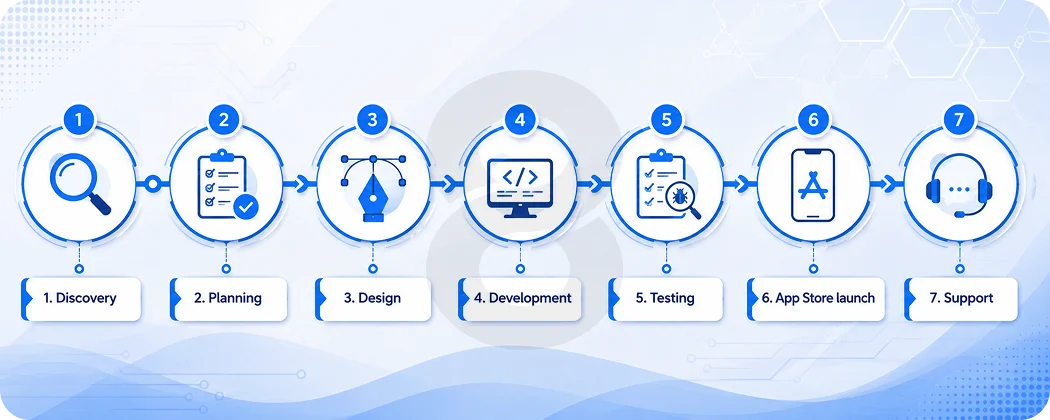
A disciplined iPhone mobile application development company does not jump straight into development. That sounds obvious, but plenty of teams still do it because everyone wants visible progress. Visible progress feels nice in meetings, but wrong progress is expensive.
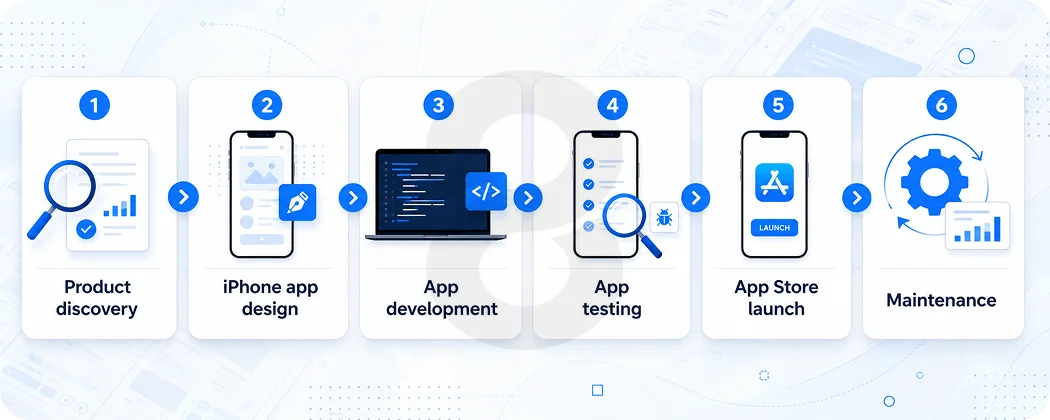
A proper process moves from discovery to wireframes, design, development, testing, App Store launch and post launch support so the product does not turn into a guessing game.
Discovery and Scope
The process starts with discovery and scope. You define the app goal, user types, business rules, success metrics, main features, risks and budget. This stage should also clarify what version one really needs, because trying to build everything at once is where many projects lose focus.
A good discovery phase creates a product scope that people can understand without sitting through three calls and a confused spreadsheet.
Wireframes
Wireframes show the rough structure of the app before visual design begins. There is no polish, no fancy color system and no final branding at this point. Just the basic flow.
This stage answers simple but painful questions, such as what screen comes first, how users move, where they get stuck and what information they need. It is easier to fix a wireframe than rebuild a finished screen.
UI and UX Design
Design turns the structure into an iPhone ready experience. This stage covers layout, visual style, accessibility, gestures, forms, empty states, error states and content.
Empty states matter more than people think because a dashboard with no data should still tell the user what to do next. Good design reduces confusion before it becomes a support ticket, which is a gift everyone appreciates after launch.
App Development
App development usually moves in stages. The team starts by building the core features, connecting APIs, adding user accounts, handling data storage, creating admin tools and getting the app ready for real device testing.
This is where the product starts to feel real, and also where weak planning starts showing up. If the scope was unclear earlier, development is usually where the budget begins to complain.
Testing and Quality Assurance
Testing should happen throughout the project, not only at the end when everyone is tired and pretending the timeline still makes sense. Late testing is where budgets go to suffer.
A good team checks functionality, performance, crashes, security, device behavior, payment flows and poor internet conditions while the feature is still fresh. You want bugs found while the team still remembers why that feature was built.
App Store Launch
Before launch, the team prepares App Store material, privacy information, testing notes and release settings. TestFlight helps collect feedback from internal testers before the public version goes live, which is useful because users will find issues anyway.
Better your team finds them first. App Store launch is not just an upload task. It includes positioning, screenshots, descriptions, review preparation and enough patience to handle feedback properly.
Post Launch Support
After launch, the team watches analytics, crashes, user reviews and support tickets. That first month is not a victory lap. It is triage with coffee, quick fixes and uncomfortable truths from real users.
Some flows will work while some will not. Similarly, some assumptions will look silly in hindsight. Post launch support helps turn that feedback into better versions instead of letting the app quietly decay after release.
iPhone App Development Stages
Stage |
What Happens |
Output |
|---|---|---|
| Discovery | Goals, users, features, budget and risks | Product scope |
| Planning | Timeline, team, tech stack and milestones | Development roadmap |
| Design | Wireframes, UI, UX and prototype | Clickable app design |
| Development | App screens, backend, APIs and integrations | Working app build |
| Testing | Bugs, crashes, security and device checks | Stable release build |
| App Store Launch | Product page, screenshots, privacy details and review | Public app listing |
| Support | Monitoring, fixes, updates and new features | Better app versions |
For long term support, bugs, updates, and performance monitoring, connect the project with software maintenance and support services instead of waiting for the app to break after launch.
App Store Launch is Part of the Product
Some teams treat App Store launch like admin work. It isn’t.
Your App Store page can affect downloads before users ever touch the app. Apple’s product page guidance says the app name, icon, description, screenshots, previews, and keywords all help users discover and understand your app.
That means your launch work should include:
- App name and subtitle
- App icon
- Screenshots
- App preview video
- App description
- Keywords
- Privacy details
- Age rating
- Review notes
- Support URL
- Promotional text
- First update plan
The App Store listing is not decoration. It is the first sales page for the app.
Technologies Used in iPhone App Development
You do not need to know every framework behind an iPhone app. You only need enough understanding to avoid getting impressed by random tool names in a proposal, because that happens more than anyone wants to admit.
The technology stack should support the product, not decorate the sales document. A serious team chooses tools based on performance, security, user experience, future updates and the actual complexity of the app.
Swift
Swift is the main language used for most modern iPhone apps. It is fast, safe and built for Apple devices, which is why serious iPhone projects usually start there. Swift helps developers write cleaner code and reduce common errors, but it is not magic by itself.
The quality still depends on planning, architecture and testing. A badly planned Swift app can still become slow, messy and expensive to maintain.
SwiftUI
SwiftUI helps teams build modern app screens and update designs faster. It can save time, especially when the product keeps changing because someone remembered a missing feature two weeks before launch.
SwiftUI works well for many modern interfaces, but it still needs careful planning. A good team uses it where it fits and avoids forcing it into areas where another approach would give better control or stability.
UIKit
UIKit is still used in many serious iPhone apps. Older products, complex interfaces and advanced user flows often rely on it, so it is not something a good team ignores just because newer tools exist.
UIKit gives developers deep control over interface behavior, which matters in products with detailed screens or mature codebases. Good iPhone app developers understand both old and new tools instead of chasing trends blindly.
Xcode
Xcode is the main development environment for iPhone apps. Developers use it to write code, test the app, fix bugs, check performance and prepare the app for release. It is where a lot of quiet damage gets fixed before users ever see the product.
Build errors, memory issues, device testing and release preparation all pass through Xcode, which makes it central to serious iOS development work.
Core Data and Local Storage
Core Data and other local storage tools help the app save information on the iPhone, so users do not lose everything the second the internet gets shaky. This matters for apps that need offline access, saved preferences, drafts, records or repeat usage.
It is not glamorous work, but when it is done badly, everyone notices. Lost data is one of those problems users rarely forgive.
Cloud Services
Cloud services handle user accounts, files, notifications, analytics, payments, messaging and all the backend work nobody gets excited about in planning meetings. The second something breaks there, the whole app starts looking unreliable, and suddenly everyone remembers how much that boring infrastructure mattered.
Good cloud planning keeps data moving, users logged in, payments recorded and teams informed when something starts failing behind the scenes.
Core ML
Core ML can support AI features like image recognition, recommendations, predictions and smarter search. These features can help when they reduce user effort or make the app genuinely easier to use.
They become wasteful when added only because AI sounds good in a meeting. A useful AI feature should save time, improve decisions or personalize the experience in a way users can actually feel.
AR Tools
AR tools can support camera based experiences for shopping, education, real estate, training and product previews. They are useful when the camera experience makes the product easier to understand or helps users make a decision faster.
They are not useful when added just to impress people in a demo. A good iPhone app development company treats AR as a product tool, not a decoration.
Trends That Matter for iPhone Apps in 2026
Trends are useful only when they improve the product. If they make the app heavier, slower or harder to understand, they are just expensive decoration.
In 2026, the strongest iPhone app trends are practical AI, camera based features, privacy first design, useful personalization and better App Store presentation.
The point is not to use every trend. The point is to choose what helps users complete tasks faster and trust the app more.
Practical AI Features
AI is the obvious trend, but most businesses still use it badly. Adding a chatbot does not automatically make an app useful. Good AI features reduce effort. They help users search faster, fill forms faster, understand data faster or make better decisions inside the app.
If AI does not remove friction or improve the result, it is probably just another feature the team will regret maintaining later.
Camera Based Experiences
Camera based experiences are becoming more common because the iPhone camera can do real work now. It can help users scan documents, measure spaces, recognize objects, preview products and help field teams capture proof of work.
This is useful for ecommerce, real estate, education, logistics and service businesses. The feature should make the task easier, not force users into a camera flow because someone wanted the app to feel modern.
Privacy First Design
Privacy aware design matters more now because users notice permission prompts. Ask for location, camera, contacts or photos too early and you may lose trust before the app has earned it.
The timing and explanation matters. The user should know why you are asking and what they get in return. Privacy first design is not only about compliance. It is also about not making users nervous.
Useful Personalization
Personalization still works, but only when it feels helpful. A retail app recommending the same item after the user already bought it feels lazy. A finance app warning users before a late fee feels useful. That difference matters.
Personalization should reflect user behavior, timing and intent. If it feels random or creepy, it hurts trust. If it saves effort, users usually accept it.
App Store Optimization
App Store presentation matters because users judge before downloading. Screenshots, app previews, ratings, reviews and product page testing affect whether people give the app a chance. App Store optimization is not magic.
It is clearer positioning, better visuals, stronger keywords and constant testing. A strong listing explains the value quickly, shows the app clearly and removes doubt before users decide whether to install it.
Common Challenges in iPhone App Development
Building an iPhone app looks clean from the outside. A few screens, some buttons, maybe a nice login flow, and everyone assumes the hard part is done.
It isn’t.
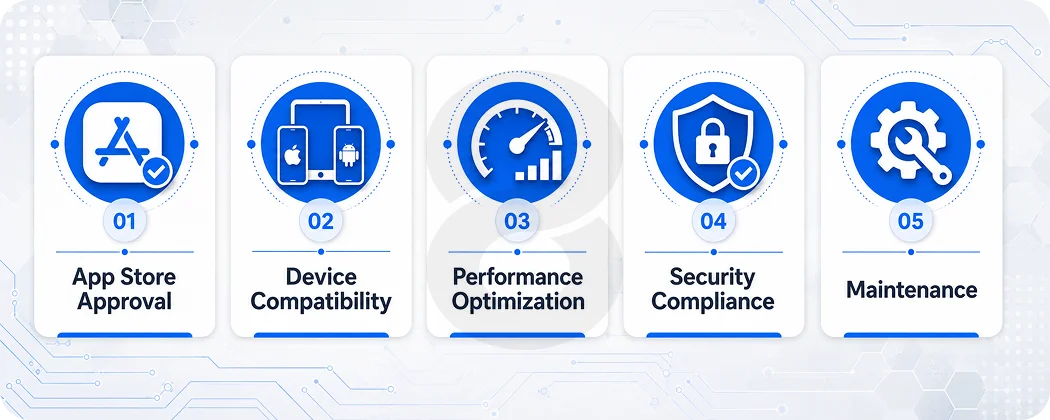
The hard part usually shows up later, when the app goes to review, older devices start lagging, users complain about crashes, or the security team asks questions nobody prepared for. This is where a serious iPhone mobile application development company earns its fee.
App Store Approval
App Store approval can slow down your launch if the app has unclear privacy details, broken links, incomplete test accounts, weak payment setup or features that don’t match Apple’s review rules.
A good iPhone app development company prepares for review during development, not after the app is already finished. That means clear privacy labels, working demo accounts, proper screenshots, accurate app descriptions, and clean user flows.
The painful part is that rejection often happens over small things. A missing support link. A login issue. A payment flow that Apple does not accept. A permission request that feels too aggressive.
Small stuff, yes. But small stuff can delay the launch.
Device Compatibility
Not every user has the newest iPhone. Some people keep older devices for years, and your app still needs to behave properly.
Device compatibility means testing different screen sizes, iPhone models, storage limits, camera behavior, battery use and network conditions. It also means checking how the app feels on older hardware, not just on the developer’s latest phone.
This matters more than teams admit. An app can feel fast on a new iPhone and still feel heavy on an older one. Users won’t care about your technical explanation. They’ll just delete it.
Performance Optimization
Performance problems usually start quietly.
A screen takes one second longer to load. Search feels slightly slow. Images take too much time. The checkout freezes once in a while. Nobody panics at first, then the reviews start looking ugly.
Good iPhone app developers check loading speed, memory use, image handling, API response time, battery drain, and crash reports before users suffer through them.
Performance is not polish. It is trust. If your app feels slow, users assume your business is slow too. Maybe that sounds unfair, but mobile users are not known for patience.
Security Compliance
Security is where shortcuts become dangerous.
An iPhone app may handle names, emails, addresses, payment details, health records, financial data, staff accounts or private documents. That data needs proper protection from the start.
Strong security includes encrypted storage, secure login, Face ID where it makes sense, protected APIs, role based access, safe session handling, and careful permission requests. For finance, healthcare, and enterprise apps, security compliance becomes even more serious.
This is why enterprise iPhone app development needs more planning than a simple customer app. Internal tools often connect with CRMs, finance systems, staff records, and business reports. If access control is weak, the app becomes a risk instead of a solution.
How Much Does iPhone App Development Cost
Any company that gives you one fixed number without understanding the scope is guessing. Maybe educated guessing. Still guessing.
Most serious iPhone app budgets fall into rough groups.
- A simple app with basic screens, login, static content, and limited backend work can cost around $15,000 to $50,000.
- A medium app with custom design, user accounts, payments, APIs, notifications, and admin tools can cost around $50,000 to $150,000.
- A complex app with real time data, AI features, advanced security, multiple user roles, heavy backend logic or enterprise integrations can cost $150,000 to $300,000 or more.
- Large enterprise iPhone apps can cross $300,000 because the app is only one part of the system. Integration, security, testing, compliance, migration, and rollout add cost.
The number depends on feature complexity, design depth, backend work, team location, seniority, testing needs, App Store support, maintenance, and how much technical debt you already have.
The cheap quote is tempting, no doubt. Everyone has a budget. But the lowest quote often removes the work you don’t understand yet, like architecture, QA, documentation, security, and support. Those missing pieces come back later, usually angry.
App Type |
Typical Features |
Estimated Cost |
|---|---|---|
| Basic iPhone App | Login, simple screens, static content, basic backend | $15,000 to $50,000 |
| Medium iPhone App | Custom design, payments, APIs, notifications, admin panel | $50,000 to $150,000 |
| Complex iPhone App | Real time data, AI, advanced security, multiple roles | $150,000 to $300,000 plus |
| Enterprise iPhone App | Internal tools, integrations, compliance, reporting, rollout | $300,000 plus |
You can use an app development cost calculator to get an early estimate before asking a team for a detailed proposal.
Hiring Models for iPhone App Developers
You can hire iPhone app developers in a few ways.
A fixed scope model works when your requirements are clear and unlikely to change. It gives budget control, but it can become painful if your product changes during development.
A dedicated team model works when you need ongoing product development. You get designers, developers, QA engineers, and project support for a longer period. This is better for funded startups and companies building serious products.
Staff augmentation works when you already have a product team but need extra dedicated iPhone developers. It gives flexibility, but you need strong internal management.
A full product team works when you want one partner to handle strategy, design, development, launch, and support. This costs more, but it reduces coordination stress.
Before you hire iPhone app developers, decide whether you need hands, brains or both. Some teams only need coding support. Others need someone to challenge the product, shape the roadmap, and stop bad decisions before they become tickets.
Native or Cross Platform for iPhone App?
If your business only cares about iPhone users, native development usually makes more sense. Native apps can use device features more deeply, feel smoother, and follow iPhone behavior more closely.
But cross platform development can work when you need to launch on multiple devices with a shared codebase and controlled budget. It depends on the product, not the trend.
Use native development when the app needs:
- High performance
- Apple Pay
- Face ID
- Camera heavy features
- AR features
- Offline behavior
- Complex animations
- Device level security
- Use cross platform development when the app needs:
- Faster launch across multiple devices
- Similar design on more than one platform
- Lower initial development cost
- Shared business logic
- A simple or medium complexity feature set
If your roadmap includes more than one device family, review cross platform app development services before locking the technical direction.
How to Choose the Right Company
Before you trust a development partner, ask for proof that goes beyond pretty screens.
Ask to see live iPhone apps on the App Store
A design image is not proof. A live app with reviews, updates, and working flows tells you more.
Ask who will work on the project
Sales calls are usually handled by polished people. Your app will be built by the delivery team. Know their experience.
Ask about security
You want clear answers about authentication, data storage, encryption, access control, secure APIs, and privacy permissions.
Ask about testing
The answer should include real device testing, crash testing, performance checks, poor network testing, and App Store readiness.
Ask about ownership
You should own the code, designs, documentation, and accounts unless there is a very specific reason not to.
Ask about communication
Weekly calls are fine, but you also need written updates, visible tasks, and honest reporting when something slips.
Ask about maintenance
Apps need updates after release. If the company disappears after launch, your app becomes a liability.
Ask what they would remove from your idea
This question reveals a lot. Strong teams can explain what should wait. Weak teams call everything essential.
Red Flags That Should Make You Pause
Be careful:
- If a company promises an exact cost without discovery.
- If every portfolio item looks like a template.
- If they avoid App Store submission details.
- If they talk only about features and never about users.
- If they cannot explain testing in plain language.
- If they push every trend into the app, especially AI, without a reason.
- If they don’t ask about your backend, data, internal tools or business model.
- And be very careful if they say yes to everything. That kind of yes feels nice in the meeting and expensive later.
Why Professional iPhone Development is Worth It
A professional iPhone app development company costs more than a random freelancer because you’re paying for fewer nasty surprises, including:
- Product thinking, not only code
- Design that works on a real iPhone screen
- Architecture that can survive growth
- App Store experience
- Testing before users find the bugs
- Someone to care after launch
Can a small freelancer build a good iPhone app? Yes. Some are brilliant. But if your app touches payments, customer data, enterprise workflows, health records, financial information or serious revenue, you need a system around the developer. QA, security, documentation, project management, and support matter.
That’s the boring truth. Boring, but useful.
How 8ration Helps Plan, Build, and Launch iPhone Apps
Building an iPhone app is easy to talk about in a meeting. The hard part comes later, when real users start tapping through the screens, payments fail for reasons nobody expected, push notifications feel annoying, older devices start lagging and the App Store review team asks for something your team forgot to prepare.
That’s where 8ration helps.
The team can support your project from the early planning stage, where the app idea is still messy and full of assumptions, to design, development, testing, App Store launch and long term maintenance.
That matters because an iPhone app is not just a set of screens. It needs user flows that make sense, secure data handling, stable backend systems, clean performance and a release plan that does not fall apart two days before launch.
If you need a customer facing app, 8ration can help with product discovery, UI and UX design, native iPhone development, API integration, payment features, notifications, analytics and App Store submission.
If you need an internal business app, the team can help with staff roles, admin controls, reporting dashboards, workflow automation and enterprise security.
The useful part is that you don’t have to pretend every feature belongs in version one. A good team should help you cut the noise, build the core product first and leave space for future updates.
Because honestly, trying to build everything at once is how teams burn six months, spend too much money and still launch something users don’t understand.
8ration can also help after launch with bug fixes, performance monitoring, user feedback, feature updates and maintenance. That part sounds boring, but it’s usually what keeps the app alive. Launch gets attention. Maintenance keeps users from leaving.