Morphology in computer vision is a family of image operations that change the shape of objects in a picture. A small template called a structuring element slides across the image and decides which pixels to keep, add or remove. With two basic moves (erosion and dilation) and a few combinations of them, you can wipe out speckle noise, close gaps in broken lines, separate touching objects and pull out outlines.
These operations are old by software standards. Georges Matheron created mathematical morphology in collaboration with Jean Serra at the École des Mines de Paris in the mid-1960s. Their methods still run inside OCR engines, medical imaging tools and factory inspection lines because they are fast and predictable and easy to tune.
How Morphology in Computer Vision Works
Morphology needs an image, a structuring element and a rule. Once you see how those pieces fit, every operation that follows becomes a variation on one idea you can reason through without formulas.
Binary Images and Foreground Pixels
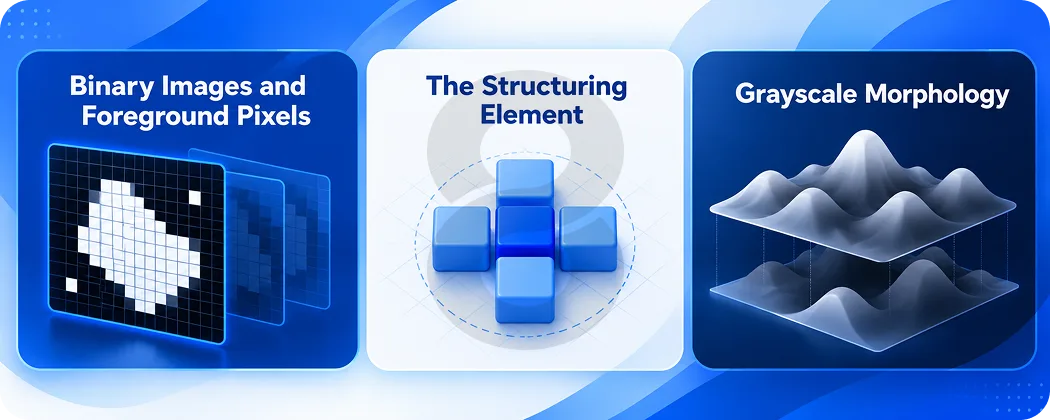
Most morphology tutorials start with a binary image. Each pixel is either foreground (white, value 1 or 255) or background (black, value 0). Text on a scanned page, a cell under a microscope and a crack on a metal part all become white shapes on a black field after thresholding.
Morphology treats those white shapes as sets of points. It asks a geometric question at every pixel. Does the template fit inside the shape here? Does it touch the shape here? The answer decides the output pixel.
The Structuring Element
The structuring element is a small matrix of ones and zeros with a center point called the anchor. It plays the same part a kernel plays in blurring. The difference is that morphology uses it as a probe and not as a set of weights.
Shape matters more than most beginners expect. A square element treats every direction the same way along the grid. An elliptical element gives rounder results. A cross only looks at the four direct neighbors. A long horizontal line will erase vertical strokes and leave horizontal ones alone, and document tools use exactly that trick to find table rules on a scanned form.
| Structuring element | OpenCV flag | Typical use |
|---|---|---|
| Rectangle | cv.MORPH_RECT | General noise removal and blocky objects such as text |
| Ellipse | cv.MORPH_ELLIPSE | Round objects such as cells, coins and blobs |
| Cross | cv.MORPH_CROSS | Thin structures where diagonal growth should be limited |
| Custom line (for example 40 x 1) | Built with NumPy | Detecting horizontal or vertical lines in forms and tables |
Size controls strength. A 3 x 3 element nibbles one pixel off each border. A 15 x 15 element removes anything thinner than 15 pixels. Pick a size a little larger than the noise you want gone and smaller than the smallest object you want to keep.
Grayscale Morphology
Morphology also works on grayscale images. Here erosion takes the minimum value under the structuring element and dilation takes the maximum. Dark regions spread under erosion and bright regions spread under dilation. Grayscale morphology is what makes the top hat transform useful on X-rays, fundus photos and unevenly lit product shots.
The Core Morphological Operations
Six operations cover most real work. Each one below shows what it does to an image, when to reach for it and the OpenCV call that runs it, so you can match problems to fixes.

Erosion
Erosion keeps a foreground pixel only if the whole structuring element fits inside the foreground at that spot. The OpenCV documentation puts it plainly: a pixel “will be considered 1 only if all the pixels under the kernel is 1, otherwise it is eroded (made to zero).”
The visible effect is shrinkage. Objects get thinner. Small white dots vanish. Two blobs joined by a thin bridge come apart. Erosion is the tool for separating touching coins or cells before you count them.
Dilation
Dilation does the reverse. A pixel turns white if the structuring element touches any white pixel at that spot. Objects grow. Holes shrink. Broken strokes in a letter join up again.
Erosion and dilation are duals. Eroding the foreground gives the same result as dilating the background and then inverting. That relationship explains why opening and closing mirror each other.
Opening
Opening is erosion followed by dilation with the same structuring element. The erosion wipes out anything too small to hold the element. The dilation then grows the survivors back to roughly their old size. Small bright noise disappears and the larger shapes keep their outline.
Opening has a useful property: running it twice gives the same result as running it once. Mathematicians call this idempotence. For a pipeline it means you can apply opening without worrying that a second pass will keep eating away at your objects.
Closing
Closing runs the steps the other way: dilation first and then erosion. It fills small dark holes inside objects and joins nearby fragments. A scanned signature with gaps in the ink or a segmentation mask with pinholes both come out solid after closing.
Morphological Gradient
The gradient subtracts the eroded image from the dilated image. What is left is a band along every edge, so you get a clean outline of each object. It works well when you need object boundaries and do not want the noise that a derivative filter such as Sobel tends to pick up.
Top Hat and Black Hat
The top hat transform subtracts the opening from the original image. Opening removes bright details smaller than the structuring element, so the difference holds exactly those details. The black hat transform subtracts the original from its closing and returns small dark details instead.
Both earn their place on images with uneven lighting. A top hat with a large element flattens a gradient background and leaves small bright features standing out. A black hat does the same for dark features such as blood vessels on a retinal photo or dark text on a shadowed page.
| Operation | Steps | Main effect | OpenCV call |
|---|---|---|---|
| Erosion | Minimum under element | Shrinks objects and removes specks | cv.erode |
| Dilation | Maximum under element | Grows objects and fills gaps | cv.dilate |
| Opening | Erosion then dilation | Removes small bright noise | cv.MORPH_OPEN |
| Closing | Dilation then erosion | Fills small dark holes | cv.MORPH_CLOSE |
| Gradient | Dilation minus erosion | Extracts outlines | cv.MORPH_GRADIENT |
| Top hat | Image minus opening | Isolates small bright details | cv.MORPH_TOPHAT |
| Black hat | Closing minus image | Isolates small dark details | cv.MORPH_BLACKHAT |
Computer Vision Open Morphology in Practice With OpenCV
Theory makes more sense once you run it. The steps below build a short OpenCV pipeline that cleans a scanned document and shows you how kernel size and operation order change the output.

A Cleanup Pipeline in Python
The snippet loads a grayscale scan and turns it into a binary image with Otsu thresholding. It then removes speckle with an opening and seals broken strokes with a closing.
<?php

import cv2 as cv
import numpy as np

img = cv.imread("scan.png", cv.IMREAD_GRAYSCALE)
_, binary = cv.threshold(img, 0, 255, cv.THRESH_BINARY_INV + cv.THRESH_OTSU)

kernel = cv.getStructuringElement(cv.MORPH_ELLIPSE, (3, 3))
opened = cv.morphologyEx(binary, cv.MORPH_OPEN, kernel)
closed = cv.morphologyEx(opened, cv.MORPH_CLOSE, kernel)

cv.imwrite("clean.png", closed)
Note the inverted threshold. OpenCV treats white as foreground, so dark ink on a white page has to flip before morphology can see the letters as objects.
Choosing Kernel Size and Iterations
Start small. A 3 x 3 element with one iteration is the safe default. If noise survives, raise the size or set the iterations argument higher in cv.erode or cv.dilate. Two iterations with a 3 x 3 element behave much like one pass with a 5 x 5 element, though the corners differ a little.
Watch the smallest real object in your image. When the element gets wider than its thinnest part, opening will delete it along with the noise. Thin text strokes and hairline cracks are the usual victims.
Getting the Order Right
Opening followed by closing gives a different result from closing followed by opening. If your image has more bright speckle than holes, open first so the closing does not glue noise onto your objects. If broken objects matter more than noise, close first. Test both orders on a handful of real samples before you lock the pipeline in.
Advanced Morphological Techniques
The six core operations combine into more powerful tools. These four techniques show up in production systems for shape matching, measurement and segmenting objects that touch or overlap one another in crowded scenes.

Hit-or-Miss Transform
The hit-or-miss transform looks for an exact local pattern. It uses one element that must match the foreground and another that must match the background. Developers use it to find line endpoints, corners or isolated pixels. OpenCV exposes it as cv.MORPH_HITMISS.
Skeletonization
A skeleton reduces each shape to a one-pixel-wide center line that keeps its topology. Repeated erosion and opening build it step by step. Skeletons help with fingerprint ridge analysis, handwriting recognition and measuring the length of roads or vessels in an image.
Morphological Reconstruction
Reconstruction grows a marker image inside a mask image until it can grow no further. It removes objects that touch the image border, fills holes of any size and keeps only the objects you marked. Unlike opening, it restores the exact original shape of each object it keeps.
Watershed Segmentation
Watershed treats a grayscale image as terrain and floods it from marked low points. Where floods meet, it draws a boundary. Morphology prepares the markers. The usual recipe uses opening to clean the mask and dilation to find sure background. It also uses a distance transform with a threshold to find sure foreground. The result separates objects that touch, such as cells in a cluster or coins in a pile.
Morphology Computer Vision Examples Across Industries
Morphology shows up wherever a camera feeds a decision. These examples show how specific operations solve specific problems, from hospital imaging to factory floors and the phone cameras people use every day.
The commercial pull is large. Grand View Research projects that the global computer vision market will reach USD 58.29 billion by 2030 and grow at a CAGR of 19.8% from 2025 to 2030.

Medical Imaging
Retinal vessel segmentation is a clear case. Kumar, Samal and Suraj used a top-hat transformation along with CLAHE and 2-D Gabor wavelet filters to pull blood vessels out of fundus photos. On the DRIVE database their unsupervised method reached an average accuracy of 94.32%. Hospitals that build healthcare software use similar steps to count cells, outline tumors and clean organ masks before measurement. Remote care tools such as telemedicine apps that accept photos from patients face the same cleanup problem with less control over lighting.
Document Scanning and OCR
OCR engines depend on clean characters. Opening removes dust and scanner speckle. Closing repairs letters broken by faded ink. Long horizontal and vertical line elements find table borders so the engine can read forms cell by cell. Banking, legal and logistics apps that scan receipts or IDs run these steps before any text recognition model sees the image.
Manufacturing Quality Inspection
On a production line a camera checks parts for cracks, scratches and missing features. Black hat transforms bring out thin dark scratches on shiny metal. Opening removes glare spots that would trigger false alarms. Plants that invest in manufacturing software often pair these steps with sensors on connected machines through IoT application development.
Agriculture and Remote Sensing
Satellite and drone images of fields need shape analysis. Opening removes isolated pixels from a crop mask. Closing joins field patches split by shadows. Watershed with morphological markers separates touching tree crowns or plants for counting. Growers using agriculture software rely on that kind of cleanup to estimate stand counts and spot gaps in planting.
Automotive and Driver Assistance
Lane detection systems threshold the road image and then clean it. Closing joins dashed lane markings into continuous lines. Opening removes reflections and small debris. Automotive software teams also use morphology on parking camera feeds and on masks from obstacle detection models.
Augmented Reality and Mobile Cameras
Phone cameras run morphology in real time. Portrait modes clean the person mask before blurring the background. Augmented reality apps close holes in hand and surface masks so virtual objects sit on the right pixels. Cheap operations matter here because the phone has to process every frame of a live preview.
| Industry | Problem | Morphological operation |
|---|---|---|
| Healthcare | Faint vessels on uneven background | Top hat or black hat |
| Healthcare | Touching cells in a cluster | Distance transform and watershed |
| Documents | Speckle and broken letters | Opening then closing |
| Documents | Table borders on forms | Opening with long line elements |
| Manufacturing | Thin scratches on metal | Black hat |
| Agriculture | Touching plants or tree crowns | Watershed with morphological markers |
| Automotive | Dashed lane markings | Closing with a vertical element |
| AR and mobile | Holes in a person or hand mask | Closing and hole filling |
Where Morphology Fits Next to Deep Learning
Neural networks now handle most detection and segmentation tasks. Morphology did not disappear. It moved to the edges of the pipeline.
Before the network, morphology cleans and normalizes input. A top hat flattens uneven lighting. Opening strips sensor noise that would confuse a small model. After the network, morphology fixes the mask. Segmentation models often output masks with pinholes, ragged borders and stray islands of pixels. One closing and one opening fix most of that. Those two calls cost far less than retraining the model to handle every edge case.
Morphology also suits tight hardware. A wearable, a drone or a low-end Android phone may not run a large model at full frame rate. Classic morphology runs on almost anything and gives the same output for the same input every time. That determinism makes testing simpler, and regulated sectors such as healthcare value results they can explain.
Some research goes further and builds morphological layers into networks so the model learns its own structuring elements. That work is still mostly academic. In production code the pattern stays simple: the network finds the objects and morphology tidies them.
How 8ration Approaches Computer Vision Work
We build software that uses cameras and images as input. Our AI development team works on object detection, image segmentation and the processing steps around them, and morphology sits inside many of those pipelines.
Our projects usually start with sample images from the client. Real images expose the problems that matter, such as uneven lighting, glare, motion blur or low resolution from older devices. We test classic operations like opening, closing and top hat transforms against those samples before we decide whether a neural network is needed at all. Some projects need only a well-tuned OpenCV pipeline. Others need a trained model with morphology handling cleanup before and after it.
We ship these features inside mobile, web and wearable apps. That includes on-device processing for Android and iOS where speed and battery use limit what the app can run. Our software testing team checks vision features against image sets that cover the lighting and device conditions users will actually have.