Dealing with customer relations simultaneously has never been as important. With mobile-first business operations becoming the new standard, the need to have a strong CRM on Android is no longer a luxury but a necessity. You can become a solopreneur or a sales manager managing a distributed team, or you can be a growing company looking to reduce licensing fees: by creating or selecting the right CRM on Android, you can change the manner in which you interact with customers, monitor deals, and close more business.
In this guide, we will take you through all you need to know, starting with the reasons Android CRM is important, the best platforms such as Zoho CRM and Vtiger CRM, and how to create a fully custom CRM app to suit your unique business requirements.
Key Takeaways
- CRM on Android = must-have for mobile teams
- Android users: 3B+ globally
- Enables real-time sales + customer management
- Must-have features:
- Contacts, pipeline, activity logs
- Offline access + notifications
- Google Workspace integration
- CRM market: $73B → $163B by 2030
- Mobile CRM: $22B → $70B by 2035
- Zoho CRM = best for quick setup
- Vtiger CRM = strong all-in-one option
- Off-the-shelf = fast & affordable
- Custom CRM = flexible & scalable
- Automation boosts productivity
- Best CRM = the one your team actually uses
The Reason Your Business Needs a CRM for Android
We will begin with the fundamentals. A Customer Relationship Management (CRM) system is the foundation of any sales, marketing, or customer care operation. It maintains contact data, follows interactions, maintains pipelines, and supports teams in their collaboration around the customer journey.
Add Android to the mix now. Android has more than 3 billion active devices across the globe, and as such, most of your sales representatives, field agents, and support staff are probably in possession of Android phones. An Android CRM enables your team to make calls, move deals through stages, send follow-ups, and view customer history in real time, all from their pocket without being tied to a desk.
The Result?
The ability to respond more quickly, lessening lost opportunities, is a benefit for a productive team, regardless of their location (in the office, at a client site, or on the road).
This is the list of the main characteristics that should be observed:
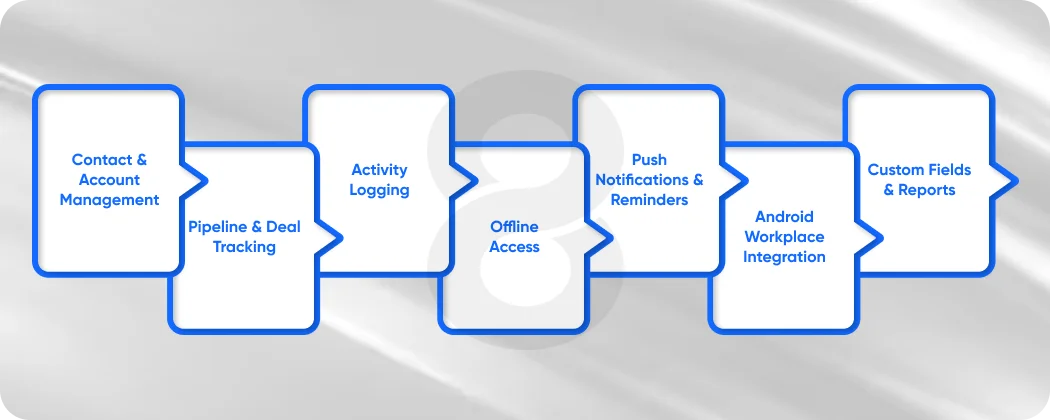
It is important to know what constitutes a great CRM on Android before getting into the platforms or developing your own. Mobile CRM apps are not all created equal. The features that are a must-have are the following:
- Contact & Account Management: Adding, searching, and updating customer profiles directly on your Android device. Find applications that will integrate with your phone contacts and calendar.
- Pipeline & Deal Tracking: Visual sales pipelines that allow reps to drag and drop deals by stage (Lead → Qualified → Proposal → Closed) without a laptop.
- Activity Logging: Log calls, meetings, and emails on the go. Android apps have the best CRM, which has an automatic logging of calls made directly through the app.
- Offline Access: Field agents usually operate in locations that have low connectivity. An effective Android CRM should be able to operate offline and automatically synchronize on regaining connectivity.
- Push Notifications & Reminders: Smart notifications and follow-ups, task deadlines, and deal updates ensure that your team is proactive and not reactive.
- Android Workplace Integration: Full integration with Google Workspace (Gmail, Calendar, Drive) is a colossal benefit to Android users.
- Custom Fields & Reports: No two businesses are the same. Growing teams need the capability to personalize data fields and generate reports by using the app itself.
The global customer relationship management market size was valued at USD 73.40 billion in 2024 and is projected to reach USD 163.16 billion by 2030, growing at a CAGR of 14.6% from 2025 to 2030.
Top CRM Options Available for Android
Zoho CRM Android
Zoho CRM Android stands out as one of the most popular and feature-rich mobile CRM solutions available today. You can download the Zoho CRM Android app from the Google Play Store, and it offers a surprisingly rich set of features even in its free version.
Using Zoho CRM Android, you can have access to leads, contacts, accounts, deals, and activities and manage them on your phone. The application allows you to work offline and so you do not need to worry about connectivity. When you come back online, all these things will get synced automatically.
The distinguishing feature of Zoho CRM Android is its level of integration. It is natively integrated with Gmail, Google Calendar, WhatsApp Business, and dozens of third-party applications. The Zia AI assistant (included in higher plans) even understands how to contact a lead at the best time, given historical data of interaction.
Zoho CRM Android is a logical fit for teams that are already using Google Workspace. The cost is free for up to three users, and paid plans increase with the size of your team.
Vtiger CRM Android
Vtiger CRM Android is another robust alternative, especially among the small and medium-sized businesses that would like to have a one-stop CRM without having to pay enterprise-level prices.
The Vtiger CRM Android application is an all-encompassing sales, marketing, and help desk solution. The Vtiger CRM Android application allows people to manage contacts, follow up on deals, support tickets, and email all on the same platform on the mobile side.
The built-in telephony integration is one of the most outstanding features of Vtiger CRM Android. You are able to make and receive calls directly in the app and log and record calls (where allowed). This is a game-changer for sales teams living on the phone.
Vtiger CRM Android also has a powerful free version with 10 users, making it a great place to start for a startup. Paid plans provide more advanced automation, AI lead scoring, and analytics.
Read More: Top 10 CRM Software Platforms of 2026
The Best CRM for Android: How to Evaluate Your Options
There is no single best CRM in Android search, as it all depends on the size of your team, industry, and how you work. The following is a brief outline:
- When you require customization down to the wire and low cost, see open-source or no-code builders (discussed below).
- When you require out-of-the-box features quickly, Zoho CRM Android and Vtiger CRM Android are your best options.
- In case you require an enterprise-level feature with Android support, Salesforce and HubSpot have good Android apps, but at a much higher price.
- In case you require a CRM that perfectly fits your business, build a custom CRM with a no-code platform.
Read More: 20 Best AI Apps for Android to Build Profitable Products
How to Build a Custom CRM on Android
And here lies the interesting part. In addition, you are paying to use features you do not require, lack features unique to your industry, and are restructuring your workflow to the software instead of vice versa.
Using no-code tools such as Knack, you can build a CRM that aligns with your specific business processes. Knack delivers fully responsive, web-based apps that run smoothly on any Android browser, and you can package them into a Progressive Web App (PWA) to provide a near-native experience.
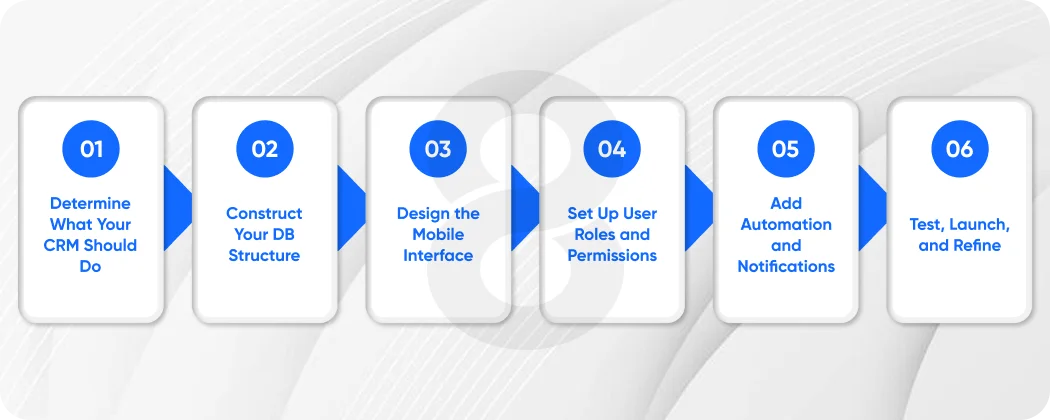
The following is a step-by-step guide to creating your own Android CRM:
Step 1: Determine What Your CRM Should Do
Ahead of any line of logic or field added, clarify your needs. Ask yourself:
- What information do I want to get concerning each customer?
- What are the steps of my sales process?
- What do you want each member of my team to have access to?
- What are the reports I should make decisions on?
This will save you hours of rework in the future. In the majority of cases of small businesses, a CRM on Android requires four basic objects: Contacts, Companies, Deals, and Activities.
Step 2: Construct Your DB Structure
Make your data objects (imagine these as database tables) using a no-code platform. To have a good CRM on Android, you will desire the following:
- Contacts: Name, email, phone, company, lead source, status.
- Companies: Company name, industry, website, address, and contact information attached to the company.
- Deals: Name of the deal, value, stage, close date, associated contact, and company.
- Activities: Type (call/email/meeting), date, notes, and deal/contact related.
Establish connections between such objects. A contact is a part of a company. A Contact is associated with a Deal. A is related to an activity. It is these connections that keep your CRM on Android a real system as opposed to a collection of spreadsheets that are disconnected.
Step 3: Design the Mobile Interface
This is a very important step of a CRM on Android; the interface should be able to be used with a thumb, load quickly, and not be overloaded. Prioritize:
- A tidy dashboard that displays what needs to be done today, outstanding deals, and recent contacts.
- Quick-add: No more than 10 seconds to log a call or add a new contact.
- A Kanban-like pipeline display that is easy to use on a small screen.
- Prominent, fast search – your reps are not expected to dig to find a contact.
Most will include responsive layouts by default, though this is only true when using a no-code platform. Test early and frequently on a real Android device.
Step 4: Set Up User Roles and Permissions
An Android CRM should have adequate access controls to be production-ready. At the very least, develop three positions:
- Admin: Complete access to all the data, settings, and reports.
- Sales Rep: Can see and update their deals and contacts, but not the data of other reps.
- Manager: Can access all deals and contacts and can generate reports, but not settings.
This keeps your sensitive customer information safe and only shows your reps the data that is relevant to them.
Step 5: Add Automation and Notifications
Automation is the true strength of a bespoke CRM on Android. Set up rules like:
- Once a deal is sent to Proposal Sent, automatically set a reminder 3 days later
- Welcome email when adding a new contact
- Remind assigned rep: a deal that has not been updated within 7 days
These automations save time on manual work so that nothing falls through the cracks, particularly when your team is working in the field on Android devices.
Phase 6: Test, Launch, and Refine
Pilot with 2-3 users before implementing your custom CRM on Android for the entire team. Collect feedback about the mobile experience in particular: what is clunky, what is lacking, and what is too hard to understand on a small screen.
Monitor adoption using the reporting tools after launch. Are activities being logged by reps? Are updates on deals being made? The data will inform you which one of your is working and which one should be improved.
The global mobile CRM market size was valued at USD 22.27 billion in 2025. It is projected to grow to USD 24.98 billion in 2026 and USD 28.02 billion in 2027, eventually reaching USD 70.22 billion by 2035. This represents a Compound Annual Growth Rate (CAGR) of 12.17% during the forecast period.
Custom vs. Off-the-Shelf: Which CRM on Android Is Right for You?
However, when your business expands and your processes get more particular, those same platforms may begin to resemble a cage. You are buying a sales pipeline, and you also require field service tracking. When you are in a consulting firm, you are getting reports that are meant to be used in e-commerce.
At this point, developing a bespoke CRM on Android will pay off. The initial cost in establishing it is compensated with reduced licensing fees, a more suitable fit to your workflow, and a system that your staff actually likes to use.
Choosing the CRM That Works for You
Be it an established solution, such as Zoho CRM Android or Vtiger CRM Android, or if you prefer to create something entirely new, the key is that your team has a CRM on Android that they will be willing to work with. Moreover, even with a large number of features, a CRM that is not utilized is useless.