


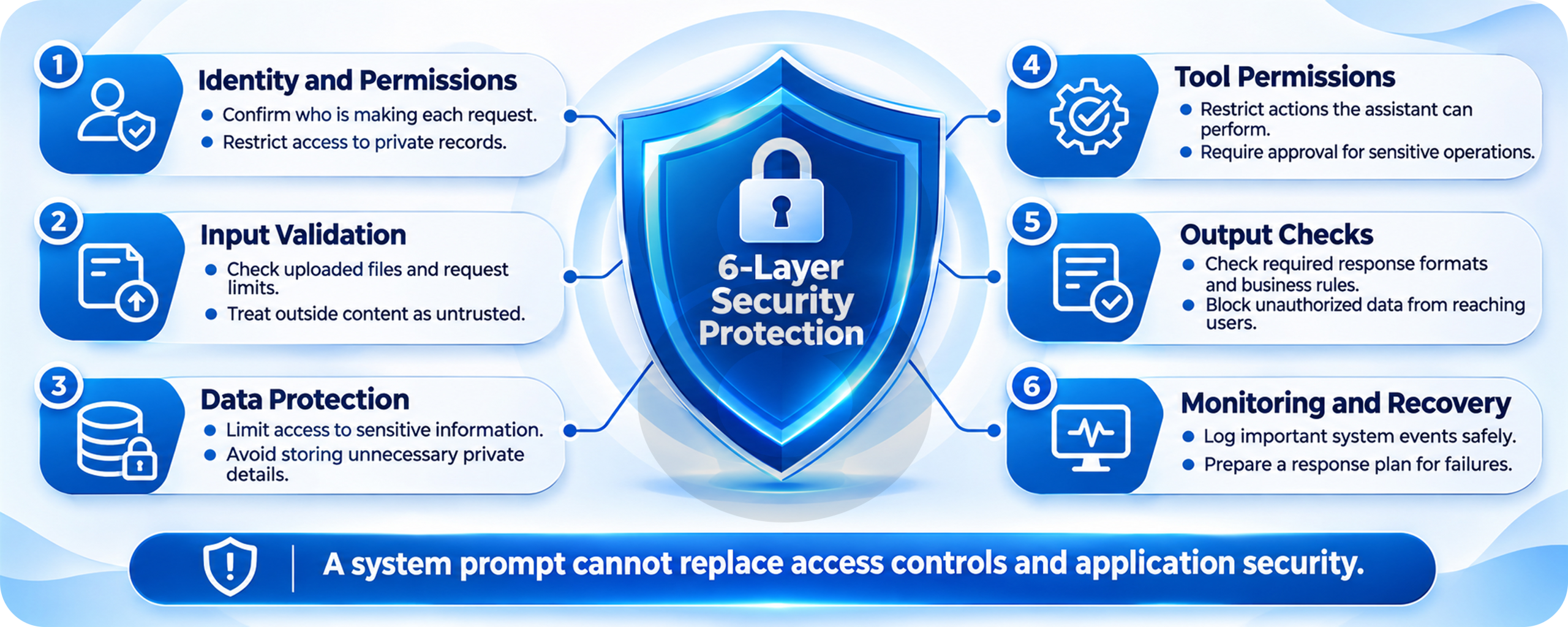
Have you ever felt you are just there, but production has other plans? There are times when the support chatbot seemed ready to go live. During testing, it had no trouble finding company policies, answering customer questions, or explaining what to do about a late delivery. Things became less predictable once actual customers started using it. Some received conflicting answers, while others waited far too long for a simple order update. The team had tested the chatbot carefully, so where had things gone wrong?
This is where LLM deployment gets complicated. A chatbot might perform well during testing, but real customers rarely ask questions the way developers expect them to. They leave out important details, upload lengthy documents, and ask for information that must come from live business systems. As more people start using the chatbot, problems with response times and data access become harder to ignore.
These issues aren’t always caused by the language model itself. Sometimes the trouble comes from how the application handles requests, retrieves information, or connects with other services. Understanding where those problems begin can help businesses avoid costly mistakes when bringing an AI product into everyday use.
The First Production Problem Usually Arrives From Somewhere Else
For a moment, pause here and think about a support assistant connected to an online store. During testing, staff ask about return periods and delivery policies. The bot finds a passage in the help center and answers correctly. Staff see the same small set of files, and nobody is testing what happens when a shopper asks about an order that belongs to someone else.
Once the assistant goes live, one shopper asks where a parcel is, another shares a partial order number, and a third wants to change an address. Those questions depend on the order system, account permissions, and business rules. The model can write a confident response even when one of those pieces is missing.
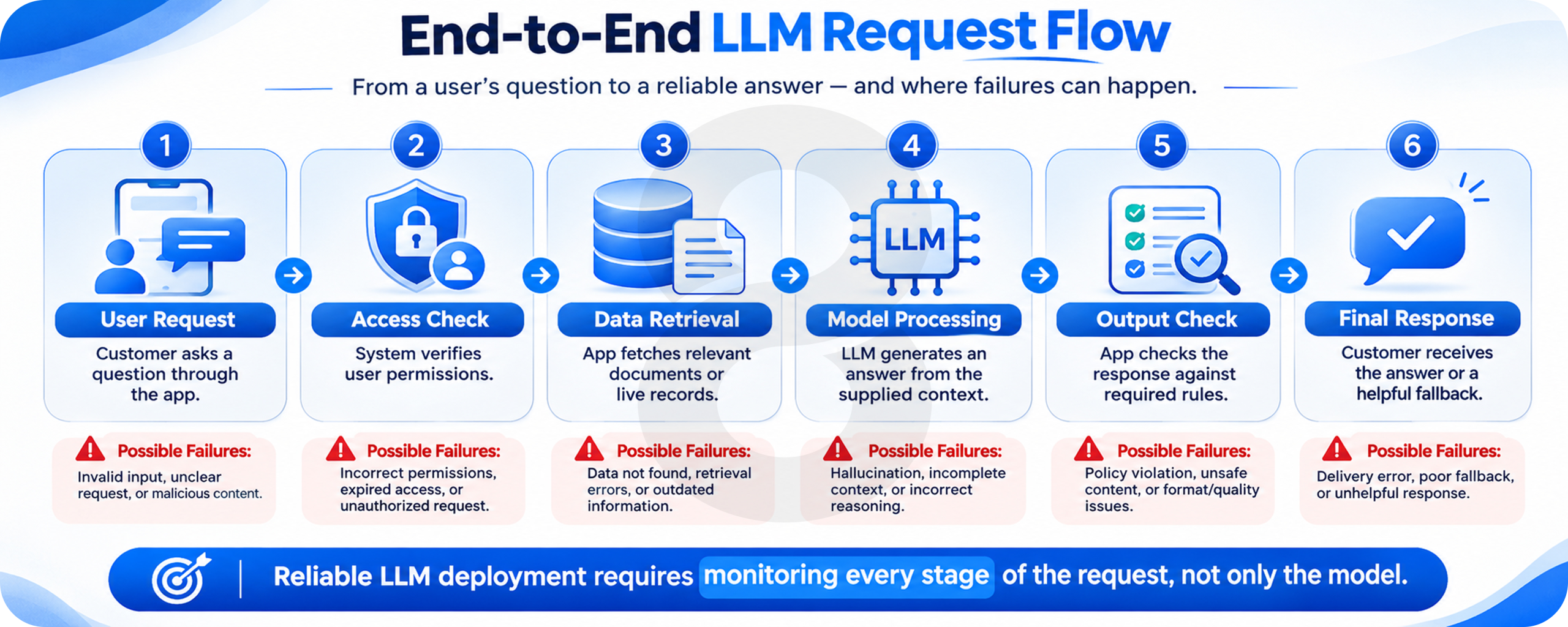
The first investigation should therefore follow the full request, rather than begin by changing the prompt. Did the account check pass? Did the order service return fresh data? Was the right policy file found? A fluent answer can hide a bad lookup, and prompt edits won’t repair a broken connection.
A Useful Answer Still Needs the Right Source
Document search is often added through retrieval-augmented generation, known as RAG. It finds useful text and passes it to the model before the answer is written. That helps with changing business facts, but search results bring their own risks: old rules, missing pages, duplicate versions, and files a user should never see.
LLM Deployment Architecture Begins With the Customer’s Request
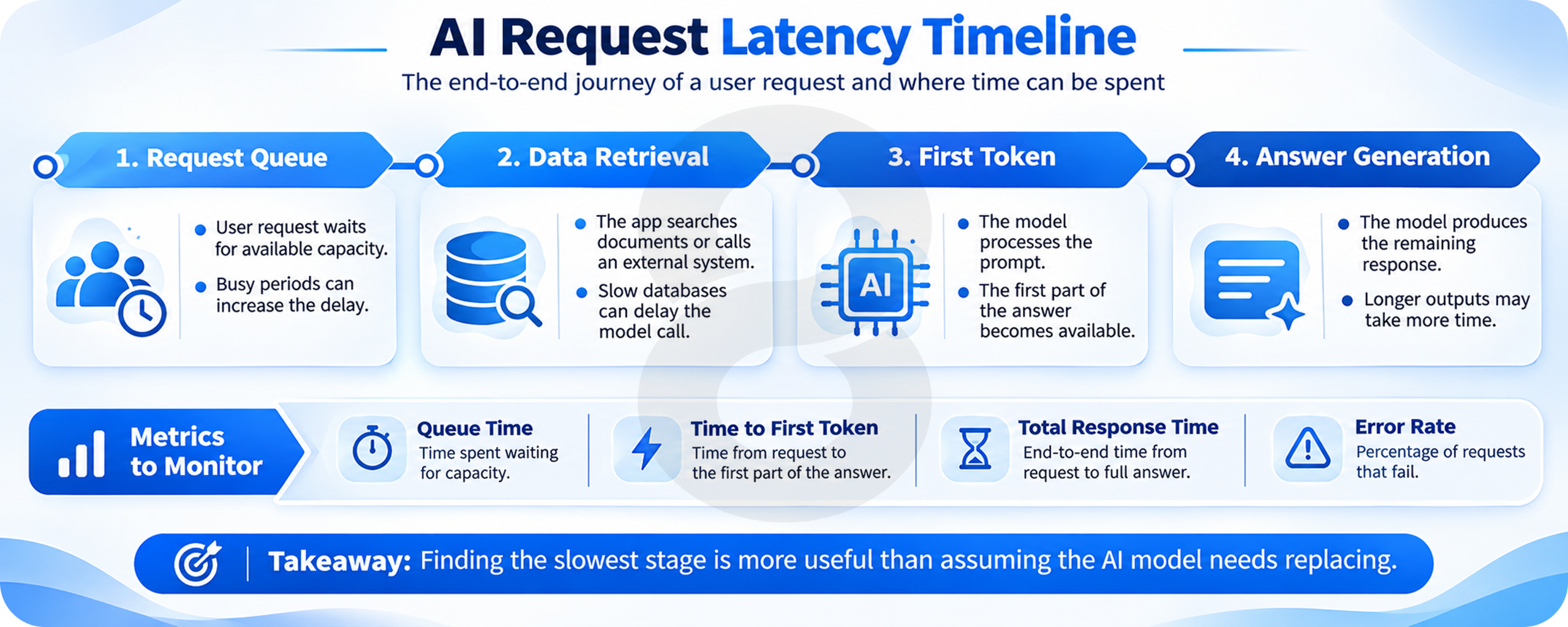
It helps to draw the path a request takes through the product. A user signs in, asks a question, and may need information from a database or company file. The app prepares that information, calls the model, checks the result, and sends the answer back. Each handoff adds a chance for delay or error.
Good LLM deployment architecture makes those handoffs clear and gives each one a clear owner. A team should be able to tell whether a slow reply came from authentication, search, a database call, or the model server. Without that detail, each issue becomes guesswork.
Decide What Happens When a System Is Down
Suppose the order service stops responding while the model remains healthy. The bot should explain that it cannot check the latest order status, then offer a practical next step. It should never fill the gap with a delivery date that sounds plausible.
Timeouts, limited retries, and a clear human handoff belong in the design before launch. Repeating a failed request without a limit can make an outage worse. Meanwhile, the customer keeps waiting.
When Your AI App Depends on Other Systems
Order records, customer accounts, and company files need to stay linked as the product grows. 8ration’s software integration services can help teams plan those connections and the paths users follow when something goes wrong.
Why a Fast Model Suddenly Feels Slow
A developer may measure a two-second reply during testing and expect customers to get the same result. That number means little without the workload behind it. Ten short questions are different from hundreds of requests, some carrying long files or full chat histories.
For self-hosted models, incoming requests compete for GPU memory and compute time. Some wait for a slot; others take longer because the model must process a large amount of text before it can start answering. Even a hosted API may slow down when the app is waiting on search or another host.
Measure the Wait Before the First Word
Users notice when a chat window stays blank. Time to first token measures how long it takes before generated text starts arriving. Total response time tells another part of the story, while queue time shows requests waiting to be processed.
The vLLM metrics documentation exposes all three, along with running and waiting requests. Looking at them together is more useful than admiring a high GPU usage chart. A busy machine may be doing plenty of work while people still face long waits.
Run the Test Your Customers Will Create
Build a test mix from real tasks. Include a short question, a search over policy files, a long uploaded document, and a request that needs a live database response. Then increase the number of users and watch the slowest requests, not only the average.
The Cost Nobody Included in the Demo
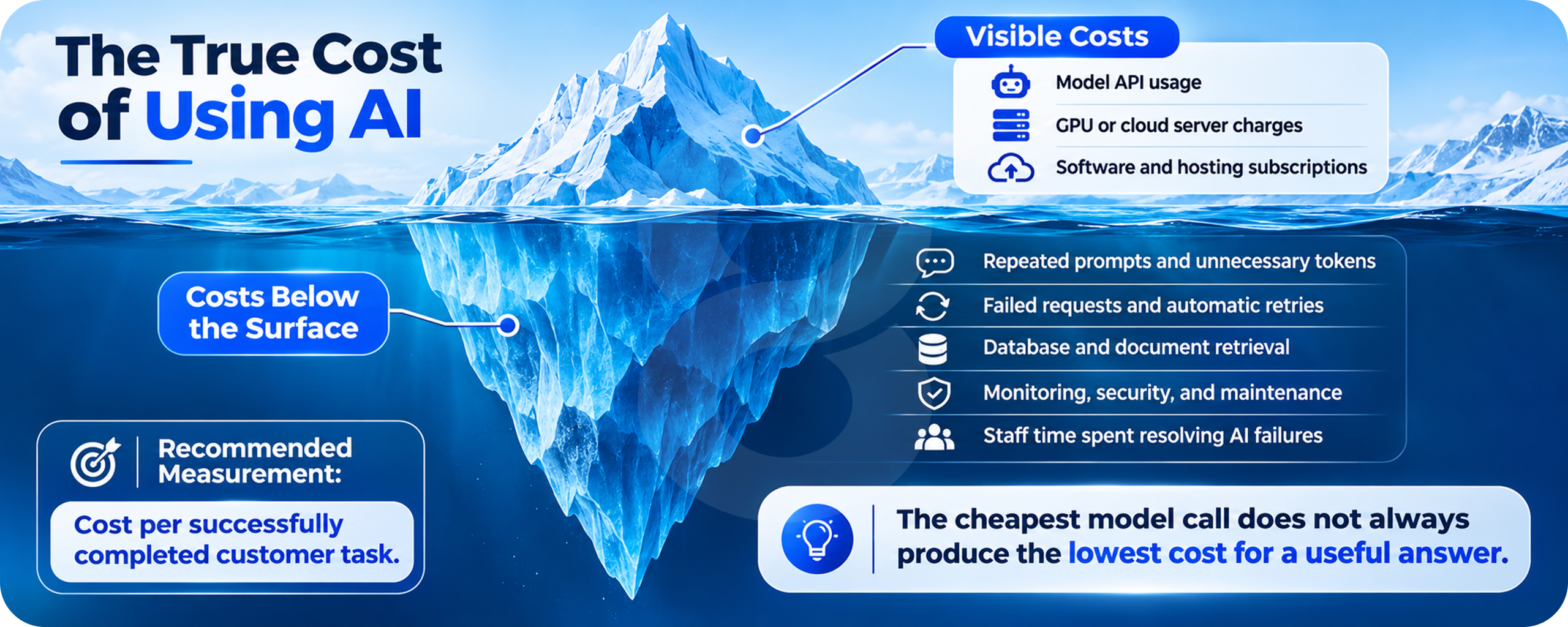
Price comparisons often start with a provider’s token rate or the hourly cost of a GPU. Neither tells the full story. A support bot that keeps searching the same records, resends a long conversation, or retries failed calls can spend money without solving any more customer problems.
For example, a product may pass the entire chat history back to the model every time the user replies. That keeps context, but the repeated text adds work. Summaries, better retrieval, or limits on older messages may lower the bill, provided the answers remain accurate.
Ask What One Resolved Task Costs
Measure the cost of a completed support request rather than a single model call. A cheap answer that sends users back to a human can cost more than a slightly slower answer that gets the facts right. Compare the result with time spent waiting and the rate of successful resolutions.
Self-hosting also brings bills that are easy to miss. Someone must manage hardware, security patches, scaling, logs, and failures outside office hours. Managed services shift much of the hosting work to a provider, though pricing, rate limits, and data terms still need close review.
Choosing LLM Deployment Tools Without Building a Giant Platform
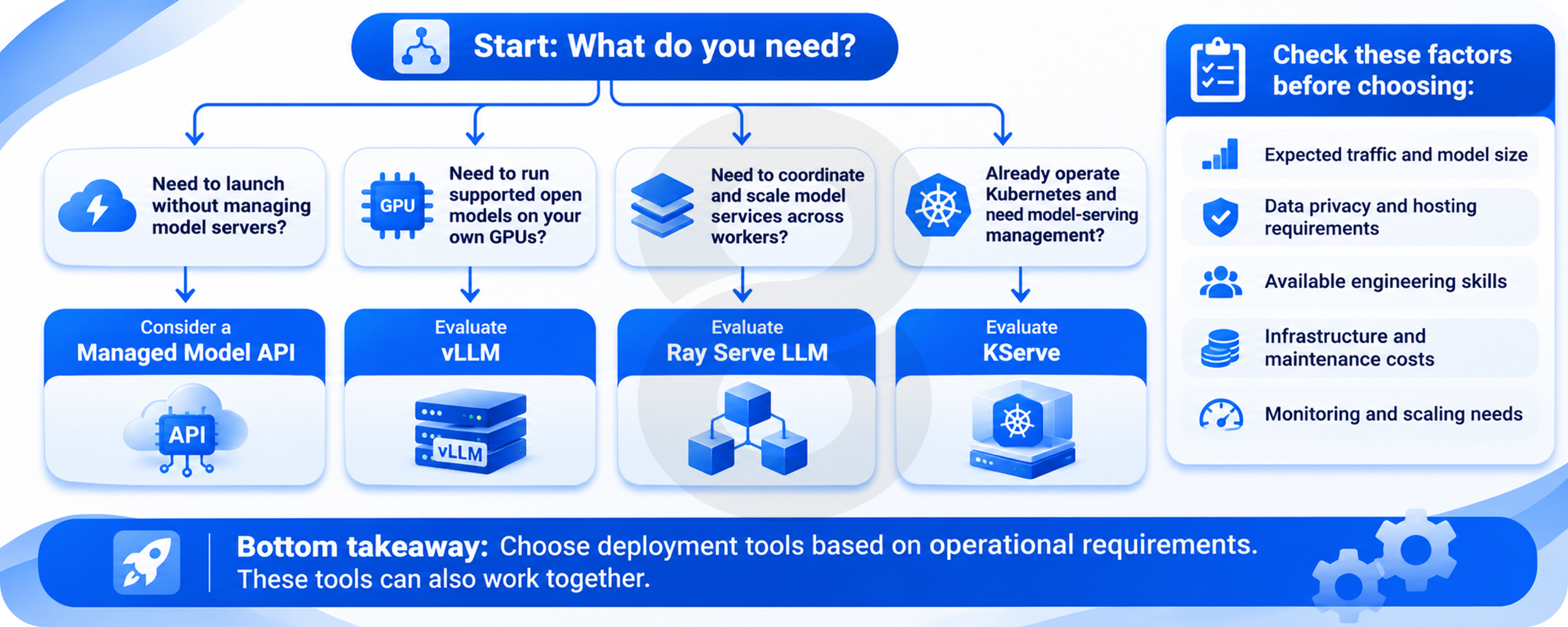
Tools should match the work. A small internal assistant might work well with a managed model API and a modest app server. A product serving several models across dedicated GPUs has different needs, particularly if traffic rises sharply or businesses need control over where data is processed.
| Option | What it helps with | The question to settle first |
|---|---|---|
| Managed model API | Model hosting and access | Are its data terms, rates, and limits acceptable? |
| vLLM | Serving supported models on your hardware | Can the team operate and monitor GPUs? |
| Ray Serve LLM | Routing and scaling across workers | Do multiple models or machines need coordination? |
| KServe | Model serving on Kubernetes | Is Kubernetes already part of your operations? |
vLLM is a model-serving engine, while Ray Serve LLM can coordinate serving across workers and models. KServe supports model-serving workflows on Kubernetes, including features aimed at larger LLM systems. These tools can complement one another; comparing their names as if they are identical products misses the point.
What a Useful LLM Deployment Framework Decision Looks Like
Start with expected traffic, the size of your model, data rules, and the staff available to maintain it. Test the simplest setup that meets those needs. If it handles realistic peaks with room to spare, adding a distributed cluster may create more work than value.
Security Problems Often Look Like Ordinary User Questions
A user asks the bot to fetch another person’s account using an order number. In a demo, nobody tries it. After launch, the system may be asked thousands of variations, including requests hidden inside uploaded documents or web pages the assistant reads.
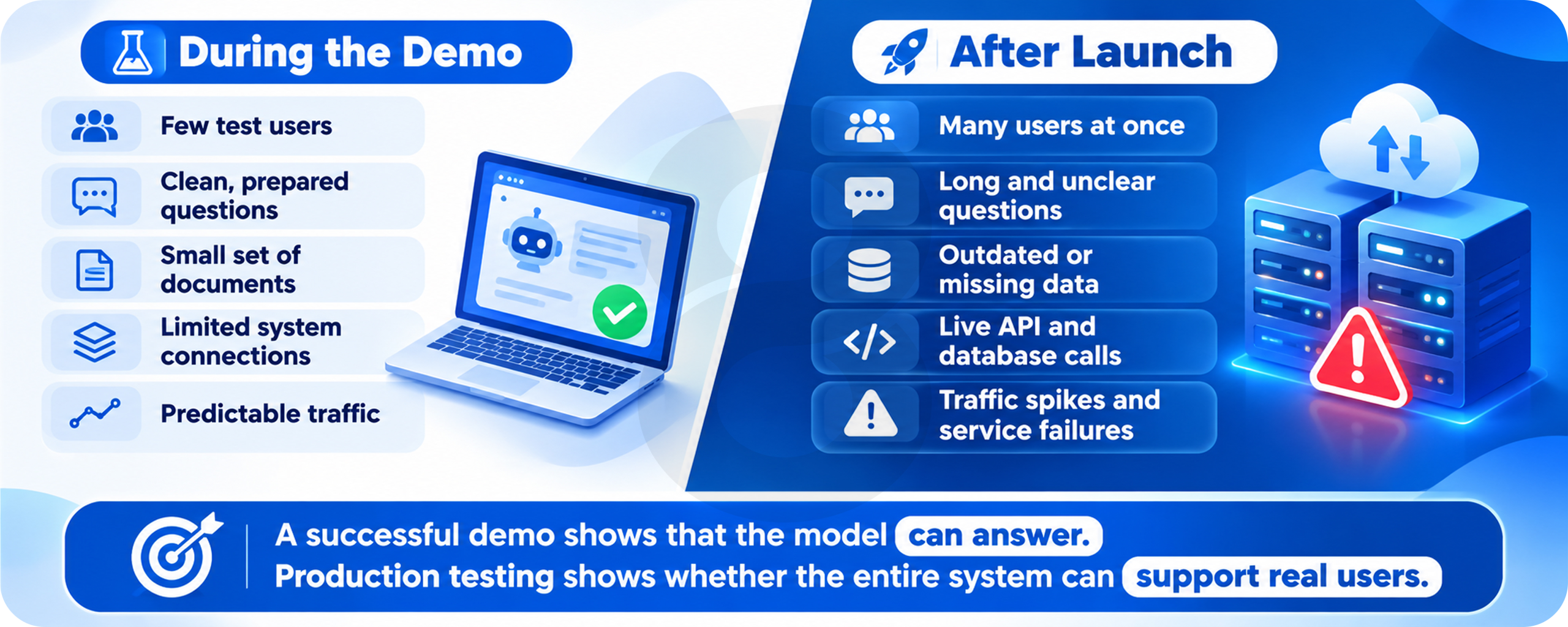
The 2026 OWASP LLM Top 10 highlights prompt injection, private data exposure, excessive agency, and other risks. An instruction inside a document must not gain the authority to change an account or reveal private records. Access checks need to happen in the app and its data services, where they can be enforced.
Give the Assistant Less Power at First
Reading an approved policy is a lower-risk task than issuing a refund or changing payment details. For actions that affect customers, use strict permissions, validate the inputs, record what happened, and require approval when appropriate. Do not rely on a polite system prompt to stop an unsafe action.
LLM Deployment Best Practices for the Things You Cannot Predict
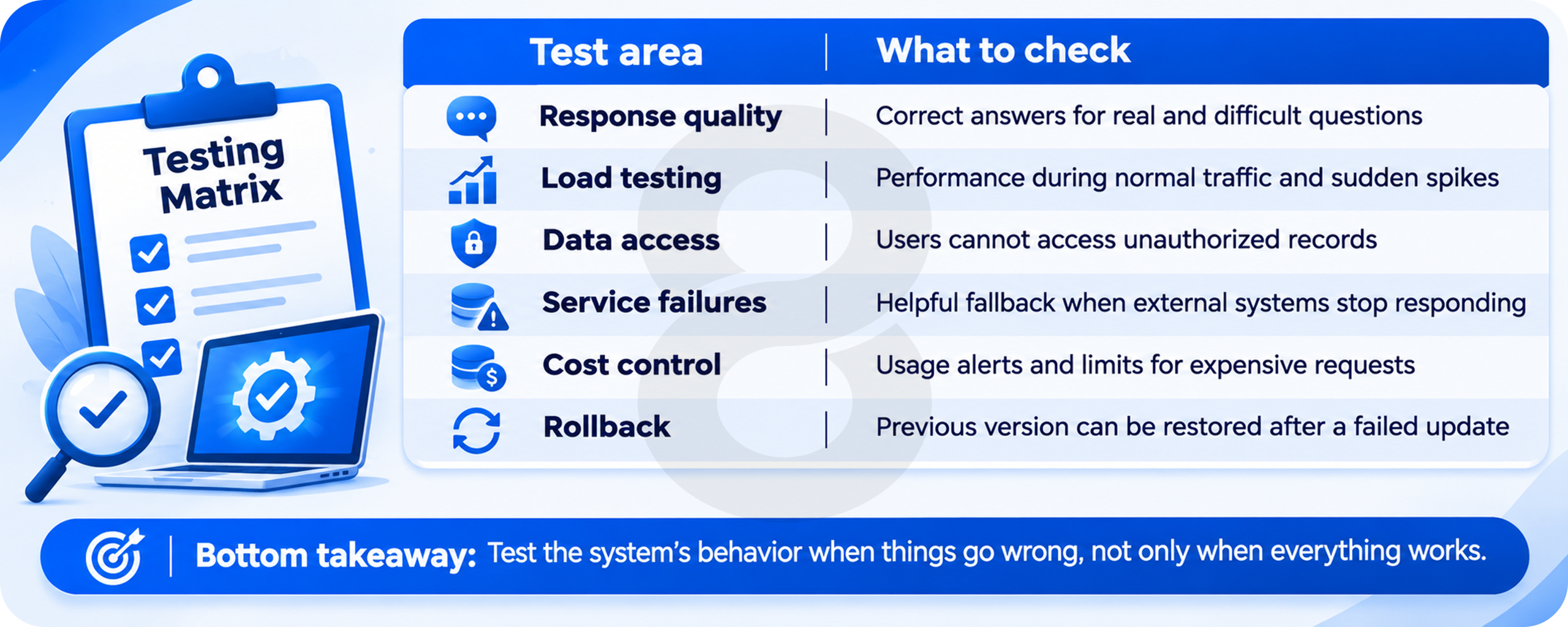
Build a Test Set From Messy Real Work
Use samples of actual support requests, with private details removed. Include vague wording, conflicting files, wrong account numbers, and questions the bot should pass to a person. Ask reviewers to judge whether the answer was useful and correct, not merely fluent.
Keep the test results alongside the model version, prompt, and document collection used. When an update causes trouble, the team needs to find what changed. A single quality score is difficult to act on if nobody can trace it to the affected questions.
Practice Rolling Back While Things Are Calm
Release a new model or prompt to a small group first and compare it with the current version. The team should know how to switch back without rebuilding the whole app. Try a failed provider call in testing and confirm that users see a clear message rather than an endless spinner.
Give Your Release a Proper Stress Test
AI testing has to cover data failures, heavy traffic, unsafe requests, and changing model output. 8ration’s software testing services can support the checks that reveal those problems before customers meet them.
When LLM Deployment Services Are Worth Paying For
Outside specialists make sense when the product team understands its users but lacks experience with serving systems or cloud operations. Help might cover architecture reviews, load tests, security checks, cost estimates, and a practical support plan. Ask for the handover details before agreeing to a project.
An in-house team can respond quickly to product changes, provided someone owns deployments and incidents. A partner may be useful for an initial build, yet the business still needs to know where the code lives and who can change production settings. That should never depend on one contractor’s personal account.
Need to Settle the Technical Plan First?
If the hosting choice, data flow, or support model is still unclear, 8ration’s software consulting services can help turn those open questions into a workable plan before the build begins.
What an LLM Deployment Course Can Teach, and What It Cannot
A course can show you how to run a model, create an endpoint, and send a request from an app. That is valuable practice, especially for someone new to model serving. It rarely feels like the morning a provider starts timing out and support tickets begin arriving.
To move beyond tutorials, give yourself a small production exercise. Simulate a traffic spike, let a database call fail, review the logs, and deploy a change you can roll back. The lesson becomes useful when you can explain what went wrong without guessing.
LLM Deployment Trends 2026: More Choices, More Decisions
Serving software has moved beyond simply spreading requests across identical workers. In August 2026, KServe 0.20 added traffic-splitting support, tracing features, and options for moving some key-value cache data into CPU memory. Those changes address real issues in large serving systems, including rollouts, visibility, and memory pressure.
Ray Serve LLM also documents routing, autoscaling, and ways to separate prompt processing from answer generation. These approaches can help at scale, but they add parts that must be run and watched. A small customer support bot may gain more from better data access and clearer error messages than from any of them.
What a Sensible First Month in Production Looks Like
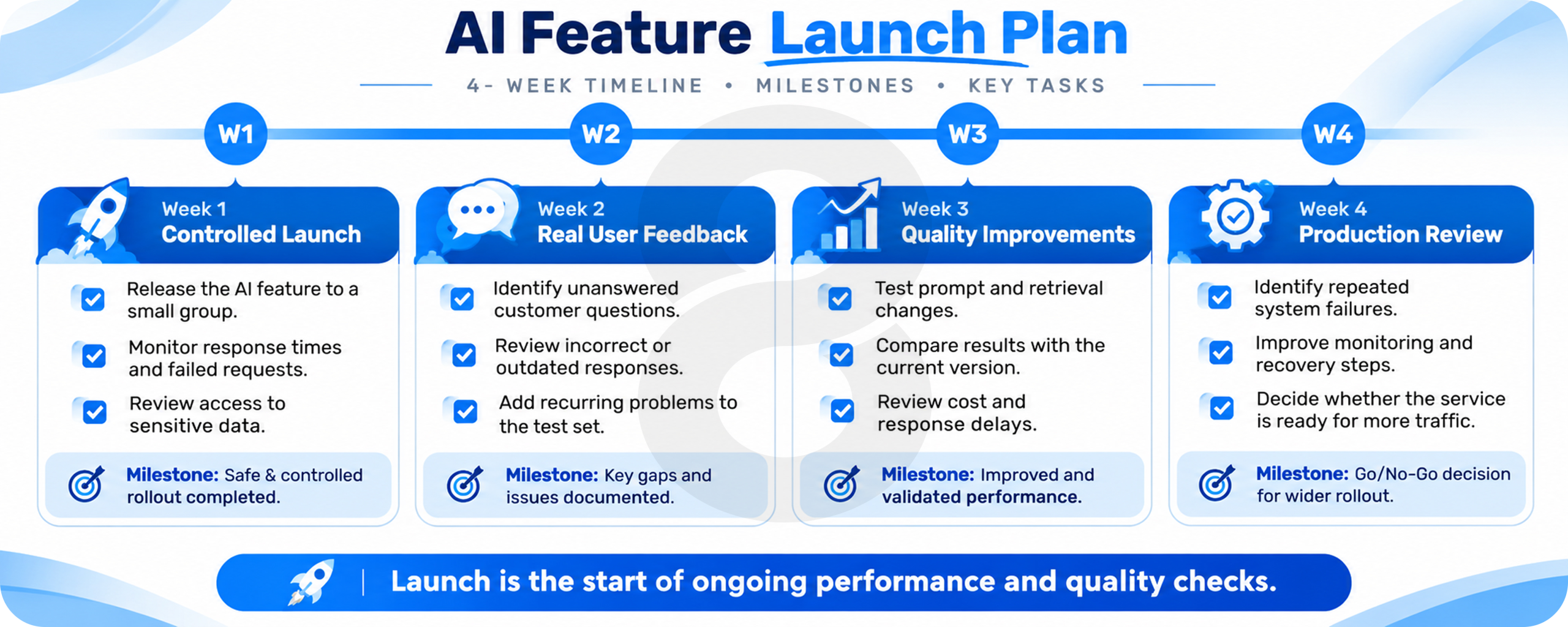
The store could begin by rolling out the support bot to a small group of customers. In the first week, the team reviews unanswered questions and checks that account data stays private. It records failed lookups and watches the wait time for real users, including the slowest requests.
Next, it tests changes to the prompt and document search against the same sample questions. Staff checks any answer that could affect refunds or personal information. If a change helps one type of customer but hurts another, the team keeps the older version while it investigates.
By the end of the month, the team knows which problems come from model responses and which come from its own systems. That is far more useful than knowing the assistant impressed everyone during a Friday meeting. This is an illustrative release plan, not a report of a real client project.
What the Monday Incident Finally Revealed
Back at the online store, the team may discover that its model never stopped working. The trouble came from a slow order lookup, outdated policy files, and a release that had no safe fallback. Those problems are less exciting than picking a new model, but fixing them is what makes the product usable.
Successful LLM deployment shows up when a buyer gets the right answer, private data stays safe, and the bot admits when it cannot help. Support staff also know who to call when the order feed fails.
Ready to Make the AI Feature Part of Your Business?
8ration’s AI automation services focus on building workflows that connect with daily operations, including deployment and ongoing support. Discuss your project when you have a use case and want to work through the technical details.