You spent months building the app. Maybe years. You got the design right, squashed the bugs, and finally hit publish. Then… silence. A handful of installs from your friends and family, a few organic trickles, and then nothing.
This is not a rare story. It is the default outcome when teams treat the launch as the finish line rather than the starting gun.
The global mobile app market is projected to hit $391.3 billion in 2026, and while global downloads are expected to exceed 324 billion in 2026, users are becoming more selective. The “app fatigue” era means people do not download everything that looks interesting. They download things that feel essential, urgent, or irresistible.
Your mobile app launch strategy is the thing that gets you into that category. And if you do not have one built months before launch, you’re already behind.
Why Most App Launches Fail (And What the Numbers Say)
42% of apps fail because the team didn’t validate that anyone actually wanted the thing before building it. That’s the most brutal stat in this whole article and worth sitting with for a second.
But even among apps that solve real problems, retention is a disaster. Day 1 retention averages around 24% industry-wide. By Day 30 it’s 5.8%. Think about that. You spend $4 acquiring a user, and 94 of every 100 of them are gone within a month. That’s not a marketing problem. That’s a strategy problem, and it starts way before anyone opens an ad account.
The teams that launch successfully don’t have better budgets. They tend to have a longer runway. They started building their audience 90 days before launch, ran a beta and fixed the onboarding before anyone had to pay for installs, and showed up in app store search results the day they went live instead of figuring out ASO three weeks later.
Most apps don’t do any of that. So if you do, you’re already different.
Phase 1: The Pre-Launch Window (90 Days Out)
Ninety days sounds like a long runway. Then you’re 60 days out, you haven’t touched a landing page, your beta has three people in it, and your ASO is a blank keyword field. Suddenly ninety days sounds like nothing.
The stuff you do in this window doesn’t feel like building. There’s no code being shipped, no feature being designed. It’s market research and email lists and figuring out who your user actually is. Founders hate it. They skip it. And then they wonder why launch day felt like a non-event.
It also helps if you start thinking about this during mobile app development itself, not afterward. The analytics hooks you build in now, the onboarding flow you design around actual user psychology rather than wishful thinking, the monetization approach you pick based on how similar apps retain users. All of that shapes your launch numbers before you’ve spent a dollar on marketing.
Read More: How the Most Downloaded Apps Monetize in 2026
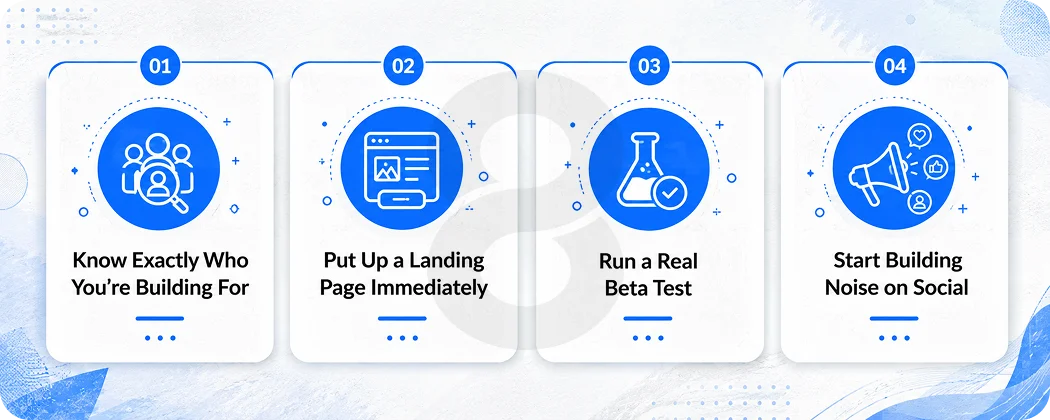
Know Exactly Who You’re Building For
Not “25-45 year olds interested in productivity.” That tells you nothing. Try this instead: the warehouse operations manager juggling inventory across three sites, checking his phone between forklift runs, needing a single screen that doesn’t require a tutorial.
Or the freelance translator invoicing clients in four currencies, ten minutes before her next call, who will delete your app if it takes more than two minutes to send an invoice.
Get that specific. Because your unique value proposition (UVP) only works if it’s aimed at somebody real. Your ASO keywords change. Your screenshot captions change. Even the tone of your launch email changes. Vague personas produce vague marketing, and vague marketing produces flat graphs.
One test worth doing: try to say what your app does better than everything else in under fifteen words. If you’re still on draft four and nothing sounds right, that’s a product clarity problem, not a copywriting problem.
Put Up a Landing Page Immediately
The second your app is functional enough to describe, get a landing page live. Just a page with a clear headline, a short explanation of what the app does, and an email capture.
That email list is genuinely the most underrated asset in any app launch. Two hundred people who signed up because they actually wanted this thing will do more for your Day 1 ratings, your first week of shares, and your early word-of-mouth than any paid push you run that week. A tweet disappears in 20 minutes. An email list is yours.
Run a Real Beta Test
Not a “send it to your developer friends” beta. A real one, with at least 100 people who look like your actual target user.
TestFlight handles iOS. Google Play’s internal testing track handles Android. Get them in, watch what they do, and pay special attention to where they stop. The onboarding drop-off points in a beta will tell you more about your real retention risk than any amount of internal testing.
Most teams learn things in beta that change their entire first screen. That’s a good thing. Better to learn it at zero cost now than after spending $20,000 on paid acquisition.
Start Building Noise on Social
You don’t need an audience yet. You need to be talking to the audience you want. Build-in-public content, including the real stuff about what’s not working, actually converts better than polished marketing. People root for the underdog. They share things that feel human. You can also create AI influencer videos to consistently showcase product updates, customer stories, and behind-the-scenes content without relying on traditional influencer campaigns.
On influencers: the instinct is to go big. Don’t, unless you have a proper budget for it. A fitness creator with 30,000 followers who actually use the apps they recommend will drive more real installs than a tech-adjacent blogger with 800,000 people who skim their posts. Engagement quality beats reach almost every time at the micro level, and the cost per install ends up a fraction of what you’d pay going upmarket.
Phase 2: App Store Optimization, the Free Channel Most Teams Ignore
70% of App Store visitors find apps through search. 65% of downloads happen immediately after a search. That is a massive, free traffic source, and most apps do almost nothing to capture it.
App store optimization is not about gaming the algorithm with keyword stuffing. It is about making sure the right people can find your app when they go looking for what it does, and then making your listing compelling enough that they actually download it.
Your Metadata is Your Real First Impression
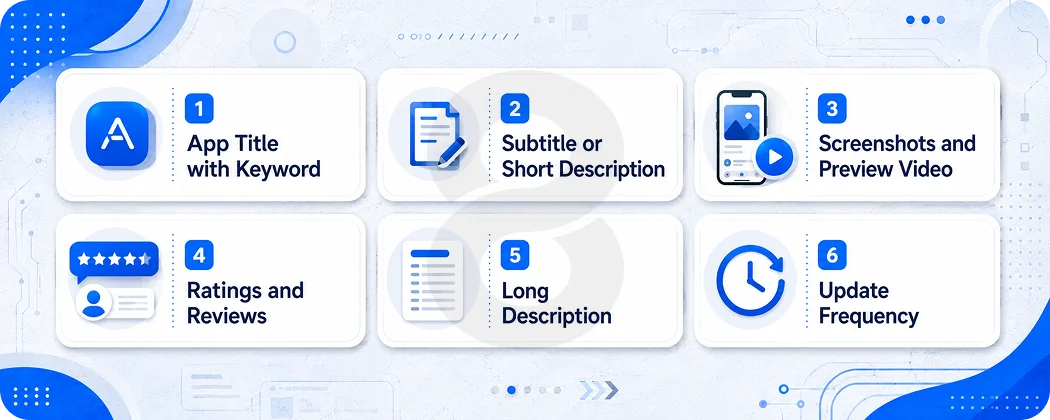
The app title carries more ranking weight than anything else on your page. Your primary keyword belongs in it, not buried in the description. Use the subtitle on iOS and the short description on Android for everything secondary. And don’t contort your phrasing just to fit a keyword in. Both stores have gotten good at semantic matching, and users spot awkward keyword stuffing immediately.
Spend time studying the top 5 apps in your category. Look at their titles, their feature descriptions, the language they use. Look for gaps. Topics they don’t mention, problems they don’t name. Those gaps are search queries that nobody is winning yet.
Screenshots Sell the Outcome, Not the Interface
Most apps make a mistake here that’s easy to fix once you see it. They show screenshots of the UI. Just the app, looking nice. And that’s… fine, but it’s not selling anything.
The better approach is showing what happens after someone uses the app. What does their problem look like solved? “3 invoices sent in 4 minutes” beats a screenshot of an empty invoice screen every single time. Put caption text on every image. Use all available slots. Make the screenshots tell a story from problem to solution in six frames.
A preview video helps too. Keep it under 30 seconds. Lead with the core value in the first five seconds or most people won’t stay.
Ratings Matter More Than People Realize
Apps with more positive ratings rank higher and convert better. Both things. Not just one.
Timing the review prompt is where most apps quietly hurt themselves. Open the app for the first time, haven’t done a single thing yet, and immediately: “Enjoying the app? Rate us!” That’s an awful experience, and the ratings it generates reflect that. People who haven’t seen anything yet mostly click away or leave a two-star out of irritation.
Ask after a moment of success. Right after the user completes their first real task inside the app. That’s when they’re most likely to say yes, and most likely to leave a positive one.
ASO Element |
Impact on Ranking |
Impact on Conversion |
| App Title with keyword | Very High | Medium |
| Subtitle or Short Description | High | Medium |
| Screenshots and Preview Video | Low | Very High |
| Ratings and Reviews | High | Very High |
| Long Description | Medium | Medium |
| Update Frequency | Medium | Low |
Phase 3: Launch Day (Which is Really Launch Week)
Most people treat launch day like a starting gun. It’s actually more like a curtain call. The real work is what you did in the 90 days before it, and by the time you hit publish, that should already be obvious.
Your PR contacts should already have early access under embargo. Your beta users should know the launch is coming and be ready to leave reviews. If none of those things are true, you’re launching cold, and it’s going to feel like it.
Line Up Your Press Coverage Before Launch
Reach out to app review sites, mobile journalists, and niche publications 2 to 3 weeks before your launch date. Offer exclusive early access. Ask them to hold coverage until your go-live date. Even 3 to 5 pieces of real coverage that all go live on the same day creates a credibility signal that’s hard to manufacture any other way.
Your Email List is Your Best Asset on Launch Day
Send a real email. Not a press release. Something that sounds like a person wrote it. Because it should. Tell the story. Why did you build this? What problem were you trying to solve? Make your subscribers feel like they’re part of something, and ask them directly to download, review, and share.
Soft Launch First If You Can
With over 1.9 million apps in the App Store and more than 2 million on Google Play, a regional soft launch in Canada, Australia, or New Zealand is a sensible filter before going global. If your crash rate is embarrassing or your Day 1 retention is terrible, you’d rather know that before you pour money into worldwide acquisition.
Teams using cross-platform app development have a real advantage here. One codebase means fixes go out faster between soft launch and full release. No separate iOS and Android queues slowing everything down.
Read More: Mobile App Development Process – From Idea to Launch
Phase 4: Paid User Acquisition (Spending Money in the Right Direction)
In 2025, app marketers worldwide spent $109 billion on mobile app marketing, $78 billion of that specifically on user acquisition. Lots of money. And a meaningful chunk of it was spent badly, because the teams optimizing for the wrong thing.
Cost-per-install (CPI) is what everyone talks about. It’s also kind of the wrong metric.
Optimize for Cost Per Retained User, Not CPI
Here’s the math that changes how you think about this. Say Channel A delivers users at $4 CPI with 5% Day 30 retention. Your cost per retained user is $80. Channel B delivers users at $6 CPI with 15% Day 30 retention. Your cost per retained user is $40.
Channel B looks 50% more expensive on every dashboard. It’s actually half the price once you account for what actually happened.
This is the single mindset shift that separates growth teams who compound from growth teams who spin their wheels. Measure the retained user, not the install.
Read More: How to Build an App That Makes Money in 2026
Which Channels Work for Which Apps
App Category |
Best Starting Channel |
Avg. CPI Range |
| Gaming (Casual) | Meta, Google UAC, ironSource | $1.50 to $3.00 |
| Finance or Fintech | Google Search, Apple Search Ads | $8.00 to $12.00 |
| eCommerce | Meta, TikTok, Google UAC | $6.00 to $10.00 |
| Health and Fitness | Meta, Apple Search Ads, TikTok | $4.00 to $8.00 |
| Productivity | Google Search, Apple Search Ads | $3.00 to $6.00 |
Apple Search Ads is worth calling out specifically for iOS apps. You’re targeting people who are already in the App Store, already searching. The intent is there. Conversion rates beat most other channels, and competitor brand bidding is completely fair game.
Creator-Driven Installs Are Underrated
TikTok integrations, YouTube placements, Instagram Reels that show the app being used in a real context. These convert well because they’re not obviously ads. The key is giving creators genuine freedom. Overly scripted content looks like an ad and performs like one.
If your app targets businesses or enterprise users, the playbook shifts. LinkedIn thought leadership and direct outreach tend to outperform consumer channels by a wide margin. That’s also a consideration worth building into the product architecture from the enterprise app development stage, since B2B apps often need different analytics, user management, and permission structures than consumer apps.
Phase 5: User Retention, the Part That Determines If Any of This Was Worth It
You can nail every single thing above and still fail. If people download your app and never come back, you have a bucket with a hole in it. More acquisition just means more water pouring through faster.
According to Adjust, keeping an existing user costs five times less than acquiring a new one. Five times. And retained users are the ones who subscribe, make purchases, refer friends, and leave reviews. They’re your whole business model, not a nice-to-have.
“The teams we see succeed long-term are the ones treating retention as a product problem, not a marketing problem. If your Day 7 retention is 12% when the category benchmark is 22%, no push notification campaign is going to fix that. You have to go back to the product and figure out where the value isn’t landing.” Senior Mobile Growth Strategist Hamza Raza at 8ration
The First Seven Days Are Everything
Industry benchmarks put Day 1 retention at 35 to 45%, Day 7 at 20 to 30%, and Day 30 at 10 to 15%. Top-performing apps push Day 1 above 65% and Day 30 above 25%. That gap is onboarding.
Your onboarding has one job: get the user to the moment where the app proves its value before it asks for anything. Not push notification permissions on screen two. Not a paywall before they’ve seen a single feature. Show them why they were right to download this thing. Do it within 60 seconds. Everything else follows from that.
Read More: How to Create an App: 8 Steps to Build an App in 2026
What Actually Moves Retention Numbers
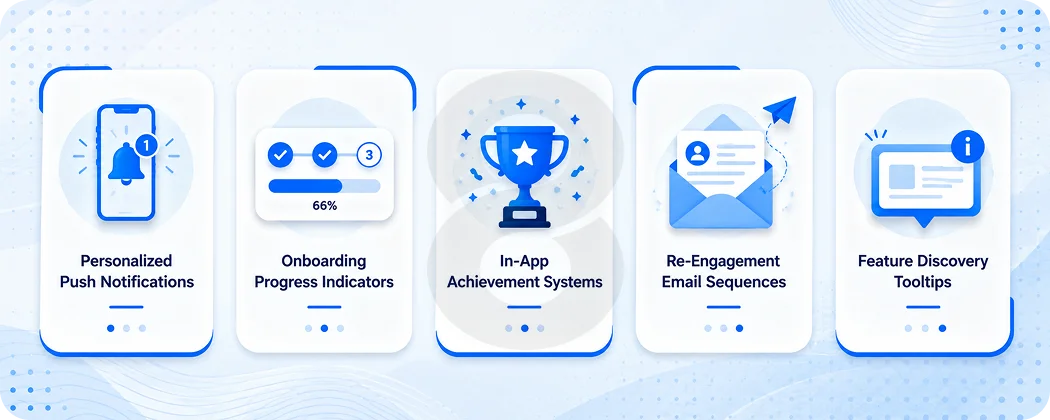
Push notifications increase app engagement by 40% when they’re personalized based on actual user behavior. Generic “We miss you” messages do the opposite. They’re annoying and they train people to ignore you.
In-app achievement systems, progress indicators, streaks, and loyalty loops all reduce churn across fitness, education, and productivity apps. Duolingo didn’t build the streak feature because it seemed fun. It’s the single most effective retention mechanic in the app, and the data shows it.
Retention Tactic |
Best For |
Expected Impact |
| Personalized push notifications | All categories | 40% engagement increase |
| Onboarding progress indicators | Complex apps | Reduces Day 1 drop-off by 20 to 30% |
| In-app achievement systems | Gaming, fitness, education | Increases Day 7 retention |
| Re-engagement email sequences | eCommerce, SaaS | Recovers 10 to 20% of churned users |
| Feature discovery tooltips | Productivity, utility apps | Reduces abandonment in complex flows |
Phase 6: Post-Launch, the Feedback Loop That Determines Long-Term Growth
Launch day is not the finish line. It’s the moment you finally have enough real data to know what to fix.
The Metrics That Actually Tell You Something
- Downloads are satisfying to watch, but they’re not a business metric. Here’s what to track instead:
- Daily Active Users (DAU) and Monthly Active Users (MAU): your real active user base, not your total install count
- DAU/MAU ratio: anything above 20% suggests genuine habit formation
- D1, D7, D30 retention: the most diagnostic numbers you have for product health
- Session length and session frequency: are users going deeper over time, or doing the same single thing and leaving?
- Lifetime Value (LTV): tells you exactly how much you can afford to spend acquiring a user
- Crash rate: directly correlates with store ranking, ratings, and everything else you care about
ASO Doesn’t End at Launch
A lot of teams set up their app store listing, hit publish, and never touch it again. That’s a mistake.
The store algorithms update. Competitors change their listings. New high-volume search terms emerge in every category as user behavior shifts. The apps that hold their rankings a year after launch are the ones monitoring and updating their metadata monthly, refreshing screenshots seasonally, and responding to reviews within 24 hours.
“Founders think ASO is a checkbox. It’s not. The apps ranking in the top ten of competitive categories got there because somebody worked that listing consistently for 6 to 12 months. It compounds, just like content.” Lead App Strategist Bilal Hussain at 8ration
Ship Updates Regularly
Apps that push meaningful updates every 2 to 4 weeks rank better in store algorithms and give users reasons to come back and re-engage. Each update is also a shot at editorial featuring by Apple or Google, which can deliver thousands of organic installs at zero cost. It happens more than people realize, and it never happens to apps that haven’t shipped in three months.
According to Statista, mobile app revenue and engagement are growing every year, but the gap between apps that keep iterating and apps that go dormant keeps widening. The ones that compound are the ones still shipping.
Read More: The Real Cost of App Maintenance: What Budget Percentage Should You Allocate?
Your App Needs to Be Launch-Ready Before Strategy Matters
Every strategy in this article depends on one thing being true: the app itself has to actually work.
Not perfect. But fast, stable, and genuinely useful for the problem you’re solving. A brilliant launch strategy with a brittle product just gets more people to the point where they experience the problem faster.
The decisions that shape launch performance (architecture, analytics instrumentation, onboarding design, monetization flow) get made during mobile app development, not after.
That’s why at 8ration we build launch considerations into the process from day one. The way you structure your codebase, the way you instrument user events, the way you design your first-run experience. All of it is either helping your post-launch growth or working against it.
Read More: 15 Best App Monetization Strategies for 2026 (Non-Ad)