In the modern globalized world, the mobile phone has been an appendage to our day-to-day being. Individuals use the mobile application UI designs to place orders, control finances, and perform other tasks with ease and the intuition of the interface. However, developers still leave millions of users behind. People with visual impairments, motor impairments, cognitive differences, or hearing impairments often struggle to use mobile applications that ignore their needs during design and development.
Mobile app interface design no longer needs to be a nice-to-have. It is an ethical duty, a legal one in most societies, and more and more, it is a competitive edge. It means that when you create an accessible design, you create one that everyone can access. You make things easier and less friction-filled and develop apps that truly accommodate the entire gamut of human capability.
The digital accessibility software market was valued at $538 million in 2022 and is projected to reach $880 million by 2030, growing at a 6.49% CAGR.
This tutorial will bring you through the basics and the principles of prototyping, as well as what you should and should not consider when putting together the project. And what strategies should be implemented during testing so that the next project will be an inclusive one.
Read More: How to Create an App – 8 Steps to Build an App in 2026
The Reason Accessibility is Important in Mobile App UI Designs
I would like to discuss the why before immersing myself in the how. The World Health Organization reported that more than 1.3 billion individuals are also disabled in one way or another across the world. That is approximately 16 percent of the world. By not including this audience in your mobile app UI designs, you will not only be neglecting a large user base, but you will also miss a huge market opportunity among them.
The Ripple Effect of Accessible Design is Obtained
Features originally built for people with disabilities often improve the experience for everyone. Subtitles, first developed for deaf and hard-of-hearing users, now help millions of people consume content in noisy environments. Voice control, designed to support users with motor impairments, has become a widely adopted and convenient interaction method for all users. High-contrast modes, created for users with low vision, now help many people view screens more clearly in bright sunlight.
Its business case is also strong. Applications that are accessible are more likely to be ranked higher in app stores, have more favorable reviews, and have longer retention. Companies may also face legal liability in many areas as a result of non-adherence to the rules of accessibility. It is just common sense to invest in the mobile app interface design of online tools and processes that are more focused on accessibility.
Core Principles of Accessible UI/UX App Development
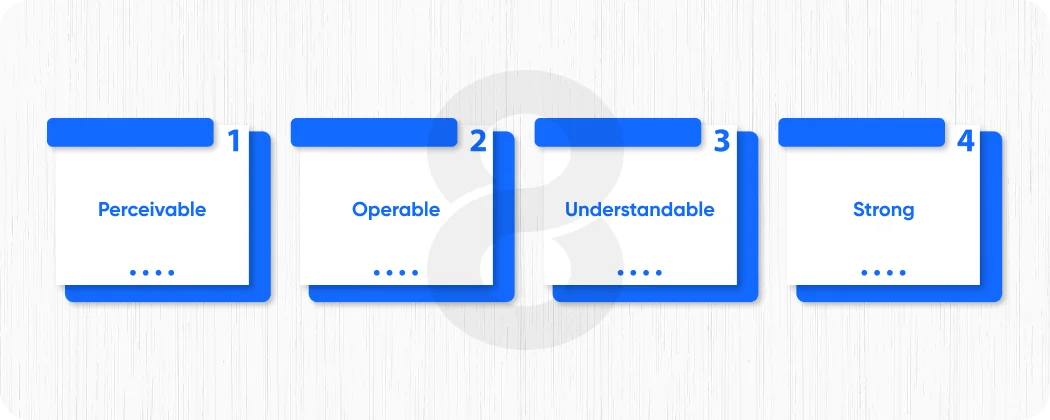
High accessibility begins with a set of principles. Although created in the web, the Web Content Accessibility Guidelines (WCAG) have also been extensively used as a reference in the development of UX apps in the UI field. The accessible design is based on the four fundamental principles, namely perceivable, operable, understandable, and robust (POUR).
Perceivable
It implies that any information and any user interface elements should be depicted in a manner that can be perceived by the users. This involves the use of non-textual alternatives in place of the text, adequate color contrast and avoiding the use of color alone as a source of information.
Operable
This refers to the fact that the interface should be able to interact with the users. Everything must apply to touch or keyboard, or assistive technology. Users who require a longer time to respond should not be caught in non-time-limited interactions.
Understandable
It refers to the fact that the information and even the functionality of the interface should be simple to understand. Curb language, behaviors of navigation, and indications of mistakes.
Strong
Strong implies that the interface should be functional with a wide range of devices, screen size, and assistive technologies. Here, a significant role is played by code quality and semantic structure.
Once these principles are integrated at the beginning of the UI/UX app development, accessibility is ingrained into the culture and not an add-on at the very end.
Another report estimates the market will grow from $7.55 billion in 2025 to $15 billion by 2035 as organizations prioritize inclusive digital experiences.
Starting with Accessible Mobile App Prototyping
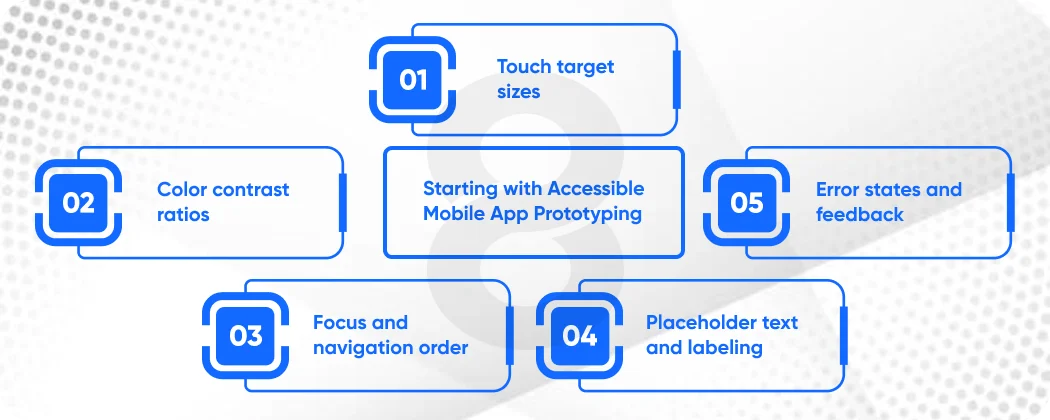
Accessibility should not be treated as an appendix; designers should implement it from the very first drawing. Prototyping mobile apps provides the best opportunity to test and confirm design choices before writing any code. At the prototyping stage, put into consideration the following:
Touch Target Sizes
Interactive components in mobile screens, like buttons, links, and form fields, need to be large to be tapped without precision. According to the Human Interface Guidelines of Apple, the minimum size of the touch target is 44×44 points. Material Design of Google proposes a minimum density-independent pixel of 48×48. One of the most frequent failures of accessibility in prototyping mobile apps is small touch targets, which particularly impact those with motor disabilities or tremors.
Color Contrast Ratios
Use a contrast checker during the wireframe and mock-up stages to verify that text is readable against its background. Maintain a minimum contrast ratio of 4.5:1 for normal text and 3:1 for large text to comply with World Wide Web Consortium’s Web Content Accessibility Guidelines (WCAG) 2.0 AA. Designers cannot compromise on this aspect of accessible mobile app UX.
Focus and Navigation Order
Think about how the people using the screen readers or keyboard navigation will navigate in your application. The sequence in which the information is read and focused on ought to be rational and expected. Combine as much as possible into one group, and do not use layouts that require assistive technology to randomly move around the screen.
Placeholder Text and Labeling
Placeholder texts should be avoided in the form fields instead of the labels. On typing, the text in place vanishes, leaving the users with cognitive disabilities or memory difficulties perplexed as to the information they need to input. Input fields should always be accompanied by persistent and visible labels.
Error States and Feedback
Make error messages very clear and descriptive with instructions not only on how something has failed but also how to rectify the same. An error cannot be recognized by color alone. Add color to icons, text descriptions, and (possibly) haptic feedback.
Read More: Mobile App Development Process – From Idea to Launch
Mobile App Interface Design: Accessibility by Platform
iOS and Android both contain strong built-in accessibility tools, which your mobile app interface design should embrace and build upon, as opposed to being in conflict with.
iOS has a built-in screen reader called VoiceOver. In designing to be VoiceOver-compatible, all interactive elements must have a descriptive accessibility label. Arranging like items, establishing details of accessibility (such as labeling a button as a button), and giving suggestions to unintuitive interactions are all mechanisms to create a VoiceOver-friendly interface. Xcode contains a very useful tool called an “Accessibility Inspector” that can be useful at this stage.
The two sites can be changed to display size, use bold fonts, invert colors, and use grayscale. It is an eye-opener to test your design in all these conditions; it will tend to show up contrast and readability problems that are not readily visible in normal viewing conditions.
Android User Interface Design and Accessibility Good Practice
For teams that develop Android UIs, Google Jetpack Compose and the older View-based framework provide powerful solutions for creating accessible interfaces. Nevertheless, tools do not work by default, and developers need to know about accessibility requirements and use them with purpose.
Android UI screen reader content descriptions on ImageViews, ImageButtons, and custom views are required in Android development of UI. To use decorative images that do not have a carrying informational value, set the content description of a picture to null. So that the screen reader bypasses it instead of declaring the picture as hard to understand.
Live regions and semantic roles are also of importance. If you have a part of the UI that is animated, like a loading indicator or a success message, indicate it as a live region so that TalkBack informs the user about the change. And they do not have to navigate to it manually. This is a minor, yet considerable, fact in the Android UI development that makes a tremendous difference to the experience of the screen reader users.
The Role of Software Testing in Accessibility
However well thought-out and constructed a design may be, bugs and oversights are always present. It is through rigorous software testing that a difference is created between the apps that are actually accessible and the ones that dream about being accessible. Teams should engage in accessibility testing at all stages of the development lifecycle and should not treat it as a checkbox at the end of the development process.
Test the software with real assistive technologies through manual testing, as no other method can replace it. Test the app using VoiceOver or TalkBack with the screen physically covered or turned off. This simulation provides a real-life experience of how a blind user interacts with the app and reveals problems that visual inspection cannot identify.
The best way is to test people with disabilities. Involving users with diverse abilities in your testing process gives you insights that internal teams cannot fully replicate. Including perspectives from people with visual, motor, and hearing impairments. Not only do these sessions uncover problems, but they also expose innovative workarounds and use patterns that can stimulate improvements in designs.
How Software Consulting Can Elevate Accessible Design
The development of an internal accessibility practice is a big task for several organizations. Software consulting can transform this situation. Seasoned accessibility consultants bring deep knowledge of WCAG guidelines, platform best practices, assistive technology behavior, and legal compliance, expertise that most in-house teams are still building.
An experienced software consulting partner will perform accessibility audits of your current application and define its vulnerabilities to established standards and rank them based on severity and user consequences. Not only will they make your team aware of what they need to fix, but the reasons why such a fix is important and even how to avoid the same problems in future releases. They are also able to develop and provide accessibility training programs, which develop sustainable capability in your organization.
In addition to remediation, software consulting companies with accessibility expertise can integrate accessibility requirements into your design systems. This upstream integration ensures teams design new features to be accessible by default, which reduces the cost and effort of retroactive fixes.
Designing an Accessibility-First Culture
Finally, culture is the biggest driver behind the readily available mobile app UI designs. An organization should implement accessibility at all levels, from product strategy to design, development, and QA, so the end product reflects it.
Educate your whole team, and not only designers and developers. Accessibility will be a priority in the roadmap planning by product managers who are aware of it. The marketing teams that comprehend it will market it as the value of the product. It will make customer support teams more knowledgeable and able to support the users who experience certain problems.
Assign accessibility champions within your team who are passionate about inclusive design and have the authority to advocate for it in meetings, design reviews, and sprint planning. Document accessibility requirements in your design system so every new component automatically includes the correct accessibility foundations.
Celebrate your wins. You should spread the word when your app has raised its accessibility score, when a user with a disability writes to your team that the experience has finally been accessible to them. Such instances make the team realize the importance of the work.
Read More: Mobile App Development Challenges – Avoiding Costly Pitfalls in Your Next Project
Great User Experience Doesn’t Just Retain Users. It Converts Them
Developing mobile apps with convenient user interfaces is not a one-time project but an ongoing commitment to serve every user with respect and empathy. Teams must prioritize accessibility from the early stages of mobile app prototyping through Android UI details, rigorous software testing. Each step in the application lifecycle creates an opportunity to build a more inclusive experience.
Tools, guidelines, and best practices are all present. It requires the desire to put people first, to slow down and question whether all users can experience what you have created, and to the fullest degree, benefit.
Next-generation apps will not be the fastest or the most full-fledged. These will be the ones that can be used by everyone. Begin developing that application now.