You know the Monday morning ritual. Half the team is reconstructing last week from memory, guessing whether that client call ran forty minutes or a full hour, pasting numbers into a spreadsheet nobody fully trusts. The invoice goes out two days late. A few hours of real work never make it onto the bill at all.
Plenty of good teams bleed money this way for years. Not because anyone was slacking. Because the tracker they were handed was built for some other company, and it fought them on every single entry.
That friction is the reason time tracking software development has stopped being an enterprise only line item and started showing up on the roadmaps of agencies, startups, and field service teams that just want their hours to add up.
None of what follows is a sales pitch. Just the parts that matter once you actually try to build one.
Why More Teams Fund Their Own Time Tracking Software Development
The money is following the work. Time tracking is a $6.13 billion market as of 2025, and Grand View Research expects it to nearly triple by 2033, to $17.39 billion. Cloud deployment alone holds close to 78% of that, with smaller companies driving the fastest growth, according to Mordor Intelligence.
And the reason isn’t surveillance, whatever the bad press says. It’s that work physically scattered. Gallup finds that about half of full time U.S. employees now hold remote capable jobs, and six in ten want hybrid. Once your team is logging hours from kitchen tables, coworking desks, and three different time zones, a manual timesheet doesn’t stand a chance.
So companies reach for a tool. Then they hit the wall every off the shelf product eventually puts in front of them. Rigid project hierarchies that don’t match how you actually bill. Per seat pricing that balloons the month you hire your tenth person.
A mobile app that drains the battery and still misses half the entries. Data locked inside someone else’s database, on someone else’s terms.
A custom build answers those problems directly. You own the workflow, the data, and the integrations. You stop paying rent on features you’ll never touch. For a team whose revenue is tied to accurate hours, that control pays for itself quickly.
The Features That Actually Earn Their Place
Every feature list for a time tracker reads the same until you try to use the thing. The trick is knowing what belongs in the first release and what can wait until you have real users complaining about real gaps.
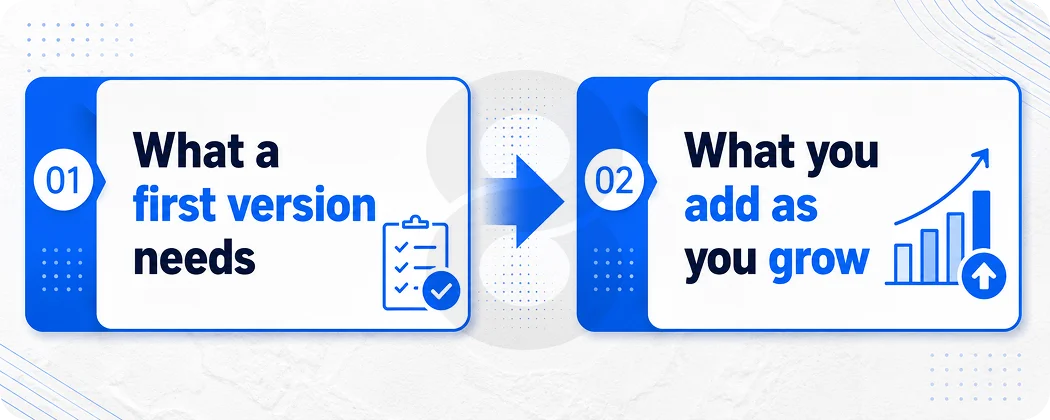
What a first version needs
Start with capture, because if logging time is annoying, nothing else matters. That means both manual timers and automatic time tracking that runs quietly in the background, plus idle detection so a forgotten timer doesn’t bill a client for a lunch break.
Layer on timesheets with manager approval and editing, then reporting that splits hours by project, client, and task. Add reliable sync so a timer started on a phone shows up on the web dashboard seconds later. Get those four things right and you have something people will use without being nagged.
What you add as you grow
Once the core holds, the value moves into connections and money. Billing with custom rate cards. Invoicing that turns tracked hours into a client ready bill without a manual rebuild every Friday. Activity context like screenshots, app and URL logs, or GPS for field crews, used carefully and transparently.
Then the analytics that managers actually open, like utilization, budget burn, and capacity forecasting. For deeper work you can bring in machine learning to flag unusual entries before they reach an invoice.
Feature area |
What it covers |
Typical build stage |
| Time capture | Manual timers, automatic tracking, idle detection | MVP |
| Timesheets and approval | Weekly sheets, manager review, edits | MVP |
| Reporting | Hours by project, client, billable and internal | MVP / Growth |
| Integrations | Jira, GitHub, QuickBooks, payroll, calendar | Growth |
| Billing and invoicing | Rate cards, auto invoices, payment links | Growth |
| Activity context | Screenshots, app and URL logs, GPS for field teams | Growth / Enterprise |
| Analytics | Utilization, budget burn, capacity planning | Enterprise |
| Compliance and access | Role based access, audit logs, GDPR controls | Enterprise |
The Tech Stack Behind a Time Tracking Build
Every stack debate in time tracking software development eventually circles back to one stubborn problem. Keeping time honest when devices drop offline, clocks drift, and the same person has a timer running on a laptop and a phone at the same moment. Get that part right and the rest is ordinary product work.
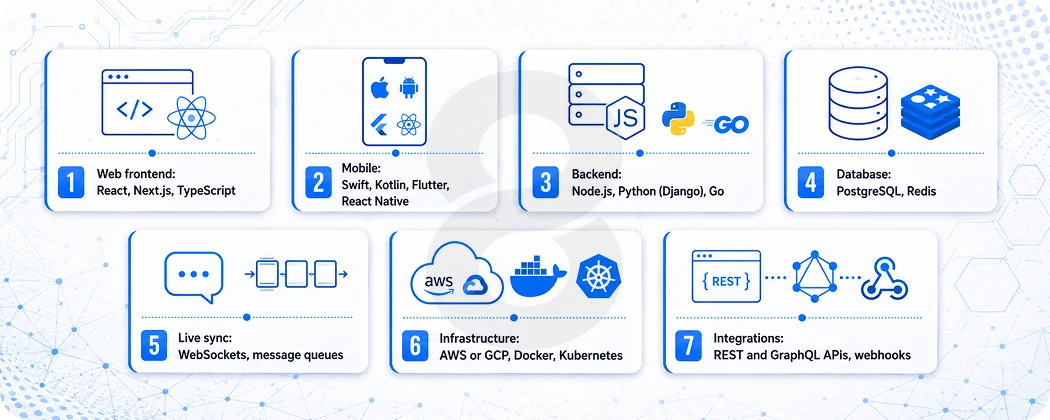
On the web, React with Next.js and TypeScript keeps the dashboards quick and lets you reuse the same components across reports, timesheets, and admin screens. Mobile is where it gets opinionated.
Native Swift and Kotlin handle background tracking and battery behavior best, which matters more than it sounds, since the operating system will happily kill a timer that misbehaves. Flutter or React Native bring the cost down when one codebase for companion apps for iOS and Android is good enough.
The backend tends to land on Node.js, Python with Django, or Go. Any of the three can hold thousands of timers ticking at once without breaking a sweat. PostgreSQL keeps the records straight, Redis takes the pressure off the reads people hit all day, and a message queue is what stops two open tabs from disagreeing about whether the clock is even running.
Layer |
Common choices |
Why it fits |
| Web frontend | React, Next.js, TypeScript | Fast dashboards, reusable components |
| Mobile | Swift, Kotlin, Flutter, React Native | Native tracking with offline sync |
| Backend | Node.js, Python (Django), Go | Handles concurrent timers and heavy sync |
| Database | PostgreSQL, Redis | Trustworthy records, quick lookups |
| Live sync | WebSockets, message queues | Timers stay current across devices |
| Infrastructure | AWS or GCP, Docker, Kubernetes | Scales as headcount grows |
| Integrations | REST and GraphQL APIs, webhooks | Connects to your existing tools |
How Long Time Tracking Software Development Takes
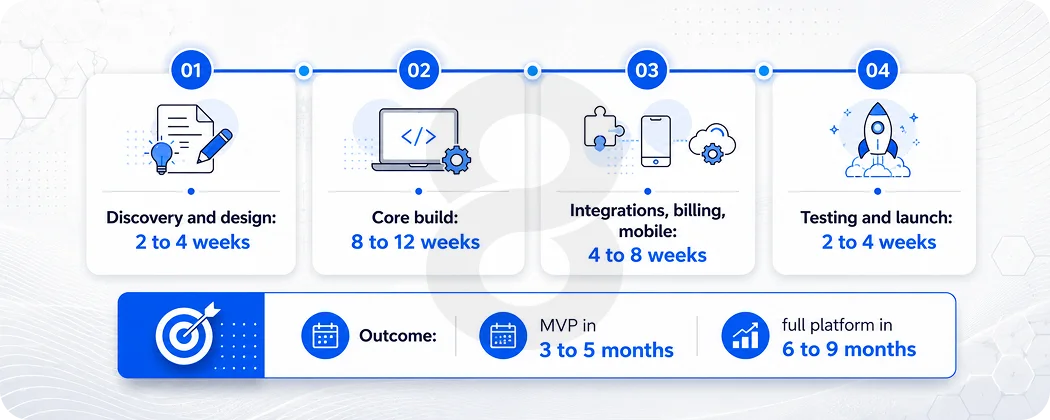
Anyone who quotes you a timeline before asking about integrations is guessing. That said, the shape of the work is predictable.
Discovery and design take two to four weeks. You map how hours move through your business, sketch the screens, and agree on what the first release actually includes. Skipping this is how projects balloon later. Core build follows for roughly eight to twelve weeks, covering capture, timesheets, reporting, and sync, the parts people touch every day.
Discovery and design eat the first two to four weeks, and cutting that short is how budgets quietly double later. It’s where you map how hours actually move through your business, sketch the screens, and decide what the first release leaves out. The core build is the long stretch, eight to twelve weeks on the parts people touch daily, like capture, timesheets, reporting, and sync.
After that, wiring in integrations, billing, and mobile adds another four to eight, because every API has its own quirks and rate limits and none of them read the same documentation. Testing and a quiet launch take the last two to four, with security checks and a small group banging on it before everyone piles in.
The quiet timeline killer is almost never the timer. It’s the migration. Moving years of existing hours, clients, and rate cards out of whatever you use today, without corrupting a single invoice, takes longer than people expect and deserves its own slot in the plan. Build that into the schedule up front and your launch week stays calm.
Read More: Pricing Models for Software Services: Fixed vs. Hourly Rates Explained
What It Costs to Build
A lean MVP costs about $25K to $ 45K. Add billing, payroll and accounting connections, native mobile, and an analytics layer on top, and the bill for time tracking software development sits between $60K and $150K. Go full enterprise, with strict compliance, ERP integration, and the kind of concurrency that doesn’t blink under load, and you’re well past that.
Three things move the number more than anything else. The count of integrations, because each one is its own small project. Whether you need native mobile or can live with a cross platform build. And how heavy your compliance load is, since audit logs and access controls add real engineering hours.
A rough way to sanity check your budget is to run it through a quick cost estimate before you ever sit down with a vendor.
One reframe worth holding onto. If a clumsy tracker loses each biller twenty minutes a day, that’s roughly two billable weeks a year, per person, gone. Against that, a build that fits pays itself back faster than the sticker price suggests.
Build, Buy, or Customize
Not every team should build. That’s the part vendors skip and burnt out engineers learn the hard way.
If a standard tracker covers how you work and the per seat cost stays reasonable as you scale, buy it and move on. Building a tool you didn’t need is its own kind of waste. The honest signal that you’ve outgrown a SaaS tracker shows up in a few recognizable ways.
- You pay for three tools to cover one workflow because no single product does billing, tracking, and approvals the way you bill.
- Your team keeps a side spreadsheet to fix what the tool gets wrong, which means you’re already maintaining custom logic, just badly.
- Per seat pricing now costs more per year than a focused build would amortize over two.
- You need an integration the vendor has parked on a roadmap with no date.
There’s a middle path people forget. You don’t always need a platform from zero. Sometimes the right move is a thin custom layer over an existing API, or a tracker that handles only the part off the shelf tools botch, while everything else stays where it is.
A good engineering partner will tell you when that’s the smarter spend, instead of selling you the biggest possible project.
Read More: How to Hire a Software Development Team: A 12-Step Guide
How 8ration Approaches a Custom Build
Plenty of agencies will take a time tracker brief and start coding by Friday. That’s usually where the trouble starts.
8ration’s approach to time tracking software development opens with the boring, valuable part, watching how your team logs hours today and where the current process leaks money.
Only then does the team design the data model, because in a tracker the data model is the product. From there it moves through agile sprints with something you can click after every cycle, so you’re never staring at a slide deck wondering what you actually bought.
The work spans the whole picture. A custom platform built from scratch on the web, mobile apps that work when the signal doesn’t, and the integrations that push clean hours into CRM, payroll, or your accounting stack. After launch 8ration stays on for the unglamorous maintenance that keeps timers honest as your headcount grows.