If your payroll team still reconciles paper timesheets or fights with a spreadsheet every two weeks, you already know the real cost isn’t the software you haven’t bought.
It’s the hours lost to manual entry, the disputes over rounded clock times, and the quiet risk of a labor audit you’re not ready for. Time and attendance software fixes this at the source: it captures hours accurately, applies your pay rules automatically, and pushes clean data straight into payroll.
This guide walks through what the software actually does, what it costs, which features matter, and how to choose a system that fits your team instead of forcing your team to fit the system.
What Is Time and Attendance Software, and How It Saves Your Payroll Team Hours Every Week
Time and attendance software is a program that records when employees start and stop work, tracks breaks and leave, and applies your organization’s pay rules to that data automatically.
Instead of a supervisor manually adding up hours from a punch card, the system calculates regular time, overtime, and paid leave the moment a shift ends, then hands that number to payroll without anyone retyping it.
Most modern platforms combine several tracking methods in one place, including web based logins, mobile check ins, proximity badges, and biometric verification such as fingerprint or facial recognition.
For growing companies, this isn’t a nice to have. Businesses that need a system built around their exact shift patterns, union rules, or multi location structure often work with a custom software development partner rather than forcing a rigid off the shelf tool to fit their operations.
450 Billion Dollars a Year: What Manual Time Tracking Really Costs US Businesses
Time theft and tracking errors are not a rounding issue, they are a line item. Industry surveys on workplace time theft estimate that inflated timecards, inaccurate reporting, and unsupervised breaks cost US employers hundreds of billions of dollars annually, and roughly four in ten employees admit to padding their own hours at some point.
Buddy punching, where one employee clocks in for an absent coworker, alone touches a large majority of US businesses at some point, and even a modest per employee loss adds up fast once you multiply it across a full workforce and a full year.
None of this requires bad intent from your team. Most of it comes from a system that relies on manual entry and honesty at the punch clock instead of verification. That is the gap automated time and attendance software is built to close.
Your Spreadsheet Is Not a Compliance Tool, It Is a Liability
The US Department of Labor requires employers to keep accurate records of hours worked, pay rates, and overtime for every non exempt employee, and those records must be retrievable for inspection. A spreadsheet with manual entries and no audit trail is exactly the kind of record that falls apart under a labor investigation, because there is no way to prove the hours logged reflect what actually happened on the floor.
A proper time and attendance system keeps every clock in, edit, and approval on a timestamped record, so if a wage dispute or audit ever comes up, your business has evidence instead of guesswork. That single feature, an unbroken audit trail, is often the difference between a routine compliance check and a costly legal exposure.
The One Thing Most Buyers Get Wrong Before They Even Compare Vendors
Most businesses start shopping for time and attendance software by comparing feature lists. That is the wrong starting point. The question that actually matters first is: what does this system need to talk to? A tool with excellent clock in features but no clean connection to your payroll provider, your HR system, or your scheduling software just creates a new data silo instead of removing the old one.
Before comparing vendors, map out every system that touches employee hours today, including payroll, benefits, scheduling, and any ERP tools. Then shortlist software built to integrate with that stack.
Read More: ERP System Development: Complete Guide for Businesses
Businesses juggling several disconnected platforms often bring in a system integration partner specifically to make sure a new time and attendance tool actually synchronizes with existing payroll and HR software instead of sitting next to it as one more disconnected app.
Why Waiting Another Payroll Cycle to Fix Your Time Tracking Is a Costly Mistake
Every payroll cycle you run on manual or outdated tracking is another cycle of avoidable errors compounding. Overtime miscalculations do not just cost extra pay, they invite wage claims. Buddy punching does not just inflate one paycheck, it normalizes a habit across a shift.
Businesses that put off modernizing their time tracking usually aren’t avoiding cost, they’re deferring it, and deferred payroll errors tend to surface at the worst possible moment, during an audit, a rapid hiring push, or a new location launch.
The good news is that implementation timelines for cloud based time and attendance software are typically measured in weeks, not quarters, especially when the system is scoped around your current headcount rather than an idealized future one.
Read More: Payroll Software Solutions for Automated Workforce Management
Cloud, On Premise, or Hybrid: Which Deployment Actually Fits Your Business
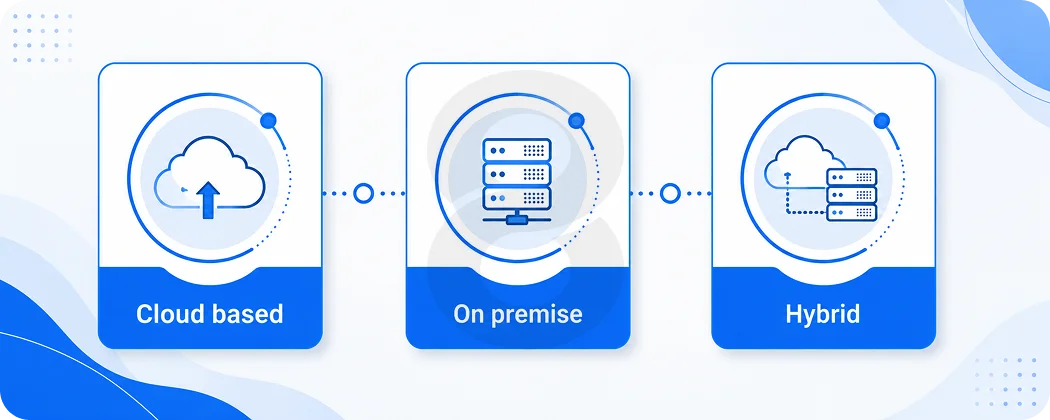
Deployment mode is one of the biggest forks in the road when choosing time and attendance software. Cloud based systems now make up the clear majority of new deployments because they support remote clock ins, require no in house server maintenance, and update automatically.
On premise systems still have a place for organizations with strict data residency rules or legacy infrastructure they are not ready to retire. Hybrid setups blend the two, often keeping biometric hardware on site while routing data through a cloud platform for reporting and payroll sync.
| Deployment Type | Best Fit For | Key Tradeoff |
|---|---|---|
| Cloud-Based | Remote & Hybrid Teams, Multi-location Businesses, and SMEs Without Dedicated IT Staff | Requires Reliable Internet and a Recurring Subscription Cost |
| On-Premise | Government Agencies and Regulated Industries with Strict Data Residency Requirements | Higher Upfront Hardware Cost and Internal Maintenance Burden |
| Hybrid | Manufacturing Floors and Healthcare Facilities Needing On-site Hardware Plus Cloud Reporting | More Moving Parts to Configure and Support During Rollout |
Manufacturing and healthcare organizations in particular tend to favor hybrid setups, since floor level biometric or badge hardware still needs to feed into a centralized system used for scheduling, compliance, and payroll across an entire facility or hospital network.
Read More: Location-Based App Development for Startups: Improve Efficiency & Reduce Costs
Ten Features Your Time and Attendance Software Cannot Ship Without
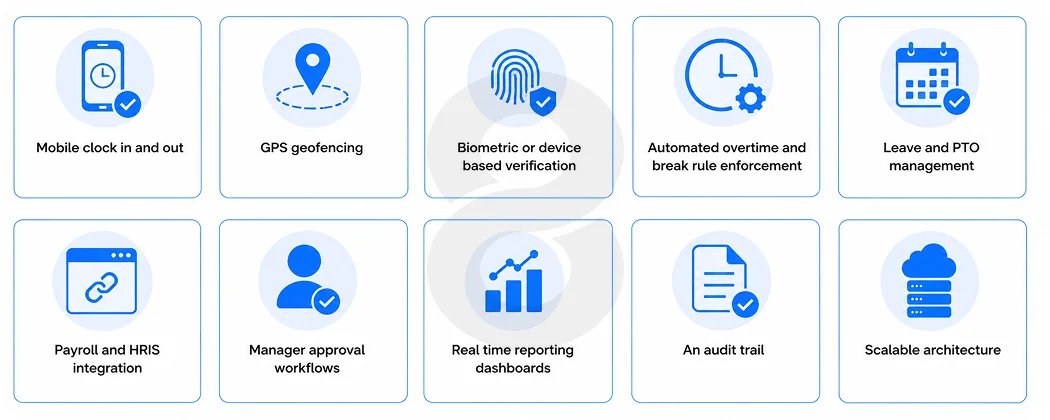
- Mobile clock in and out for field, remote, and hybrid employees.
- GPS geofencing to confirm employees are clocking in from an approved location.
- Biometric or device based verification to cut down on buddy punching.
- Automated overtime and break rule enforcement based on your local labor laws.
- Leave and PTO management synced with the same attendance record.
- Payroll and HRIS integration so hours flow through without manual re entry.
- Manager approval workflows for exceptions and timesheet corrections.
- Real time reporting dashboards for labor cost visibility.
- An audit trail that timestamps every edit for compliance purposes.
- Scalable architecture that supports growth from one location to many.
Businesses that need attendance hardware to talk to sensors, badge readers, or connected devices on the shop floor usually pair their software rollout with an IoT app development partner to make sure biometric terminals and connected devices report clean, real time data back into the main system.
Read More: User Management Software: Custom Development Guide for Businesses
Biometric Clocks Will Not Stop Time Theft on Their Own
It is tempting to treat a biometric time clock as a silver bullet. Fingerprint and facial recognition scanners are genuinely effective at eliminating buddy punching at the door, since one person physically cannot punch in for another.
But biometrics only verify identity at a single moment. They do nothing to catch an employee who clocks in on time and then disappears from the floor for an hour, or who lingers on break well past the allotted window.
The more complete answer is combining identity verification with ongoing visibility, whether that is geofenced mobile check ins for field teams, manager approval workflows for exceptions, or scheduling software that flags unusual patterns. Treating biometrics as one layer of a broader system, rather than the whole solution, is what actually moves the needle on time theft.
A Day in the Life of a Payroll Manager, Before and After Automation
Picture a payroll manager at a two hundred person distribution company the Monday before payday. Before automation, her morning starts with chasing down three supervisors for missing paper timesheets, manually re-keying overtime hours into a spreadsheet, and cross checking totals against a separate leave tracker that never quite matches. By the time payroll runs, she has spent most of the day on data entry instead of the exceptions and corrections that actually need her judgment.
After moving to automated time and attendance software, that same Monday looks different. Clock in data from mobile apps and floor terminals is already synced. Overtime and leave are calculated automatically against the company’s pay rules.
Her morning is spent reviewing the small number of flagged exceptions, not reconstructing the whole payroll from scratch. The hours she gets back are not abstract, they are the hours she now spends on workforce planning instead of arithmetic.
Read More: Learning Management System Development: The Complete Guide
How to Choose the Right Time and Attendance Software in 7 Steps
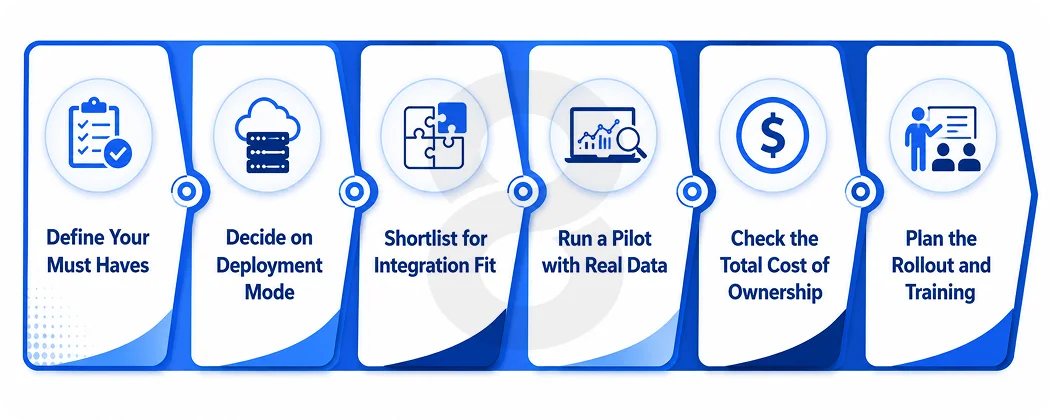
Map your current systems. List every tool that touches hours, pay, or leave today, including payroll, HR, and scheduling software, plus any spreadsheets or paper processes still running quietly in the background across departments or locations.
Define Your Must Haves
Separate compliance critical features, such as overtime rules, break enforcement, and audit trails, from nice to have extras like gamified dashboards, so vendors get judged on what actually protects your business first.
Decide on Deployment Mode
Choose cloud, on premise, or hybrid based on your industry, workforce location, data residency requirements, and available IT resources, rather than defaulting to whatever a sales rep recommends without understanding your constraints.
Shortlist for Integration Fit
Prioritize vendors with proven, documented connections to your payroll and HR stack, and ask each one for real examples of similar integrations they have completed, not just a generic list of supported platforms.
Run a Pilot with Real Data
Test the shortlist against one department or location before a company wide rollout, using actual employees, actual shift patterns, and actual payroll cycles so problems surface early instead of after full deployment.
Check the Total Cost of Ownership
Include per user fees, hardware, implementation, training, and ongoing support, not just the advertised sticker price, since hidden costs at renewal or during scaling often outweigh the original quote.
Plan the Rollout and Training
Build a rollout timeline that includes manager and employee training, since adoption often determines the return on investment more than the software itself, and a system nobody trusts gets worked around, not used.
Companies without an internal team to manage this evaluation often bring in software consulting support to run the vendor comparison and pilot phase objectively, then hand off a clear recommendation instead of guessing between two similar looking platforms.
The Surprising Way AI Is Turning Time Data Into a Staffing Forecast
The newest shift in this space has little to do with clocking in faster. It is about what happens to attendance data after it is captured. AI powered time and attendance platforms are starting to analyze historical clock in patterns, seasonal demand, and absence trends to predict staffing gaps before they happen, rather than simply reporting hours after the fact.
That turns a system that used to be purely defensive, tracking hours to avoid disputes, into a planning tool that helps managers schedule the right number of people before a shortage hits the floor.
Businesses exploring this shift often start with a scoped agentic AI development engagement, layering predictive scheduling and anomaly detection on top of the attendance data they already collect, rather than replacing their core time and attendance system altogether.
Read More: Time Tracking Software Development Services: Features, Tech Stack & Timeline
How 8ration Supports Time and Attendance Software Projects
8ration works with businesses across manufacturing, healthcare, retail, and logistics to design and build workforce systems that fit how they actually operate, rather than forcing a generic template onto their payroll process.
That work spans custom time and attendance platforms, integrations that connect attendance data to existing payroll and HR systems, and mobile apps that give field and hybrid teams a reliable way to clock in from anywhere. For manufacturing floors and healthcare facilities in particular, that often means connecting biometric hardware and scheduling rules into one system that holds up under audit and scales as the organization grows.
The manufacturing software and logistics software teams at 8ration bring the same approach to shift-based and distributed workforces that need attendance data synced across multiple sites in real time.
Read More: HR Software Development: How It’s Removing Daily Headaches for HR Teams
The Bottom Line
Time and attendance software is no longer a back office convenience, it is a compliance safeguard, a payroll accuracy tool, and increasingly a staffing forecast engine.
The businesses getting the most value from it are not necessarily the ones with the most features, they are the ones that chose a system built around their actual payroll stack, workforce structure, and industry rules.
If you are ready to map out what that looks like for your business, 8ration’s team can walk through your current setup and scope a system that fits.