For months, businesses research tools, watch demos in presentations, select one that seems sophisticated, and three months later half of the sales reps don’t log anything. Reports are unreliable. Originally a solution to the visibility problem, it became the visibility problem.
More than 70% of CRM implementations fail to meet their goals, and it’s not because of technology. Despite the fact that 91% of businesses with over 10 employees rely on CRM software, 22% of salespeople have no idea what it really is. Most projects fail in that gap.
What CRM App Development Means (And What It Doesn’t)
CRM is an acronym for Customer Relationship Management. It’s essentially a single platform that captures all interactions with existing and potential customers through sales, marketing and support and eliminates the endless “did anyone follow up with this person?” email back-and-forth.
CRM Software Development is the design, creation, and customization of those systems. A robust CRM can record interactions throughout the customer journey, collate data in one place and handle repetitive tasks, which take up time but offer no value.
CRM application development refers to one of three things: creating a new app from scratch, adding to a platform to accommodate your real business processes, or creating a standalone mobile CRM app for field workers. The costs, time and long-term consequences of each path vary.
The Four Types of CRM and Why Picking the Wrong One Costs You Later
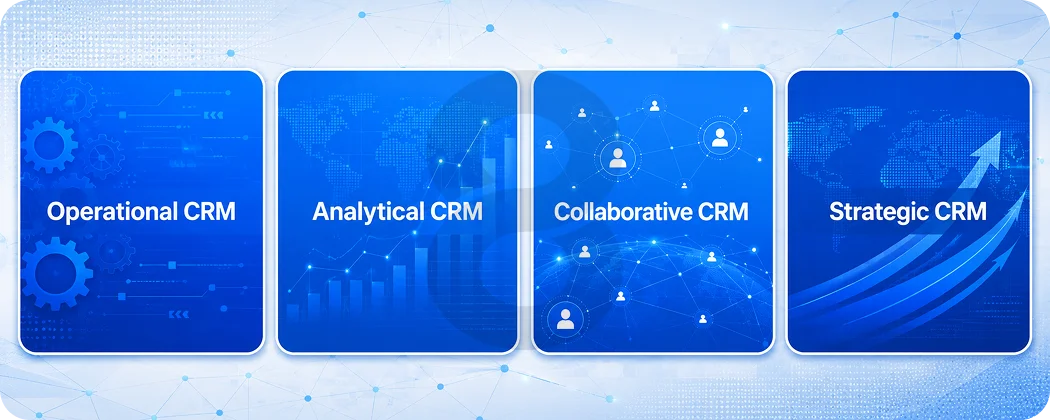
The vast majority of businesses consider CRM as a single category. It isn’t. There are 4 different types and they’re designed to solve very different problems. The wrong type, or creating the wrong features in a custom system, is the way companies end up with a CRM that works, but doesn’t help.
Operational CRM
It is the most basic and the most popular choice that most teams will turn to when they want to use a “we need a CRM” tag. It automates basic business processes in sales, marketing and customer service. All of this is covered in contact management, lead tracking, email follow-up sequences, pipeline management, ticket routing, and sales automation.
It is most effective for teams that communicate with a lot of new prospects or customers on a daily basis. Start by looking at an operational CRM if your sales reps are engaged in repetitive outreach and not remembering where they are in conversations.
Analytical CRM
The principle of Analytical CRM is less doing and more knowing. It helps analyse customer data and determine customer buying patterns, pipeline trends, customer churn and customer segment behaviour. It can answer questions like “Which leads are converting best?” “Who are the leads that are likely to churn in the next 60 days?” “Where is the sales process going wrong?”
This sort starts to be useful when you’ve got 12 months to 18 months of consistent, clean data. It’s like purchasing a powerful engine before having data density to analyze.
Collaborative CRM
Collaborative CRM is about ensuring that everyone in sales, marketing and support has the same view of the customer, real-time. A sales rep needs to know when a support ticket has been opened for a customer who is in the process of negotiating a renewal. If a marketing campaign is running to a part of the business the sales team is already engaged in, there needs to be seamless communication between them.
This category eliminates the inside friction that might make customers think they are working with three separate businesses. It’s especially important for companies that have a history of failure at a departmental handoff.
Strategic CRM
The focus of strategic CRM is on the long-term value of the relationship rather than the volume of transactions. It doesn’t calculate the best time to close an account for this month; it focuses on the health of long-term accounts, it represents the lifetime value, it detects the risks of the relationship, and it informs teams when and how to invest in a particular relationship.
This type is ideal for B2B companies that have long sales cycles, enterprise sales account management teams, and customers with years-long relationships.
| CRM Type | Primary Focus | Best For | What It Requires |
|---|---|---|---|
| Operational | Automating daily tasks and workflows | High-volume sales and support teams | Clean contact data from day one |
| Analytical | Turning customer data into decisions | Marketing-heavy teams, data-driven leadership | Sufficient data history to analyze |
| Collaborative | Connecting cross-department customer views | Companies with complex department handoffs | Strong integration architecture |
| Strategic | Long-term relationship and lifetime value | B2B, enterprise accounts, long sales cycles | Consistent usage across time |
Most mid-sized businesses need a blend of operational and collaborative functionality first. Analytical capabilities become more useful after the team has established consistent data habits. Strategic functionality is typically a Phase 3 consideration.
Read More: Time Tracking Software Development Services: Features, Tech Stack & Timeline
Custom CRM vs. Off-the-Shelf: An Honest Comparison
This is the decision most teams agonize over, and the honest answer depends on where your business is right now and where it’s heading in three years.
Off-the-shelf platforms like Salesforce, HubSpot, and Zoho are fast to deploy. They come with pre-built integrations and enough features to get a team functional within weeks. Salesforce and HubSpot cost between $25 and $165 per user per month, which works fine until your team grows and per-seat costs become a real budget line.
The math changes at scale. For teams of 20 or more with processes that don’t fit a generic template, custom development typically becomes more cost-effective within two to three years.
You stop paying perpetual licensing fees, own your data architecture, and get a system built around how your team actually works. The tradeoff is a higher upfront cost and longer deployment timeline.
Side-by-side comparison
| Factor | Off-the-Shelf CRM | Custom CRM |
|---|---|---|
| Initial Cost | $25 to $165/user/month | $25,000 to $200,000+ one-time |
| Deployment Time | Days to a few weeks | 3 to 9 months |
| Customization Ceiling | Limited by the vendor’s architecture | None. You define the limits. |
| Long-Term Cost | Scales linearly with headcount | Fixed after build (plus maintenance) |
| Data Ownership | Vendor controls the database | You own everything |
| Competitive Differentiation | None (competitors use the same tool) | Your system is yours alone |
| Integration Flexibility | Pre-built library, limited custom options | Fully custom-built to your needs |
| Scalability | Upgrade tiers or pay more per seat | Expand features without new license fees |
The practical guidance: if you’re under 15 people with straightforward sales processes, start with an off-the-shelf tool and invest that budget elsewhere. Plan the custom build when your team hits the ceiling of what a generic platform can do without expensive workarounds every week.
Read More: Hire CRM Developer vs. Buy Ready-Made CRM Software: What’s Right for Your Business?
What a CRM App Needs to Actually Be Worth Building
This is where most development briefs go sideways. Teams compile a wish list, build everything in Phase 1, and end up with a system that’s slow, complex, and ignored. The better question isn’t “what should our CRM do?” It’s “what does our team need to do their job better starting on day one?”
The non-negotiable core features
Contact and Lead Management
A centralized, searchable database of every customer, prospect, lead, and interaction history. Without this working cleanly, nothing else in the CRM delivers value. Contact management remains the most used CRM feature by a significant margin.
Sales Pipeline Tracking
A visual representation of where every deal stands, from first contact through to close. This removes the “what’s the status on this?” back-and-forth that kills productivity in sales teams. 45% of CRM buyers rank automation as their top feature requirement, and pipeline tracking is where automation has the most immediate impact.
Task Automation and Follow-up Reminders
Automated reminders for follow-ups, stale deals, and scheduled check-ins are often the first feature that converts a skeptical sales rep into a genuine CRM user. When the system surfaces the right action at the right time, trust in the tool builds fast.
Reporting and analytics dashboards
Not just vanity metrics, but actual pipeline velocity, conversion rates by lead source, revenue by rep, and deal stage breakdowns. Reporting turns data into decisions.
Email and calendar integration
A CRM that doesn’t connect to where communication already happens is just another tool to maintain. 36% of CRM buyers list integration with existing tools as a primary selection criterion, and for good reason.
Role-based access control
Not everyone needs to see everything. A good access control system keeps sensitive deal data and customer information visible only to the people who need it, from day one.
Audit trail and activity logging
A complete, timestamped history of every interaction: calls, emails, meetings, notes. This is the accountability layer that makes CRM data reliable over time.
The Phase 2 and 3 Features Worth Planning For
AI lead scoring and predictive analytics
Businesses using generative AI in their CRM are 83% more likely to exceed their sales goals. Lead scoring based on behavioral signals rather than gut feel makes sales prioritization far more accurate.
Workflow automation builder
As the team scales, the ability for non-developers to build and edit automation rules without engineering support becomes essential.
Advanced mobile access with offline capability
More on this in detail below, but it belongs in the planning conversation from the beginning even if it’s delivered in Phase 2.
Third-party API integrations
Marketing automation platforms, ERP systems, billing tools, and communication platforms all need to connect to the CRM without requiring manual data syncing.
Custom reporting and data exports
Giving leadership the ability to build the reports they actually need rather than working around a vendor’s fixed dashboard layout.
Feature priority table
| Feature | Development Phase | Complexity | Business Impact |
|---|---|---|---|
| Contact and lead management | Phase 1 | Low | Critical |
| Sales pipeline tracking | Phase 1 | Medium | Critical |
| Email and calendar integration | Phase 1 | Medium | High |
| Reporting dashboard | Phase 1 | Medium | High |
| Task automation and reminders | Phase 1 | Medium | High |
| Role-based access control | Phase 1 | Low to medium | High |
| Mobile CRM access | Phase 1 or 2 | Medium to high | High |
| Third-party API integrations | Phase 2 | High | Medium to high |
| AI lead scoring | Phase 2 or 3 | High | High |
| Workflow automation builder | Phase 2 | High | Medium |
| Predictive analytics | Phase 3 | High | High |
| Offline mobile functionality | Phase 2 or 3 | High | Medium to high |
Building a Mobile CRM App: Why Desktop-Only Is Already Behind
This statistic just might put to bed the argument: 65% of salespeople who use mobile CRM hit their sales targets. Of those who don’t have mobile access, only 22% have. That’s not the smallest gap. This is the distinction between a sales team that reaches its goals and a sales team that doesn’t.
Mobile CRM systems are now 70% of businesses’ sales strategy. The transition to mobile-first CRM isn’t a matter of preference. It’s a matter of data quality and response time.
A data pipeline is current if a field rep can log a meeting as soon as it’s over, in the parking lot, before driving to the next meeting. The key information is lost and the facts are stale when they need to wait till they are back at a desk at 6pm.
Manual data entry is one of the biggest challenges users of CRM systems face, accounting for 23% of the population. 32% of salespeople spend more than an hour a day manually entering data rather than going out and making sales. A mobile CRM that allows for quick and seamless workflows addresses both these issues at once.
What a mobile CRM actually needs to work
The biggest mistake in mobile CRM development is treating it as a compressed version of the desktop system. A 47-field contact form that’s manageable on a wide monitor becomes a reason to avoid the app entirely on a phone. The UX has to be rebuilt around the specific actions a field rep or account manager needs to complete in 90 seconds standing outside a client’s office.
Real-time sync with the desktop version, so reps aren’t working from stale pipeline data. Offline mode with local caching, because connectivity isn’t reliable in the field. Push notifications for follow-up reminders and deal status changes. Quick-log features for calls, notes, and meetings that take three taps, not three minutes.
Voice input for notes is worth building if your team is frequently in situations where typing is inconvenient. The friction reduction compounds quickly across a large sales team.
Platform choices for mobile CRM development
For building a mobile CRM that supports multiple platforms, the two leading platforms are React Native and Flutter. Both enable developers to build a single code base that works on both the iOS and Android platforms, an important aspect for cost management.
React Native works best for data dense apps that have complex states, such as most CRM scenarios. For teams looking to provide a high-quality UI without developing two native applications, Flutter provides better UI uniformity across platforms.
The performance and device integration that comes from native iOS (Swift) and Android (Kotlin) development comes at about double the development cost as you have two code bases to maintain. There’s a technical need for native apps if there’s a particular reason, but otherwise, it’s a good choice for most CRM mobile apps.
The Full CRM App Development Process, Phase by Phase
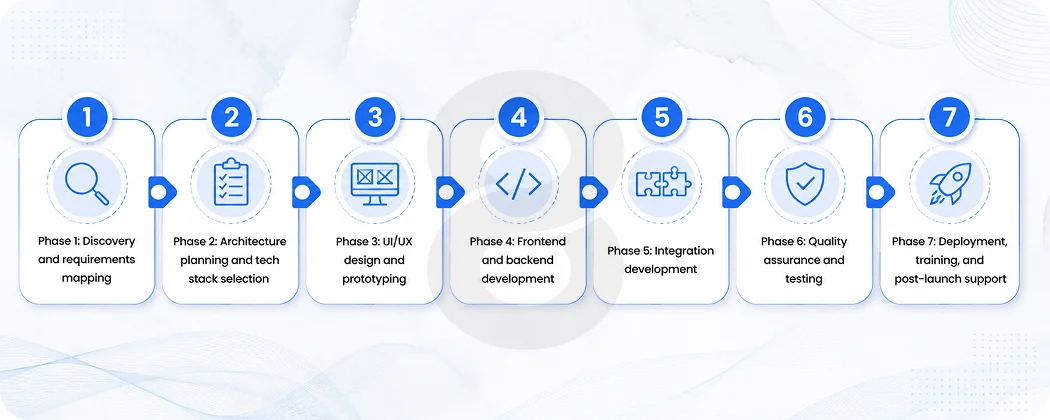
There’s a big difference between knowing you need a CRM and actually building one that your team will use consistently two years from now. The process matters as much as the technology.
Phase 1: Discovery and requirements mapping
This is the phase most clients want to compress. It feels like talking rather than building, and that’s exactly why it’s where the most costly mistakes get prevented. Every department that will touch the CRM (sales, marketing, support, leadership) needs to map out their daily workflows, the friction points, and what “a better day” actually looks like with the right tool in place.
The output of this phase isn’t a feature list. It’s a clear picture of the problems the CRM needs to solve, ranked by impact. “We want a pipeline view” is a feature request. “Our reps are losing track of deals after the second touchpoint and follow-ups are falling through” is a problem the CRM can actually fix.
This phase should also include a data audit: what customer data currently exists, where it lives, how clean it is, and what migration looks like. Data problems identified in discovery cost hours to fix. Data problems discovered during deployment cost weeks.
Phase 2: Architecture planning and tech stack selection
Before a line of code gets written, the system architecture needs to be defined. Cloud deployment or on-premise? Web-only or web plus mobile? Microservices architecture or monolithic? These decisions shape the cost, the scalability ceiling, and how much flexibility the system will have when Phase 2 features need to be added.
87% of CRM systems are now cloud-based, and for good reason. Cloud deployment offers faster deployment, automatic updates, reduced infrastructure maintenance, and real-time data sync. On-premise remains relevant for organizations with strict data control requirements, particularly in regulated industries like healthcare and financial services.
Phase 3: UI/UX design and prototyping
Wireframes and prototypes before any development work begins. This is where bad UX gets caught cheaply. A confusing navigation pattern or a poorly designed data entry flow that gets caught in wireframes takes hours to revise. The same issue caught after development takes weeks and a significant budget to address.
The prototype should be tested with actual users, specifically the sales reps or support staff who will use it daily, not just managers reviewing it in a conference room. Their feedback at the wireframe stage is free. Six months of low adoption after launch is not.
Phase 4: Frontend and backend development
This is where the actual build happens. Frontend development covers everything users interact with: dashboards, pipeline views, contact pages, forms, and reporting screens. Backend development handles the logic and infrastructure: how data is stored, retrieved, secured, and processed.
For frontend, React.js remains the standard choice for web CRM dashboards due to its component-based architecture, large ecosystem, and performance in data-heavy interfaces. Angular suits enterprise-grade applications that require strong data handling and modular architecture. Vue.js offers a lighter-weight option for teams that want faster development cycles.
On the backend, Node.js with Express or NestJS handles concurrent connections well and suits real-time data applications like CRM activity feeds and live pipeline updates. Django (Python) is preferred when data accuracy and security are the primary concerns, particularly for healthcare and fintech CRM builds. PostgreSQL is the most common database choice for relational CRM data, offering ACID compliance and strong scalability.
For mobile, React Native or Flutter for cross-platform builds, as discussed above. AWS, Google Cloud, and Azure are the hosting layer of choice for most CRM deployments, offering the reliability and scalability required for a business-critical system.
Phase 5: Integration development
A CRM that exists in isolation is glorified contact management software. The integrations are where a CRM earns its investment.
Basic integrations with email clients, calendar systems, and communication tools (REST APIs) run $1,500 to $4,000 per integration. Mid-tier integrations with ERP systems, accounting platforms like QuickBooks, or marketing automation tools cost $4,000 to $8,000 each. Enterprise-level integrations with SAP, Oracle, or complex proprietary systems are priced case by case.
These costs almost never appear in initial development quotes. Budget for them separately and plan for at least one integration that takes longer than expected. It happens in the majority of projects.
Phase 6: Quality assurance and testing
QA testing should cover functional correctness, performance under load, data security, cross-device compatibility, and user flow validation. Load testing deserves particular attention. The moment when a CRM first gets used by the full team simultaneously often reveals backend capacity issues that were invisible in development.
Security testing is non-negotiable for any system holding customer data. Penetration testing, data encryption validation, and access control verification should all happen before deployment.
Phase 7: Deployment, training, and post-launch support
Phased deployment reduces risk significantly. Start with a power user group, gather structured feedback, address the issues surfaced, then roll out to the full team. The teams that do a full-company launch on day one are the same teams reporting widespread adoption problems six months later.
Training is where implementations get rescued or abandoned. 42% of businesses cite a lack of training or CRM expertise as the biggest barrier to successful implementation. The training plan should be specific to each role’s actual use cases, not a generic walkthrough of every feature the system has.
Post-launch support, regular maintenance, and a structured feedback loop with users in the first 90 days are what separate a CRM that becomes indispensable from one that slowly gets ignored.
The Tech Stack Behind a Well-Built CRM
For teams who want to understand what’s actually powering the system they’re building, this is the honest breakdown of the most common and reliable choices in 2026.
| Layer | Common Choices | Why |
|---|---|---|
| Web Frontend | React.js, Angular, Vue.js | Component-based, performant with large datasets, strong ecosystem |
| Backend | Node.js + Express/NestJS, Django, Ruby on Rails | High concurrency (Node.js), strong data security (Django) |
| Database | PostgreSQL, MySQL, MongoDB | PostgreSQL for relational data integrity; MongoDB for flexible document storage |
| Mobile | React Native, Flutter | Cross-platform efficiency; single codebase for iOS and Android |
| Cloud Hosting | AWS, Google Cloud, Azure | Reliability, scalability, global CDN options |
| Authentication | JWT, OAuth 2.0 | Industry-standard secure token-based auth |
| Real-Time Features | WebSockets, Redis | Live pipeline updates, activity feeds |
| API Layer | REST, GraphQL | REST for simplicity; GraphQL for complex data fetching needs |
| CI/CD | GitHub Actions, Docker | Consistent deployment across environments |
| Cache Layer | Redis | Reduces database load on high-traffic queries |
The MERN stack (MongoDB, Express, React, Node.js) is one of the most common setups for mid-tier custom CRM builds. It keeps the full stack in JavaScript, which reduces context-switching for development teams and speeds up iteration.
For enterprise CRM builds with complex security requirements, a combination of React on the frontend with Django or NestJS on the backend and PostgreSQL as the database tends to offer better structure, stronger typing, and cleaner separation of concerns.
Read More: Offshore Software Development Guide: How to Find the Right Partner
CRM App Development Costs: The Honest Breakdown
The wide cost range in CRM development isn’t vagueness. It’s real variance driven by a handful of factors that compound quickly. Here’s what actually drives the number.
The biggest variable is feature complexity. A CRM with contact management, a sales pipeline, email integration, and basic reporting is a fundamentally different build than one with custom automation rules, AI lead scoring, multi-team role management, and deep integrations with five external tools. Development hours scale with complexity, and developer hourly rates add the multiplier.
Platform choice matters significantly. A web-only CRM is less expensive and works across devices via a browser. Adding native or cross-platform mobile apps increases cost. Web plus mobile plus tablet with offline functionality is the most expensive build but often the most adopted.
Developer location is the other major factor. US-based developers charge $100 to $200 per hour. Skilled teams in India, Eastern Europe, and Latin America typically run $20 to $65 per hour. For a 1,500-hour project, that spread represents a $120,000 difference in cost, which explains why offshore development is the dominant model for most custom CRM builds.
Cost breakdown by project scope
| Project Tier | Estimated Cost | Timeline | What’s Included |
|---|---|---|---|
| Basic CRM | $25,000 to $50,000 | 2 to 4 months | Contact management, pipeline, basic reporting, email integration, web-only |
| Mid-Tier CRM | $50,000 to $120,000 | 4 to 7 months | All basic features plus automation, dashboards, mobile access, 2 to 3 integrations |
| Advanced CRM | $120,000 to $200,000 | 6 to 9 months | Full feature set, AI capabilities, complex workflows, advanced security, multi-platform |
| Enterprise CRM | $200,000 and above | 9 to 18 months | Fully custom architecture, deep integrations, compliance features, dedicated support |
The hidden costs that derail budgets
These rarely appear in initial quotes but show up in almost every project:
Data migration from the legacy system: $3,000 to $15,000 depending on data volume and quality. Third-party API integrations: $1,500 to $10,000 per integration. User training and documentation: $2,000 to $8,000. A contingency buffer of 15 to 20% for scope changes, which happen in the large majority of projects. Ongoing maintenance, security patches, and updates after launch: typically 15 to 20% of the original build cost annually.
The off-the-shelf vs. custom cost comparison deserves an honest look beyond the upfront numbers. A Salesforce Enterprise plan for 50 employees costs approximately $75,000 annually. A custom CRM build at $80,000 pays for itself in Year 2, with full data ownership and no per-seat scaling costs as the team grows.
Read More: How Much Does It Cost to Hire a CRM Developer in 2026
Why CRM Projects Fail and What Actually Prevents It
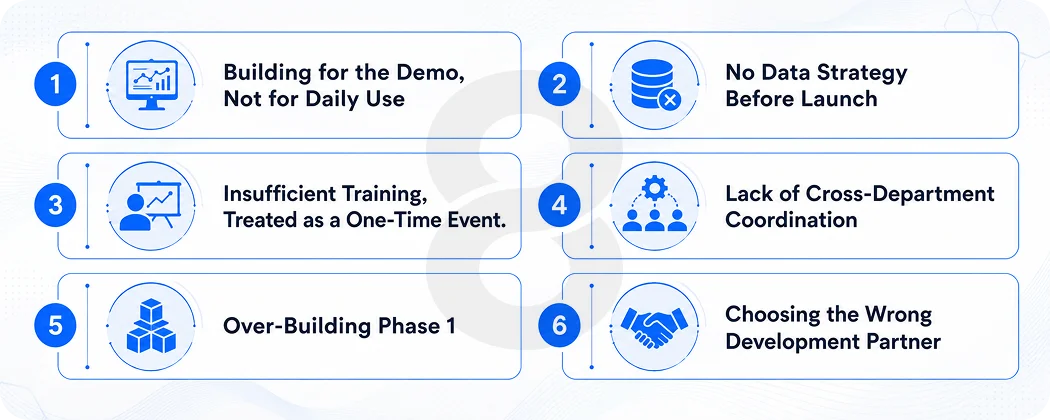
The failure statistics are worth sitting with for a moment. More than 70% of CRM projects don’t meet their objectives. 50% fail specifically due to lack of cross-functional coordination. 76% of CRM users say less than half of their organization’s CRM data is accurate and complete. 37% of companies report losing revenue directly because of poor CRM data quality.
None of these failures are mysterious.
Building for the Demo, Not for Daily Use
Management approves the system based on a controlled walkthrough. Sales reps reject it based on how long it takes to log a call at 5pm on a Friday. Those are different user experiences, and the second one determines whether the CRM survives.
No Data Strategy Before Launch
A CRM is only as useful as the data inside it. Without a clear plan for what gets entered, by whom, in what format, and with what validation rules, data quality degrades within weeks. 37% of companies lose revenue directly because of poor CRM data quality.
Insufficient Training, Treated as a One-Time Event.
The initial training session covers features. Ongoing support covers the moments where the system doesn’t behave the way a rep expects it to. Companies that treat training as a week-one event rather than a continuous process see adoption rates drop sharply after the first month.
Lack of Cross-Department Coordination
Sales builds the CRM for sales. Marketing uses it and finds their workflows aren’t supported. Support teams have no clear ownership of their data in the system. Siloed design produces siloed outcomes.
Over-Building Phase 1
The instinct to include every possible feature before launch delays deployment, adds complexity, and means the team is learning a system with 50 features when they needed 12. MVP first. Learn. Expand.
Choosing the Wrong Development Partner
A CRM is a long-term technical asset. The team that builds it needs to understand your business process, not just write clean code. A development partner without domain expertise in business process automation, integration architecture, and UX for daily professional use will build something that technically works but doesn’t actually solve the problem.
Read More: CRM on Android: How to Build a Custom CRM App for Your Business
CRM App Development for Specific Industries
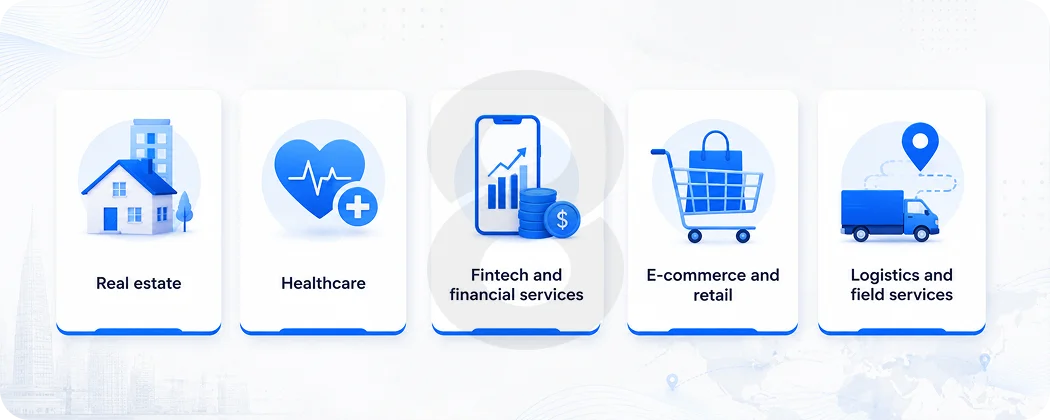
Generic CRM capability descriptions miss something important: the same features solve very different problems depending on the industry. Here’s how it actually plays out.
Real estate
Real estate CRM needs to manage property listings alongside contact management, track buyer and seller preferences over long sales cycles, automate follow-ups for leads who inquired months ago, and handle the coordination between agents, clients, and external parties. The real estate companies using CRM report a 41% increase in revenue per sales rep. 70% of real estate professionals already use CRM to manage their sales pipeline.
Healthcare
Healthcare CRM brings HIPAA compliance requirements into every architectural decision. Patient data, appointment management, follow-up protocols, and referral tracking all need to run on infrastructure that meets security and privacy standards. Hospitals like Apollo have adopted CRM systems specifically to manage patient outreach, post-visit follow-ups, and loyalty programs for elective procedures. Healthcare CRM adoption sits at 82% and is growing.
Fintech and financial services
Banking, Financial Services, and Insurance accounted for 24.48% of total CRM spending in 2025, the largest single vertical. Financial services CRM focuses on compliance-first data handling, KYC (Know Your Customer) workflows, client portfolio tracking, and automated regulatory reporting. Mobile-first design matters here specifically because relationship managers and loan officers work in the field, not at desks.
E-commerce and retail
E-commerce CRM connects purchase history, browsing behavior, support interactions, and marketing engagement into a single customer profile. Personalized campaigns built through CRM insights boost conversion rates by up to 80%. Retail CRM usage is the highest of any industry, and automation of abandoned cart follow-ups, loyalty tier management, and reorder reminders is where the ROI is most immediate.
Logistics and field services
Logistics companies use CRM to manage client accounts alongside real-time operational data: shipment status, delivery performance, and service issue history. Field service businesses integrate CRM with dispatch systems so technicians can see account history before arriving on-site. A custom CRM built for a logistics client that integrated fleet management, live tracking, and automated invoicing directly addressed the coordination failures that were costing them client relationships.
Read More: Top 10 CRM Software Platforms of 2026
AI in CRM App Development: Where It’s Actually Adding Value
The AI in CRM market is worth $11.04 billion in 2025 and projected to reach $48.4 billion by 2033. That’s not speculative growth. It’s happening now across organizations already building AI capabilities into their CRM architecture.
The most impactful AI applications in CRM aren’t the most dramatic-sounding ones. They’re the ones that remove the specific friction points that kill adoption and data quality.
- AI lead scoring uses behavioral signals (email open rates, page visits, response times, deal stage dwell time) to rank prospects by close probability automatically. Reps stop wasting time on leads that aren’t ready and focus energy on the ones that are.
- Predictive churn detection flags accounts showing disengagement signals before the customer has asked to cancel. Proactive retention is consistently more effective than reactive recovery.
- Automated data enrichment keeps contact records current without manual research. When a prospect’s title changes or a company announces new funding, the CRM knows.
- Natural language interaction allows sales managers to ask the CRM questions in plain language, like “show me deals that have been in proposal stage for more than three weeks,” rather than navigating to specific reports.
- Intelligent follow-up recommendations surface the right action for the right account at the right time, based on patterns from successful deals in the same stage.
According to Statista, revenue in the CRM software market is projected to grow at a CAGR of 10.59% annually, reaching $131.90 billion by 2028, with AI integration as one of the primary growth drivers across every industry segment.
Choosing the Right CRM Development Partner
A CRM is not a six-week project. It’s a system your team will depend on for years, and the development partner you choose determines how the first 90 days of planning go, which shapes everything after.
Look for a team with experience in custom software development for business process applications, not just consumer apps. Dedicated UX capability matters as much as backend skills, because adoption lives or dies on interface quality.
Before signing anything, ask how they handle scope changes, what post-launch support looks like, and how they manage data migration.
Mobile app development capability, enterprise app development experience, solid custom API development skills, and AI solutions all tell you whether the partner can take the CRM from Phase 1 through to a fully intelligent system without switching vendors midway.
Read More: How to Hire a Software Development Team: A 12-Step Guide
Common CRM Integration Scenarios Worth Planning For
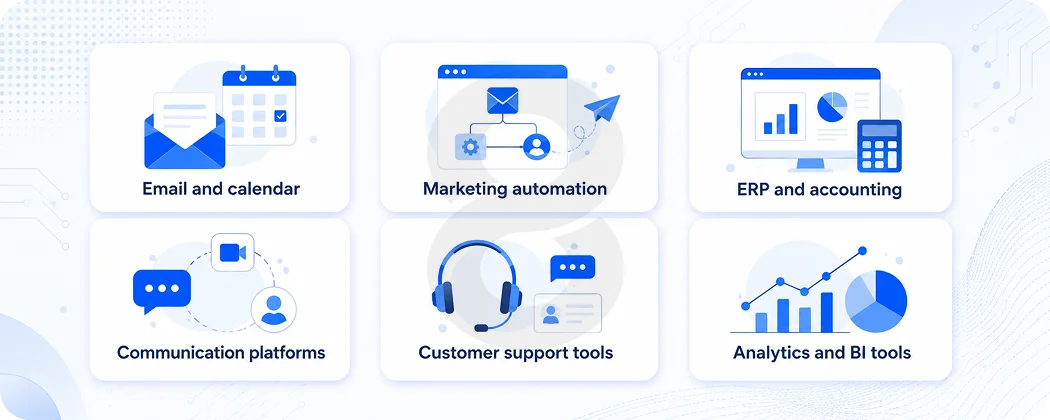
One of the most practical sections of any CRM planning conversation is the integration map: what other systems does the CRM need to connect with, and how? Getting this wrong at the architecture stage means rebuilding connections later at high cost.
Email and calendar
Gmail, Outlook, and Google Calendar integration are standard. This makes communication logging automatic rather than manual, which has an outsized impact on data quality.
Marketing automation
HubSpot Marketing, Mailchimp, Klaviyo, or custom email campaign tools need to sync lead activity with CRM records so sales reps can see what a prospect has clicked on before calling them.
ERP and accounting
QuickBooks, Xero, SAP, and NetSuite integration allows the CRM to show payment status, invoice history, and contract value alongside the sales record without requiring anyone to check two systems.
Communication platforms
Slack, Microsoft Teams, and Zoom integration means deal updates and meeting notes flow into the CRM from where the team already communicates, rather than requiring a separate logging step.
Customer support tools
When Zendesk, Intercom, or Freshdesk tickets are visible alongside the sales record for the same customer, account managers can see service history before renewal conversations. That context changes the quality of the conversation.
Analytics and BI tools
Feeding CRM data into Tableau, Power BI, or Google Looker gives leadership richer reporting without being limited to the CRM’s built-in dashboards.