You can spend six months building a restaurant app and still end up with something people delete after ordering once. That’s the annoying part nobody likes saying out loud.
From the outside, a restaurant app looks harmless. You need a menu, a cart, a payment flow, a delivery option, and maybe a loyalty program if someone in the meeting still has energy left. But once you start building, the little things start eating the budget.
Menu modifiers, out of stock items, promo codes, delivery zones, failed payments, kitchen delays, refunds, and angry customers asking where their burger went all become part of the same system.
At that point, the app stops feeling like a simple customer tool and starts acting like the operating system behind your restaurant. So if you want to make restaurant app for your brand, don’t start with screens. Start with the mess you’re trying to control.
Before you build the app, get honest about what problem you are trying to fix. Marketplace commissions may be eating your margins, repeat orders may be too low, pickup may feel messy, or customer data may be stuck inside third party platforms while you keep guessing who orders the spicy chicken sandwich every Friday night.
The right restaurant app starts with that problem.
Why Restaurant Apps Still Matter in 2026
The restaurant business is still brutally physical. Food gets cooked by humans. Drivers get stuck in traffic. Customers change their minds. Kitchens get slammed at 8 pm.
But ordering behavior has changed.
The National Restaurant Association reported that 47 percent of adults pick up takeout from restaurants, coffee shops, snack places, or delis at least once a week, while 37 percent order delivery weekly through restaurant channels or delivery platforms.
Its 2025 off premises report also said nearly 75 percent of restaurant traffic now happens away from the dining room, including takeout, drive thru, and delivery. That is not a small side channel anymore. That is the business.
The online market is huge too. Statista projects the United States online food delivery market to reach $473.49 billion in revenue in 2026. That number sounds absurd until you look at your own phone and count how many meals were bought through an app instead of a waiter.
The hard truth is that customers already order through apps. Customers are already ordering through apps. That part is settled. The real question is whether they order through your app, a marketplace app, or the restaurant down the street that made reordering easier than thinking.
Marketplaces help you get discovered, and sometimes that reach is useful. But they also take a cut, keep the customer relationship close to themselves, and train people to chase the next discount.
A branded restaurant app gives you more control over orders, loyalty, customer data, and repeat business, but only if the app is good enough to stay on someone’s phone after the first order.
That part matters. Customers do not download an app because a restaurant owner wants better margins. They download it because ordering is faster, rewards feel useful, payment works, and the food arrives the way they expected.
Read More: Best POS System for Restaurant: Build a Custom POS Solution Instead of Buying Software
Types of Restaurant Apps You Can Build
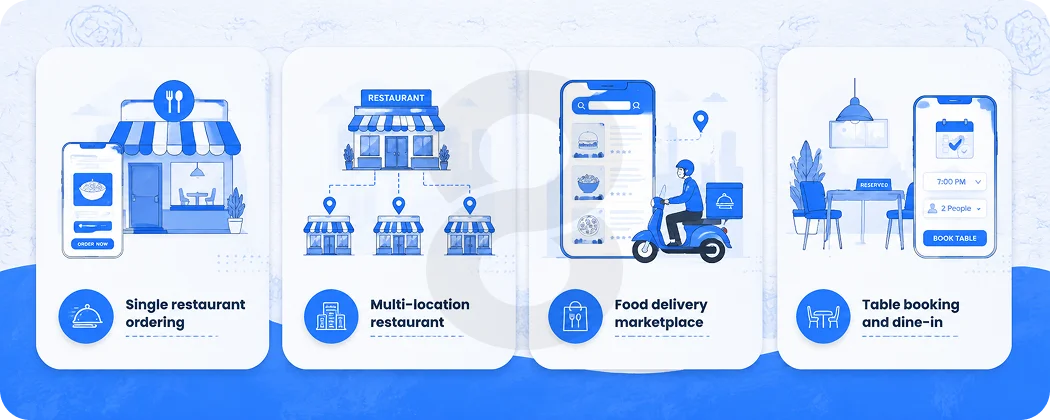
Not every restaurant needs the same app. A small burger shop does not need the same system as a cloud kitchen network or a multi location fast casual brand.
Don’t let an agency sell you enterprise architecture when your real need is a clean ordering app, a simple loyalty flow, and a reliable admin panel.
Single restaurant ordering app
This setup is for one restaurant or one food brand that wants its own ordering app without pretending to become the next DoorDash.
Customers can check the menu, order pickup or delivery, pay online, track the order, and collect loyalty points if rewards are part of the plan. It’s basic stuff, but basic stuff still has to work properly. That’s where restaurant apps usually start causing headaches.
This kind of app works best for local restaurants, cafes, bakeries, pizza shops, burger chains, dessert shops, and small food brands that already have people coming back.
You’re not trying to convince strangers to trust you from zero. You’re giving regular customers a direct way to order again without sending them through a marketplace every time.
You build the app around your own menu, your own kitchen, and your own customers instead of trying to manage a whole marketplace on day one.
You are not managing hundreds of vendors, complex commissions, or marketplace logic.
Multi location restaurant app
This is for brands with several branches. The app needs location selection, branch specific menus, delivery zones, stock availability, different opening hours, and branch level reporting.
That may sound like a small upgrade from a single restaurant app, but multi location logic changes the backend, admin panel, menu rules, reporting, and testing workload.
Once each branch has different pricing, different menu availability, and different prep times, your backend needs proper structure. Otherwise one wrong setting sends an order to the wrong kitchen and everyone starts blaming the app.
Food delivery marketplace app
This model is for platforms that connect users with many restaurants, serving as a comprehensive blueprint for end-to-end food delivery app development. It covers every essential component of the ecosystem, including the customer app, restaurant panel, driver app, and admin dashboard, while seamlessly managing backend operations like commission management, refunds, ratings, promotions, and dispute handling.
This is expensive because you are not building one app. You are building a whole business engine.
If you are a startup founder thinking about this model, be honest with yourself. The app solves only part of the problem because restaurant onboarding, driver supply, customer acquisition, support, refunds, and city level operations usually hurt more than the code.
Table booking and dine in app
Some restaurants don’t care about delivery as much as reservations, waitlists, digital menus, table ordering, and guest management. And honestly, that makes sense. A fine dining restaurant has different problems than a burger shop doing 200 delivery orders on a Friday night.
This model works for fine dining restaurants, casual dining spots, hotel restaurants, lounges, and busy places where an empty table is not just empty space. It is lost revenue.
The app can show available tables, collect deposits, send booking reminders, save guest notes, preview menus, and support QR ordering.
More than anything, it helps staff catch small issues early, before they turn into another awkward front desk conversation with a hungry guest and a manager pretending everything is fine.
Read More: Best Apps for Delivery Drivers to Inspire Your Next Delivery App
Must Have Features for Restaurant App
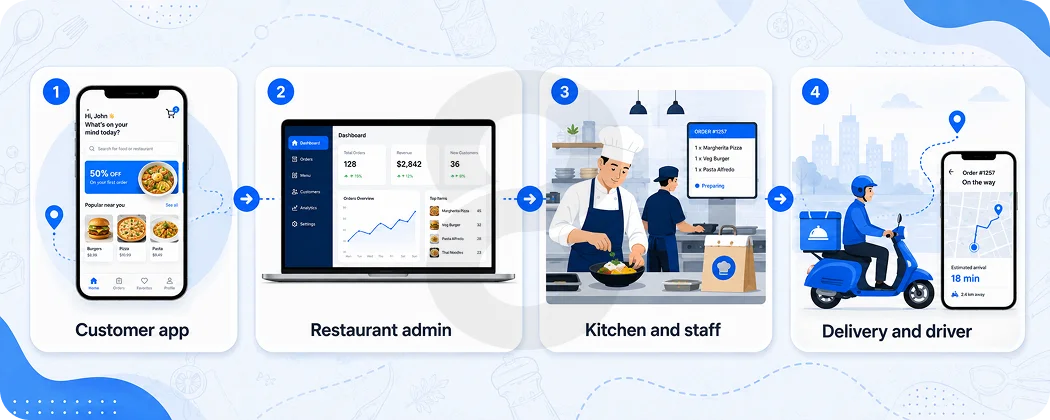
Features need to earn their place. Every extra feature means more design work, more development time, more testing, and one more thing that can break when everyone thought launch week was finally over.
Here’s the practical version.
Customer app features
Customers need a clean menu first. The menu does not only need to look good. It needs to be usable when someone is hungry, distracted, and trying to order quickly. Categories should make sense. Photos should load fast. Prices should be clear. Modifiers should not feel like doing taxes.
You also need account signup, guest checkout, pickup and delivery options, location selection, cart, secure payment, order status, order history, saved addresses, promo codes, ratings, and push notifications.
Loyalty matters more than many owners think. PYMNTS reported that loyalty program enrollment climbed to 48 percent of diners in 2025, and loyalty influenced 61 percent of delivery customer decisions. If your app has no reason for people to return, it becomes a one time ordering tool.
A loyalty system can include points, rewards, birthday offers, tier levels, referral credit, wallet balance, and personalized deals. But don’t turn the first version into a loyalty maze.
If customers need to stop and think about how the reward works, they’ll ignore it. People are hungry. They want food, discount, or free item. They don’t want a small math problem before checkout.
Restaurant admin features
The admin panel is where the real business lives.
You need menu management, category control, item availability, order dashboard, pickup time settings, delivery radius, promo code management, branch management, refund handling, customer data, reporting, and staff roles.
For multi location restaurants, the admin panel needs branch permissions. A manager from Branch A should not accidentally change Branch B’s biryani price at midnight. It sounds funny until it happens.
Kitchen and staff features
A restaurant app should make kitchen work easier.
Kitchen display system integration helps staff see incoming orders, prep status, item notes, priority, pickup time, and delivery handoff.
For smaller restaurants, a simple order tablet may work. For larger operations, POS and kitchen display integration becomes much more valuable.
Order status updates should match real kitchen flow. Customers should see clear order updates as the food moves from received to preparing, ready, picked up, and delivered. If something goes wrong, the status should also make cancellation or refund progress clear.
These updates look small, but they stop a lot of support calls. People don’t enjoy asking where their food is. They only ask because the app left them guessing.
Delivery and driver features
If you manage your own delivery, the app needs driver assignment, a rider app, route view, delivery status, earnings, proof of delivery, customer calls and admin tracking. Without those pieces, your team will keep solving delivery problems manually while the app pretends everything is under control.
If you use delivery partners, API integration is only part of the job. The system also needs clear fallback rules for rejected orders, missing drivers, bad addresses, delayed pickups and customer complaints. These are not edge cases in food delivery. They are normal bad days, and the app should be planned for them before development starts.
User Type |
Core Features |
Why It Matters |
|---|---|---|
| Customers | Menu browsing, item customization, cart, pickup, delivery, online payment, order tracking, loyalty points | Customers want to order quickly without calling the restaurant or guessing what happens next. |
| Staff | Order dashboard, kitchen updates, item availability, prep status, refund notes, customer instructions | Staff need a clear system that does not make lunch rush worse than it already is. |
| Managers | Menu control, promo codes, branch settings, sales reports, customer data, delivery rules | Managers need control without asking a developer to change every small thing. |
| Drivers | Order assignment, route view, pickup status, delivery status, customer contact, proof of delivery | Delivery only works when drivers know where to go, what to pick up, and when to update the order. |
| Admin Team | User roles, payment records, refund handling, analytics, notifications, system settings | The admin side keeps the whole app from turning into scattered messages and fixes. |
Restaurant App Development Cost in 2026
The honest answer is that restaurant app development cost depends on the product type, features, design depth, platforms, integrations, backend logic, and support plan.
But vague answers are useless, so here is a practical range.
App Type |
Estimated Cost |
Typical Timeline |
|---|---|---|
| Basic Restaurant App | $20,000 to $40,000 | 2 to 4 months |
| Mid Level Restaurant App | $40,000 to $90,000 | 4 to 7 months |
| Advanced Restaurant App | $90,000 to $180,000 plus | 6 to 10 months |
| Food Delivery Marketplace | $120,000 to $300,000 plus | 8 to 12 months or more |
If you make restaurant app with only menu browsing and basic pickup orders, the cost stays lower. If you add live driver tracking, custom loyalty, POS integration, dynamic delivery fees, AI recommendations, and multi branch reporting, the budget climbs fast.
And yes, someone will ask for all of it after the first demo. Ambition is fine, but pretending every ambitious feature is cheap will damage the budget quickly.Cost Factors That Change Final Budget
A restaurant app estimate is a risk count.
App platform
Building separate iOS and Android apps can give you better native performance. However, it also means maintaining two codebases. Every update takes more time. You need more coordination for every fix. Also, the cost starts creeping up before anyone wants to admit it.
For most restaurant apps, that’s a lot of extra work for very little benefit. Flutter or React Native usually makes more sense because you can launch faster, control the budget, and avoid turning every small change into another mini project.
For many food brands, cross platform is enough. Native development makes sense when performance, device level features, or platform specific polish matter deeply.
UI and ordering experience
Restaurant UX looks simple until you work on modifiers.
A pizza builder, meal combo, family deal, coupon restriction, scheduled order, and allergy note all need careful design. Bad UX does not just make the app look rough. It makes people abandon carts, call support, and sometimes give up before they even reach payment.
That is why the digital side matters more now. Square’s 2025 Future of Restaurants report shows that restaurant owners and customers expect more options for online ordering, automation, and customer engagement. That means your app cannot feel like a PDF menu trapped inside a phone.
Backend and admin complexity
The backend handles users, menus, orders, payments, refunds, promotions, delivery logic, notifications, reports, and branch rules.
A weak backend is how you end up with duplicate orders, missing payments, and managers refreshing a screen while the kitchen screams.
Custom backend development costs more than a simple template setup, but it also gives you control. If you plan to grow, your backend needs clean logic from day one.
POS and payment integrations
POS integration can save staff from typing app orders manually. It can also become the most painful part of the project if the POS system has limited API support.
Common integrations include Stripe, PayPal, Apple Pay, Google Pay, Square, Toast, Clover, delivery partners, CRM tools, analytics, and email or SMS providers.
This is where scope gets real. Each integration needs setup, testing, failure handling, and sometimes certification.
AI features
AI can help with personalized recommendations, demand forecasting, automated support, smart upsells, and inventory insights.
But don’t bolt AI onto a broken ordering flow. Adding AI before fixing the basic ordering flow is like putting a fancy sign outside a kitchen that still has no working ticket printer.
If the basics work, AI app development can improve personalization and operations. A simple example is showing lunch deals to weekday office customers and family bundles on Sunday evenings.
Step by Step Process to Build a Restaurant App
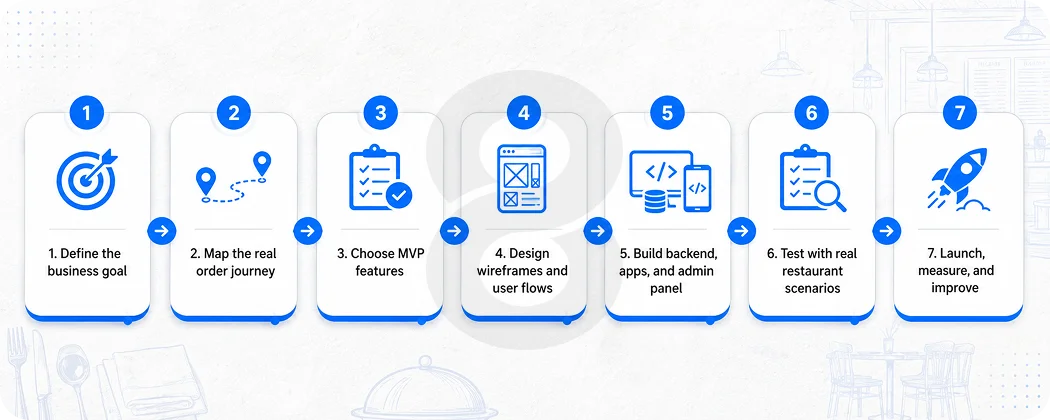
The smartest way to make restaurant app is to stop treating development like a shopping list. Treat it like a product build.
Step 1: Define the business goal
Pick the main goal first.
Do you want more direct orders? Fewer marketplace commissions? Better loyalty? Faster pickup? Better branch reporting? More repeat customers?
You can care about all of these, but one should lead the project. Otherwise every feature feels urgent and the product turns into a junk drawer.
Step 2: Map the real order journey
Write down what happens from the customer opening the app to the kitchen receiving the order.
A customer opens the app, chooses the nearest branch, checks the menu, customizes an item, adds a coupon, selects pickup, and pays. The kitchen receives the order, staff accept it, the customer gets a status update, and the order is ready for pickup.
Now do the same for delivery, refunds, canceled orders, out of stock items, bad addresses, and late drivers.
This work feels boring during planning, but it saves money once development starts.
Step 3: Choose MVP features
Your MVP should include the smallest feature set that can support real orders without embarrassing you.
A strong MVP usually includes menu, item details, cart, checkout, online payment, pickup or delivery, order status, customer accounts, order history, push notifications, and admin panel.
Leave advanced AI, deep loyalty tiers, referral campaigns, and complex analytics for later unless your business already needs them.
Step 4: Design wireframes and user flows
Wireframes show how the app works before anyone spends weeks on polished visuals. At this stage, the team should check whether users can find food quickly, reorder without digging through menus, understand delivery fees and place an order without confusion.
Staff workflows matter too, because restaurant teams should be able to manage incoming orders without training videos, guesswork or silent prayers during lunch rush.
Once the structure is clear, UI design can turn those rough flows into screens that feel clean, readable and easy to use.
Step 5: Build backend, apps, and admin panel
Development usually runs in parts. Backend engineers build APIs and database logic. Mobile developers build the customer app. Web developers build the admin panel. QA tests everything that can go wrong.
For more custom builds, custom software engineering helps connect restaurant logic, admin workflows, reporting, and integrations into one system instead of scattered tools.
Step 6: Test with real restaurant scenarios
Do not test the app with one burger order and one credit card, then call it ready. A restaurant app needs to be tested against the situations that usually break real operations, including lunch rush pressure, sold out items, coupon abuse, failed payments, refunds, closed branches, delayed drivers and a sudden wave of orders in a short window.
The app should survive bad days, because good days rarely expose the problems that show up during peak hours, late deliveries, failed payments, kitchen backlogs and angry customers asking where their food is.
Step 7: Launch, measure, and improve
Launch with analytics from day one. Track app installs, signup rate, menu views, add to cart rate, checkout completion, repeat orders, loyalty usage, average order value, and support tickets.
Then improve the product in cycles. App development does not end at launch.
Read More: Food Delivery App Development Cost in 2026: A Detailed Guide
Suggested Tech Stack for Restaurant App
Your tech stack depends on budget, platforms, team skills, and long term plans. Don’t choose technology because someone on Twitter sounded confident.
If your restaurant also needs a web ordering portal, web application development can support customers who prefer ordering from a browser. That can be useful for office orders, catering, older customers, and people who don’t want another app on their phone.
Restaurant App Monetization and ROI
A restaurant app does not make money magically. It helps protect and grow revenue through better control.
The first ROI area is direct ordering. If customers order through your app instead of a marketplace, you can reduce commission pressure. You still have payment fees, delivery costs, and support costs, but you own more of the relationship.
The second area is repeat orders. Loyalty, reorder buttons, saved favorites, and smart promotions can bring people back without paying for every order like it is a new customer.
The third area is higher average order value. Combo suggestions, add ons, bundles, and limited time offers can increase cart size. Keep it tasteful. Nobody likes being attacked by five popups while trying to buy fries.
The fourth area is customer data. You can see who orders, what they order, when they order, which offers work, and where drop off happens.
This data becomes useful only when someone actually looks at it. I’ve seen dashboards nobody opened after launch. That becomes a very expensive dashboard nobody uses.
Common Mistakes That Waste Budget
The most painful restaurant app mistakes are predictable.
The first mistake is copying marketplace apps. Your branded app does not need every feature DoorDash has because DoorDash serves many restaurants, while your app serves your own brand, customers, and operations.
The second mistake is skipping guest checkout. Forcing signup before ordering feels like a tax. Let people order first. Ask for account creation when it helps them save time later.
The third mistake is designing for perfect operations. Restaurants are not perfect. Items sell out. Staff forgets updates. Payment fails. Customers call. Build for reality.
The fourth mistake is ignoring admin UX. Owners focus on the customer app because it looks nicer in demos. But your staff will live inside the admin panel every day. If the admin panel is painful, they will work around it with WhatsApp, paper notes, and chaos.
The fifth mistake is launching without support. After launch, app store updates, OS changes, bugs, security patches, and customer feedback keep coming. Maintenance is part of the cost.
How Long Does Restaurant App Development Take
A basic restaurant app usually takes 2 to 4 months. A mid level app can take 4 to 7 months. A complex multi branch or marketplace product can take 8 to 12 months or more.
Timelines depend on design approval, integrations, content readiness, payment setup, testing, app store review, and stakeholder speed.
Yes, stakeholder speed matters. A lot.
If your team takes two weeks to approve a login screen, the project will not magically launch in three months. Development delays often come from unclear decisions rather than lazy developers.
A practical timeline looks like this.
Discovery and planning can take 1 to 3 weeks. UI and UX design can take 3 to 6 weeks. Backend and mobile development can take 8 to 20 weeks depending on scope. Testing can take 2 to 5 weeks. App store launch and fixes can take another 1 to 3 weeks.
A tight MVP helps the team move faster, while extra feature requests from every department slow the project down.
How 8ration Can Help You Build a Restaurant App
The work usually starts with product clarity. What kind of restaurant app are you building? Who is ordering? What happens in the kitchen? Which POS system do you use? Do you need pickup, delivery, loyalty, branch management, or all of it? What can wait?
From there, the team can shape the app structure, user journey, admin panel, backend logic, payment flow, and integrations. That includes mobile apps, web ordering, POS connections, AI features, analytics, and long term support.
The goal is not to throw every shiny feature into version one. The goal is to build the thing your customers can actually use and your staff can actually manage.
That may sound less glamorous, but it is how restaurant apps survive after launch.