
There’s a conversation that repeats itself constantly in insurance. A team lead describes how their agents log into five different systems just to close one auto policy. The quoting tool is separate from the policy tracker. Renewal reminders live in a spreadsheet someone built in 2019. Nobody planned it this way. It just happened, one tool at a time.
One carrier’s 1,200 captive agents averaged 14 minutes of context-switching per quote. Multiply that by 80 quotes per agent per week and you’re looking at 18 hours of pure system-switching, every week, per agent. That’s a design failure.
Most CRM platforms were built for general B2B sales. They don’t natively model policy hierarchies, household roll-ups, commission splits, NAIC producer licensing, or broker-of-record changes. That gap is where the friction lives.
Read More: Top 10 CRM Software Platforms of 2026
The spreadsheet trap most agencies are still stuck in
33% of agencies still rely on spreadsheet-based tracking for 50% of their daily operations. It’s often because the CRM they tried didn’t work well enough to fully replace it, so agents keep both and maintain neither well.
The average agency retention rate is 84%, meaning agents must generate 16% in new business just to break even. A missed renewal isn’t bad luck. It’s a missing automation. The global insurance CRM market is projected to grow from USD 2.5 billion in 2023 to USD 6.2 billion by 2032, at a CAGR of 10.5%, driven by agencies desperate for something that actually works.
What CRM Software for Insurance Agents Actually Needs to Do
Let’s get specific. Because “manage client relationships” is too vague to build anything useful around. Insurance agents deal with a kind of operational complexity that most CRM vendors handwave past in their demos.
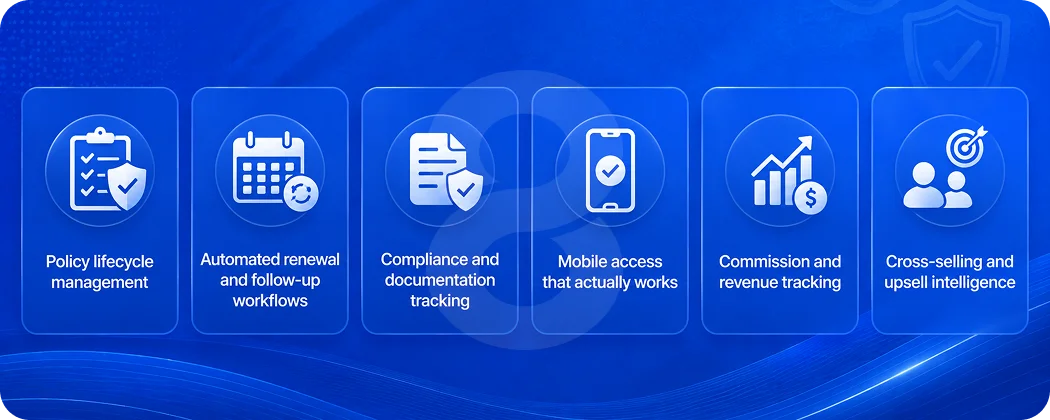
Policy lifecycle management
A client might hold three policies with your agency (auto, home, and life) each with different renewal dates, different carrier portals, and different documentation requirements. A strong insurance CRM should include policy tracking, renewal reminders, carrier information, and claims documentation. These features allow agents to manage the full lifecycle of a policy in one place.
That sounds basic. It is basic. And yet, the majority of mid-sized agencies are still tracking this across a mix of systems that don’t talk to each other.
Automated renewal and follow-up workflows
Renewals should be the easiest revenue stream for any agency. The right automations turn that chaos into a predictable, revenue-generating machine, with automated reminders set at 90, 60, and 30 days so agents focus on conversations, not follow-ups.
Beyond reminders, the best systems track engagement patterns and flag clients who are likely to shop around before renewal. Predictive churn scoring, next-best-action recommendations, and AI-assisted quoting are the three categories where carriers that operationalized these features in 2024-2025 are seeing measurable lift today.
Compliance and documentation tracking
This is the one most generic CRMs skip entirely. Insurance agencies operate under NAIC requirements, state licensing rules, and carrier-specific compliance standards. NAIC licensing, appointed-state tracking, CE compliance, and errors-and-omissions verification should all live inside the CRM, tied to the producer record.
When compliance documentation sits outside the CRM, it creates audit risk. And frankly, it creates real legal exposure.
Mobile access that actually works
Producers spend 60-70% of their working week away from a desk. Any platform that treats mobile as a secondary use case is designing for a workforce that no longer exists. Mobile-first means more than responsive design. It means thumb-input flows, offline tolerance, camera and GPS as first-class inputs, and full feature parity with desktop.
If an agent can’t pull up a client’s policy history during a home visit, the CRM has already failed half its job.
Commission and revenue tracking
Advanced commission tracking features include automated reconciliation with carrier statements, customizable commission structures for different product lines, and integration with accounting systems. This eliminates manual data entry while providing the financial visibility needed for strategic business decisions.
Commission discrepancies are a massive source of frustration in multi-carrier agencies. A CRM that can’t reconcile carrier statements automatically forces agents to do it manually, which means errors, delayed payouts, and more time not spent selling.
| Feature | Generic CRM | Insurance-Specific CRM | Custom-Built CRM |
|---|---|---|---|
| Policy lifecycle tracking | Manual setup required | Pre-built templates | Built around your workflow |
| Renewal automation | Basic reminders only | 30/60/90-day sequences | Custom triggers per product line |
| Compliance tracking | Not included | Partial (varies by platform) | Fully integrated |
| Commission reconciliation | Not included | Limited | Configured to your carriers |
| Mobile access | Responsive design | Varies | Native app or full PWA |
| Carrier API integration | Third-party only | Some pre-built | Direct integration |
| Custom reporting | Templates only | Configurable dashboards | Built to your KPIs |
Cross-selling and upsell intelligence
The most profitable clients hold multiple policies. Smart cross-selling intelligence does the work for you. Life event triggers allow the CRM to flag major life changes (new homes, new businesses, or new drivers) to surface timely opportunities.
This is where a well-built CRM starts to feel less like admin software and more like a revenue engine. When a client buys a house, the system should already be prompting the agent to review their home and auto coverage. That prompt shouldn’t require a human to remember to check.
Custom vs. Off-the-Shelf: The Real Cost Breakdown

This is where most conversations get uncomfortable. Custom development sounds expensive. And honestly, done badly, it is. But the math on off-the-shelf insurance CRMs is rarely as clean as the sales pitch suggests.
For top-20 carriers with an existing Salesforce footprint, plan for $2-5M in initial implementation. Even smaller agencies find that per-seat licensing, carrier portal integrations, and customization work adds up fast.
45% of agencies struggle with a 30% productivity drop during the first three months of implementation. Approximately 37% of software deployments fail because 65% of features go unused.
A system nobody uses doesn’t save you anything. It just costs more.
What custom development actually gets you
A custom-built CRM starts from your workflows, not a vendor’s template. Your quoting process, your carrier mix, your compliance requirements, your team structure, all of it gets built into the system rather than mapped onto something designed for a generic sales team.
The custom software development approach means you’re not paying for features you don’t need, not inheriting technical debt from someone else’s architecture, and not locked into a vendor’s roadmap that may or may not align with how your business operates.
Read More: How Much Does It Cost to Hire a CRM Developer in 2026
By the end of 2026, 70% of new enterprise applications, including CRM customizations, will be built using low-code or no-code technologies. That’s made custom builds significantly more accessible, faster to develop, less expensive to maintain, and easier to modify as your agency grows.
Read More: Hire CRM Developer vs. Buy Ready-Made CRM Software: What’s Right for Your Business?
The build-vs-buy comparison table
| Consideration | Off-the-Shelf (Specialized) | Custom Build |
|---|---|---|
| Initial cost | $25-$150/user/month + setup | $20,000-$150,000+ one-time |
| Insurance data model | Pre-built but rigid | Designed around your operation |
| Integration with carriers | Limited pre-built connectors | API-level integration to your carriers |
| Customization ceiling | Medium (configurable, not flexible) | No ceiling |
| Vendor dependency | High (pricing, features, roadmap) | Low (you own the codebase) |
| Training overhead | Standard onboarding | Built to your team’s actual workflow |
| Scalability | Depends on tier/plan | Built to your growth requirements |
| Time to deploy | 4-12 weeks | 3-9 months |
How to Build a Custom CRM That Your Insurance Team Will Actually Use
The graveyard of failed CRM projects is full of technically sound systems that nobody adopted. Building something that agents actually open in the morning takes more than good engineering. It takes a process that keeps the humans at the center.
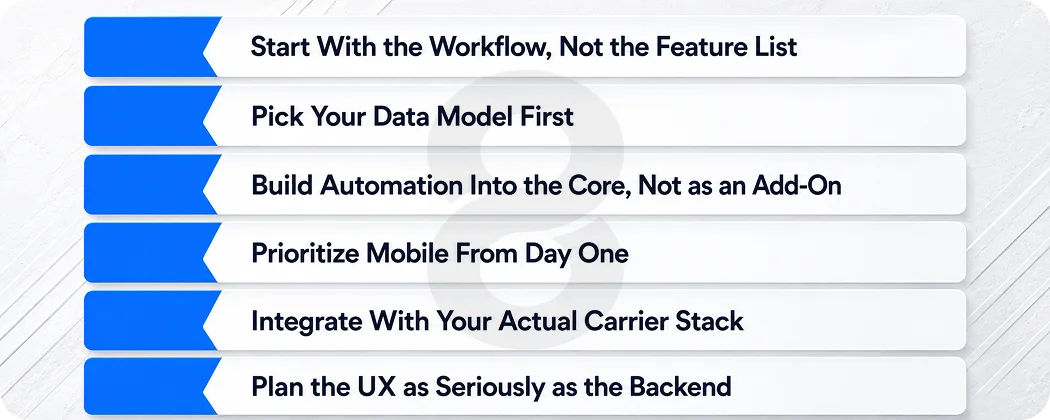
Start With the Workflow, Not the Feature List
Before writing a single line of code, take time to understand how your agents operate daily. Analyze the stages where time is lost, leads are missed, or client communication becomes inconsistent. Engaging sales and customer support teams can highlight important CRM features, including automated reminders and policy management tools. Participation from agents, underwriters, and IT professionals during planning helps create a CRM that solves genuine workflow challenges.
Read More: Customer Service Management System: Complete Development Guide
The goal is a system that feels like it was already there, just better organized and automated. Not a foreign tool agents have to learn around.
Pick Your Data Model First
Insurance data is structurally different from standard sales data. A household might have one primary contact but three policyholders. A single client might hold five policies across four carriers. The data model (how contacts, policies, households, and carriers relate to each other) needs to be right before anything else gets built.
The enterprise app development approach 8ration uses treats the data architecture as the foundation. Get that wrong and you’re rebuilding later. Get it right and every feature you add works with it, not against it.
Build Automation Into the Core, Not as an Add-On
Renewal reminders. Lead follow-ups. Cross-sell triggers. These shouldn’t be features you configure after the system is live. They should be core to how the system works. That requires thinking through your business rules during development: what triggers an action, what conditions need to be met, who gets notified.
Insurance agents using specialized CRM software report saving 10-15 hours per week on administrative tasks through automation and improved workflows. The most significant productivity gains come from automated data entry, streamlined communication workflows, and integrated reporting capabilities.
That 10-15 hours only shows up if automation is thoughtfully built in, not bolted on as an afterthought.
Prioritize Mobile From Day One
Your agents aren’t sitting at desks. A CRM that only works well on a desktop is already failing most of your use cases. Mobile app development built alongside the core system (not adapted from a web interface) gives agents full functionality in the field: pulling up a client profile during a home visit, logging a claim conversation right after the call, checking renewal status while waiting for a meeting to start.
Integrate With Your Actual Carrier Stack
The value of a CRM multiplies when it talks to the systems already in your workflow. Carrier portals, quoting engines, e-signature tools, accounting software. Modern CRMs integrate with quoting engines, e-signature tools like DocuSign, VoIP systems, policy rating tools, marketing platforms, accounting software, and carrier APIs. The best systems don’t work in silos. They connect the dots across your stack so data flows instead of getting stuck in disconnected tools.
A custom build gives you API-level integration with exactly the carriers and tools you actually use. Not a generic connector to 50 platforms you don’t.
Plan the UX as Seriously as the Backend
Adoption lives and dies on interface design. If logging a client interaction takes six clicks and three dropdowns, agents will stop doing it. Clean client data by removing duplicates, test migration on a small scale first, run workshops for agents on lead tracking, and provide video guides and ongoing troubleshooting to ease adoption.
The UI/UX design process matters as much as the technical architecture. A well-designed insurance CRM should require almost no explanation to use for the tasks agents perform daily.
The AI Layer: What’s Worth Building Into Your Insurance CRM Now
AI in insurance CRM isn’t science fiction anymore. Some of it is genuinely useful. Some of it is vendor marketing. Here’s what’s actually worth building in.
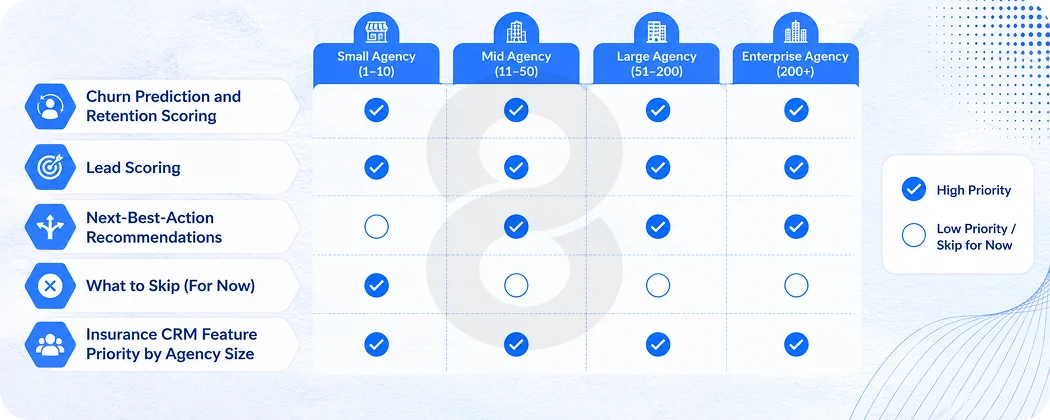
Churn Prediction and Retention Scoring
63% of agents believe AI can help predict client churn with 85% accuracy, allowing for proactive retention efforts. For an industry where acquiring a new customer costs 5 to 25 times more than retaining an existing one, a model that flags at-risk clients 60 days before renewal isn’t a nice-to-have. It’s a retention tool that pays for itself in saved renewals.
Lead Scoring
Not all leads are created equal. An AI-powered lead scoring layer inside your CRM can rank incoming leads by conversion probability based on historical patterns (policy type interest, geographic factors, referral source, engagement behavior). Agents spend their time on the leads most likely to close.
Read More: Time Tracking Software Development Services: Features, Tech Stack & Timeline
CRM users see a 17% increase in lead conversions, a 16% boost in customer retention, and a 21% rise in agent productivity. Lead scoring is one of the primary drivers behind that conversion lift.
Next-Best-Action Recommendations
When a client has a life event (marriage, a new driver on the policy, a home purchase) the system should surface the relevant product conversation automatically. AI, machine learning, and predictive analytics are making CRM systems increasingly sophisticated, moving insurers from reactive to proactive relationship management.
That shift from reactive to proactive is exactly what separates agencies growing their book of business from agencies fighting to hold even.
What to Skip (For Now)
AI-generated policy summaries, chatbot-driven client intake, and fully automated underwriting recommendations are real, but they add significant complexity to a custom build and require substantial training data to work well.
For most independent agencies and mid-sized brokerages, the ROI on those features doesn’t justify the development cost at initial build. Ship the core system, get it adopted, then layer in advanced AI once you have clean data flowing through it.
The AI development roadmap for an insurance CRM should be phased. Start with automation that replaces manual tasks, then move to prediction and intelligence once the foundation is stable.
Read More: CRM App Development: Complete Guide to Custom CRM Software & Mobile Apps
Insurance CRM Feature Priority by Agency Size
| Feature | Solo Agent | Small Agency (2-10) | Mid-Size Agency (11-50) | Large Agency (50+) |
|---|---|---|---|---|
| Contact & policy management | Essential | Essential | Essential | Essential |
| Renewal automation | Essential | Essential | Essential | Essential |
| Mobile access | Essential | Essential | Essential | Essential |
| Lead scoring | Optional | Recommended | Essential | Essential |
| AI churn prediction | Optional | Optional | Recommended | Essential |
| Commission reconciliation | Basic | Recommended | Essential | Essential |
| Multi-carrier integration | Optional | Recommended | Essential | Essential |
| Compliance tracking | Basic | Essential | Essential | Essential |
| Custom reporting | Optional | Optional | Recommended | Essential |
What Good CRM Implementation Actually Looks Like
Building the system is half the work. Getting your team to use it consistently is the other half, and most agencies underestimate that part.
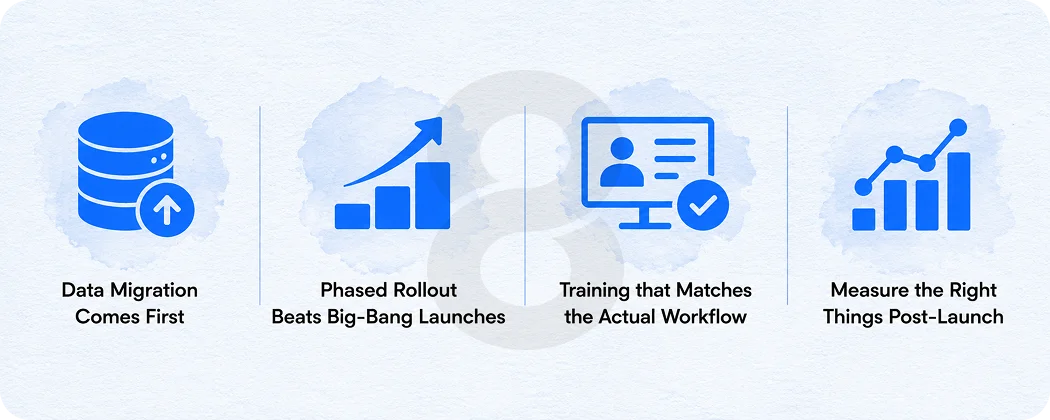
Data Migration Comes First
Before anything goes live, client data needs to be cleaned, deduplicated, and correctly structured. Policy records that live in spreadsheets, email threads, and three different platforms need to be consolidated before migration. This is tedious. It’s also the step that determines whether the new system works from day one or spends six months correcting data errors.
Phased Rollout Beats Big-Bang Launches
45% of agencies struggle with a 30% drop in productivity during the first three months of CRM implementation due to training requirements. That productivity dip is real, but its severity depends heavily on how the rollout is managed. A phased approach (starting with one team, one product line, or one office) lets issues surface at small scale before they affect the whole business.
Training that Matches the Actual Workflow
Generic CRM training covers features. Insurance agent training should cover scenarios: how to log a new policy, how to trigger a renewal sequence, how to document a claim conversation. The closer training is to real daily tasks, the faster adoption happens.
Measure the Right Things Post-Launch
Renewal reminder open rates. Time from lead to first contact. Policy renewal rate before and after implementation. These metrics tell you whether the system is doing its job. Usage metrics alone (logins, records created) don’t tell you whether the CRM is actually moving the business forward.