Somewhere around the third week of refreshing a shared inbox that three different people assumed someone else was watching, every founder asks the same question. Why does answering a customer email feel harder than shipping the actual product.
The honest answer is that most early support setups are duct tape. A shared mailbox, a spreadsheet of open issues, maybe a free helpdesk plan nobody ever finished configuring. A customer service management system is the unglamorous fix for that mess.
It will not show up in a pitch deck. Nobody brags about their ticket routing rules at a dinner party. But it is the difference between support that scales with the business and quietly drags the whole thing down.
This guide gets into what actually matters if you are building one, whether that means buying software, customizing it, or having a development team build it from scratch around your workflow.
CSM vs CRM: Where Most Teams Get the Definition Wrong
Strip it down and a customer service management system is just the layer of software sitting between a customer’s problem and someone on your team actually fixing it.
The ticket, the back and forth that follows, who picked it up, whatever account data they had to dig up along the way. All of it lives in one place instead of scattered across someone’s inbox and memory.
People mix this up with a CRM constantly. The two overlap but they’re not doing the same job. A CRM is where the relationship lives, the deals, the contacts, the account history going back years.
The support system is where the actual work happens day to day, answering tickets, routing them, closing them out. If a CRM is the filing cabinet, the support system is the desk.
This stops being academic the moment a team starts shopping for software. A lot of CRM vendors will bolt on a thin ticketing module and slap the customer service management label on it. It rarely deserves the label.
A platform that actually earns the name is built around how fast agents resolve things and how their workflow runs, with the CRM sitting in the background feeding context rather than calling the shots.
Once a company is actually growing, it’s the system half of the phrase that carries more weight than the customer service half. Most teams already know how to talk to people, that’s not the gap.
What’s missing is software that keeps track of who said what once the week gets busy and three different people have touched the same ticket.
Read More: CRM App Development: Complete Guide to Custom CRM Software & Mobile Apps
When SaaS Helpdesk Tools Stop Fitting and Custom Builds Start Making Sense
Most companies start with an off the shelf helpdesk tool. That is the right call early on. Then volume climbs, the product gets more complicated, and the tool that was supposed to save time starts costing it instead. Per seat pricing gets painful once you have twenty agents. Workflow automation that felt clever at five tickets a day breaks down at five hundred.
This isn’t a hunch dressed up as an insight. Grand View Research put the customer experience management market at 15.5 billion dollars in 2025, on track toward 47.7 billion dollars by 2033.
That kind of growth does not happen because everyone is happy with their current setup. It happens because more businesses are investing in service infrastructure built around their own workflow instead of someone else’s template.
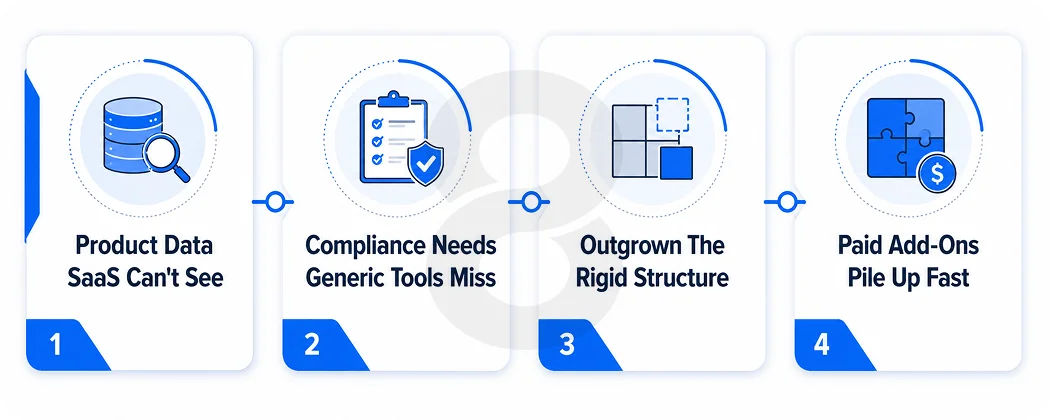
The real trigger for going custom is usually one of three things. The product has a data model the SaaS tool cannot see into. The industry has compliance requirements a generic platform was never built for, healthcare and fintech being the obvious examples.
Or the team has simply outgrown the rigid structure of a rented tool and needs the actual software holding support together to bend around how the business runs, not the other way around.
There’s a quieter reason too, the one vendor case studies never mention. Support teams start customizing workflows inside a SaaS tool, and sooner or later they hit a wall. Paid add-ons stacking up. APIs locked behind a higher tier. Feature requests sitting in some backlog nobody’s touched in years.
At that point the monthly subscription stops looking like the cheap option. Teams start running the math on what a custom build would cost over three years against what they are already paying per seat, and the numbers are closer than most people expect.
Core Features Every CSM Platform Needs to Work
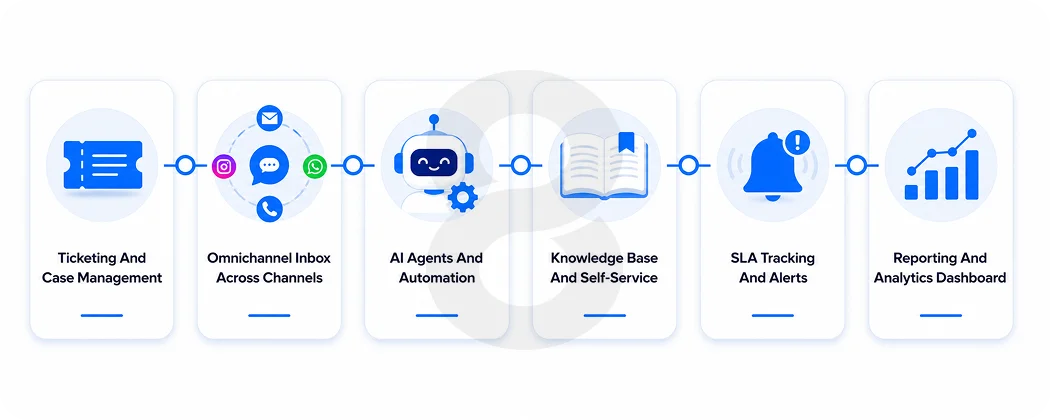
Strip away the marketing language and a working CSM platform comes down to a handful of pieces. Skip one of these and agents end up doing manual work that the software should be handling.
| Feature | What it actually does | Why it matters |
|---|---|---|
| Ticketing and case management | Captures every request, assigns ownership, tracks status | Nothing gets lost in someone’s personal inbox |
| Omnichannel inbox | Pulls email, chat, social, and phone into one view | Agents stop asking customers to repeat themselves |
| AI agents and automation | Handles routine requests and routes the rest | Reduces volume without making support feel robotic |
| Knowledge base and self-service | Lets customers solve simple issues on their own | Cuts ticket volume before it ever reaches an agent |
| SLA tracking | Flags requests at risk of missing response targets | Keeps promises to customers honest and measurable |
| Reporting and analytics | Surfaces resolution times, backlog, and agent load | Tells leadership what is actually working |
The AI piece deserves a closer look because it has changed faster than anything else on this list. Early chatbots just deflected, pointing customers at an article and hoping for the best. The current generation is built differently.
What teams want now is AI that can actually act on a ticket. Issuing a refund. Updating an order. Escalating with the full thread attached so a human isn’t starting from zero. That’s a different engineering problem than a scripted bot ever was, and it’s usually where the cost of custom development pays for itself.
Read More: How Much Does It Cost to Hire a CRM Developer in 2026
The Technical Architecture Behind a Scalable Support Platform
Every feature on that list is worthless if what’s running underneath can’t keep up. A platform built to actually last is made of a handful of layers stacked on top of each other, not one giant app trying to be everything at once.
Tickets, customer profiles, and conversation history… all of it is in the data layer. You can find it in a relational database with a search index parked next to it so lookups stay fast even as ticket counts climb into the hundreds of thousands.
Live chat and notifications run on the real-time layer, almost always over websockets so an agent sees a new message land instantly instead of refreshing a tab and hoping.
The integration layer eats up most of the actual engineering time. This is the piece that gets the support system talking to your CRM without some nightly batch job lagging behind reality, plus billing, product analytics, and whatever else the team needs eyes on.
Then there’s the AI layer sitting on top of all of it, with its own pipeline for pulling knowledge base content, reasoning through it, and actually doing something instead of just generating a reply that sounds plausible.
None of these are optional past a certain size. Skip the search index and agents burn minutes hunting for a ticket that should’ve taken five seconds to find. Skip real websocket infrastructure and live chat starts feeling like email with extra steps.
Get the integration layer wrong and agents are juggling five browser tabs to answer one ticket It’s the exact thing the system was supposed to fix in the first place.
Read More: Top 10 CRM Software Platforms of 2026
How to Build a Customer Service Management System from Scratch
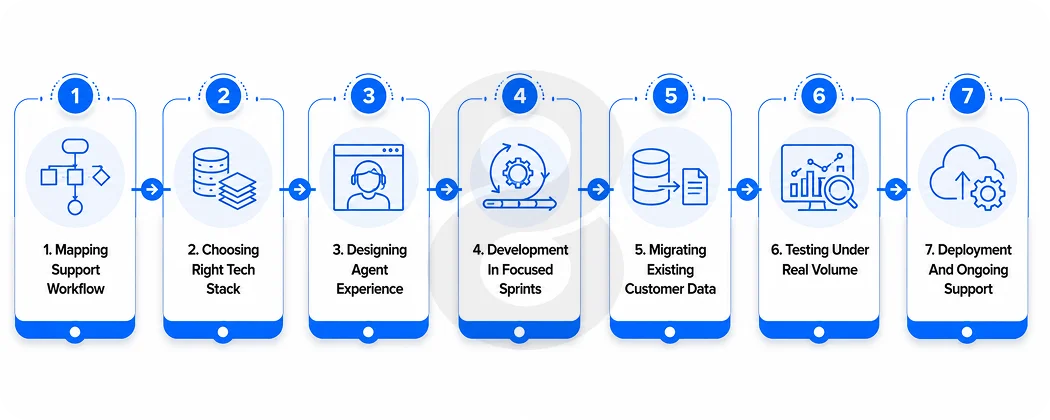
Nobody builds a support platform from scratch over a weekend no matter what the timeline on a slide deck says. It’s a detailed process. Skip steps and it doesn’t disappear, it just shows up later as bugs, security holes, or agents quietly building their own workaround instead of using the tool you paid for. Here’s roughly how it actually plays out.
Mapping actual support workflow
Before anyone writes a line of code, someone has to actually sit with the support team and watch how tickets move, not how the org chart insists they’re supposed to move. This step is where the requirements that actually matter come from. It’s also where the hidden complexity surfaces early instead of blowing up the timeline three months in.
Choosing right tech stack
This comes down to scale and integration needs. A team fielding heavy real time chat volume needs different infrastructure than a team that’s mostly handling email with the occasional live chat spike. Whatever gets decided here also shapes how easily the whole thing scales two years from now, which is reason enough to not rush it.
Designing agent and customer experience
Agents live in this tool for eight hours a day, so the interface has to be fast and low on friction. Plenty of teams also want a phone-first app for agents who are out in the field or simply never sit at a desk, technicians, delivery staff, on-site healthcare workers.
Prototypes get tested with real agents at this stage, not just stakeholders, because the people doing the clicking all day catch friction that a product manager will miss.
Development in focused sprints
Ticketing and the inbox get built first, full stop. AI features and the deeper integrations come after the foundation actually holds, not bolted on while the ground underneath is still shifting. Every sprint should end with something you can actually look at, because that’s what keeps scope creep visible instead of something you discover the week before launch.
Migrating existing data
Whatever’s sitting in the old system needs a clean path into the new one. Tickets. Customer history. The macro someone wrote three years ago and forgot about. This is the step everyone rushes and a sloppy migration is one of the fastest ways to make agents distrust a brand new tool on day one.
Testing under real ticket volume
Load testing matters here more than in most software categories, because a support tool that buckles during a product outage is failing at the exact moment it is needed most. Security testing runs alongside it, since a support platform holds a lot of sensitive customer data in one place.
Deployment and ongoing support
Launch day is the start, not the finish. Bug fixes, performance tuning, and feature requests from actual agents using the tool daily continue well past go-live. Most teams underestimate how much this phase matters until they live without it. Stitched together, a build like this typically runs four to seven months from the first discovery call to a stable launch.
Read More: CRM on Android: How to Build a Custom CRM App for Your Business
Custom CSM Development vs Off-the-Shelf Software: Which One Actually Fits
There is no universally correct answer here, only a correct answer for your specific volume, budget, and how strange your workflow already is. Off the shelf tools win on speed. You can be live in a week. Custom builds win on fit, especially once a business has outgrown generic ticket fields and rigid automation rules.
Read More: Hire CRM Developer vs. Buy Ready-Made CRM Software: What’s Right for Your Business?
Here’s a decent gut check, count the workarounds your support team is already living with. A spreadsheet that exists because the tool can’t do the one thing they need. Manual tagging because the automation rules are too rigid to trust.
Copy and paste the same data between two systems that refuse to talk to each other. Once that list gets long enough, the off the shelf tool isn’t saving anyone time anymore.
| Factor | Off the shelf | Custom built |
|---|---|---|
| Time to launch | Days to a few weeks | Months, depending on scope |
| Workflow fit | Generic, configurable within limits | Built around your exact process |
| Ongoing cost | Per seat, scales with headcount | Upfront investment, lower marginal cost at scale |
| Data ownership | Often locked into the vendor’s platform | Fully owned by the business |
Customer Service Management System Development Cost: Real Ranges by Scope
Budget talks go a lot smoother when scope gets nailed down honestly before anything else. The brief “build us a support platform” could mean a basic ticket queue, or it could mean a full AI-driven system with omnichannel routing built in, and those two projects don’t live anywhere near the same price range.
| Project scope | What is included | Typical cost range |
|---|---|---|
| Basic ticketing system | Case management, single channel inbox, basic reporting | $20,000 to $40,000 |
| Mid-size omnichannel platform | Multi-channel inbox, knowledge base, SLA tracking, CRM integration | $40,000 to $90,000 |
| Enterprise platform with AI agents | Full automation, AI agents, advanced analytics, multiple integrations | $90,000 to $150,000+ |
These ranges track closely with what 8ration sees across its own software projects, where scope and feature depth move the number far more than any single technology choice does.
The biggest variable is almost always how many existing systems the new platform has to integrate with, not the ticketing interface itself, which is usually the most templated part of the entire build.
Three CSM Development Mistakes That Kill Timelines and Agent Adoption
The most common mistake is not technical at all. It is sequencing. Teams get excited about AI agents and try to layer automation on top of a support process that was already broken, which mostly automates the chaos instead of fixing it.
The second mistake is underestimating integration work. Teams budget for the visible features, the inbox and the chat widget, and treat connecting everything to existing systems as an afterthought. In reality that integration work is usually closer to half the total engineering effort.
A support platform that cannot see order history, account status, or product usage data is just a nicer-looking version of the same disconnected mess it was meant to replace.
The third mistake is skipping agents in the design process entirely. Plenty of platforms get built around what leadership thinks support work looks like instead of what agents actually deal with hour to hour.
The result is a tool that looks great in a demo and gets quietly worked around within a month, agents falling back to private notes, side spreadsheets, or whatever habit the new system was supposed to replace.
Read More: Time Tracking Software Development Services: Features, Tech Stack & Timeline
Agentic AI and Voice: What CSM Platforms Need to Support by 2029
How much autonomy gets handed to AI agents inside these systems is probably the question that defines the next few years. Agentic AI will resolve 80 percent of common customer service issues on its own by 2029, with no human touching the ticket, and operational costs dropping roughly 30 percent along the way.
That number sounds aggressive. It probably is, for a lot of businesses. But the direction itself isn’t really up for debate anymore. Password resets, order status checks, simple refunds.. all of it is already sliding toward automated resolution wherever a company has clean data and integrations that actually work.
The conversations that are harder, messier, or higher stakes still need a human and that’s not changing anytime soon. Whatever gets built right now has to handle both modes at once, automated where that makes sense, human where it actually matters.
Voice is the piece nobody’s watching closely enough. Phone support has trailed behind chat and email in automation for years, mostly because getting real-time speech right is a much harder problem than getting text right.
That gap is closing faster than people expect, and any platform built today without a real plan for voice is probably looking at a second round of development sooner than its owners think.
How 8ration Builds Custom CSM Platforms for Compliance-Heavy Industries
8ration approaches customer service management systems the way it approaches any custom software project, starting with the actual workflow rather than a feature checklist pulled from a competitor’s pricing page.
That has meant building ticketing and case management tools for healthcare clients with strict compliance needs, fintech platforms that needed an audit trail on every customer interaction, and support tools for an eCommerce storefront that needed to handle ticket spikes during flash sales without falling over.
The process doesn’t really change based on the industry. Discovery and planning come first, to actually understand the workflow. Design happens around the people using the tool every day, not the people approving the budget.
Development runs in sprints with something real to review at the end of each one and testing simulates actual peak load instead of running through a handful of sample tickets and calling it done.
Once something ships, the work doesn’t stop there. A support platform that quits improving after launch day has a way of drifting right back toward the problems it was built to solve.
Pricing and timeline get scoped against the real feature list every time, not a flat package deal, which is also why those cost ranges earlier aren’t just marketing copy wearing a number.