You have a great app idea, but it doesn’t really work out. Target users are unambiguously defined. The problem it addresses is a genuine one. However, when someone asks about native or cross-platform, most founders and product managers hit a brick wall here: they don’t have all the answers to this question.
Do it wrong and it’s six months later and you find yourself starting from square one with a short budget. Do it right and you deliver faster, spend wiser, target iOS and Android all in one go and scale without regrets. This guide will help you make that decision with confidence.
Native vs Cross-Platform App Development at a Glance
Native App Development creates different apps for iOS and Android platforms with platform-specific programming languages, such as Swift and Kotlin, for optimum performance and maximum access.
Cross-platform development is done with a common codebase, typically Flutter or React Native, and targets both platforms simultaneously, which means that it will cost less and come to market sooner, but will have a few minor performance compromises.
Quick Comparison Table
| Factor | Native Apps | Cross-Platform Apps |
|---|---|---|
| Performance | Highest | 80–90% of native |
| Cost | Higher | 30–50% lower |
| Development Time | Longer | Faster |
| User Experience | Platform-native feel | Near-native |
| Maintenance | Two codebases | Single codebase |
| Scalability | Excellent | Good to excellent |
| Security | Industry-leading | Strong |
| Offline Support | Full | Full |
| Device Feature Access | Complete | Mostly complete |
| Best For | Gaming, banking, healthcare | Startups, MVPs, SaaS |
What Is Native App Development?
Native development involves designing a mobile application for a particular platform. You write iOS Apps in Swift or Objective-C and Android Apps in Kotlin or Java. That implies an application that is as functional as its surroundings and that is depicted in how fast and easy it is to use.
How Native Apps Work
Native apps interface directly with the operating system. No intermediate layer between code and device hardware. A native iOS app is loaded using Apple’s rendering engine and accesses the system features using Apple’s APIs. The same applies for Android. This direct connection makes native apps fast, smooth, and able to access all peripheral and sensor capabilities of the device.
Native Development Languages
Swift and Objective C are the languages used to develop iOS. It is primarily used in older code bases while Swift is the standard. On the Android side, Kotlin is used for developing lots of new projects. Google officially announced Kotlin as their language of choice for Android, and by 2024, over half of all professional Android developers adopted Kotlin as the language of choice.
Read More: Swift App Development: Benefits, Features, Best Practices, Cost & Business Guide
Advantages of Native Development
The Performance ceiling is the maximum possible. Animations are rendered at 60 fps, with no frames dropped. 3D graphics, AR and other tasks that use the GPU operate without overhead.
You have full, immediate access to all of the platform’s features, such as Face ID, NFC, Bluetooth, camera APIs, ARKit, and more. You are also not at the mercy of a third party framework to support new OS features. Apple has released a new API today, so you can use it today.
Limitations of Native Development
You’re creating two applications. That equals double the code base, double the team (or half of a team doing twice the work), and double the maintenance streams. More expensive and more time-consuming. It is sometimes difficult to make that case when a product is in its infancy and only testing a hypothesis.
Read More: Web App vs Native App: A Complete Comparison for Business Owners
What Is Cross-Platform App Development?
Detach from the limitations of using a single platform and write code once, run multiple times on both iOS and Android. The frameworks deal with the translation to the native components of each platform. It is like one recipe for two different cooks to use in their own kitchens.
How Cross-Platform Development Works
Shared code is compiled to native machine code (Flutter does this), or executed via a JavaScript plugin to native components (older React Native), or executed in a webview (Ionic with Cordova). There was a remarkable improvement in cross-platform performance relative to that of native performance, as most applications are now within 80-90% of native performance under standard workloads.
Popular Cross-Platform Frameworks
Flutter compiles to native ARM code and uses its own graphics engine to render. Now accounts for 42% of the cross-platform developer market. React Native maps components to native UI elements. It is the leading non-native platform in the App Store increasing from 4.73 percent to 6.75 percent. Kotlin Multiplatform shares business logic and retains native UIs.NET MAUI optimizes for mobile, desktop and web, all in one project. It is best suited to web-first teams; Ionic wraps web technologies in a native shell.
Read More: Ionic App Development: Cost, Features & Use Cases
Benefits of Cross-Platform Development
One Team, one codebase, one release cycle. Send to both platforms simultaneously, maintain brand consistency, and make iterations quicker. The savings are genuine. In most cases, cross platform development is about 30-50% cheaper than native development on both platforms.
Limitations
Cross-platform frameworks still lag behind native development for GPU-intensive tasks, such as 3D gaming and real-time AR. They also often take weeks or months to support new operating system features after their release. Even more advanced device-specific capabilities may necessitate the creation of native modules.
Read More: Cross Platform App Development Guide: Everything Businesses Need to Know
Native vs Cross-Platform App Development: Complete Comparison
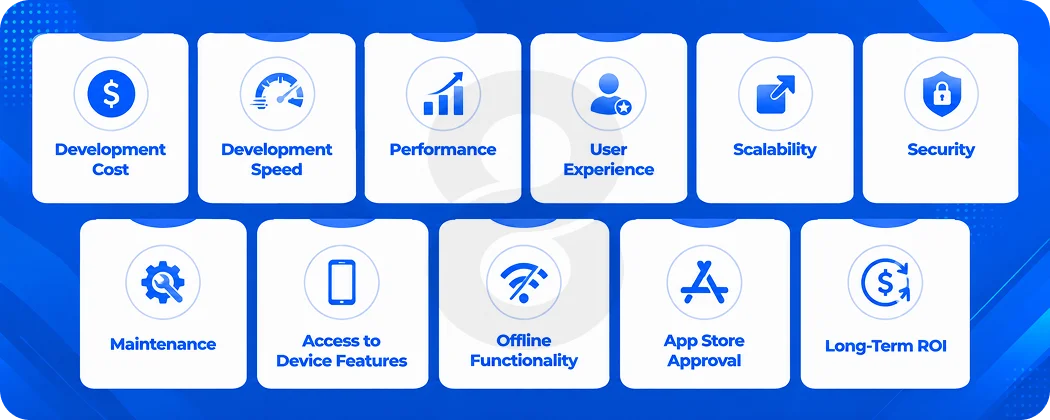
Both methods will bring apps to users, but in very different ways. This section dissects each of the main considerations side-by-side to provide a clear picture of the strengths and weaknesses of each and how this translates for a business with actual budgets and deadlines.
Development Cost
Native means employing two distinct teams of specialists or one team with an intimate knowledge of both Swift and Kotlin. You’ll need one team that can work with both Flutter and React Native. Because it is code reuse across multiple platforms (usually 70-90% of the code is shared), you are immediately reducing your build cost.
An app of medium complexity, $100,000 to build natively, can cost $55,000 to $70,000 to build cross-platform. In the long run, you also save money on maintenance costs as the bug fixes and updates are required at only one location.
Development Speed
There is no doubt in this cross-platform win. If a single team is responsible for shipping to both platforms, then they can reduce the time to market by 30-50%. This is hugely important when racing to prove an idea or for funding deadlines.
Performance
Native applications are built directly to use CPU, GPU and device memory without any layer of abstraction. Native is faster when it comes to animation rendering pipelines and heavy computation. Multi-platform solutions such as Flutter and React Native provide 80 to 90% of the native performance for most app workloads. With most business apps, that difference is not felt by the end user. It becomes an issue when you’re playing games, AR or 3D simulations.
User Experience
Native apps look exactly like folks would expect on each platform. iOS apps are designed to apple’s human interface guidelines. Android apps are designed based on the material design approach. Cross platform frameworks create near-native UIs but there may be subtle differences in the animations, transitions or system widgets.
Scalability
Both of these methods scale, albeit in a different way. Native applications scale well inside the respective platforms. If you wish to add native modules subsequently, you will need careful design of a cross-platform application. Large enterprises have tested the Flutter framework and proved it can scale, especially for apps. It’s in production at both BMW and Alibaba!
Security
Native apps may have a minor advantage as they can leverage the platform level security features such as Secure Enclave on iOS or Android Keystore without needing to work around them. If it’s a banking app or a health-related app storing sensitive data, this edge is important. There are also ways to deliver good cross-platform security, although sometimes native modules must be written separately.
Maintenance
It’s here that cross-platform truly shines for most companies. Single codebase = single bug fix location, single push location, single CI/CD pipeline. Native maintenance involves twice the overhead because there are two teams that have to check two codebases every OS update release for both iOS and Android.
Access to Device Features
GPS, NFC, Bluetooth, Face ID, Camera, AR frameworks, haptic feedback, HealthKit and so much more are here at your fingertips with Native. Edge cases such as support of some Bluetooth LE protocols or ARKit’s advanced features may necessitate native bridge code though, while the more common features are covered by cross-platform frameworks.
Offline Functionality
Both are offline compatible. Native has a more flexible approach to local storage and background sync. For most offline use cases, SQLite, Hive and other local databases are well supported by cross-platform frameworks.
App Store Approval
No meaningful difference. Native and cross-platform apps have similar success rates in the App Store and Google Play review process. It’s not about how the app is developed, but what it does.
Long-Term ROI
Cross-platform offers greater ROI for start-ups and companies testing out a market in the short term. Native will almost always win for a business with a mission-critical app, long-term support requirements, and platform-specific requirements.
Detailed Comparison Table
Below you will find a comprehensive comparison of all the factors that play a role in a business application decision, from UI appearance to ownership costs and best applications.
| Factor | Native | Cross-Platform |
|---|---|---|
| Performance | Highest | 80–90% of native |
| Startup Speed | Fast | Fast (Flutter AOT compilation) |
| UI Rendering | Platform renderer | Flutter’s own / native bridge |
| UX Consistency | Per-platform best | Consistent across platforms |
| Scalability | Excellent | Good to excellent |
| Cost | Higher | 30–50% lower |
| Development Time | Longer | 30–50% faster |
| Security | Maximum control | Strong, with some limits |
| Testing | Two test suites | One test suite |
| Device APIs | Full access | Most access, some gaps |
| OS Update Adoption | Immediate | Delayed by framework cycle |
| Code Sharing | 0% (separate codebases) | 70–90% |
| Team Size Required | Larger | Smaller |
| Battery Usage | Optimized | Slightly higher (framework overhead) |
| Maintenance Cost | Higher | Lower |
| Offline Features | Full | Full |
| Best Use Cases | Gaming, banking, AR, healthcare | MVPs, SaaS, marketplaces, internal tools |
| Long-Term Value | High for complex apps | High for most business apps |
When Should You Choose Native App Development?
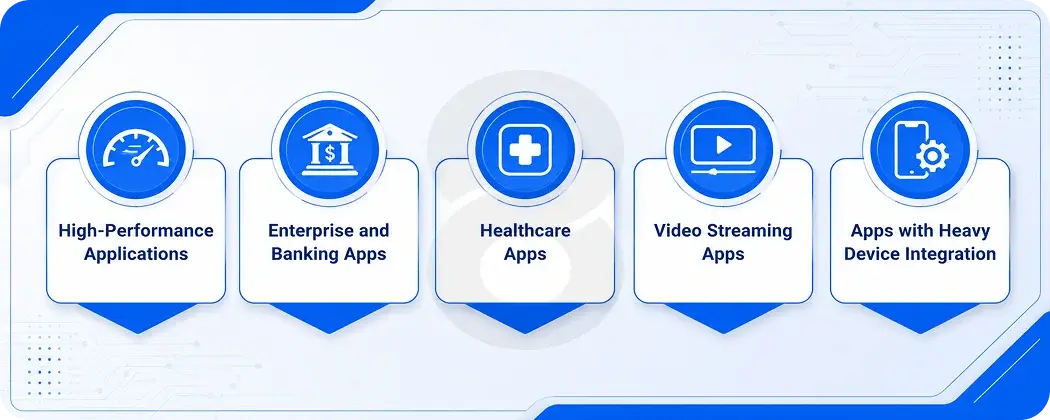
When you need the highest performance, full access to the device, or you’re developing for a regulated industry where security is a non-negotiable, then native is the route to take. That’s also a good strategy when platform specific behaviors are essential to your app’s experience, and they can’t be simulated via frameworks.
High-Performance Applications
The GPU is heavily used in gaming apps, AR/VR experiences, and 3D visualization tools, all of which rely on native. In games, the frame rate is important. Latency is an issue in AR. These workloads are not where cross-platform frameworks can compete with native metal rendering.
Enterprise and Banking Apps
Full access to the platform API is useful for large enterprises, which typically have strict security requirements, on-premise integrations and complex authentication flows. Secure Enclave on iOS and Android Keystore should be required on banking apps, with no workarounds. Typically, any app that processes money or important business information should be native.
Healthcare Apps
Healthcare apps that integrate with wearables, HealthKit, or medical-grade Bluetooth devices need deep hardware access. Regulatory compliance also often implies additional scrutiny on how data is stored and encrypted, and that’s where native provides the most control. 8ration’s healthcare software development services typically involve native builds for exactly this reason.
Video Streaming Apps
Efficient codec usage, HDR playback, and background audio require tight integration with platform media APIs. Native gives you direct access to AVFoundation on iOS and ExoPlayer on Android without any abstraction.
Apps with Heavy Device Integration
Whether you need NFC for contactless payments, Bluetooth LE for IoT sensors, or ARKit/ARCore for spatial computing, native is the more secure way to go. For some of these features, there are inconsistencies in the cross-platform support. For example, 8ration’s AR app development always begins with a foundation of native iOS or Android.
Read More: Native App vs Hybrid App Development: A Business Owner’s Decision Guide
When Should You Choose Cross-Platform Development?
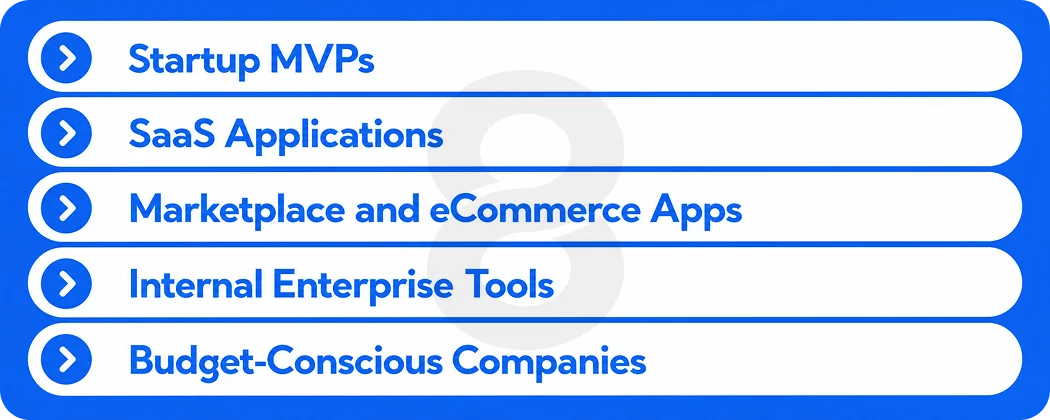
The best option for most business apps is cross-platform. It’s not only faster and cheaper but, if you choose the right framework, it offers an experience users will find indistinguishable in daily use. Here are the times when it always makes more sense than going native.
Startup MVPs
You’re validating an idea. You need both iOS and Android users in the funnel. You don’t have infinite runway. A Flutter app built by a single team gets you to market in half the time and gives you real usage data before you commit to a full native rebuild (if you ever need one).
SaaS Applications
SaaS products typically have feature-heavy dashboards and data-heavy screens. Cross-platform frameworks handle these well. Consistent UX across platforms also matters for SaaS because your users are often switching between mobile and web.
Marketplace and eCommerce Apps
Product listings, search, cart, and checkout are all standard UI patterns that cross-platform frameworks handle without issue. Your users won’t know or care whether it’s Flutter or native. 8ration’s eCommerce software development team regularly uses cross-platform frameworks for marketplace builds.
Internal Enterprise Tools
Field service apps, inventory management, and internal communication tools need to work reliably on whatever devices employees carry. Cross-platform reduces the build and maintenance burden significantly for apps that don’t need bleeding-edge device features.
Budget-Conscious Companies
If you’re working with a defined budget and need to cover both platforms, cross-platform is the only math that makes sense. One codebase, one team, one timeline.
Best Industries for Each Approach
Industry context shapes this decision as much as technical requirements do. Some industries have hardware, compliance, and performance demands that almost always point toward native. Others are better served by the speed and flexibility of cross-platform. Here’s how that breaks down by sector.
Native: Where Platform Depth Wins
| Industry | Why Native Works Better |
|---|---|
| Healthcare | Wearable integration, HealthKit, strict data security requirements |
| Finance & Banking | Secure Enclave, biometric authentication, regulatory compliance |
| Gaming | Full GPU access, low-latency rendering, platform-specific audio |
| Automotive | Bluetooth, CarPlay/Android Auto, real-time sensor data |
| Manufacturing | Industrial IoT sensor integration, AR-assisted maintenance |
| Logistics | GPS precision, background location, NFC scanning |
Cross-Platform: Where Speed and Coverage Win
| Industry | Why Cross-Platform Works |
|---|---|
| Retail & eCommerce | Standard UI patterns, rapid iteration, both platforms equally important |
| Food Delivery | GPS, payments, notifications all well-supported in Flutter/RN |
| Education | Content-heavy apps, consistent UX, frequent updates |
| Fitness & Wellness | Health data APIs mostly covered, fast iteration needed |
| Travel | Maps, bookings, itinerary management are standard cross-platform territory |
| Real Estate | Listings, search, maps with no platform-specific requirements |
| SaaS | Feature-rich dashboards, web-mobile consistency |
Native vs Cross-Platform App Development Cost
Cost is usually where the conversation gets concrete. The ranges below reflect US market rates for agencies and development teams based on app complexity. They also cover the full cost of ownership, so you know what to expect after launch.
Native Development Cost (US Market Estimates)
| App Complexity | Cost Range |
|---|---|
| Basic (single feature set) | $40,000 – $80,000 per platform |
| Medium (multiple modules, APIs) | $80,000 – $200,000 per platform |
| Enterprise (complex integrations) | $200,000 – $500,000+ per platform |
Cross-Platform Development Cost
| App Complexity | Cost Range |
|---|---|
| Basic | $25,000 – $50,000 |
| Medium | $50,000 – $120,000 |
| Enterprise | $120,000 – $300,000 |
Total Ownership Cost Comparison
| Cost Factor | Native (Both Platforms) | Cross-Platform |
|---|---|---|
| Development | $160,000 – $400,000+ | $50,000 – $250,000 |
| Testing | Two test suites (higher cost) | Single test suite |
| Maintenance per year | 15–20% of build cost (x2) | 15–20% of build cost |
| OS update integration | Two cycles per update | One cycle per update |
| Team required | iOS + Android specialists | Flutter or RN generalists |
Popular Frameworks for Cross-Platform Development
The framework you choose inside cross-platform development matters almost as much as choosing cross-platform itself. Each one has a different philosophy, language, and set of trade-offs that affect how your team builds, what your users experience, and how the app holds up over time.
| Framework | Language | Best For | Strengths | Limitations |
|---|---|---|---|---|
| Flutter | Dart | Visually rich apps, MVPs | Fast compilation, consistent UI, large community | Dart learning curve, larger app size |
| React Native | JavaScript/TypeScript | Social apps, SaaS, marketplaces | Huge ecosystem, easy web overlap, Meta-backed | JS bridge overhead in older versions |
| .NET MAUI | C# | Enterprise and Microsoft-stack teams | Multi-platform including desktop, strong typing | Smaller mobile community |
| Ionic | HTML/CSS/JS | Web-first teams | Web skills transfer directly, fast prototyping | Performance ceiling lower than Flutter/RN |
| Kotlin Multiplatform | Kotlin | Shared business logic, gradual adoption | Native UIs, Google-backed, strong type safety | Still maturing, UI sharing is limited |
Common Myths About Native and Cross-Platform Development
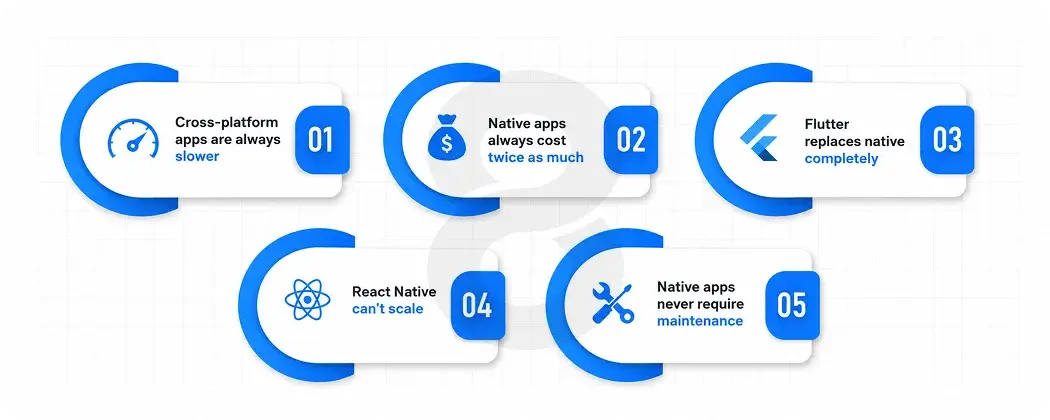
A lot of outdated advice still circulates in agency pitches and developer forums. Some of it made sense five years ago but doesn’t reflect where these technologies are today. Here’s what’s actually true versus what’s stuck around past its expiration date.
Cross-platform apps are always slower
Not true for most apps. Flutter compiles to native ARM code. React Native’s new architecture removes the JavaScript bridge. For standard business apps handling CRUD, listings, forms, and maps, users can’t tell the difference in performance.
Native apps always cost twice as much
They can, but it depends on complexity. For a simple app, the premium might be 40%. For an enterprise app with heavy device integration, it could approach 2x. The cost difference scales with complexity.
Flutter replaces native completely
Flutter is outstanding for most app categories, but it can’t fully replace native for apps that need deep platform-specific hooks like advanced AR sessions in ARKit, CarPlay integration, or custom audio unit plugins on iOS. Native remains essential in those cases.
React Native can’t scale
Instagram, Shopify, and Microsoft Office Mobile all use React Native in production at massive scale. The framework can absolutely handle large, complex apps when architected correctly.
Read More: React Native App Development Cost: Features, Timeline & Pricing Explained
Native apps never require maintenance
Both approaches require ongoing maintenance as iOS and Android release new OS versions. Native apps need OS-specific updates. Cross-platform apps need framework updates plus any native module patches.
Read More: Native App vs Progressive Web App (PWA): A Complete Technical & Strategic Comparison
How to Choose the Right Development Approach
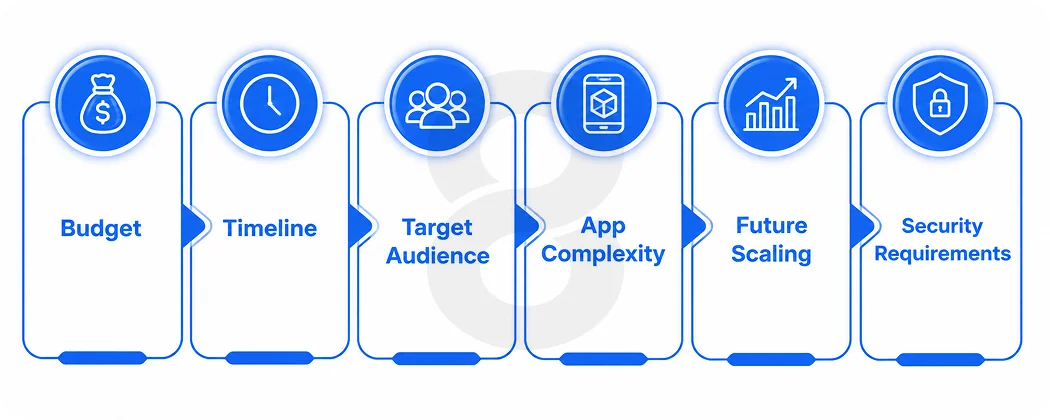
There’s no decision matrix that replaces knowing your own product. But there are consistent factors that should drive this conversation in a predictable direction. If you work through these one by one against your actual project, the right answer usually becomes clear.
Budget
If your budget is under $100,000 and you need both iOS and Android, cross-platform is likely your only viable path. If you have $300,000+ and the app’s success depends on platform-specific capabilities, native is worth the investment.
Timeline
Launching in three to four months? Cross-platform. Launching in twelve months with a feature-complete product for a regulated industry? You may have time to go native.
Target Audience
If your users are split 60/40 between iOS and Android (common in consumer apps), you need both platforms. Cross-platform serves that need efficiently. If you’re building an enterprise iOS app for a company that has standardized on iPhones, native iOS might be the only requirement.
App Complexity
Simple apps with standard UI patterns, API calls, and notifications fit cross-platform well. Apps with real-time 3D rendering, deep hardware integration, or heavy offline computation point toward native.
Future Scaling
Where do you want to be in three years? If you anticipate needing complex device integrations as the product matures, starting native avoids a painful migration later. If you’re building a data-driven SaaS product, cross-platform will scale with you.
Security Requirements
Banking, healthcare, and defense applications should start from native unless there’s a compelling reason otherwise. The security primitives are more accessible and better tested.
Decision Matrix
If you’re still weighing the options, this matrix maps common app categories and business situations to the more appropriate approach. Think of it as a starting point rather than a final answer, but for most of these scenarios the recommendation holds consistently across projects.
| If You Need… | Choose |
|---|---|
| Fast MVP to both platforms | Cross-platform (Flutter or React Native) |
| AAA gaming or 3D graphics | Native |
| Healthcare app with device integration | Native |
| eCommerce marketplace | Cross-platform |
| Banking or fintech app | Native |
| Social media app | Depends on features; Flutter handles most cases |
| Startup with limited budget | Cross-platform |
| Enterprise internal tool | Cross-platform |
| AR/VR application | Native (or hybrid with native AR modules) |
| AI-powered consumer app | Depends; most AI inference can run cross-platform |
| IoT device control | Native (Bluetooth LE reliability is better) |
| Field workforce management app | Cross-platform |
Future Trends in Native and Cross-Platform Development
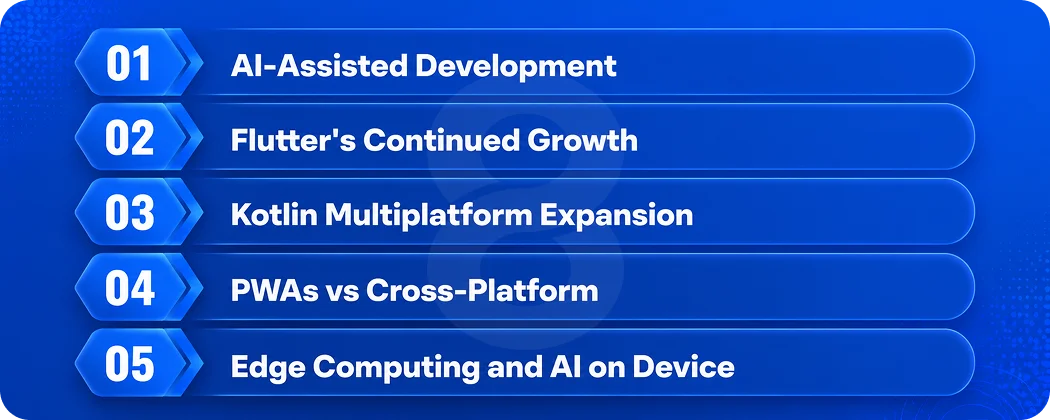
The gap between native and cross-platform is narrowing every year, but the direction each approach is heading tells you something about which bets are worth making now. These are the trends worth watching if you’re making a technology decision with a multi-year horizon.
AI-Assisted Development
AI code generation tools are closing the productivity gap between native and cross-platform even further. GitHub Copilot and similar tools now generate platform-specific code fast enough that the “writing two codebases” argument against native is weaker than it was two years ago.
Flutter’s Continued Growth
Apps built using Flutter increased by 30% on Google Play in 2025. Flutter’s single-engine approach makes it the leading framework for teams that want consistent UI with near-native performance.
Kotlin Multiplatform Expansion
Kotlin Multiplatform is gaining traction as a middle path. It lets you share business logic and data layers while keeping native UIs on each platform. It’s a pragmatic option for teams that want code sharing without giving up platform-specific UI control.
Read More: Kotlin Android Development: A Complete Business Guide
PWAs vs Cross-Platform
Progressive Web Apps are improving, but they still can’t match native-like access to device features or app store distribution. Cross-platform frameworks will maintain the edge over PWAs for most mobile-first use cases.
Edge Computing and AI on Device
On-device AI inference (running models locally on the device) is becoming a bigger part of mobile apps. Native frameworks have the most direct access to Apple’s Neural Engine and Android’s NPU, giving native apps an early advantage in this space.
How 8ration Approaches Mobile App Development
8ration is a full-service digital product agency that builds both native and cross-platform mobile apps for startups and enterprise clients. Their mobile team has shipped iOS apps and Android apps across healthcare, logistics, fitness, travel, and marketplace categories. They also have dedicated Flutter app development and hybrid app development practices.
What sets their process apart is that they don’t default to one approach. They evaluate each project against the client’s budget, timeline, audience, and feature requirements before recommending a tech stack.
Their team has built native apps requiring deep device integration like cardiac fitness trackers using Bluetooth health monitors, as well as cross-platform apps for marketplaces and social platforms where speed to market was the priority.
Read More: Progressive Web App vs Mobile App: Complete Comparison Guide for 2026
Final Verdict!
There’s no universal winner in the cross-platform vs native app development debate. The choice comes down to what your app actually needs to do, what you can afford to spend, and how quickly you need to ship.
Native is the right call when performance is non-negotiable, when you need immediate access to every platform feature, or when your industry demands maximum security. If you’re building a game, an AR experience, a banking app, or a healthcare tool that talks to medical devices, go native.
Cross-platform is the right call for the majority of business apps. If you’re validating a product, building a marketplace, shipping a SaaS tool, or working with a realistic budget, a well-built Flutter or React Native app will serve your users well and get to market faster.
The worst decision isn’t picking the wrong framework. It’s making the decision without fully understanding your requirements, your constraints, and where you want the product to be in two years.
That’s worth a conversation with people who’ve made this call dozens of times across dozens of industries.