Choosing between a native app vs hybrid app build is one of the first real decisions a business owner makes about a mobile product. Most owners treat it as a budget line. This choice decides how fast you launch. It also decides what maintenance costs in year three and who you can hire once the original team moves on.
The stakes are not small. For a sense of scale, consumers spent about $171 billion on mobile apps in 2023 according to Statista, and nearly every app fighting for a piece of that money began with this exact choice.
The rest of this guide walks through both approaches, the differences that actually show up on invoices, and a way to make the call for your own product. We are not going to crown a winner up front. Nobody honest can do that without seeing your feature list.
The Quick Answer on Native vs Hybrid Apps
Build native and you are writing two apps: Swift on iOS and Kotlin on Android. Build hybrid and you write the app once in web code and let a WebView run it on both platforms. Native earns its cost when the product is performance-heavy or leans on hardware.
Hybrid earns its speed when the app is mostly web-style screens, an internal tool, or a launch that has to hit both stores on one budget.
That is the native app vs hybrid app decision in four sentences. The table stretches it a little further and keeps the column most comparisons skip: what each difference does to your money or your timeline.
| Factor | Native App | Hybrid App | Business Impact |
|---|---|---|---|
| Codebase | Separate Code per Platform | One Shared Web Codebase | Staffing and Maintenance Load |
| Performance | Runs Directly on the Platform | Depends on WebView and Plugins | Matters for Demanding Features |
| Development Speed | Slower Across Two Platforms | Faster to Reach Both Stores | Launch Timing |
| User Interface | Follows Each Platform’s Conventions | One Shared UI with Adjustments | User Familiarity |
| Device Features | Direct API Access | Through Plugins or a Bridge | Hardware-Heavy Products |
| Maintenance | Two Codebases to Update | Mostly Shared Updates | Long-Term Workload |
| Best Suited For | Complex, Performance-Sensitive Products | Web-Heavy, Multi-Platform Products | Narrows the Decision Fast |
What is Native App Development
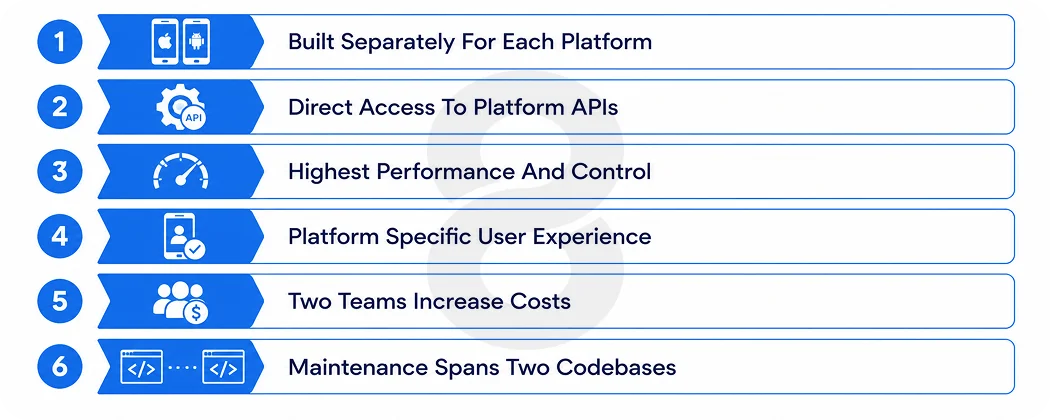
Native app development means building an application for one operating system with that platform’s official languages and tools. iOS and Android apps are two separate projects even when they look identical to the person using them.
How native apps work
A native build runs as two parallel efforts. Each codebase talks to its platform’s APIs directly. It gets tested on its own devices and ships through its own store review. When Apple or Google releases a new capability, native code can use it the day it lands.
Advantages of native apps
Native gives you the highest performance ceiling and the most control over how the app behaves on each device. Interfaces follow the conventions people already know from the rest of their phone. Heavy background work, precise animation, and demanding processing all sit closer to the metal.
Accessibility features and device behavior are easier to get exactly right. One caveat worth stating plainly: none of this makes an app secure by default. Security comes from architecture, authentication, and data handling. It does not come from the word native.
Disadvantages of native apps
Everything gets built twice. That means two codebases and two skill sets on payroll. Testing is duplicated, and features sometimes ship on one platform weeks before the other.
Coordination overhead is real. So is the hiring problem: experienced Swift and Kotlin developers cost more and take longer to find than web developers.
For a product that is mostly forms and content, you can end up paying twice for screens that did not need the platform depth.
Read More: How to Create an App: 8 Steps to Build an App
What is Hybrid App Development
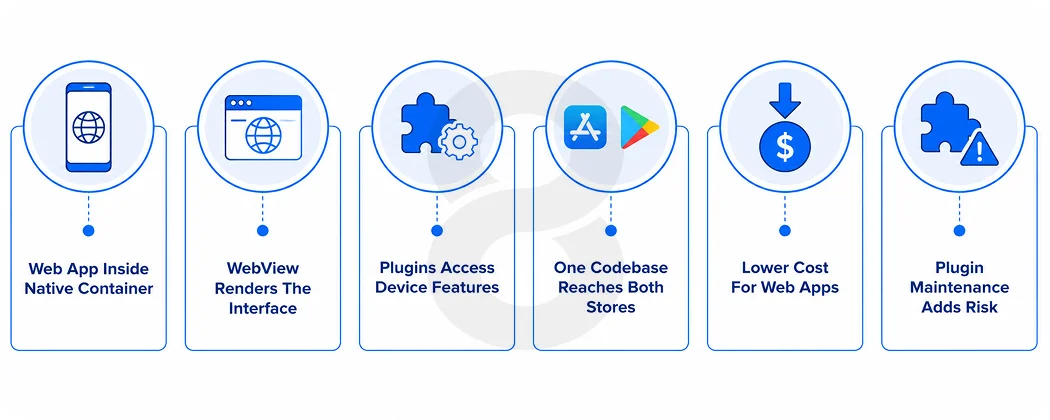
Hybrid app development puts web technologies inside a native application container. The interface is built with HTML, CSS, and JavaScript. A bridge or plugin layer lets the web code reach device capabilities such as the camera, GPS, push notifications, and local storage.
Capacitor’s official documentation describes exactly this model: a web app running in a WebView and talking to native APIs through a bridge.
How hybrid apps work
One web application sits at the center. A native container wraps it on each platform. A WebView renders the interface and plugins handle the device features. The finished product ships through the App Store and Google Play like any other app. Users cannot tell how it was built from the store listing.
When a needed capability has no existing plugin, developers can write custom Swift or Kotlin code and expose it to the web layer. That last point matters because a persistent myth says hybrid apps cannot access native features.
Modern hybrid app development reaches most of the device through mature plugins; the question is how much custom bridging your specific feature list requires.
Advantages of hybrid apps
The commercial case is straightforward. If you already have a web team or an existing web product, most of that skill and code carries over. One codebase reaches both stores, features ship to both platforms at the same time, and routine maintenance happens once instead of twice.
For content-heavy interfaces, catalogs, and business tools, the result is often indistinguishable from native at a meaningfully lower build cost.
Disadvantages of hybrid apps
The WebView is a dependency you do not control. It renders slightly differently across devices and OS versions. Plugins are a second dependency. Some are well maintained and others get abandoned. Every abandoned plugin your app relies on becomes your problem at the next OS release.
Platform-specific polish costs extra effort rather than coming by default. And for genuinely intensive interfaces, heavy animation, or real-time media, the performance ceiling is lower and you will feel it.
Common hybrid technologies
The current standard stack is Ionic with Capacitor, with Angular, React, or Vue as the web layer. Apache Cordova still appears in older projects and is mostly a legacy consideration now. If an agency proposes Cordova for a new build in 2026, ask why.
Before the deeper comparison, here is the short version of the trade in one table.
| Approach | Main Advantages | Main Limitations |
|---|---|---|
| Native | Platform Control, Direct API Access, Highest Performance Ceiling, and Platform-Native User Experience | Two Codebases, Specialized Staffing, and Duplicated Maintenance |
| Hybrid | Shared Web Code, Faster Multi-Platform Delivery, Web Team Reuse, and Efficient for Content-Heavy Builds | WebView Dependency, Plugin Maintenance, and Native Customization May Still Be Required |
Read More: Hybrid App Development: Costs, Benefits & Best Practices
Hybrid Apps and Cross Platform Apps Are Not the Same
Most comparison articles use hybrid and cross platform as interchangeable words. They are not, and the confusion causes real budget mistakes, because the two approaches have different performance profiles, different hiring pools, and different costs. There are three buckets, not two. Hybrid apps render a web interface inside a WebView. Cross-platform app development shares code across platforms but produces native or natively rendered interfaces without a WebView. Native apps use each platform’s toolchain end to end.
Where Flutter and React Native fit
Flutter compiles Dart code and draws its interface with its own rendering engine. React Native drives real native components from JavaScript. NativeScript also drives native UI directly from JavaScript or TypeScript.
None of these run in a WebView so calling them hybrid misprices them in both directions: it understates their performance and overstates how much of your web code they can reuse.
Both Flutter and React Native have ranked among the most widely used frameworks outside the web category in Stack’s survey. They are mainstream choices, and they deserve their own comparison rather than a seat at the hybrid table.
Where Kotlin Multiplatform fits
Kotlin Multiplatform takes a middle path: teams share business logic across platforms while keeping fully native interfaces on each one. It suits organizations that want to stop writing the same logic twice without giving up native UI. For most business owners reading this guide it is a later-stage option. Still, the term is worth knowing so a proposal that uses it does not read as native or hybrid when it is neither.
Native App vs Hybrid App Key Differences
These are the native app vs hybrid app differences that actually move budgets and timelines. Each one starts with the direct answer, then the honest version of when it matters.
Performance and responsiveness
Native has the higher performance ceiling, and most apps never get anywhere near the ceiling. A booking form, a product catalog, a dashboard, or an approval workflow will not show a difference your users notice.
Games, live video, AR, long animated lists, and heavy background processing will, because hybrid routes everything through a WebView and a bridge, and that overhead compounds under load.
A practical test: write down your five heaviest screens before deciding. If none of them involve real-time rendering or intensive processing, performance probably should not drive this decision. If two or more do, it probably should.
User experience and interface
Native follows each platform’s conventions by default, while hybrid gives you one consistent interface everywhere, and either of those can be the feature depending on your audience. iPhone users expect iOS navigation patterns and gestures; Android users expect theirs.
Native delivers both without extra work. Hybrid delivers your brand identically on both platforms, which some businesses actively prefer, and platform-specific behavior becomes extra effort instead.
Accessibility deserves a specific mention here: platform accessibility features integrate more directly in native code, and if accessibility compliance matters to your product, test it early in a hybrid build rather than assuming.
Development cost
Native usually costs more up front because you are paying for two builds. Hybrid usually costs less at launch and more per surprise. The honest breakdown separates initial development, design, testing, plugin and integration work, custom native additions, ongoing maintenance, and rebuild risk, and the two approaches distribute those buckets differently rather than one being uniformly cheaper.
You will see agencies advertise fifty percent savings for hybrid. Treat that number with suspicion: shared code does not mean shared everything, and platform testing, WebView fixes, and plugin gaps all land on the invoice eventually. The cost section below goes deeper on what actually moves the number.
Development timeline
Hybrid reaches both stores faster in most cases but the gap depends on your feature list more than the framework. What actually moves the timeline: how many platforms you target, feature complexity, whether existing web code can be reused, and store review cycles, which take the same time either way. A hybrid build with three missing plugins can take longer than a clean native build of a simple product.
Device and operating system access
Native code reaches every platform API directly. Hybrid reaches most of them through plugins, and the difference only bites at the edges. Camera, GPS, push notifications, biometric login, and local storage are all well covered by mature plugins, and for the majority of business apps that is the whole list.
The edges are things like home screen widgets, live activities, advanced Bluetooth work, health data, and whatever Apple and Google announced at their most recent developer conferences.
New and uncommon APIs need custom native work in a hybrid app, which is possible but adds a bridge to write and maintain. Inventory your integrations honestly before choosing, especially the ones on next year’s roadmap.
Security and compliance
Neither approach is secure or insecure by default. Implementation decides. This is also the section where labels do the most damage. Every real control is an architecture decision that exists in both worlds: secure storage, authentication, API security, and encryption in transit and at rest.
Hybrid adds specific surfaces to audit: the WebView and every third-party plugin in the dependency tree. Native adds a subtler risk. Teams sometimes treat the word native as a security control, and it is not one.
Choosing native also does not make an app HIPAA, PCI DSS, or GDPR compliant. Compliance lives in data handling, process, and infrastructure rather than in the UI framework.
Maintenance and long term ownership
Maintenance is where the launch-day math flips, so treat this as the most important subsection in the article. Native means two codebases tracking two OS release cycles, but nothing sits between you and the platform.
Hybrid means shared fixes ship once, but you also maintain the runtime, the plugins, and the WebView quirks, and abandoned plugins turn into unplanned native work. Hiring shapes the long game too: web developers are easier to find and replace than senior Swift and Kotlin pairs, which favors hybrid for lean teams.
The biggest ownership risk on the hybrid side is architectural: if your native requirements keep growing, you can reach a point where most new work happens in custom native code anyway, and at that point you are paying hybrid overhead for native effort. The migration section below covers what that looks like.
Read More: Hybrid App Development: Costs, Benefits & Best Practices
Which Approach Fits Your Business Type
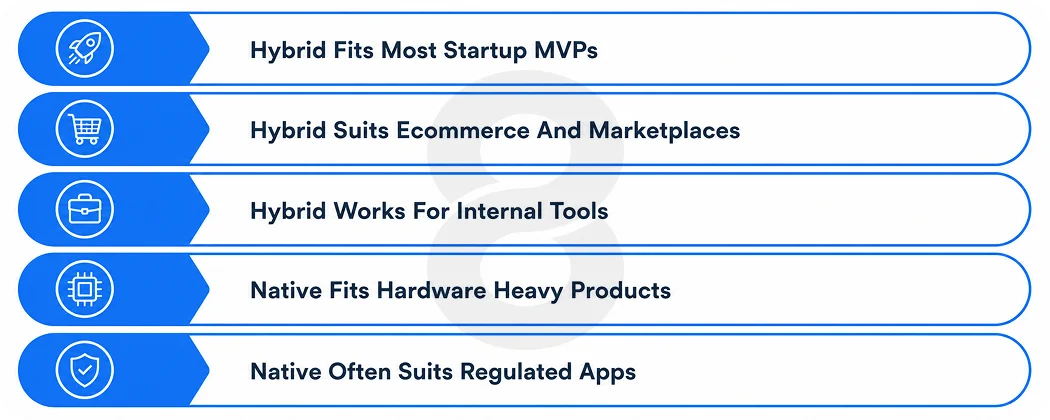
The same technical differences land differently depending on what you are building. Four common cases, without a universal winner.
Startups and MVPs
Hybrid earns its keep when the product is mostly forms, content, accounts, and transactions, validation speed matters, and a web team already exists. Getting a working product into both stores in one budget cycle is a genuine strategic advantage for an unproven idea, and on-demand products often fit this exact profile at MVP stage.
The exception is when performance or hardware is the product itself. If your pitch is real-time AR try-on or professional video tools, a hybrid MVP will demo your idea at its worst, and that is the one thing an MVP cannot afford.
Ecommerce and marketplace apps
Most ecommerce apps are catalogs, search, checkout, and push notifications, and hybrid handles all of that well. Barcode scanning and standard personalization are plugin territory.
The decision tilts native when the shopping experience itself is the differentiator: AR product placement, camera-based search, or interfaces where scroll performance across thousands of items is a conversion factor. Be honest about which kind of store you are running. Most are the first kind.
Internal business tools
Field-service apps, dashboards, inventory tools, and approval workflows are usually authenticated web applications that happen to need a phone icon. Hybrid is the honest fit here, especially when the tool already exists as a web app and employees, are the audience. Paying for two native builds so that staff can file expense reports is rarely defensible spending.
Fintech and healthcare apps
Regulated products raise the stakes on device integrity, biometric authentication, secure storage, and auditability. Architecture matters more than the label, and plenty of regulated businesses run hybrid or cross-platform surfaces successfully.
That said, deep device-integrity work, hardware-backed security features, and unusual compliance requirements are simpler to implement and audit in native code, which is why fintech and healthcare products with serious regulatory exposure tilt native more often than other categories.
If you are in this bucket, involve whoever handles your compliance before choosing an architecture, not after.
Read More: Soft Launch vs Hard Launch: Which App Release Strategy Actually Works?
What Native and Hybrid App Development Cost
Nobody can give you an honest fixed price for native vs hybrid without seeing a feature list, so this section explains what moves the number instead of inventing ranges. Any article that quotes exact dollar figures without knowing your requirements is quoting someone else’s project.
What drives native app cost
The main driver is duplication: two builds, staffed either by two platform teams or one team with both skill sets, which is rarer and priced accordingly. The backend is shared, which is why native does not simply cost double. Platform-specific features, QA on real devices for each platform, and managing two release trains fill out the rest of the invoice.
What drives hybrid app cost
The biggest discount comes from what you already own. Existing web code and an existing web team can remove a large share of the build. From there the cost drivers are plugin availability, because every integration without a solid plugin becomes a small native project, WebView performance tuning for your heavier screens, and testing across devices and OS versions, which hybrid does not escape.
Initial cost vs total cost of ownership
The launch invoice and the five-year bill are different numbers, and they often point in different directions. This table is the shape of the trade.
| Cost Category | Native | Hybrid |
|---|---|---|
| Initial Development | Often Higher, Requiring Two Separate Builds | Often Lower When Code Is Heavily Shared |
| Native Integrations | Built Directly into Each Platform | Uses Plugins or Custom Native Code When Needed |
| Testing | Full Test Coverage for Each Platform | Shared Logic Plus WebView and Device Testing |
| Maintenance | Two Codebases with Separate Release Cycles | Shared Updates Plus Plugin and Runtime Maintenance |
| Rewrite Risk | Lower When Deep Platform Integration Is Essential | Higher If Native Requirements Outgrow the Architecture |
How to Decide Between Native and Hybrid
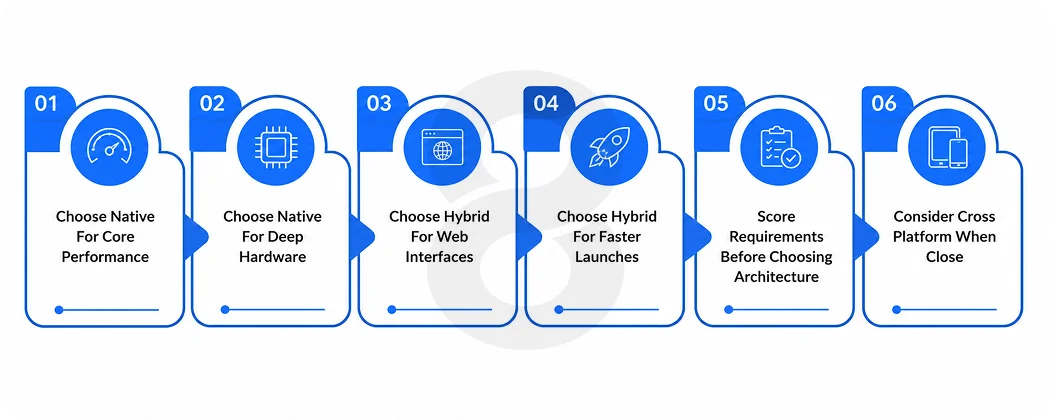
The decision comes down to a short list of conditions, and most products match one column more than the other once the conditions are written down.
Choose native when
- Performance is part of the product’s value, not just a nice property of it
- The app leans on platform APIs, hardware, or background processing as core features
- A platform-specific experience is a competitive advantage with your audience
- The app is expected to be a primary product for five years or more
- The organization can realistically staff and retain expertise on both platforms
Choose hybrid when
- The interface is primarily web-driven: content, forms, accounts, transactions
- Speed to market on both platforms is a hard constraint
- A capable web team or reusable web code already exists
- The integrations you need are covered by stable, maintained plugins
- The product is an MVP, an internal tool, or a supporting channel rather than the flagship
Score your own project
If the lists above did not settle it, weight the criteria. Rate each row from 1 to 5 by how strongly it describes your product, total each half, and compare. The top half argues for native, the bottom half for hybrid.
A clear lead in either half is your answer. Close totals are an answer too: they usually mean cross-platform native deserves a look, or that a short technical discovery is worth buying before you commit a full build budget to anything.
| Criterion | Points Toward |
|---|---|
| Performance Sensitivity of Core Features | Native |
| Dependence on Hardware or Platform APIs | Native |
| Value of Platform-Specific UX to Your Audience | Native |
| Offline and Background Complexity | Native |
| Compliance and Device-Integrity Depth | Native |
| Expected Lifespan of Five Years or More | Native |
| Launch Urgency on Both Platforms | Hybrid |
| Budget Pressure at Build Stage | Hybrid |
| Existing Web Team or Web Codebase | Hybrid |
| Feature Overlap Between Platforms | Hybrid |
Real Examples of Native and Hybrid Apps
The famous examples in this debate are mostly out of date, which is its own lesson. Half the internet still lists major apps as hybrid based on information from 2012 to 2016, long after those companies rebuilt. Before copying any brand’s choice, find a dated engineering post confirming what they actually run today.
The best documented case study is Airbnb. The company adopted React Native in 2016, then announced in June 2018 that it was sunsetting the technology, citing a mix of technical and organizational issues, with support ending through 2018 and winding down in 2019. Two details from that post get skipped in most retellings.
First, Airbnb was moving away from cross-platform code toward native, which says something about what platform depth was worth to a mature product. Second, Airbnb itself later added a note warning readers that the posts reflect the ecosystem of 2017 and should not be the sole reason anyone avoids React Native today. The company that wrote the most cited case study in this debate is telling you not to over-read it.
What these examples actually prove
Less than the articles citing them claim. A brand’s architecture choice reflects its team size, existing codebase, product requirements, and migration history, none of which are yours. A company that can staff full native teams on each platform faces a completely different decision than a five-person startup with three web developers.
The useful lesson from Airbnb is not the verdict but the process: they measured against their own requirements, made a call, and published the reasoning. Do the first two.
Read More: Android vs iOS Development in 2026: Which Platform Should You Actually Build For?
Can You Migrate From Hybrid to Native
Yes, and it happens more often than launch-day plans admit, so it is worth understanding before you choose rather than after. The good news is that a migration is not a restart. Your backend, APIs, and business logic usually survive intact. What changes is the client: the interface gets rebuilt with platform tools, and plugins get replaced with direct implementations.
Sensible migrations move feature by feature, running old and new screens side by side in the same shipped app, so users never see a cliff. The risks concentrate in data migration and release management, which is why the migration plan deserves as much attention as the new code.
Signs a hybrid app has outgrown its architecture
- A growing share of new work is custom native plugin development
- Recurring defects trace back to WebView behavior on specific devices
- Performance complaints cluster in the product’s core workflows, not edge cases
- New platform features sit on the roadmap waiting for plugin support
- The team maintains more platform-specific exceptions than shared code
Signs a native app is costing more than it should
- The iOS and Android apps are near-identical screen for screen
- Device integration is limited to camera, notifications, and storage
- Forms and content dominate the interface
- Feature parity between platforms is chronically weeks behind
- A small team is maintaining every feature twice
Common Mistakes When Choosing an App Approach
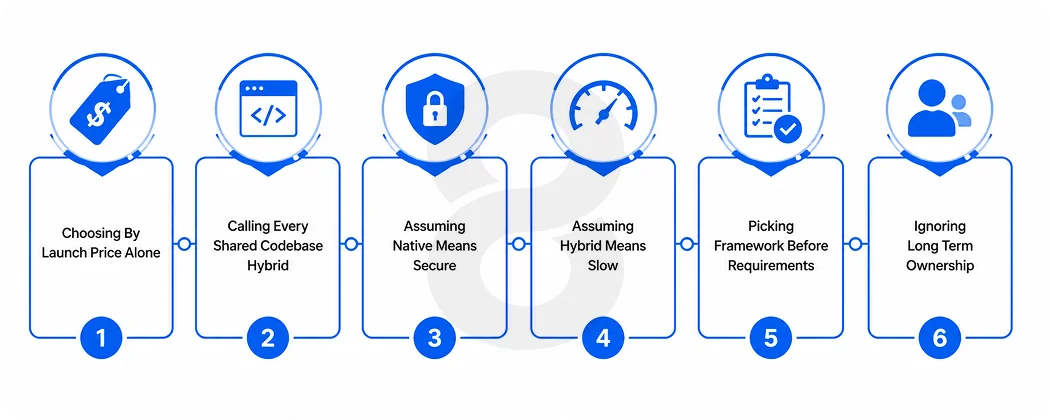
Deciding on initial price alone
The launch invoice is the smallest number in the app’s life. Maintenance, hiring, testing, and future integrations run for years, and they are where the approaches genuinely diverge. A choice that saves thirty percent at build and forces a rewrite in year two saved nothing.
Treating every shared codebase as hybrid
Flutter, React Native, and Kotlin Multiplatform are cross-platform approaches with different performance profiles and hiring pools than WebView-based hybrid. Mixing the categories leads to mispriced proposals and mismatched expectations in both directions. If a proposal uses the terms interchangeably, ask the vendor to be precise. Their answer will tell you something either way.
Assuming native means secure and hybrid means slow
Both are label fallacies. Security is determined by implementation and operations in either architecture, and hybrid performance is entirely adequate for the majority of business apps, which are not pushing any rendering limits. The accurate versions are narrower: native gives more direct control over security-relevant device features, and hybrid has a lower performance ceiling that only some products ever reach.
Choosing a framework before defining requirements
The architecture should fall out of the requirements, and choosing it first inverts the process. Before any framework conversation, write down the user journeys, core features, device integrations, offline behavior, compliance obligations, and performance targets. A one or two week discovery that produces that document is the cheapest insurance in this entire process, and it makes every vendor quote you receive afterward comparable.
Read More: MVP Vs Full Product On-Demand App Strategy: Which One Saves More Money?
How 8ration Chooses the Right App Architecture

8ration builds on both sides of this comparison, which is exactly why we do not argue for one of them. Our teams ship native iOS and Android products, WebView-based hybrid apps on Ionic and Capacitor, and cross-platform builds on Flutter and React Native, so a recommendation from us is a fit assessment.
The process mirrors what this guide has been telling you to do: we start with a short technical discovery that documents your user journeys, integrations, offline behavior, compliance obligations, and performance targets, and the architecture recommendation falls out of that document with the reasoning attached.
RC Event Hub, Circle Track Connections, and Be Line are all live in the App Store and on Google Play right now. Each one came in with a different set of constraints, which is why the architecture conversation happens before scoping rather than after it. If your project sits in the close-call zone the scorecard sometimes produces, an hour of discovery settles it on evidence instead of preference.
Read More: How to Outsource Mobile App Development: Expert Hiring Guide
The Final Verdict on Native vs Hybrid
There is no single winner in the native app vs hybrid app comparison, and any agency that declares one before seeing your requirements is selling you its bench, not an answer. Native is not automatically the premium choice, and hybrid is not automatically the budget one.
Native fits products where platform depth, performance, and device integration sit at the center of the value. Hybrid fits products where shared web code and launch efficiency deliver more commercial value than platform polish.
Cross-platform native is a legitimate third option that this framing usually hides, and for some products it beats both. If the scorecard above came out close, spend a small amount on technical discovery before committing a large amount to mobile app development. A week of discovery is the cheapest line item this project will ever have.