Think about the last time you needed to reach someone fast; you probably opened a chat, not a phone app. With over 3.1 billion messaging app users globally in 2025, real-time communication is now core infrastructure. WhatsApp, Slack, Discord, all built with deliberate architecture and a clear UX vision.
This guide covers everything you need to build a chat app that scales: features, architecture, the development process, and the decisions that matter most.
What Is a Chat Application, and Why Does It Matter in 2026?
Before diving into the development side, it is worth taking a moment to answer a foundational question: what is a chat application?
A chat application is a software platform that enables two or more users to communicate in real time through text, voice, images, video, or files over the internet. At its most basic level, it is a messaging tool. But in 2026, modern chat applications are far more than that. They are collaboration hubs, customer service engines, community platforms, and even commerce channels.
Here is how the landscape breaks down by type:
- One-to-one messaging apps (WhatsApp, Signal) focus on private, often encrypted conversations between individuals.
- Group chat and community platforms (Telegram, Discord) support large-scale, multi-channel communication for communities and creators.
- Enterprise messaging tools (Slack, Microsoft Teams) integrate workflows, bots, file management, and deep software integrations for business teams.
- In-app chat is embedded directly inside products like e-commerce platforms, healthcare apps, or on-demand services.
The reason this distinction matters is simple: the type of app you want to build drives every architectural and feature decision you will make. A healthcare in-app chat has completely different compliance, latency, and security requirements than a consumer social messaging app. Understanding your category first means you build with intention instead of building and pivoting later.
And if you need motivation to proceed, consider this: according to Business of Apps, WhatsApp alone processes over 100 billion messages per day. The demand for real-time communication tools is not just holding steady. It is accelerating.
Core Features Every Chat App Needs (and the Advanced Ones That Set You Apart)
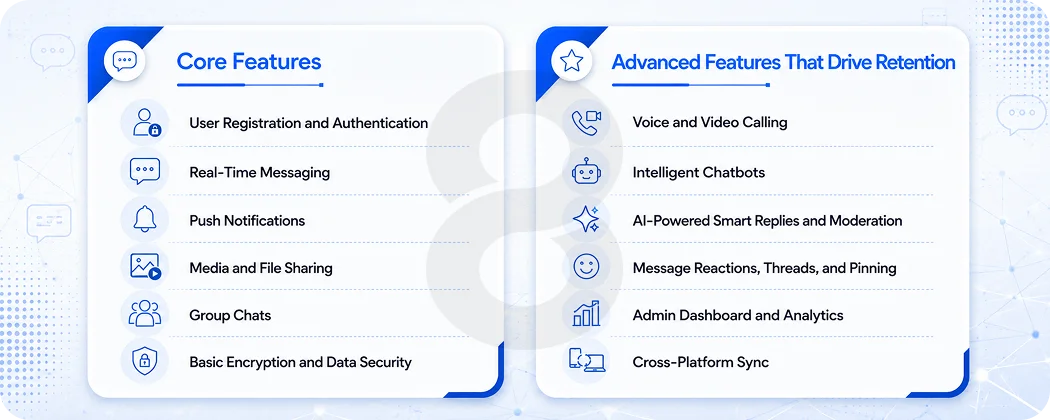
When you set out to build a chat application, feature planning is where most teams either get it right or go off the rails. The most common mistake is trying to build everything at once. Instead, think in two tiers: core features that your app cannot launch without, and advanced features that drive differentiation and retention.
Core Features
User Registration and Authentication
Every user journey starts here. Support email, phone number, or social login (Google, Apple). Add two-factor authentication for security-conscious users. Use JWT (JSON Web Tokens) or OAuth 2.0 for session management. This is non-negotiable.
Real-Time Messaging
This is the heartbeat of your app. Users expect messages to appear instantly, not after a perceptible delay. Real-time delivery is powered by WebSocket connections, which maintain a persistent, bidirectional channel between the client and server. Typing indicators, message status (sent, delivered, read), and timestamps all feed into this layer.
Push Notifications
When users are not actively in the app, push notifications are how you bring them back. Use Firebase Cloud Messaging (FCM) for Android and Apple Push Notification Service (APNs) for iOS. Notifications should be contextual, not spammy, and always respect user preferences.
Media and File Sharing
Text is just the beginning. Users expect to send photos, videos, voice notes, PDFs, and location pins. This requires a dedicated media service with proper compression, storage, and CDN-backed delivery to avoid performance bottlenecks.
Group Chats
Whether it is a family group, a project team, or a 10,000-member community channel, group chat functionality requires thoughtful architecture around roles, permissions, message broadcasting, and moderation tools.
Search and Message History
Users need to find that one file someone shared three weeks ago. Robust message history with fast, indexed search (powered by tools like Elasticsearch) is a feature that quietly determines whether users stick around long-term.
Basic Encryption and Data Security
At a minimum, all data in transit must be encrypted using HTTPS/TLS. For consumer-facing apps, end-to-end encryption (E2EE) is increasingly expected, not optional.
Advanced Features That Drive Retention
Once your core is stable, these features transform a good app into a great one:
- Voice and Video Calling: Built with WebRTC for peer-to-peer audio and video. Integration with a service like Twilio or Agora can accelerate this significantly.
- Intelligent Chatbots: Embedding intelligent chatbots within your chat platform lets you automate support, onboarding, FAQs, and even transactions, reducing operational overhead while improving user experience.
- AI-Powered Smart Replies and Moderation: Machine learning models can surface suggested responses, auto-translate messages, and flag harmful content at scale.
- Message Reactions, Threads, and Pinning: These micro-interaction features improve usability in group contexts dramatically.
- Admin Dashboard and Analytics: For enterprise or B2B apps, admins need visibility into usage patterns, user activity, and performance metrics.
- Cross-Platform Sync: A user who starts a conversation on mobile should pick it up seamlessly on desktop. This requires careful state management and real-time sync across sessions.
Read More: Custom Online Payment Gateway Development: Features, Cost, and Compliance Guide
Chat App Architecture: The Technical Foundation That Makes or Breaks Scalability
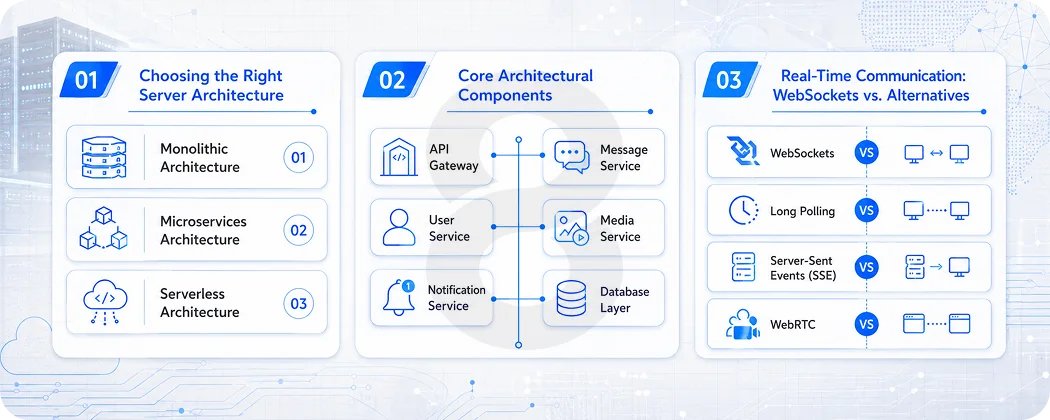
This is where most blog posts go shallow. Architecture is not just a backend concern. It determines whether your app handles 100 users or 10 million, whether it is fast or laggy, and whether it stays online or goes down under load. Getting this right from the start is one of the most valuable investments you can make.
Choosing the Right Server Architecture
There are three primary architectural approaches for chat applications:
Monolithic Architecture
A single codebase handles all services: authentication, messaging, notifications, media, and more. It is simpler to build initially and fine for MVPs or small internal tools. However, as your user base grows, a monolithic system becomes harder to scale and deploy without downtime.
Microservices Architecture
Each function of the app (user management, messaging, media storage, notifications) lives as a separate, independently deployable service. This is the approach taken by large-scale platforms like Slack and Discord. It is more complex to build and manage, but it offers far greater scalability, fault isolation, and flexibility. If you plan to grow, designing with a scalable backend architecture in mind from the start will save you enormously painful and expensive refactoring down the road.
Serverless Architecture
Functions run on demand in the cloud (AWS Lambda, Google Cloud Functions), scaling automatically with traffic. It reduces infrastructure overhead and follows a pay-per-use pricing model. This is a good fit for variable or unpredictable workloads, though it can introduce cold-start latency if not managed carefully.
For most production-grade chat applications, a hybrid approach works well: start with a well-organized monolith or light microservices, then extract high-load services (like real-time messaging or media processing) as independent services once you have evidence of where the bottlenecks are.
Core Architectural Components
No matter which architecture you choose, every chat app is built around the same set of core components:
API Gateway
The front door of your application. Every client request, whether it comes from a mobile app or a web browser, passes through the API Gateway. It handles authentication checks, rate limiting, and routing to the appropriate backend service.
Message Service
The core engine. It receives messages from the sender, validates them, stores them in the database, routes them to the recipient, and updates delivery status. Real-time delivery is handled through WebSocket connections maintained by this service.
User Service
Manages everything related to user identity: registration, login, profile data, contacts, and privacy settings. It is the authority on who a user is and what they are allowed to do.
Media Service
Handles all non-text content. When a user sends an image, the client uploads it to the media service, which compresses it, stores it in a cloud bucket (such as AWS S3), and returns a CDN-backed URL that gets embedded in the message.
Notification Service
Listens for events (new message, mention, missed call) and dispatches push notifications via FCM and APNs. It manages user preferences around notification settings and handles both foreground and background notification scenarios.
Database Layer
Chat applications typically use a hybrid database strategy:
| Data Type | Recommended Technology | Reason |
| Messages | MongoDB, Cassandra | High write throughput, flexible schema |
| User data, relationships | PostgreSQL, MySQL | Structured data, strong consistency |
| Caching (active sessions, recent messages) | Redis | Sub-millisecond read/write |
| Search (message history, user lookup) | Elasticsearch | Full-text search at scale |
Real-Time Communication: WebSockets vs. Alternatives
The protocol choice for real-time messaging matters more than most developers realize. Here is a quick breakdown:
- WebSockets maintain a persistent, full-duplex connection between client and server. This is the gold standard for chat apps because it allows the server to push messages to the client the moment they arrive, without the client needing to ask.
- Long Polling is an older technique where the client repeatedly asks the server if there are new messages. It works but is inefficient and introduces noticeable latency.
- Server-Sent Events (SSE) allow one-way server-to-client streaming. Useful for notifications but insufficient for two-way messaging.
- WebRTC is specifically for peer-to-peer audio and video. It routes media directly between users’ devices, reducing server load for calls.
For most chat applications, WebSockets via Socket.io (Node.js) or a managed service like Pusher or Ably provide the best combination of performance and developer experience.
Recommended Tech Stack for 2026
Here is a practical, production-tested tech stack that works for most chat applications:
| Layer | Technology Options |
| iOS | Swift, SwiftUI |
| Android | Kotlin, Jetpack Compose |
| Cross-Platform | Flutter, React Native |
| Web Frontend | React.js, Vue.js + Socket.io |
| Backend | Node.js (real-time), Python (AI features), Go (high concurrency) |
| Real-Time Protocol | WebSockets, WebRTC (voice/video) |
| Message Queue | Apache Kafka, RabbitMQ |
| Cloud Infrastructure | AWS, Google Cloud, Azure |
| Storage | AWS S3, Google Cloud Storage |
| CI/CD | GitHub Actions, Docker, Kubernetes |
How to Build a Chat App: The Step-by-Step Development Process
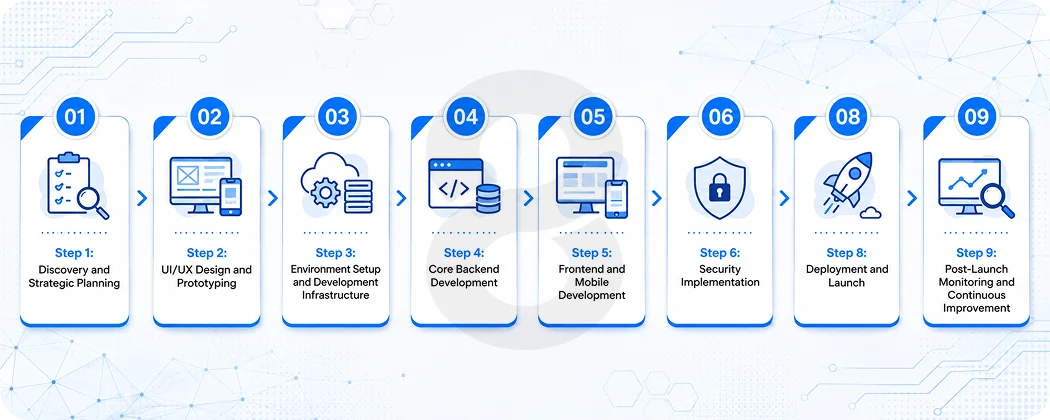
With architecture and features mapped out, here is how the actual build process unfolds. This is the process 8ration follows when partnering with clients to build scalable mobile apps and real-time communication platforms.
Step 1: Discovery and Strategic Planning
Before a single line of code is written, the most important work happens here. Define your target user, your primary use case (consumer messaging, enterprise communication, in-app chat, etc.), your platform priorities (iOS-first, Android-first, web), and your monetization model.
Equally important is competitive analysis: what do existing apps do well, and where is the gap your product fills? The clearer your answers here, the more efficient every subsequent step will be.
Also during this phase, document your technical requirements: expected concurrent users, message volume, data residency requirements, and compliance considerations (HIPAA for healthcare, GDPR for European users, etc.).
Step 2: UI/UX Design and Prototyping
Chat app design deceptively looks simple. In reality, designing an interface that feels fast, intuitive, and comfortable for extended daily use is genuinely difficult. Invest in UX research: look at how users behave in apps they already love, and understand why.
Build interactive prototypes early and validate them with real users before development begins. Changes at the prototype stage cost almost nothing. Changes after development is well underway cost a great deal.
Key design principles for chat apps: minimize friction for the core action (sending a message), use familiar patterns (chat bubbles, timestamps, read receipts), optimize for one-handed mobile use, and ensure accessibility from the start.
Step 3: Environment Setup and Development Infrastructure
Set up version control (Git), define your branching strategy, configure your development, staging, and production environments, and implement a CI/CD pipeline. These are not exciting, but they are the foundation of a professional, maintainable build process.
Step 4: Core Backend Development
This is where the real work begins. Build your API Gateway, set up your database schemas, implement authentication, and stand up your WebSocket server for real-time messaging. The message schema is particularly important to get right early:
message_id        — Unique identifier
conversation_id   — Links message to a chat thread
sender_id         — Who sent it
content           — Encrypted message body
timestamp         — When it was sent
message_type      — text | image | video | file | audio
delivery_status   — sent | delivered | failed
read_status       — unread | read
Build message queuing from the start. A message queue (Redis Pub/Sub, Kafka, or RabbitMQ) ensures messages are not lost when a recipient is offline and provides the buffer needed to handle traffic spikes without data loss.
Step 5: Frontend and Mobile Development
With the backend APIs ready, mobile and web development can proceed in parallel. Build your chat UI components: conversation list, message thread view, composer, media previews, and notification handling.
For mobile chat app development specifically, performance optimization is critical. Use lazy loading for message history, optimize image rendering, implement efficient state management (Redux for React Native, ViewModel/LiveData for Android), and test relentlessly on lower-end devices where performance issues surface first.
Step 6: Security Implementation
Security is not a feature you add at the end. It is a discipline woven through every layer of development. Key security implementations include:
- End-to-end encryption using protocols like Signal Protocol (the same one powering WhatsApp and Signal)
- TLS/HTTPS for all data in transit
- JWT-based authentication with short expiry windows and refresh token rotation
- Input sanitization to prevent injection attacks
- Rate limiting at the API Gateway to prevent abuse
- GDPR/CCPA compliance for user data handling, deletion, and consent
Step 7: Quality Assurance and Testing
Thorough testing is what separates apps that users trust from apps that let them down at the worst moment. Your QA process should cover:
- Unit testing of individual functions and components
- Integration testing of API endpoints and database operations
- End-to-end testing of complete user flows (send a message, receive a notification, etc.)
- Load and performance testing using tools like JMeter or Locust to simulate thousands of concurrent users
- Security penetration testing before any public launch
Step 8: Deployment and Launch
Deploy to a scalable cloud architecture using containerization (Docker) and orchestration (Kubernetes) so you can scale horizontally as user load increases. For mobile apps, prepare your App Store and Google Play submissions well in advance, as review times can be unpredictable.
Consider a phased rollout: launch to a limited beta group first, monitor closely, address issues, then gradually expand. This approach dramatically reduces the risk of a reputation-damaging public launch failure.
Step 9: Post-Launch Monitoring and Continuous Improvement
The launch is not the finish line. It is the starting line. After launch, instrument your app with performance monitoring (Datadog, New Relic), error tracking (Sentry), and analytics (Mixpanel, Amplitude) to understand how users actually behave versus how you expected them to.
Collect user feedback systematically, prioritize improvements based on usage data, and ship updates on a regular cadence. The best messaging apps in the world are in a permanent state of iteration.
Common Challenges in Chat App Development (and How to Overcome Them)
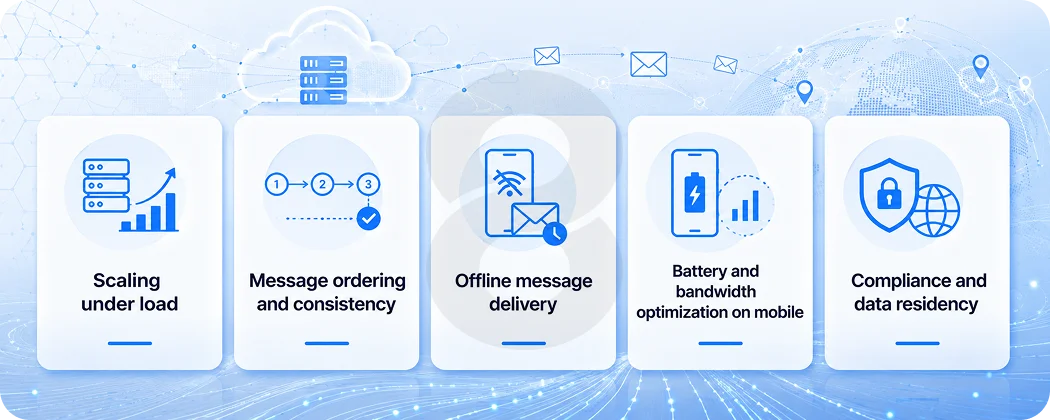
Even experienced teams run into the same set of problems when building messaging apps. Here is how to navigate the most common ones:
Scaling under load
A chat app that works beautifully for 1,000 users can buckle at 100,000. Design for horizontal scalability from the start: stateless backend services, distributed databases, and load balancing. Do not wait until you need to scale to think about how you will do it.
Message ordering and consistency
In a distributed system, messages from different devices can arrive at the server out of order. Use server-side timestamps as the authoritative ordering source, and implement conflict resolution logic for edge cases.
Offline message delivery
When a recipient is not connected, messages need to be queued and delivered reliably when they come back online. Message queues (Kafka, RabbitMQ) are the standard solution.
Battery and bandwidth optimization on mobile
WebSocket connections consume battery. Use heartbeat intervals wisely, implement reconnection logic with exponential backoff, and compress message payloads to reduce bandwidth usage for users on metered connections.
Compliance and data residency
For enterprise customers or regulated industries, you may need to store data in specific geographic regions. Plan your cloud infrastructure with data residency requirements in mind early, not as an afterthought.
Read More: Mobile App Development Challenges: Avoiding Costly Pitfalls in Your Next Project
What Does It Cost to Build a Chat App?
Cost varies significantly based on scope, team, and geography. Here is a realistic breakdown:
| App Tier | Timeline | Estimated Cost | Key Features |
| MVP / Basic Chat | 3 to 4 months | $25,000 to $50,000 | Text messaging, auth, basic groups |
| Mid-tier App | 5 to 7 months | $50,000 to $100,000 | Media sharing, voice calls, notifications |
| Full-featured Platform | 8 to 12+ months | $100,000 to $300,000+ | E2EE, video, AI, enterprise features |
Monthly infrastructure costs (cloud hosting, databases, CDN, third-party APIs) typically range from $500 to $8,000+ depending on user volume and feature complexity.
One cost-effective strategy: use pre-built chat SDKs like Sendbird, Stream Chat, or PubNub for your MVP, validate your concept, then invest in custom infrastructure as you scale. This approach can reduce initial development time by 40 to 60 percent.
For those evaluating a web app development approach versus native mobile, cross-platform frameworks like Flutter or React Native can also significantly reduce cost without a meaningful sacrifice in user experience for most chat use cases.
Read More: Online Payment App Development Cost in 2026
Future Trends Shaping Chat App Development
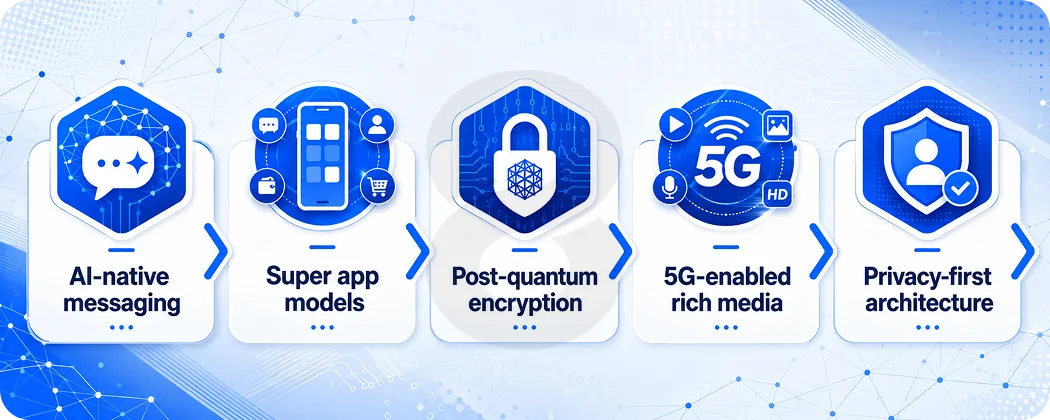
Staying current on where messaging technology is heading helps you make architectural decisions today that will age well rather than create technical debt.
AI-native messaging
The next generation of chat apps will not just support AI as a bolt-on feature. AI will be woven into the core experience through contextual smart replies, real-time translation, automated moderation, and conversational interfaces powered by large language models.
Super app models
Particularly in emerging markets, chat platforms are evolving into all-in-one ecosystems that include payments, commerce, services, and mini-apps, much like WeChat has done in China.
Post-quantum encryption
As quantum computing matures, current encryption standards will eventually become vulnerable. Forward-thinking teams are beginning to evaluate post-quantum cryptographic protocols for long-lived messaging platforms.
5G-enabled rich media
Ultra-low latency 5G connectivity is enabling richer in-app experiences: high-definition group video, real-time AR effects, and spatial audio in communication apps.
Privacy-first architecture
According to a McKinsey report, consumer trust is increasingly tied to data privacy. Apps that are built on zero-knowledge or privacy-by-design principles will have a meaningful competitive advantage in the coming years.
Read More: The Future of Mobile: Trends Every App Development Agency Should Be Following
Why Partner with 8ration to Build Your Chat App?
Building a production-ready chat application is genuinely hard. It requires deep expertise across backend engineering, real-time systems, mobile development, security, and UX design, all working in tight coordination.
At 8ration, we bring 10+ years of experience delivering custom software solutions across industries. Our team has built and launched real-time communication platforms, in-app messaging features, and enterprise collaboration tools for clients around the world. We do not just write code. We architect systems that scale, design experiences that retain users, and ship products that actually get used.
Whether you are starting from a blank slate, rebuilding an existing platform, or adding real-time communication features to an existing product, we can help you do it right the first time.
Get in touch with 8ration today and let us turn your vision into a product your users will love.
Final Thoughts!
Knowing how to build a chat app is not just about picking a framework or copying features from WhatsApp. It is about making the right decisions at every layer: understanding your user deeply, choosing a scalable architecture, implementing security that earns trust, and running a development process that delivers quality without burning out your team.
The global demand for real-time communication tools is not slowing down. If anything, it is intensifying. Businesses that invest in building their own messaging platforms gain control over their user experience, their data, and ultimately their competitive positioning in a world where communication is at the center of everything.
The path is clear. Build with intention. Scale with architecture. Launch with confidence.