Magento development is the process of building and maintaining online stores on Magento Open Source or Adobe Commerce. It covers everything from storefront design and catalog architecture to custom checkout logic, third party integrations, and mobile shopping apps that run on the same commerce backend.
If you’re reading this, you’re probably somewhere between “we’ve outgrown our current platform” and “someone quoted us a number for Magento and we don’t know if it’s fair.” This guide is for that exact spot. We’ll walk through what Magento development actually involves and how to avoid the mistakes that turn a store launch into an eighteen-month rebuild.
One number worth sitting with before we start. Online sales now account for more than 20% of total global retail sales, with worldwide ecommerce reaching $6.4 trillion. The platform your store runs on is no longer a technical detail. It’s the foundation of a serious revenue channel.
What is Magento Development?
Magento development goes well beyond installing the platform and choosing a theme. A functional store needs a clear catalog structure and a properly configured checkout. Payments and shipping must work without friction. The store also needs regular performance tuning, security updates and custom code that fits the way the business operates.
Magento is still widely used across ecommerce. BuiltWith tracks well over 100,000 live Magento stores worldwide, with the platform appearing frequently among larger merchants that need more control over their storefront, backend systems, and integrations than many hosted platforms provide. The work breaks into a few distinct disciplines.
Magento ecommerce development
Magento ecommerce development means building the entire sales system. It covers the product catalog and customer accounts. It also handles everything else from cart, checkout and payments to shipping, promotions and order management.
Each part comes with its own setup choices. Get those choices wrong at launch, and the store may lose customers without making the reason obvious.
Custom Magento development
Custom Magento development covers everything standard configuration can’t handle. The custom pricing rules for different customer groups. Approval workflows for B2B purchasing. Subscription billing. Marketplace functions where third parties sell through your store. Industry-specific checkout requirements that no off-the-shelf extension was built for.
This is where Magento earns its reputation, for better and worse. The platform will let you build almost anything. Whether you should is a different question, and we’ll get to it in the mistakes section.
Magento web development
Magento web development covers the storefront customers use in a browser. It may involve a responsive Magento theme or a fully custom frontend. Some businesses choose a headless setup instead. In that case, the storefront runs as a separate application and connects to Magento through APIs.
Adobe’s developer documentation treats GraphQL and REST APIs as standard parts of Commerce development. API-based storefronts are now a normal Magento option rather than a niche approach.
Magento app development
Magento app development can refer to several different products. It may mean a native app built for iOS or Android. It can also mean a cross platform app developed with Flutter or React Native and connected to the Magento backend.
Another option is a progressive web app. Some businesses also build a headless storefront that works like an app inside the browser. Each approach is valid. However, the costs and maintenance requirements are very different. We compare those options later in this guide.
| Development Type | Best Suited For | Typical Work Involved |
|---|---|---|
| New Magento Store | Businesses Launching or Replatforming | Architecture, Theme, Catalog & Checkout Development |
| Custom Magento Development | Stores with Unique Business Requirements | Custom Modules, Workflows & Backend Logic |
| Magento Web Development | Browser-based Storefront Experiences | Responsive Themes, Headless Builds & Progressive Web Apps (PWAs) |
| Magento App Development | Mobile-first Customer Experiences | Native, Cross-platform & PWA Applications |
| Magento Integrations | Businesses with Existing Systems | ERP, CRM, PIM, Payment & Shipping Integrations |
Why Magento Ecommerce Development Still Wins for Complex Stores
Plenty of platforms will get a simple store online faster than Magento. That’s not the argument. The argument is what happens when your requirements stop being simple.
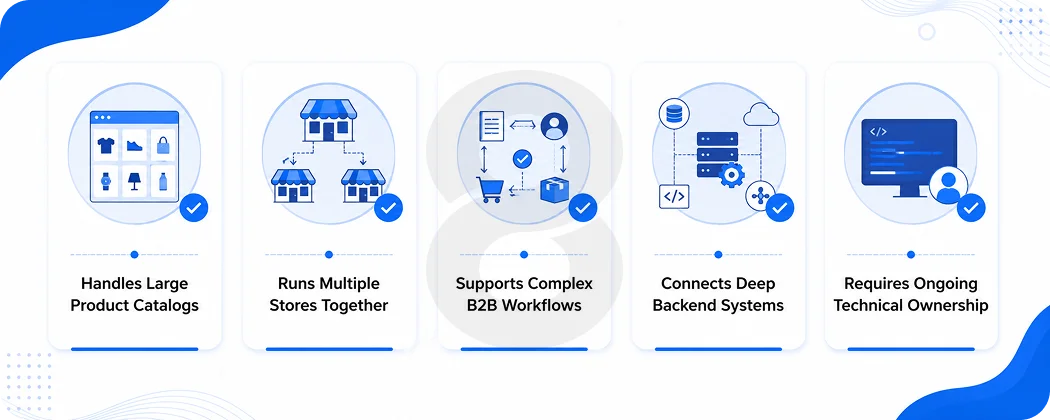
Magento handles large catalogs without falling over. It runs multiple storefronts, brands, currencies, and languages from one installation. It supports B2B features like company accounts, negotiated pricing, and requisition lists that most hosted platforms bolt on as afterthoughts.
And because the codebase is open, a development team can change anything, which is the whole point for businesses whose operations don’t fit a template.
The catch is that all of this capability assumes someone competent is maintaining it. Magento is a platform you invest in… not one you set and forget. Businesses that treat ecommerce development as an ongoing operation rather than a one-time project are the ones that get the return.
Magento Open Source vs Adobe Commerce
Both products share the same foundations. The differences are about who carries the operational load and what you pay for.
Magento Open Source is free to download and gives you the complete framework. You handle hosting, security patching, extensions, and everything else. It suits businesses with capable technical partners and requirements that don’t need enterprise tooling.
Adobe Commerce is the commercial version of Magento. It comes with B2B tools and advanced merchandising features. It also offers cloud hosting options and access to the wider Adobe ecosystem.
Its licensing cost rises with revenue. The platform is best suited to larger businesses that value enterprise support more than lower licensing costs.
| Choose Magento Open Source When | Choose Adobe Commerce When |
|---|---|
| You Want Full Control of the Codebase | You Need Enterprise Support & SLAs |
| Your Team or Agency Manages Hosting & Security Patches | You Want Managed Cloud Infrastructure |
| Requirements Are Focused & Well-defined | You Run Complex B2B or Multi-brand Operations |
| Controlling Licensing Costs Is a Priority | Built-in Enterprise Features Are More Cost-effective Than Building Them Yourself |
Most mid-sized businesses start on Open Source with a strong development partner. The move to Adobe Commerce usually happens when B2B features or organizational scale justify the license, and it rarely makes sense before that.
Read More: Hire Magento Developers for Ecommerce Platforms
Magento Isn’t Right for Everyone
Here’s the section most agency guides skip, because it costs them leads. We’d rather you make the right call.
Magento works well when you have:
- A large or complicated product catalog
- Multiple storefronts, brands, or regional sites
- B2B selling with custom pricing and account structures
- Heavy integration needs with ERP, warehouse, or PIM systems
- Workflows that no hosted platform supports out of the box
Magento is probably the wrong fit when:
- Your catalog is small and your processes are standard
- You need to launch fast with minimal technical involvement
- There’s no budget for ongoing maintenance after launch
- A hosted platform’s built-in features already cover your needs
If you land in the second column, something like Shopify or WooCommerce will get you to market faster and cheaper. Magento’s power is real, and so is its overhead. Paying for capability you’ll never use is just an expensive way to feel enterprise-grade.
Read More: Magento vs Shopify: Which Ecommerce Platform Is Best?
Five Custom Magento Development Services Businesses Ask For Most
Custom Magento development usually starts with a specific business problem. A company may need a new store, faster frontend, custom checkout flow, or reliable connection with its existing software.
The services below cover the requests that come up most often. Some projects need only one of them. Larger builds usually combine several.
1. New store development
The full build. Discovery, architecture planning, catalog structure, theme, checkout, payment configuration, and launch. The quality of the discovery phase predicts the quality of everything after it, because decisions about catalog structure and integrations are cheap to change on a whiteboard and expensive to change in production.
2. Theme and frontend development
Custom themes, responsive layouts, and conversion-focused frontend work. Magento’s frontend has a learning curve, and it shows in the wild. Stores with thoughtful frontend engineering load faster, convert better, and cost less to modify later.
3. Module and extension development
When an off the shelf extension exists and it’s well maintained, use it. When it doesn’t or when three extensions would need to be duct-taped together, a custom module is the cleaner path.
One honest warning here. Extension bloat is the most common disease in Magento stores. Every extension is code someone else wrote, running in your checkout, that needs to survive every future upgrade.
4. API and third party integrations
Magento stores rarely operate on their own. An ERP handles inventory and finance. A CRM stores customer data. A PIM manages product information. The store may also connect with payment gateways and shipping carriers.
Tax software and analytics tools often form part of the same setup. Good system integration keeps data moving between these platforms. Without it, staff may have to enter the same information manually every morning.
5. Migration, upgrades, and maintenance
Replatforming from another system, moving legacy Magento 1 stores that are still out there running without security support, or keeping a current store patched and fast. Migration projects live or die on data integrity and SEO preservation.
Losing ten years of URL equity during a replatform is a self-inflicted wound that’s entirely avoidable with proper redirect planning.
Magento Web Development vs Magento App Development
A Magento website runs in the browser. A Magento app puts your store on the customer’s home screen, connected to the same backend. A PWA sits between the two. The right choice depends on how your customers actually shop, and the data says mobile deserves the attention.
Research from Capital One Shopping shows that 59% of worldwide ecommerce sales now come from mobile devices, with mobile ecommerce totaling an estimated $2.51 trillion.
Responsive Magento web development
One storefront that adapts across desktop, tablet, and mobile. Lowest cost, single codebase, no app store involvement. For most stores, a fast responsive site is the correct starting point, and a slow one is the first thing to fix before considering anything fancier.
Headless Magento and PWA development
The frontend gets decoupled from Magento’s backend and communicates through APIs. You get more frontend freedom, faster perceived performance, and app-like behavior in the browser. The tradeoff is real. Headless adds architectural complexity and a second codebase to maintain. It should solve a problem you actually have, not a problem a conference talk told you about.
Native and cross-platform Magento apps
A dedicated mobile app makes sense when customers buy repeatedly, when push notifications drive measurable revenue, or when loyalty programs need a home. Builds range from fully native iOS and Android apps to cross-platform development with Flutter or React Native, which covers both stores from one codebase at lower cost.
| Factor | Responsive Web | Headless / PWA | Native or Cross-platform App |
|---|---|---|---|
| Relative Cost | Lowest | Moderate to High | Highest |
| Time to Launch | Fastest | Moderate | Longest |
| User Experience | Good | App-like Experience in the Browser | Best for Repeat Buyers |
| Maintenance Load | One Codebase | Two Systems | Two to Three Codebases |
| Best For | Most Stores | Performance-critical Brands | High-frequency Purchase Businesses |
How the Magento Development Process Works
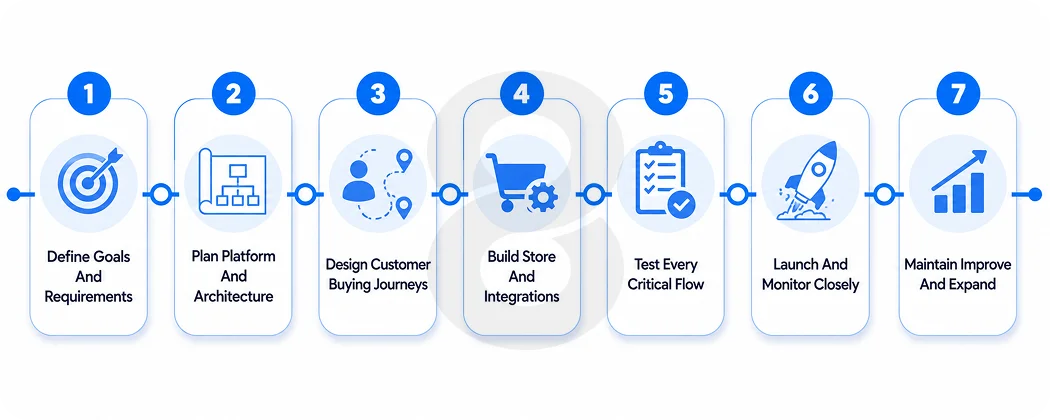
The exact order may change from one project to another. Still, some decisions need to come first. The team should settle the platform, integrations and data structure before spending time on polished screens.
That order matters. A design may look finished but it will need to be reworked if the catalog structure or backend systems cannot support it.
1. Discovery and requirements
Discovery turns a rough idea into a practical project plan. The team starts by defining the business goals and the shape of the catalog. It also identifies the customer groups and target markets. Internal workflows need the same attention.
This stage should answer a few basic questions. Where do product prices come from? Which system controls stock? Do retail and wholesale customers follow different buying flows? Does staff still move data by hand?
The team also lists every system Magento must connect with. That may include an ERP or CRM. A PIM may manage product data. Payment and shipping providers also need to be included.
Skipping discovery usually leads to vague estimates and late changes. A decision that takes an hour to change on a whiteboard may take weeks to fix after development begins.
2. Platform and architecture planning
The next step is deciding how the store will work behind the scenes. The team chooses between Magento Open Source and Adobe Commerce. It also selects the hosting setup. Another decision is whether the storefront will use a traditional Magento theme or a headless frontend.
Each system needs a clear job. Magento may manage orders. The ERP may control prices and inventory. A PIM may own product descriptions and images. Without clear ownership, the systems may overwrite each other’s data.
The architecture plan should also cover search and caching. Security and backups need to be included as well. The team must think about deployment and future traffic before the store goes live. A setup that works for 5,000 products may struggle with 500,000. Planning for growth early is cheaper than rebuilding the system later.
3. UX and storefront design
The design stage focuses on how customers use the store. The team maps the main journeys first. That includes navigation and search. It also covers product pages, cart, checkout, and customer accounts.
Complex catalogs need extra care. A customer may need to compare technical details. Another may search by model number. Wholesale buyers may need quotes or account-specific pricing.
Mobile design should not be treated as a smaller desktop layout. Filters need to be easy to use on a phone. Product options and checkout forms should also fit a smaller screen. Real product data should be used during design. Long titles and missing images often expose problems that sample content hides.
4. Development and integrations
Development begins once the architecture and designs are approved. Frontend developers build the theme or headless storefront. Backend developers configure Magento and create custom modules.
The team then connects Magento with outside systems. These may include payment services or shipping platforms. ERP and warehouse systems may also be part of the setup. A working API connection is only the starting point. Each integration needs logs and retry rules. The team also needs alerts when data stops moving.
Data migration often runs alongside development. Products and customer records are moved in test batches first. Orders and website content may also need to be transferred. Version control and code review should be standard. The project also needs a staging environment. These practices make deployments safer and future maintenance easier.
5. Testing
Testing should cover normal customer activity and the cases where something fails. Functional testing checks product pages and customer accounts. It also covers pricing, promotions, cart behavior, and checkout.
Payment testing should include successful transactions and declined cards. Refunds and interrupted payments need to be tested too. Security testing reviews permissions and common weaknesses. Performance testing checks how the store behaves under traffic. Device testing confirms that the storefront works on different browsers and phones.
Integrations need separate testing. The team should see what happens when an inventory update is late. It should also test unavailable shipping services and incorrect data from another system.
The client then completes user acceptance testing. This confirms that the finished store matches the agreed requirements. Testing before launch is cheaper than fixing a broken checkout while customers are trying to place orders.
6. Launch and monitoring
Launching a Magento store involves more than moving files to a live server. The team completes the final data transfer and checks redirects. Analytics must be verified. Payment settings and email notifications also need review. Shipping and tax rules should be tested again in the live environment.
The team should place real test orders before calling the launch complete. This confirms that payments reach the correct account. It also shows whether order data moves through the connected systems.
The first few weeks need close monitoring. The team should watch error logs and page speed. Checkout failures and integration queues need attention as well. A rollback plan should be ready before deployment. If a serious problem appears, the team needs a safe way to restore the previous version.
7. Maintenance and growth
A Magento store still needs technical work after launch. Magento releases security patches and platform updates. Extensions also change over time. External services may update their APIs without much warning. Someone needs to test and apply those changes.
Maintenance also covers backups and bug fixes. Performance should be reviewed regularly. Small issues are easier to fix before they pile up. Growth work may include new payment methods or customer groups. The business may add markets, integrations, or mobile features. Analytics can also show where the buying journey needs improvement.
The first launch is only the first working version. A good maintenance plan keeps the store secure and gives the business room to grow without rebuilding the foundation.
Read More: Top 10 eCommerce Solution Providers for the B2B Industry
How Much Does Magento Development Cost?
Honest answer first. There is no useful single price for Magento development, because a theme refresh and a multi-store Adobe Commerce build with ERP integration are not the same project wearing different hats.
What we can tell you is what moves the number:
| Cost Driver | Why It Matters |
|---|---|
| Magento Edition | Adobe Commerce Adds Licensing Costs on Top of Development |
| Catalog Size & Complexity | Configurable Products, Bundles & Attributes Significantly Increase Setup Work |
| Custom Modules | Each Module Must Be Designed, Developed, Tested & Maintained Through Future Upgrades |
| Number of Integrations | ERP, CRM & PIM Integrations Often Become Standalone Projects |
| Data Migration | Well-organized Data Migrates Quickly, While Poor-quality Data Requires Extensive Cleanup |
| Frontend Approach | Development Complexity Varies Between Responsive Themes, Headless Builds & Mobile Apps |
| Multi-store or Multilingual Setup | Each Additional Storefront Increases Configuration, Translation & Content Management Effort |
Then there’s the part quotes often leave out. Ongoing costs include hosting, any licensing, security patching, extension renewals, and support. A realistic Magento budget accounts for the store’s life, not just its birthday.
5 Magento Development Mistakes That Quietly Kill Stores
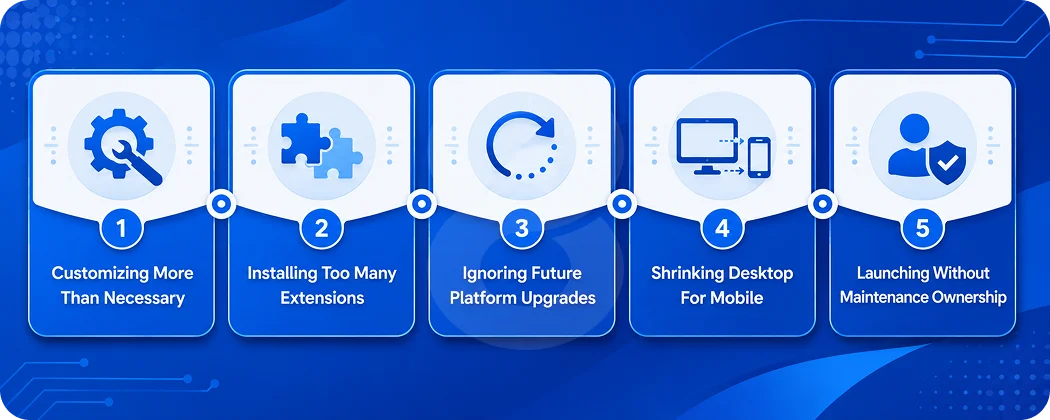
The most expensive Magento failures rarely happen overnight. They begin with small technical decisions that seem harmless at the time.
Months later, the store becomes slower. Updates take longer. Simple changes cost more than they should. By then, the original mistake may be buried under years of custom code and extensions.
Customizing more than necessary
Every customization creates future work. A custom module may solve a problem today. It will still need to be tested during the next Magento update. It may also affect pricing or checkout in ways that were not obvious when it was built.
Experienced Magento teams do not write custom code for every request. They first check whether the platform already supports the requirement. A reliable extension may also solve it without adding another codebase to maintain.
Custom development makes sense when the feature is specific to the business. It should not be the default answer. Before approving a custom module, ask who will maintain it. Also ask how it will be tested during upgrades. If nobody owns those tasks, the module may become a problem later.
Installing too many extensions
Extensions can save time. They can also turn a clean Magento store into a fragile one. Two extensions may change the same checkout step. Another may duplicate a feature that already exists elsewhere in the store. These conflicts often appear only under a specific set of conditions, which makes them difficult to reproduce.
Extensions can also slow down the site. Each one adds more code and another vendor dependency. Every module needs updates and compatibility checks. Audit the store before installing anything new. Remove extensions that are no longer used. Avoid adding three tools when one maintained module can handle the job.
Every extension should have a clear purpose. Someone should also be responsible for tracking its updates.
Ignoring future upgrades
Custom code may work well on the current Magento version and fail during the next upgrade. This usually happens when developers change core files or ignore Magento’s coding standards. Poor documentation makes the problem worse. A new development team may spend days trying to understand the code before it can even estimate the repair.
The safest custom work uses Magento’s supported extension points. Core files should remain untouched. Upgrade planning should begin during development. The team should document each custom module and the parts of Magento it affects. Automated tests can then check important flows after an update.
Regular upgrades are usually manageable. Waiting several years turns a routine update into a migration project.
Treating mobile as a shrunken desktop site
A responsive layout does not automatically create a good mobile store. Desktop navigation may become awkward on a phone. Large filters can cover the screen. Product options may be difficult to select. Long checkout forms can make a simple purchase feel like work.
Mobile shoppers also have less patience for slow pages. Heavy images and unnecessary scripts become more noticeable on weaker connections. Test the store on real phones rather than only resizing a browser window. Check the search experience and product filters. Complete several purchases from start to finish.
Pay close attention to forms and error messages. Customers should be able to fix a mistake without losing the information they already entered. Mobile is part of the main buying journey. It should be designed that way from the beginning.
Launching without a maintenance plan
A Magento project does not end when the store goes live. Magento releases security patches. Extensions need updates. Payment providers and shipping services may change their APIs. Any of these changes can affect the store without warning.
A maintenance plan should name the team responsible for updates and monitoring. It should also define how quickly urgent problems will be handled. Backups need to be tested rather than simply scheduled. The team should review error logs and failed integration jobs. Page speed and checkout performance also need regular checks.
Without clear ownership, small issues remain unnoticed. They eventually become failed orders or security risks. A store that processes customer and payment data cannot afford to stay unpatched.
Read More: How to Build an Ecommerce Inventory Management System
How to Choose a Magento Development Company
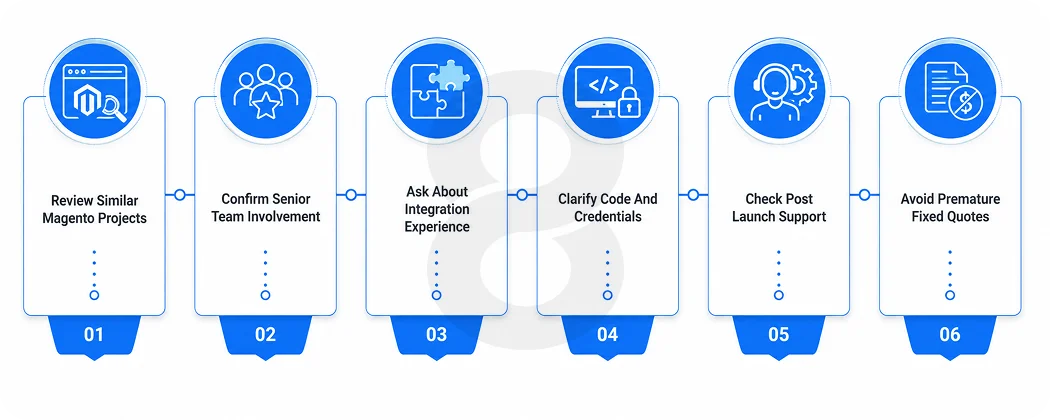
Pick based on relevant Magento work, technical ownership, and post-launch support. Not the length of the technology list on an agency’s homepage.
- Questions worth asking any candidate:
- Can you show live Magento stores with similar catalog size and integrations to ours?
- Will the senior people in these sales calls actually work on our project?
- How do you handle ERP, payment, and inventory integrations, specifically?
- Who owns the source code, repositories, and credentials at handover?
- What happens after launch when checkout breaks at 2 am?
Red flags: a fixed quote before your requirements are understood, no live work to review, heavy reliance on unsupported extensions, no upgrade plan, and vague answers about code ownership.
Read More: Payment App Development Cost Breakdown (2026 Guide)
How 8ration Approaches Magento Development

8ration builds and maintains ecommerce stores on Magento, Shopify, WooCommerce, and BigCommerce. That broader experience matters. The team can recommend another platform when Magento is not the right fit instead of forcing every project into the same solution.
For Magento projects, 8ration handles new store development and custom modules. The team also manages integrations, migrations, and ongoing maintenance. It works with both Magento Open Source and Adobe Commerce.
Projects that need a mobile app stay under the same delivery team. The app and the store connect to one backend. This avoids the usual problem of two vendors blaming each other when something breaks.
Every project begins with discovery. The team then defines the scope, timeline, and estimate before development starts. Clients receive full ownership at handover. That includes the source code, repositories, documentation, and credentials.
8ration also works on ecommerce products outside Magento. That helps keep its platform advice practical. The recommendation is based on what fits the business rather than what the team happens to sell.