Mobile app maintenance is the ongoing work of keeping a live app secure, stable, and compatible after release. It covers bug fixing, security patching, crash monitoring, OS and SDK updates, API and backend upkeep, and app store compliance, and it usually runs somewhere between 15 and 20 percent of what the app cost to build.
None of that is optional in the way founders hope it is. New OS versions ship on a schedule. Payment providers change SDKs without asking. Google and Apple move their submission requirements every year, and an app that misses one stops being updatable at all. The app also gets slower on its own, quietly, unless somebody is watching.
So maintenance needs a plan and a budget line, not a call to whoever built it when something breaks.
Why Mobile App Maintenance Matters After Launch
Maintenance matters after launch because launch is the moment the app stops being a controlled test and starts meeting conditions nobody planned for. Every OS release, device model, network condition, and third party SDK update after that date is a change your app has to survive without being rebuilt.
The team gets a few good days first. The app is live, the founder shares the store link, the product owner sends the rollout email, marketing starts pushing traffic. Then real users arrive.
Someone on an older Android phone can’t log in. A payment gateway times out. Push notifications work on test devices but fail for part of the audience. An iOS update changes a permission flow. The backend slows down during a campaign. Reviews drop from five stars to three. A weak idea is one way to fail. The more common one is a decent app that nobody looked after.
The market is not the problem. Sensor Tower’s State of Mobile 2026 report puts global in-app purchase revenue at 167 billion dollars for 2025, up around 10 percent year over year, against 5.3 trillion hours spent in apps. There is money and attention in mobile. What users don’t have is patience for an app that crashes on the payment screen.
That gap is where maintenance sits. A maintained app loads faster, crashes less, passes store review, and keeps improving on what people actually do inside it. An unmaintained one drifts the other way and costs more to fix every quarter it is left alone.
For a startup, one crash at checkout can mean lost early revenue and weaker investor confidence. For an enterprise, one failed internal app update can interrupt sales, logistics, field operations, or customer service.
What Mobile App Maintenance Services Include
Mobile app maintenance services cover eight areas: bug fixing, security patching, crash monitoring, OS and SDK compatibility, API and integration upkeep, backend and infrastructure health, performance work, and app store compliance. The table below breaks down what sits inside each one.
Most teams do the first item and call it maintenance. Bug fixing matters, but a plan built only on bug fixing is a plan to always be late. The other seven are what stops the tickets arriving, and they include the parts nobody volunteers for, like the messy code and the cloud bill nobody reads.
Two live deadlines make this concrete. From 31 August 2026, Google Play requires new apps and app updates to target Android 16, API level 36, while existing apps have to sit on Android 15, API level 35, at minimum to stay available to new users on devices running anything newer. Teams that need longer can request an extension to 1 November 2026.
Apple moved earlier in the year. Since 28 April 2026, anything uploaded to App Store Connect has to be built with Xcode 26 using the iOS 26 SDK or later. Miss it and the upload is rejected outright, which means the security fix you needed to ship on Monday now waits behind a toolchain upgrade.
So maintenance is partly technical and partly administrative. Some of it makes the app better. The rest of it keeps the app eligible to be on the store at all.
Maintenance |
What it includes |
Why it matters |
| Bug fixing | Fixing login errors, broken buttons, payment issues, layout bugs, and feature defects | Stops small problems from damaging reviews and user trust |
| Security patches | Updating libraries, fixing known risks, improving authentication, and closing exposed data gaps | Protects user data and reduces security risk |
| Crash monitoring | Tracking crashes by device, OS version, screen, and user action | Helps the team fix the real cause instead of guessing |
| OS compatibility updates | Updating the app for new Android and iOS versions, SDKs, permissions, and devices | Keeps the app working after platform changes |
| API updates | Maintaining payment gateways, maps, analytics, CRM, ERP, social login, and other connected tools | Prevents broken integrations and failed data sync |
| Backend maintenance | Checking servers, databases, cloud costs, uptime, logs, and response times | Keeps the app stable as users and traffic grow |
| Performance checks | Reviewing load time, memory use, API speed, battery drain, and slow screens | Makes the app feel smoother and more reliable |
| App store compliance | Updating builds, privacy details, target API levels, screenshots, and store requirements | Reduces the risk of rejected updates or limited availability |
Startup App Maintenance Vs Enterprise App Maintenance
Startups and enterprises both need maintenance, but they don’t need the same kind of maintenance. The reason to split this by company type is that risk is not evenly distributed.
A fitness MVP with five thousand users and a fintech app with biometric login, KYC checks, admin dashboards, and audit logging do not need the same maintenance model, even though most maintenance pages describe one plan and apply it to both. A restaurant loyalty app can go a month without anyone looking at it. A healthcare app holding patient records cannot go a week.
What startups should maintain first
A startup usually worries about speed. The product is young. The team is learning from users. The first version may have rough edges because the goal was to launch, test, and improve. That’s normal. But after launch, the startup needs tight feedback loops. A startup maintenance plan should focus on the things that protect learning. That means crash fixes, analytics setup, user feedback, app performance optimization, onboarding improvements, and quick feature cleanup. The goal is to keep users active while the product is still finding its best shape.
What enterprises should maintain first
Enterprise maintenance is different. Bigger systems have more dependencies, users, permissions, data, and risk. A small bug in an enterprise app can affect internal teams, customer records, delivery operations, reporting, or compliance. Enterprise maintenance needs clear ownership, SLA support, release planning, security review, access control, audit trails, server monitoring, and integration checks.
If you’re still building your first version, connect maintenance planning with your mobile app development services from day one. It’s cheaper to build maintainable architecture early than to untangle messy code later. Companies running internal tools, field apps, dashboards, or logistics and workflow apps should budget for long term support from the first release rather than the first outage.
That plan needs to answer simple questions.
- Who monitors crashes?
- Who owns server alerts?
- Who reviews user feedback?
- Who updates SDKs?
- Who checks app store policy changes?
- Who approves releases?
- Who responds after business hours?
Without those answers, maintenance becomes guesswork.
Business type |
Main maintenance concern |
Best maintenance focus |
| Early stage startup | Users leave before the product proves value | Crash fixes, onboarding improvements, analytics, and quick bug resolution |
| Funded startup | Traffic grows faster than the app can handle | Backend scaling, performance checks, cloud cost control, and code cleanup |
| Small business app | Sales, bookings, orders, or customer contact depend on the app | Payment checks, API updates, support tickets, and store compliance |
| Mid sized company | More users and integrations create more failure points | QA cycles, release planning, security patches, and data sync monitoring |
| Enterprise | Downtime affects teams, customers, and daily operations | SLA support, security reviews, role based access, audit trails, and infrastructure monitoring |
Read More: How to Create an App: 8 Steps to Build an App in 2026
Types of Mobile App Maintenance
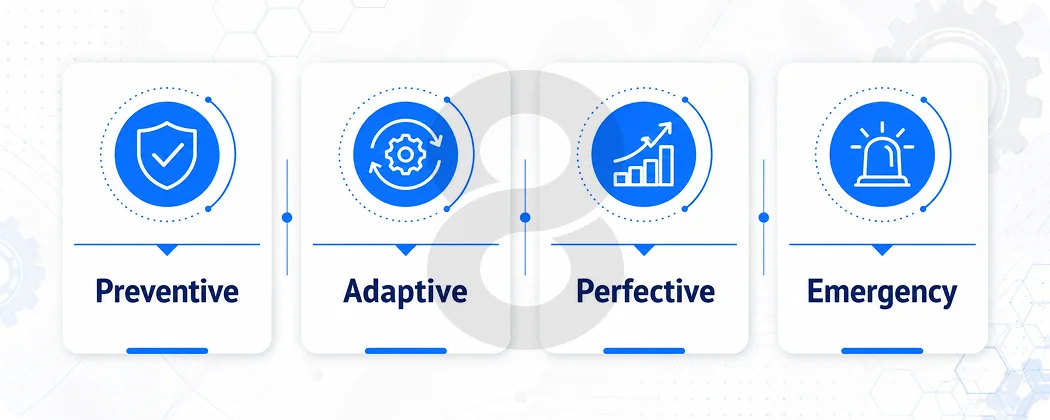
There are five kinds of mobile app maintenance: corrective, preventive, adaptive, perfective, and emergency. Corrective and emergency work is reactive and almost always underbudgeted. The other three are scheduled, and they are what keeps the reactive column small.
Corrective Maintenance
Corrective maintenance fixes what’s already broken. That includes login errors, broken buttons, failed payments, wrong data, crashes, layout issues, and app store rejection problems. These fixes often feel urgent because users are already affected.
For startups, corrective maintenance usually protects early trust. For enterprises, it protects operations.
Preventive Maintenance
Preventive maintenance fixes problems before users feel them. This includes code refactoring, removing technical debt, updating old libraries, improving test coverage, reviewing logs, and cleaning backend processes.
This work is easy to delay because it doesn’t always look urgent. But delay it long enough and you’ll pay for it during a release, a campaign, or an outage.
Adaptive Maintenance
Adaptive maintenance keeps your app working with outside changes. Android changes. iOS changes. Payment providers change SDKs. Map APIs update pricing or rules. Social login flows change. Privacy requirements change. Devices change. Your app has to adjust.
This is where mobile app maintenance protects app store compliance and user access.
Perfective Maintenance
Perfective maintenance improves the app based on real usage. Maybe users abandon onboarding at step three or search is too slow. Maybe the checkout screen has too many fields or support tickets keep mentioning the same confusion.
Perfective maintenance turns user behaviour into better features, cleaner flows, and stronger retention.
Emergency Maintenance
Emergency maintenance is what happens when something breaks badly enough that the schedule stops mattering. The app goes down, payments fail, a release ships a crash to everyone at once, or a provider you depend on has an outage of their own.
This is the most expensive engineering time you will ever buy, because it is unplanned, usually out of hours, and always diagnosed under pressure. The rest of your maintenance plan mostly exists to make this column smaller.
Read More: Mobile App Development Process: From Idea to Launch
Mobile App Maintenance Cost
Budget 15 to 20 percent of your original development cost per year. That is the benchmark most of the industry works from, so a 100,000 dollar build carries roughly 15,000 to 20,000 dollars of annual maintenance. In monthly terms, simple apps sit around 500 to 2,000 dollars, growth stage apps around 2,000 to 7,000, and enterprise apps from 7,000 upward.
Year one usually runs higher than that, sometimes close to double, because the twelve months after launch are spent fixing what shipped rather than maintaining what works.
Past that, the range is wide for a reason. A content app with a small admin panel needs a few hours a month. A fintech or healthcare app needs monitoring, security review, compliance updates, backend support, audit logs, and release controls somebody has to sign off on.
Typical Cost Factors
- Number of platforms, such as iOS, Android, Flutter, React Native, or hybrid
- Number of users and traffic spikes
- Backend size and cloud infrastructure
- Number of third party integrations
- Compliance needs in fintech, healthcare, logistics, or enterprise operations
- App store update frequency
- Security requirements
- Age and quality of the codebase
- Availability needs, such as business hours support or round the clock support
- Frequency of new feature releases
What you pay for every month regardless
Part of the maintenance bill is engineering hours. The rest arrives whether anyone touches the code or not.
- Apple Developer Program: 99 dollars a year, or 299 for the Enterprise Program
- Google Play developer account: 25 dollars, one time
- Hosting and cloud: commonly 70 to 320 dollars a month for a standard app, more once you add real time features or heavy traffic
- Crash and performance monitoring: Firebase Crashlytics is free, while Sentry and comparable tools start low and scale with event volume
- Push, analytics, maps, and payment SDKs: mostly usage priced, and mostly invisible until a campaign spikes them
- Certificate, key, and provisioning profile renewals: no cost, but a missed renewal takes an app down as effectively as a bad deploy
These are small numbers individually. They matter because they are the line items that go unowned when the person who set them up leaves.
How maintenance contracts are structured
Four models cover almost everything on offer.
- Retainer: You buy a fixed block of hours each month, usually 20 to 160, at an agreed rate. Whether unused hours roll over is the clause worth reading twice.
- Time and materials: You pay for what gets done. Cheapest while the app is stable and worst when it isn’t, because there is no ceiling in the month everything breaks at once.
- Dedicated team: One or more engineers assigned to your product full time. Only sensible above a certain size, and at that point it is closer to an in-house team you do not employ.
- Pay per ticket: Rare, and usually a warning sign. It puts your vendor’s incentive on closing tickets rather than on the preventive work that stops tickets being created.
Whichever model you pick, the number that matters is the response time attached to it. A real agreement defines severity levels and commits to each. Critical, meaning the app is down or payments are failing, acknowledged within an hour and worked continuously.
High, meaning a core flow is broken for some users, resolved the same business day. Everything else, next scheduled release. A proposal that says “SLA support” without those bands has not promised you anything.
Read More: The Real Cost of App Maintenance: What Budget Percentage Should You Allocate?
If the app doesn’t exist yet, run the numbers before the build decisions harden. Our app development cost calculator won’t replace technical discovery, but it will show you how each platform and integration you add changes what you will be paying to keep the thing running three years later.
App type |
Monthly maintenance scope |
Typical monthly range |
| Simple app | Basic bug fixes, small UI updates, OS checks, and store support | 500 to 2,000 dollars |
| Growth stage app | Crash monitoring, API updates, performance checks, backend support, and feature improvements | 2,000 to 7,000 dollars |
| Enterprise app | SLA support, security reviews, compliance updates, infrastructure monitoring, integrations, and planned releases | 7,000 to 25,000 dollars or more |
Those are market ranges, not 8ration pricing. Our own maintenance engagements start at 2,000 dollars a month.
How to Keep a Mobile App Secure and Compliant After Launch
Security maintenance belongs in the release cycle, not in an annual review. In practice it comes down to four recurring jobs: keeping dependencies current, keeping credentials out of the build, keeping data storage and transport correct, and keeping your store privacy disclosures matched to what the app actually collects.
OWASP’s Mobile Top 10 for 2024 includes risks such as improper credential usage, supply chain security, insecure authentication, insecure communication, privacy control gaps, security misconfiguration, insecure data storage, and weak cryptography. Six of those ten are things a maintenance team either does every quarter or never does at all.
Mobile apps often rely on SDKs, APIs, cloud services, analytics tools, push notification providers, payment gateways, and social login systems. Every connection adds convenience. Every connection also adds maintenance work.
A secure maintenance plan should include the following.
Dependencies and third party SDKs
- Review third party SDKs and remove the ones nothing calls anymore
- Update libraries with known vulnerabilities
- Monitor suspicious API usage
Automate the first two if you can. Dependabot or Snyk running against your repo will flag a vulnerable dependency the week it is published rather than the quarter someone remembers to look.
Credentials, sessions, and keys
- Check authentication and session expiry
- Review API keys and secret handling
- Test jailbreak and root related risks for sensitive apps
Data storage, transport, and permissions
- Encrypt sensitive data properly
- Test permissions after OS updates
- Check logs for exposed personal data
Store disclosures and privacy paperwork
- Review the privacy policy and both stores’ disclosures
Apple requires a privacy manifest and signature for commonly used third party SDKs, and Google Play requires the Data Safety form to match actual app behavior. Both drift out of date the moment an SDK is added or removed, and neither team gets a reminder. Fintech and healthcare products carry more on top, since PCI DSS and HIPAA obligations do not pause between releases, and a SOC 2 audit will ask when your dependencies were last reviewed.
For fintech, healthcare, B2B SaaS, logistics, and enterprise systems, security maintenance should sit inside the normal release cycle. Don’t treat it like a yearly cleanup.
Apps with AI features carry a maintenance line nobody budgets for. Model endpoints get deprecated, providers change pricing and rate limits mid contract, and anything sending user data to a third party model needs the same disclosure review as any other processor. If that describes your product, treat the AI integration layer as part of the maintenance scope rather than a feature that shipped once.
Read More: How to Build HIPAA & GDPR Compliant Apps
Android vs iOS App Maintenance Requirements
Android has wider device variety and more screen sizes, OS fragmentation, and manufacturer behaviour differences. That means testing needs to cover more device conditions.
For Android heavy products, Android app development should include target SDK updates, device testing, permission checks, performance profiling, Google Play policy review, and crash monitoring across common Android versions. For Apple-first products, iOS app development should cover SDK and Xcode upgrades, App Store review guideline changes, privacy details, new device support, iPad behavior, push reliability, and TestFlight feedback ahead of each major iOS release.
Flutter and cross platform apps need another layer of care. One shared codebase can reduce duplicate work, but dependency updates, plugin support, native bridges, and platform specific behaviour still need attention. If your team wants one app across iOS and Android, Flutter or cross platform app development can help reduce long term maintenance effort when the architecture is planned well.
Cross platform changes the shape of the maintenance work rather than removing it. You still ship releases, still test against both stores, still need someone reachable when a plugin stops building after an OS update. What you save is duplicate feature work. What you take on is dependency risk, because one unmaintained plugin can block a release on both platforms at the same time.
The version of this that actually costs money is a framework end of life. Xamarin support ended and handed teams a migration rather than an update. React Native’s new architecture became the default and turned older native modules into rewrites rather than version bumps. Ask your team once a year how many major versions behind you are on your framework and your key plugins. That gap is the largest maintenance cost you can accumulate without noticing.
Read More: Android App Development Cost in 2026: A Detailed Guide
How Often Should You Update Your Mobile App
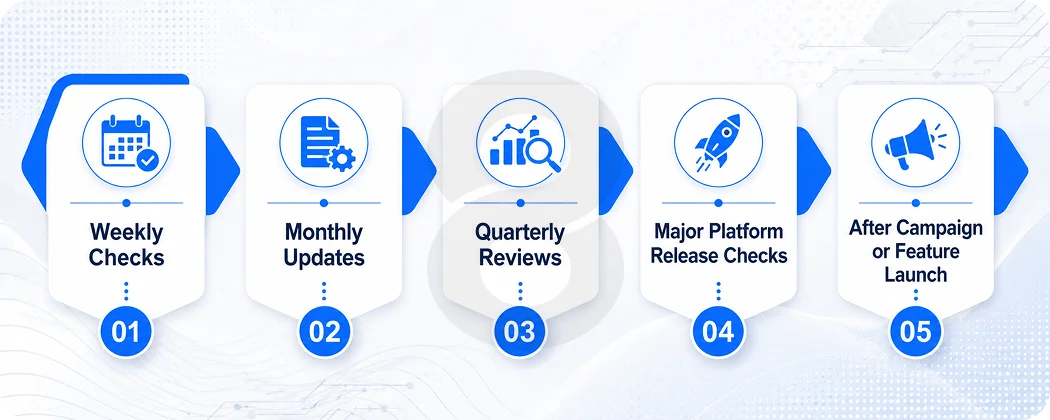
A workable default is weekly monitoring, monthly minor releases, quarterly technical review, and a dedicated pass before each major Android and iOS release. High traffic and compliance heavy apps compress that. Nothing sensible stretches it further.
The schedule most apps actually run on is waiting for complaints, which means finding out about a crash from a one star review instead of from your crash dashboard.
Weekly Checks
Look at crash free session rate first, then store reviews, support tickets, backend alerts, and API error rates. If crash free sessions fall below roughly 99 percent, that is the week’s priority whatever else is on the roadmap.
Google Play also publishes your crash and ANR rates in Android Vitals, and going past its bad behavior thresholds changes how the store surfaces your app to new users.
Monthly Updates
Fix bugs, update minor dependencies, improve slow screens, refresh content, adjust small UX issues, and release minor improvements.
Quarterly Reviews
Review app performance, technical debt, security patches, cloud cost, feature usage, retention, app store listing quality, and roadmap priorities.
Major Platform Release Checks
Before major Android and iOS releases, test the app on beta versions where possible. Check permissions, notifications, login, payments, camera, location, background tasks, and deep links.
After Campaign or Feature Launch
When marketing pushes new traffic or the product team releases a major feature, monitor the app closely. More users expose more bugs. That’s not failure. That’s real life.
Read More: Mobile App Launch Strategy: Get More Downloads in 2026
How to Choose Right Mobile App Maintenance Partner
Choose on two things: whether they will audit the app before quoting, and whether they will put response times in writing. Everything else below is a tiebreaker.
Both matter for the same reason. A team that quotes without looking is guessing at your codebase, and a team that won’t commit to a response window has not agreed to be available. Silence during a live issue does more damage to the relationship than the outage does.
Scope and ownership
- Will you audit the app before taking responsibility?
- Do you support both frontend and backend issues?
- Can you support our tech stack?
- How do you decide whether a request is a bug, an improvement, or a new feature?
- Who owns documentation?
- Can you work alongside our internal team?
Response and escalation
- What is your response time for urgent issues?
- What happens after business hours?
- Do you monitor crashes and performance, or do you wait for us to report them?
Security and releases
- How do you manage security patches?
- Do you handle app store updates and submissions?
Reporting
- Do you provide monthly reports, and what is in them?
What handover actually involves
Moving an app to a new maintenance team is not a kickoff call. Before anyone can take responsibility for your product, they need the repository with its full history, the signing keys and provisioning profiles, admin access on both store accounts, backend and cloud credentials, environment configuration for every environment, whatever API documentation exists, and an honest list of known issues.
Budget two to four weeks for that on a mid sized app, and expect the audit to surface things the previous team never mentioned. If your current vendor holds the signing keys and owns the store account, sort that out while the relationship is still good. Doing it afterwards is how apps end up stranded.
For custom products, custom software development services can help when app maintenance depends on deeper backend changes, admin dashboards, cloud systems, integrations, or workflow tools.
Read More: How to Choose the Right Mobile App Development Company
A good partner will not say yes to everything blindly. They’ll ask for code access, analytics, crash reports, architecture notes, app store history, API documentation, and known issues.
That first audit matters.
Those three jobs price very differently. Support is ongoing hours against an app that basically works. Refactoring is a scoped project to make a working app cheaper to change, paid once and recovered over the following year in shorter release cycles. A rescue is a rebuild wearing a maintenance label, which is what you have when the original team is gone, the documentation isn’t there, and every change breaks two other things. Get the category wrong at quoting stage and the budget runs out somewhere around month three.
Signs Your App Needs Maintenance
The clearest three are a rising crash rate, repeat support tickets about the same screen, and store reviews that mention speed. If any of those is true this month, the app is already behind, and the rest of the list below tells you how far.
- Crash rate is rising
- Analytics show sudden drop offs
- Backend costs keep rising without user growth
- Third party SDKs are outdated
- Users complain about login or payment failures
- Reviews mention slowness
- Push notifications fail randomly
- The app looks broken on newer devices
- Support tickets repeat the same issue
- App store approval takes longer than usual
- Developers avoid touching old parts of the code
- Nobody can explain the release process clearly
The one that should worry you most is ownership, and it is more common than anyone admits. A vendor built it, the internal developer who understood it left, documentation was always thin, the backend runs on an account nobody can name, and nobody knows which SDK versions are in the last build. That app is fine right up until the first forced platform update, at which point it stops being a maintenance line item and turns into a rescue with a maintenance budget attached.
How to Reduce App Maintenance Costs
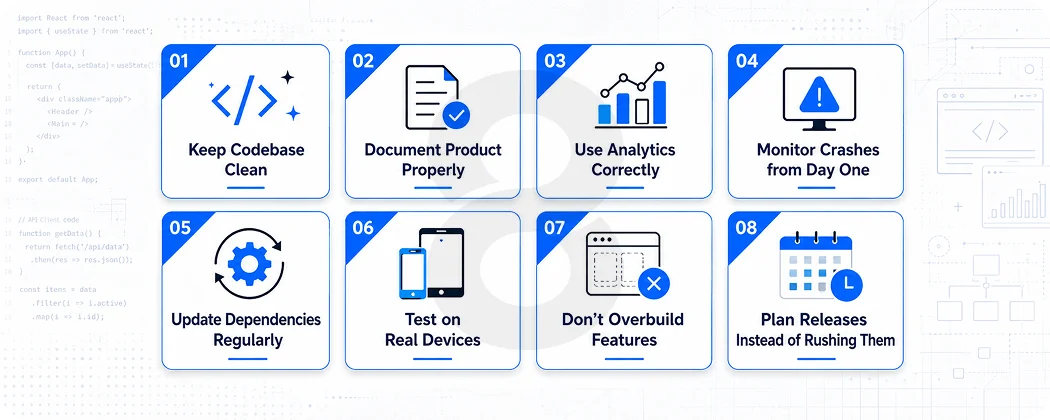
Most of the saving comes from four habits: keeping dependencies current, writing down how releases actually happen, testing on real devices before users do, and shipping fewer features than you want to. The rest is detail.
The cheapest app to maintain is almost always the one with the least surface area, not the one with the cleverest architecture.
Keep Codebase Clean
Refactor the parts of the codebase every release has to touch, and leave the rest alone. Debt taken deliberately to hit a launch date is a fair trade. Debt nobody wrote down and nobody scheduled is the kind that turns a two day feature into a two week one.
Document Product Properly
Write down APIs, admin flows, environment setup, release steps, payment rules, user roles, and known limitations. Documentation saves hours every month.
Use Analytics Correctly
Track events that show real behaviour. Sign up. Search. Add to cart. Payment attempt. Booking. Invite sent. File uploaded. Lesson completed. Don’t track everything just because you can.
Monitor Crashes from Day One
Crash monitoring should start before launch. Waiting until users complain is too late.
Update Dependencies Regularly
Old libraries create security and compatibility risks. Set a regular review cycle for SDKs, frameworks, and plugins.
Test on Real Devices
Simulators help, but real devices catch real problems. Older Android phones, low memory devices, tablets, and different screen sizes can expose issues that clean test environments miss.
Don’t Overbuild Features
Unused features still need maintenance. They still carry code, tests, bugs, and support questions. Remove what users don’t need.
Plan Releases Instead of Rushing Them
A rushed release can create three weeks of cleanup. Use staging, QA checklists, rollback plans, and clear approval steps.
Read More: Mobile App Development Challenges: Avoiding Costly Pitfalls in Your Next Project
Mobile App Maintenance Checklist
Run this before you hire a maintenance team, and again each quarter with the team you already have. Anything you cannot answer in the first five minutes is the thing to fix first.
Product Health
- Review authentication and session expiry
- Rotate exposed or ageing keys and certificates
- Update SDKs with known vulnerabilities
- Check data storage and transport encryption
- Review permissions after the last OS update
- Confirm the store privacy disclosures still match what the app collect
Technical Health
- Review crash logs
- Check API response times
- Review backend errors
- Update outdated libraries
- Check app size and loading speed
Security Health
- Review authentication
- Rotate exposed or old keys
- Update vulnerable SDKs
- Check data storage
- Review permissions
Store Health
- Check Google Play policy updates
- Check Apple App Store requirements
- Update screenshots when needed
- Review privacy disclosures
- Monitor rejected builds
Business Health
- Compare maintenance cost with revenue risk
- Review cloud cost
- Check support workload
- Plan next quarter releases
- Decide what to improve, remove, or rebuild
Read More: Building a Successful Mobile App Deployment Strategy
Hiring a Mobile App Maintenance Company
Hiring for maintenance works differently from hiring for a build. You are not buying a scope, you are buying availability and judgement, so the first deliverable should be an audit rather than a proposal. Anyone quoting a monthly retainer before they have seen the codebase is guessing, and the guess gets corrected out of your budget later.
A useful audit answers four questions. What breaks at the next platform deadline. Which dependencies carry known vulnerabilities. Where the backend costs more than it should. And whether this is a support job, a refactor, or a rescue.
That is where 8ration starts. We go through the live app, the crash data, the dependency tree, and the store readiness, then come back with what to fix first and what can safely wait. For a startup that usually means stabilizing the MVP, closing the crash points that cost you activations, and getting onboarding out of the product’s way. For an enterprise it usually means backend and cloud work, integration monitoring, access control, compliance review, and a release calendar somebody actually owns.
If the audit says the app needs more than support, we say so before the contract rather than after. Our app maintenance and support service covers the ongoing work, and where the problem sits underneath the app rather than inside it, our backend and API work handles the systems it depends on.
Read More: Why Every Fortune 500 Brand Partners with a Specialized App Development Firm
What to Do This Month
If your app is live and you cannot name the person who reviews its crash data, start there. Checking crash free session rate, current dependency versions, target API level, and whether your last build would still be accepted by both stores today takes an afternoon.
Two of those carry dates in 2026. If your Android build is not on API level 35 at minimum, it is already invisible to new users on newer devices, and the API 36 requirement lands on 31 August. If your last iOS upload predates 28 April, your next one waits behind a toolchain upgrade before anyone gets to the actual bug.
Neither is an emergency today. Both become one in about a week if nobody is looking.