You know the feeling. Sales is working off one spreadsheet and finance off another. The warehouse guy keeps a notebook and every Monday someone spends three hours stitching it all together into a report that’s wrong by Tuesday. Everybody has their own version of the truth. That’s the moment most companies start googling ERP.
An ERP system is supposed to end that mess. One platform and database… Everyone is looking at the same numbers. The building of it, though, is where things get real and where a lot of money goes to die if you walk in without a map.
This guide is that map. What ERP system development actually involves, whether you should build or buy, how the process runs, what it costs, and the specific ways these projects fall apart so you can dodge them.
What ERP System Development Means and What Goes Into It
ERP stands for enterprise resource planning. Strip away the corporate wrapping and it’s the software that connects the parts of your business that keep drifting apart.
From finance, procurement, and inventory to human resources, manufacturing, and sales, every one of those runs on data. Left alone, each department builds its own little island of it. ERP is the bridge.
Close a deal in a working ERP and the whole chain just moves on its own. Inventory drops the count, finance cuts the invoice, the warehouse gets a pick order, all of it reading off one record as it happens. Nobody keys the same thing into a second system. There aren’t four slightly different versions of the same customer floating around anymore.
And no, this is nothing like installing an app and flipping it on. You’re modeling the way your business actually behaves, then threading that model into the software your team already lives in all day.
The demand behind all this keeps climbing, too. The global ERP market was worth around $77 billion a year ago and is heading toward $157 billion by 2033.
Most of that money now flows into cloud deployments and the AI pieces that used to be an upsell, forecasting, and automated flagging, are turning into the baseline. So build for where things are clearly going. Don’t build something you’ll be prying off the cloud in three years
The core idea behind an ERP
Picture one shared spine that everything else bolts onto. A single database sitting under the whole operation. That one source of truth is the entire reason ERP exists in the first place.
Split your finance figures and your inventory figures across two systems and they start drifting apart almost right away, and you’ll be the one awake at midnight forcing them back into agreement.
The other half of the idea is modularity. Nobody makes you swallow the whole platform on day one. Switch on what’s urgent, leave the rest alone, and bolt on more as the company actually grows into it.
That’s the part that stops an ERP from bloating into some expensive beast you can barely afford to keep the lights on for.
What sits inside an ERP
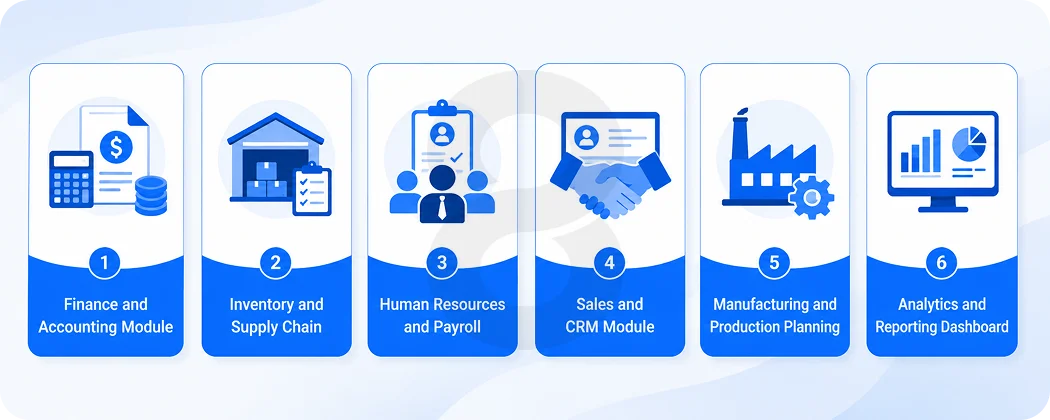
Most systems are assembled from a set of core modules. You’ll recognize your own pain points in here:
- Finance and accounting where the ledger, the payables, the receivables, and every report leadership keeps asking for actually live.
- Inventory and supply chain tracking what’s on the shelf and what’s moving through the warehouse at this exact moment.
- Human resources carrying payroll, employee records, and the time tracking nobody enjoys but everybody needs.
- Sales and CRM holding the orders, the pipeline, and the full story of who bought what and when.
- Manufacturing for production planning and resource tracking, if you make things.
- Analytics and reporting so leadership can actually see what’s happening without asking three people.
You start with the modules that hurt the most and expand from there. A distributor might lead with inventory and finance. A services firm might lead with CRM and HR. The build follows your bleeding edge instead of a template.
Custom ERP vs Off the Shelf Software (How to Choose)
This is the fork in the road and the wrong turn here is the most expensive mistake in the whole project.
Off the shelf means a ready made product from a vendor like SAP, Oracle NetSuite, or Microsoft Dynamics. It’s faster and cheaper to start. The catch is that you adapt your business to the software’s way of thinking, not the other way around. For standard operations, that’s fine. Great, even.
Custom ERP system development means the software gets built around your workflows. It costs more and takes longer up front. In return you get something that fits like it was measured for you, with no modules you’re paying for and never using and no ugly workarounds for the way your business is actually different.
Here’s the honest test. If your operation runs mostly like everyone else in your industry, buy. If your edge comes from doing something in a way nobody else does and a packaged system would force you to give that up, build.
| Differences | Off the Shelf ERP | Custom ERP |
|---|---|---|
| Time to launch | Weeks to a few months | Several months to a year |
| Upfront cost | Lower | Higher |
| Fit to your business | Good for standard processes | Built exactly to your workflows |
| Ongoing fees | Per user licenses, often recurring | Higher build cost, lower per user drag |
| Scaling | Limited by vendor’s roadmap | Grows on your terms |
| Best for | Common, predictable operations | Unique processes and a real competitive edge |
A lot of teams pick a packaged system for the sticker price, then spend two years and a fortune customizing it into something it was never meant to be. That’s the worst of both worlds. Decide honestly at the fork and you avoid it.
How to Build an ERP System: Step by Step
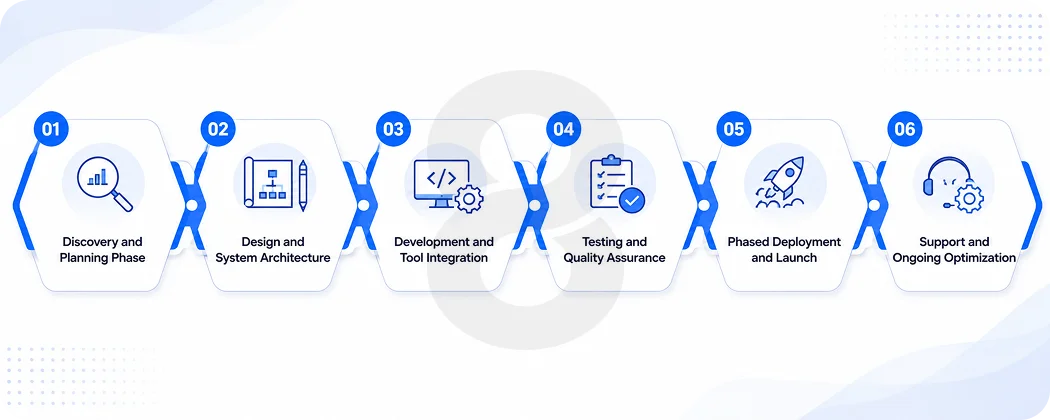
Nobody starts an ERP build by writing code. That’s the first thing worth knowing. The code is maybe a third of the work. The rest is understanding your business well enough to model it correctly, then getting your people to actually use what you built. Here’s how a real project runs.
Discovery and planning
The team sits with your people and learns how work actually flows. Where are the bottlenecks. What gets rekeyed by hand. Which reports take forever. This is where scope gets defined and where most doomed projects get doomed because the scope was fuzzy from the start. Slow down here. It saves you later.
Design and architecture
Now the shape of the system takes form. Which modules and how they connect. Where the data lives (on premise or cloud) and what the screens look like. Good design work is where a system stops being a database with a login and starts being something your team doesn’t hate opening every morning. The interface matters more than most budgets admit.
Development and integration
This is the build. Backend, database, business logic, and the front end your staff will live in. The quiet killer in this phase is integration. Your new ERP has to talk to your existing tools, CRM, accounting software, and shipping partners.
Every connection is real engineering and every one you forgot to scope shows up as a surprise invoice. AI capabilities like demand forecasting or automated flagging often get wired in here too.
Read More: AI System Integration Services: What to Look for in a Development Partner
Testing and quality assurance
Everything gets pushed hard before anyone real touches it. Unit tests, integration tests, security checks, and load testing. Insufficient testing is one of the most common reasons rollouts blow up on go live day. Rushing this phase to hit a date is a decision you pay for in production, in front of your whole company.
Deployment and go live
The system moves into the real world. The smart move is phased. Turn on one module, let it prove itself, then expand. Flipping every switch at once, the “big bang” launch, is how you get a company wide outage with your CEO watching. Start small, win, repeat.
Support and optimization
Launch is the beginning, not the finish line. Bugs surface, people request changes, the business shifts. Ongoing support keeps the thing alive and useful instead of slowly rotting into the next legacy system someone will want to replace in five years.
Read More: Project Management Software Development: How Teams Meet Deadlines
ERP Development Cost and the Factors Behind It
Everyone wants one number. There isn’t one, and anyone who gives you a firm quote before understanding your business is guessing or lying.
That said, you can understand where the money goes, which is more useful than a fake number anyway. The build itself is only part of it. The costs that ambush people are the ones around the build.
Here’s roughly how it shakes out by company size, based on what these projects typically run.
| Business Size | Typical Range | Timeline | What You’re Paying For |
|---|---|---|---|
| Small business | $40K to $100K | 3 to 6 months | Fewer modules, light customization, small user base |
| Mid sized business | $100K to $250K | 6 to 9 months | More modules, real integrations, moderate customization |
| Large enterprise | $250K to $400K+ | 9 to 12 months | Heavy customization, many integrations, large user base |
The levers that move that number:
- Number of users and modules: More of either, more cost. Simple.
- Customization depth: Every deviation from standard behavior is engineering time.
- Integrations: Connecting to your existing tools is often the single most underestimated line item.
- Data migration: Your old data is messier than you think. Cleaning and moving it eats weeks.
- Cloud or on premise: Cloud lowers upfront cost but adds subscription drag. On premise flips that.
- Where your team is: Developer rates swing hard by region, from around 25anhourinpartsofAsiato120 plus in North America.
- AI and advanced tech: Forecasting, automation, and analytics add real value and real cost.
- Training and change management: Budgeted last, felt first, when your staff can’t use the thing.
One honest note on that last group. Maintenance alone usually runs 15 to 20 percent of the initial build every year. And the “cheap” partner is often cheap because they left these costs out of the bid. The overrun that follows isn’t an overrun. It’s the real price finally showing up.
Why ERP Implementation Projects Fail and How to Avoid It
Time for the uncomfortable part. ERP has a rough track record, and pretending otherwise helps nobody.
According to Statista, close to half of ERP implementations run over budget. Industry analysts have found for years that a large majority of projects miss at least one of their original goals, whether that’s budget, timeline, or the outcomes they were bought for.
That’s not a technology problem. Modern platforms work. It’s a planning and people problem, over and over.
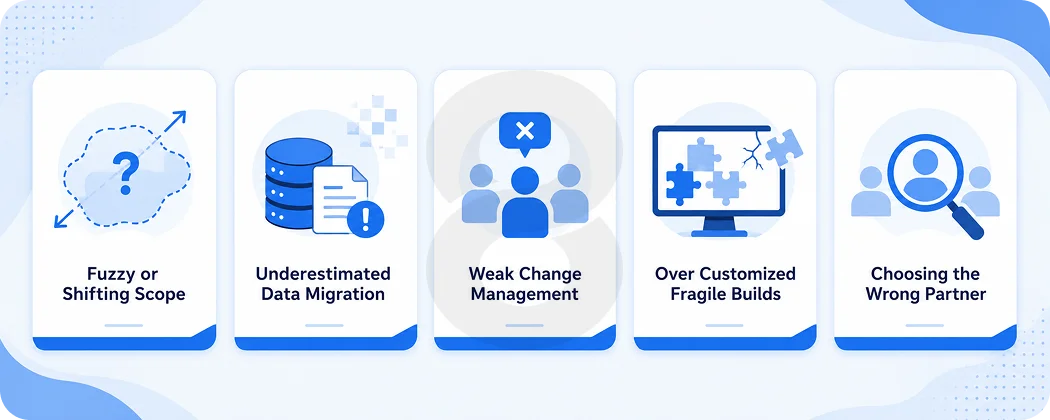
The failures tend to rhyme. Dig into enough of them and the same short list of causes keeps showing up.
- Fuzzy scope: Nobody ever pinned down what finished was supposed to look like, so the target kept sliding further out.
- Underestimated data migration: The old data was riddled with duplicates and holes that stayed invisible until they choked the new system on go live day.
- No change management: Technology doesn’t resist change. People do. Skip the training and the buy in, and your beautiful system sits unused.
- Over customization: Bending a packaged product into knots until it’s fragile and impossible to update.
- The wrong partner: A team that staffed the sales pitch with seniors and the actual work with juniors.
None of that is exotic. It’s all preventable and it all traces back to the same root. Treating ERP like a software purchase instead of a change to how the whole business operates. Get that framing right and you’re already ahead of most.
Read More: Time Tracking Software Development Services: Features, Tech Stack & Timeline
How 8ration Approaches Custom ERP Development
Plenty of shops will take your money and hand you a system. Fewer will tell you before you start whether you even need a custom build or whether an off the shelf platform with light tuning would serve you better and cheaper. That honesty up front is where a lot of pain gets avoided.
8ration builds custom software that fits how your teams actually work, then wires it into the tools you already depend on. The work starts with discovery instead of a code because a system modeled on a wrong understanding of your business is just an expensive way to keep your old problems.
For companies on a factory floor, that means connecting production, procurement, and stock so manufacturing operations stop running blind. For teams drowning in disconnected sales tools, it means unifying customer relationship data into the same spine as finance and fulfillment.
And for anyone moving physical goods, it means giving supply chain and logistics real time visibility instead of end of day guesswork.
Where it helps, AI features like demand forecasting and anomaly detection get built in, so the system doesn’t just record what happened but flags what’s about to. Deployment runs in phases, so you prove value on one module before betting the company on ten.
Getting Your ERP Build Right From the Start
ERP system development is not really a technology project. It’s a decision about how your whole company will run, dressed up as software.
Get the thinking right first, honest scope, clean data, real training, a phased rollout, and the build tends to go fine. Skip that and no platform on earth will save you.
Start with the module that hurts most. Prove it works. Expand from there. That’s how the projects that succeed actually get done, and it’s a lot less dramatic than the horror stories suggest.