
You know the moment. A former employee still shows up in your admin panel, three weeks after they walked out. Nobody closed the account, and honestly, nobody remembered it was there.
That tiny gap is how most access problems start. Sometimes it is a stale login. Other times it is a person carrying permissions they never needed. Often it is a shared password still sitting in an old Slack thread.
Here is the honest part. Managing users feels easy at five people. It gets ugly fast at fifty. And by the time you notice, you are patching a system that was never built to hold this much.
This piece walks through what a real user management setup does. It covers when to build your own. And it shows how growing businesses get it right without burning a whole quarter on it.
Core Functions of User Management Software
Strip away the jargon and the job is simple. It controls identity and access. Who is this person, and what are they allowed to do inside your product or your internal tools.
User management software sits under almost every app you touch. It runs quietly until it breaks. Then suddenly nobody can log in, or worse, the wrong person can.
The core jobs it does every day
Underneath, a decent system is always juggling four jobs at once. None of them win awards. All of them hurt when they slip.
- Authentication checks you are really you before it lets you in, whether by password, passkey, or single sign-on.
- Authorization decides what you get to see and change once you are inside, usually by role.
- Provisioning hands out access on day one and yanks it back the day someone walks.
- Auditing keeps the receipts so when things go sideways you can trace what happened.
Drop any one of these and you notice fast. Weak authentication is an open invitation. Lazy provisioning leaves ghost accounts breathing for months.
Where the data actually lives
Every user has a profile. Name, email, role, maybe a department or a region. That record is the spine of the whole system.
Good design keeps that data in one place. Scattered accounts across five tools are how permissions drift and gaps open. A centralized directory closes those gaps before attackers find them.
There is also a split worth knowing. Some systems manage your own staff. Others manage your customers, which people call customer identity and access management, or CIAM.
The two look similar but pull in different directions. Staff systems care about control and compliance. Customer systems care about a smooth signup that does not scare people off. A good build knows which one it is serving.
| Function | What it does | What breaks without it |
|---|---|---|
| Authentication | Verifies identity at login | Account takeover and credential theft |
| Role-based access | Limits what each user can reach | Interns seeing payroll data |
| Provisioning | Adds and removes access on time | Orphan accounts nobody closed |
| Audit logs | Records every action | No way to trace a breach |
Read More: How to Hire a Software Engineer: The 2026 Checklist
Why Growing Businesses Outgrow Basic User Management
Almost nobody starts with a proper system. You start with what is fast. Maybe a shared admin login, Google Sheet, or cheap plugin that came with your framework.
And for a while, it works. That is the trap. The first setup does not fail loudly. It fails slowly, then all at once.
The spreadsheet phase never scales
Ten users on a sheet is fine. Two hundred is a liability. Someone edits the wrong cell and a manager loses access to their own dashboard.
Manual work also invites human error. And people are the weak spot here. Verizon found the human element sat behind 60% of breaches in its 2025 report. Spreadsheets make that worse.
Access creep and the accounts nobody closed
Here is what quietly kills you. People change roles but keep their old permissions. Contractors finish projects but keep their logins. The pile grows.
And those forgotten accounts pile up into a real attack surface. Stolen credentials remain one of the favorite ways in, the same Verizon report found. Each account you never closed is another unlocked door you have stopped noticing.
Growing businesses feel this most. New hires arrive weekly. Roles split and merge. A system built for a five-person team simply cannot keep up.
User Access Management Mistakes to Avoid
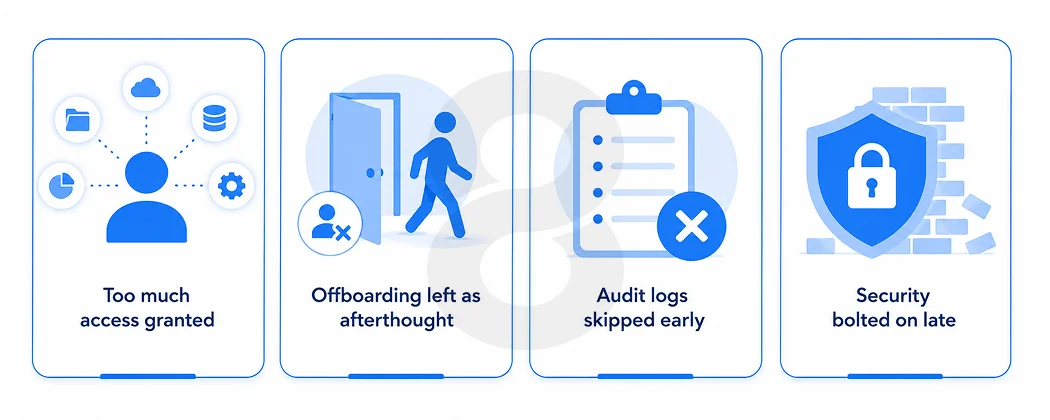
Most access problems are not exotic. They are the same handful of slips, repeated across thousands of companies. The good news is they are all avoidable.
Here are the ones that show up again and again in growing teams.
Handing out more access than people need
Handing everyone admin rights feels generous. It is a trap. Least privilege means people get exactly what the job needs and nothing extra.
One over permissioned account is all it takes to turn a small breach into a big one. Lock it down early. Loosening access later is easy, but clawing it back once people rely on it never is.
Treating offboarding as an afterthought
Onboarding gets attention because it is exciting. Offboarding gets ignored because it is dull. That is exactly backward from a security view.
Every account you forget to close is a live risk. Automate the shutdown so it happens the day someone leaves.
Skipping audit logs until you need them
Nobody misses logs until something breaks. Then they are the only thing that matters. Build them in from the start.
Logs also help with compliance. Auditors want proof of who touched what. Without records, you are guessing, and guessing does not pass an audit.
Bolting security on at the end
Security bolted on at the end is security with gaps baked in. Encryption, session limits, and access rules belong in the foundation. Adding them later costs far more than building them in from day one.
A rushed build with no security first plan always circles back to bite you. Shortcuts like that just defer the invoice.
Read More: Intellectual Property in Software: How to Protect Your App Idea Before You Build
Build vs Buy: Your User Management System
This is the fork every founder hits. Do you buy a ready-made platform, or build something of your own. Both are valid, and both cost you, just in different ways.
And the pull toward these systems keeps building. The identity and access management market is projected to grow from $25.96 billion in 2025 to $42.61 billion in the next five years. Access has quietly become part of the product itself, not a box you tick at the end..
When off-the-shelf tools are enough
Sometimes buying is the smart call. If your needs are standard, a vendor gets you live in days.
- You need basic login and roles, nothing unusual.
- Your budget favors a monthly fee over upfront build cost.
- You would rather not maintain security patches yourself.
The catch shows up later. You bend your product to fit their model. Their pricing jumps as you scale. And your user data lives on someone else’s terms.
When custom development wins
Custom pays off when your access rules are yours alone. A generic tool cannot model a workflow it has never seen.
- You run complex roles that vendors do not support out of the box.
- You handle sensitive data with strict compliance rules.
- You want the login flow and admin panel to match your brand exactly.
- You refuse to hand your user data to a third party.
Building it as custom software wired to your exact rules means no forced trade-offs. You own the code, data, and roadmap.
The hidden costs nobody mentions
Vendors quote you a starting price. They rarely mention what comes after. Per-user fees climb as you hire. Premium features sit behind a higher tier.
Then there is lock-in. Migrating off a platform later is painful and slow. Your data lives in their schema, on their terms. Custom avoids that trap because the system answers to you.
None of this means buying is wrong. It means you should read the whole bill.
| Factor | Buy off the shelf | Build custom |
|---|---|---|
| Time to launch | Days to weeks | Weeks to months |
| Upfront cost | Low | Higher |
| Long-term cost | Rises with users | Predictable after build |
| Fit to your workflow | Partial | Exact |
| Data ownership | Vendor holds it | You hold it |
Must-Have Features in a Custom User Management System
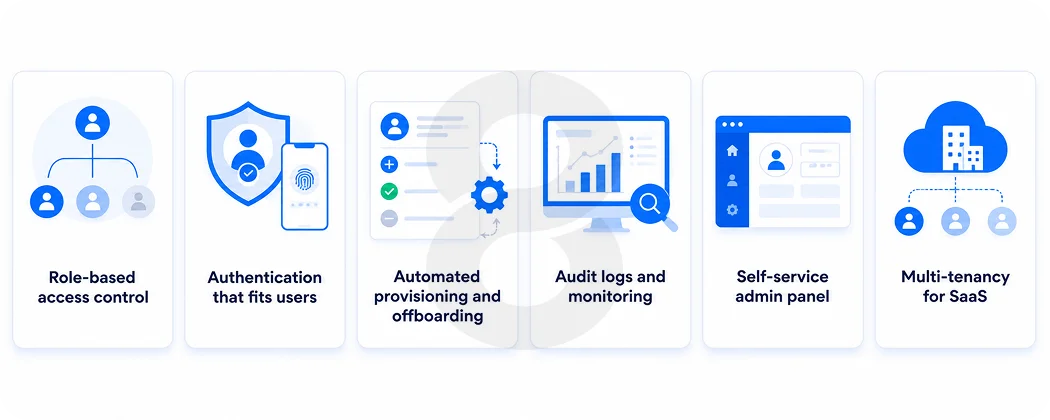 Not every build needs every bell. But a few pieces are non-negotiable. Skip them and you are just rebuilding the spreadsheet with extra steps.
The right mix depends on who you serve. An internal tool for staff leans on tight control. A customer-facing product leans on a smooth login. Know your audience before you spec the build.
Here is what a serious build should include from day one.
Role-based access control and permissions
This is the heart of it. Role-based access control, or RBAC, groups permissions by job. A sales rep sees deals. An admin sees everything.
Good RBAC is granular but not fiddly. You want roles that map to how people actually work. For a CRM that respects who sees which client, this layer decides everything.
Authentication that fits your users
Passwords alone are not enough anymore. Passkeys and single sign-on are becoming the default instead of a premium feature. Passwordless login is where the market is heading.
- Single sign-on lets people use one login across everything, which kills password fatigue fast.
- Multi-factor authentication adds a second check and it stops most stolen password attacks dead.
- Passkeys drop passwords altogether for a login that phishing cannot easily fake.
Provisioning, onboarding, and offboarding
New hire starts Monday. Their accounts should be ready Monday morning. Automated provisioning makes that happen without a ticket queue.
Offboarding matters even more. The second someone leaves, access should vanish. This is where B2B platforms juggling partner access live or die. One stale partner account can expose a whole supply chain.
Audit logs and activity monitoring
You cannot fix a problem you cannot see. Audit logs quietly track every login, permission change, and record someone deleted. When something breaks, that log is the first place you look.
Smarter systems go further. AI models that flag odd login behavior can catch a 3 a.m. access attempt before it becomes a headline.
Self-service and a clean admin panel
Users should reset their own passwords. Admins should manage roles without opening a database. A rough admin panel turns every small change into a support ticket.
Design counts here more than people expect. If the interface confuses your team, they will find risky shortcuts around it.
Multi-tenancy for SaaS builds
Selling software to other businesses adds a twist. Each client needs its own walled space. One customer must never see another customer’s data.
That is multi-tenancy. It sounds simple and it is not. Get the boundaries wrong and you leak data across accounts. This layer needs real thought, especially as you sign larger clients who bring their own security demands.
Read More: How Custom SaaS Development Can Transform Your Business Operations
Industries That Need Custom User Management Most
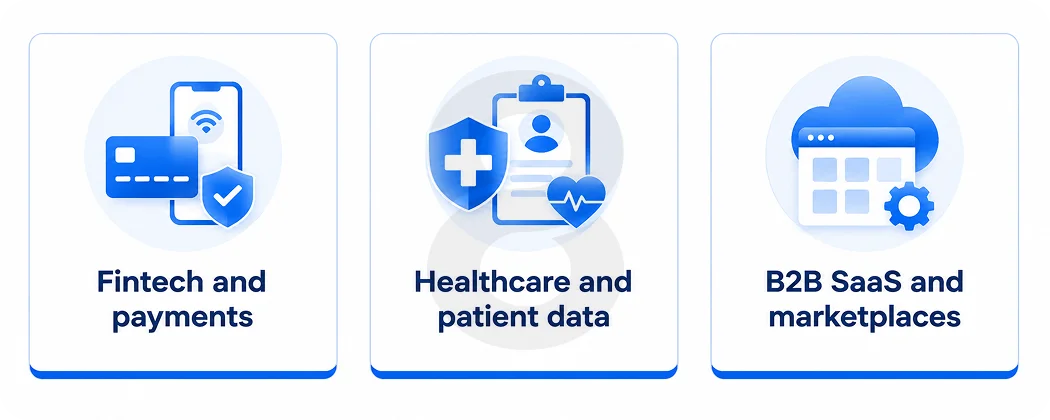
Not every company needs a custom build. Plenty run fine on a standard tool for years. But some fields make custom almost unavoidable. The pattern is simple. Stricter rules and more sensitive data make generic tools fit worse and worse.
Fintech and payments
Money attracts attackers. It also attracts regulators. Fintech products carry both a heavy compliance load and a large target on their back.
Standard access tools rarely cover every rule these products face. A custom layer lets you enforce exactly the controls auditors demand, with nothing left to chance.
Read More: How to Build an Online Payment App: Features, Architecture, and Development Process
Healthcare and patient data
Patient records are among the most protected data anywhere. Access has to be tight, logged, and provable. A slip here is not just a bug. It is a legal event.
Custom systems let healthcare teams model access down to the specific role and record. That precision is hard to buy off a shelf.
Read More: 10 Telehealth Mobile App Success Stories: What Worked and What Didn’t
B2B SaaS and marketplaces
These products serve many organizations at once. Each one wants its own admins, roles, and rules. Some enterprise clients will not sign without single sign-on and their own controls.
That is a lot to ask of a generic tool. Building your own means you say yes to those enterprise demands instead of losing the deal. A busy eCommerce marketplace with buyer and seller roles often starts from the same access foundation.
Read More: eCommerce App Development Guide: Everything You Need to Know
What Custom User Management Development Costs
The honest answer is, it depends. Cost tracks with complexity. A simple role system is one thing, while a multi-tenant platform with SSO and audit trails is another.
A few things move the number the most.
- Number of roles and rules: More granular access means more logic to build and test.
- Authentication methods: SSO, MFA, and passkeys each add integration work.
- Compliance needs: Regulated data demands extra security and documentation.
- Scale: Building for millions of users costs more than building for thousands.
The trade-off is worth naming. You pay more upfront than a monthly tool. But you stop paying rising per-user fees, and you own the result outright.
Think of it as buying versus renting. A subscription feels cheap until you have paid it for five years straight. But a build is an asset that sits on your side of the ledger.
There is a softer return too. A breach costs money, trust, and sleep. And a system that closes those gaps earns its keep every single day it does not fail.
How 8ration Builds User Management Software for Growing Businesses
Plenty of agencies can hand you a login screen. Fewer build an access layer that holds up two years later, at ten times the users.
8ration builds user management software as core infrastructure. The focus is fit, security, and room to grow.
Every business runs access differently. So the work starts with questions. Who needs what. Which rules are legal requirements. Where the current setup already hurts.
That mapping shapes the build. It is why a healthcare client and a marketplace client never get the same system.
Security is not a final coat of paint. It sits in the architecture from the start. Encryption, least-privilege defaults, and clean session handling come standard.
For regulated fields, this is the whole game. Healthcare systems bound by strict compliance need access controls that satisfy auditors. 8ration builds to that bar.
A system that works at 100 users should not choke at 100,000. The architecture is designed to grow without a rewrite.
That scaling extends to your interface too. Access might live in a web dashboard. It might live in a mobile app where account controls feel native. Either way, the experience stays clean as you grow. And when you need extra senior hands mid-project, borrowing vetted engineers keeps momentum without a long hiring cycle.
Your access layer does not live alone. It has to talk to your HR system, your directory, and the apps your team uses daily. A custom build connects to all of them through clean APIs.
That matters more than it sounds. When your HR system marks someone as leaving, their access should drop on its own. It happens with no ticket and no waiting. The systems just agree, and the risk closes itself.
Shipping the system is the start. Users grow. Rules change. New threats appear. A build nobody updates slowly turns into the very risk it was meant to prevent.
8ration stays on after launch. That means security patches, new features, and help when your needs shift. The system keeps pace with the business instead of falling behind it.