Java turned 30 last year. Most languages never get close to that, and the ones that do usually survive as museum pieces, yet Java still runs an absurd amount of the software you touched today. Your bank almost certainly processes payments through it, and the backend behind whatever app you opened this morning probably has Java in it somewhere.
This guide covers the whole span of Java app development, starting with what these apps actually are, then the build process from the first planning call to the day you push to production, the frameworks worth knowing in 2026, and what a sane budget looks like. Maybe you’re picking a tech stack for your company, or maybe you’re just curious how this stuff gets made. Either way, it’s all here.
What is Java App Development
Java app development is the practice of building software applications on the Java programming language and its runtime known as the Java Virtual Machine. The term sounds narrower than it is. Android apps qualify. So do web backends and desktop tools along with the enterprise systems that keep banks and hospitals running.
Sun Microsystems shipped the language three decades back and Oracle owns it today. A fresh version now lands every six months whether anyone asked for one or not.
How the JVM makes Java platform independent
Here’s the trick behind it. Java code never compiles straight into instructions for a specific chip. It compiles into something called bytecode. It sits halfway between source code and machine code. Every device then carries its own Java Virtual Machine that reads the bytecode and translates it for whatever hardware happens.
The same compiled file will therefore run on a Windows laptop or a Linux server or a Mac… and nobody ever touches the code. Sun marketed this as write once run anywhere back in the day. That promise is why companies keep betting on Java for systems they expect to live ten or fifteen years.
Where Java stands in 2026
Java’s age fools people into writing it off, and the numbers keep proving them wrong. It still sits near the top of the 2025 Stack Overflow Developer Survey rankings with JavaScript and Python, which are hardly slouches for company.
Oracle also shipped Java 25 in September last year as the newest long term support release and promised at least eight years of support for it. That promise carries more weight than anything in the release notes.
A company building a core system on Java today is really asking one question… whether the platform will still get security patches in 2033? And the answer is yes.
Read More: How to Hire a Software Development Team: 12-Step Guide
Types of Apps You Can Build with Java
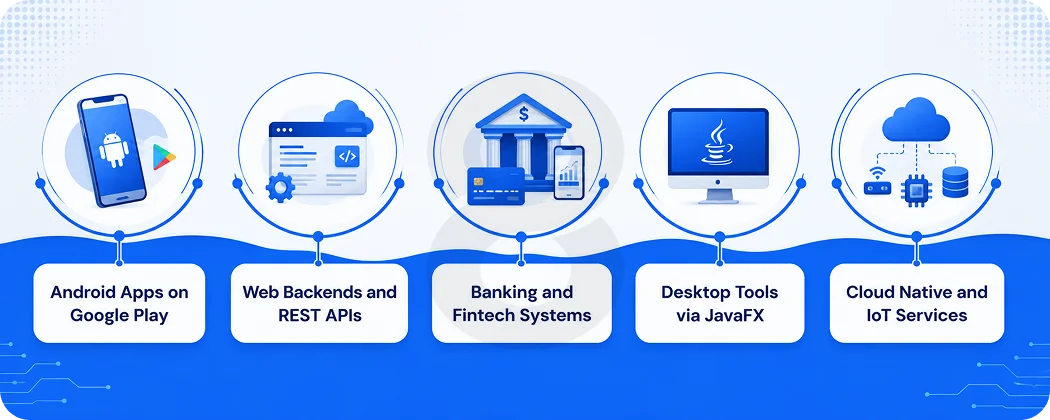
Say Java to most people and they either think Android or they picture some gray enterprise screen from 2008. Fair enough, since both are real. The actual range runs a lot wider though.
Android mobile apps
Java was the language Android shipped with. Millions of apps on Google Play still run on it today. The entire Android SDK grew up around Java APIs. Even the apps written in Kotlin end up calling Java libraries somewhere below the surface. Any team already fluent in the language will reach a working mobile product fastest through an Android app.
Web applications and backends
Most professional Java work lives here now. The server side of an enormous number of web products runs on Java, covering login systems, payment flows, and the APIs your phone quietly talks to all day. A decade ago this work meant drowning in XML configuration. Spring Boot changed that, and backend Java turned into something you could genuinely enjoy.
Enterprise and fintech systems
There’s a reason banks won’t let go of Java. Thirty years in production means its failure modes have been documented and argued over for decades, which counts for more in finance than novelty ever will. Trading platforms run on it, and so do payment processors and core banking systems across the world. Teams building fintech software tend to reach for Java once a crash or a rounding error starts costing real money.
Desktop applications
JavaFX and Swing can still produce desktop tools that run on Windows, macOS, and Linux from a single codebase. The browser ate most of this market, and there’s no point pretending otherwise. Internal business tools and certain specialized software keep the niche alive anyway.
Cloud native services and IoT
Frameworks like Quarkus and Micronaut slimmed Java down for containers and serverless platforms, where startup speed and memory use show up directly on your cloud bill. And Java runs happily on embedded hardware too, which is why IoT app development often lands on it when a physical device and a backend need to share a language.
Java Basics Every Beginner Should Know
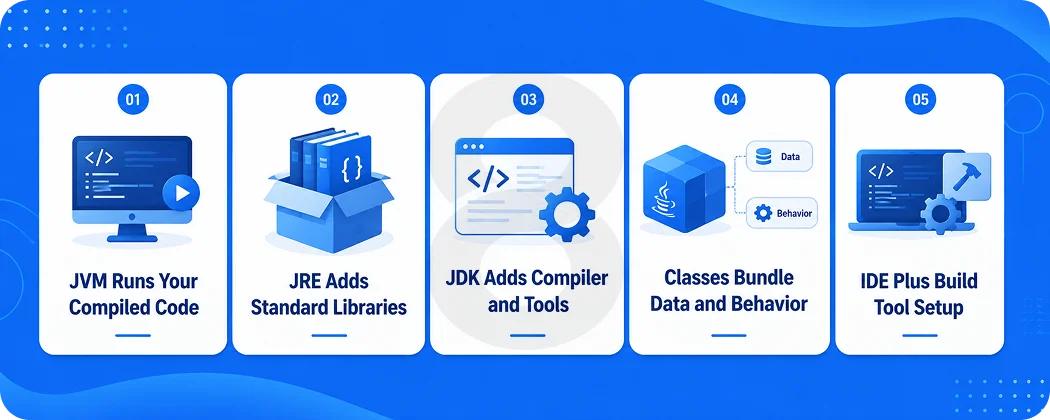
You do not need to write code to make good decisions about a Java project, but a few terms come up constantly. Learn these and the rest of the guide gets easier.
JDK, JRE, and JVM explained simply
These three names sit so close together that beginners mix them up constantly. Take the JVM first, because it is the engine that actually runs a Java program. Bundle it with the standard libraries a running program depends on and you’ve got the JRE.
The JDK is the full toolkit for developers, containing the JRE plus the compiler and debugging tools. If you build apps, you install the JDK. If you only run them, the JRE is enough. Modern installers bundle everything together, so in practice you download one package and move on.
Core concepts behind every Java app
Java belongs to the object oriented family, so programs get assembled from classes, which are small bundles of data and the behavior that goes with it. Picture a banking app. Somewhere in its code sits an Account class, a Transaction class, and a Customer class, and each one minds its own corner of the logic.
Exception handling is the other concept worth knowing. Java forces developers to plan for failure, like a network call timing out or a file going missing, instead of letting the app crash blind. Strict typing rounds it out. The compiler catches whole categories of mistakes before the code ever runs, which is part of why large teams manage Java codebases for years without them rotting.
Setting up your development environment
A working setup needs three things. First comes a JDK, either Oracle’s build or an open source OpenJDK build . Then you pick an IDE. Most working professionals have settled on IntelliJ IDEA. Eclipse still has its loyalists and costs nothing, while Android work leaves you no choice at all, since Android Studio is mandatory there.
The last piece is a build tool. In practice, that means Maven or Gradle. Either one handles the libraries your project pulls in and packages the finished code into something you can actually ship. Setting all of it up on a fresh machine takes most developers under an hour.
Read More: Pricing Models for Software Services: Fixed vs. Hourly Rates Explained
The Java App Development Process from Start to Finish
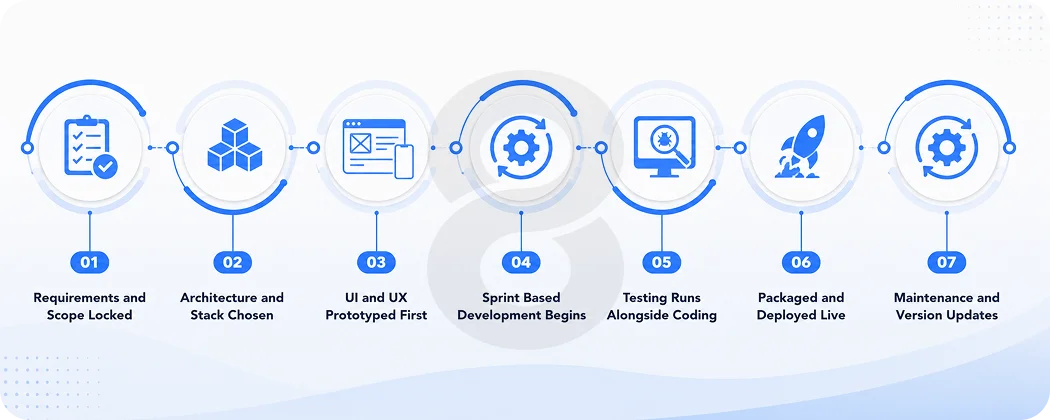
Every agency dresses this up differently, but a Java project that ships on time moves through the same seven stages. Here is what actually happens in each one.
Requirements and planning
More projects are won or lost here than anywhere else. You’re pinning down what the app does, who it serves, what it has to connect with, and what finished actually means, and none of that feels like progress compared to writing code. Skip it anyway and the bill arrives later at triple the price. A requirement changed in week two costs almost nothing, and the same change in month four ripples through everything already built.
Architecture and tech stack decisions
This is where the technical bets get placed. Monolith or microservices, which framework, which database, where the thing will actually be hosted, and how it should behave when usage grows. Teams botch this in two opposite ways. Some build a fragile shortcut that folds the moment real users show up, and others construct an elaborate distributed system for an app that a hundred people will ever open.
UI and UX design
Design runs in parallel with architecture. Wireframes turn into clickable prototypes, and the team pressure tests the flows before a line of production code exists. Solid software design work at this stage is the cheapest insurance a project can buy, since moving a button in Figma takes minutes and moving it after launch takes a sprint.
Development and coding
The build itself usually runs in two week sprints. Backend developers stand up the APIs and database layer while mobile or frontend developers build the screens, and both sides meet in the middle through agreed API contracts. Good teams demo working software every sprint instead of disappearing for three months.
Testing and quality assurance
Teams that schedule testing as a final phase are the ones who ship late. Unit tests check small pieces of logic. Integration tests confirm those pieces still behave once they’re wired together. End to end tests go further and walk the whole app the way a real user would.
Budgeting for software testing before each release looks like an expense you could skip. It stops looking that way the first time it catches something that would have cost you a weekend of firefighting and a few hundred users.
Deployment and release
Now the app leaves the developer’s machine and enters a real environment. It gets packaged up, configured for production, and pushed out to servers or an app store. There’s a full section on this further down, mostly because deployment has a talent for exposing projects that only looked finished.
Maintenance and updates
Launch sits somewhere near the middle of the real timeline. Dependencies need updating, the JDK version will age, users will find bugs no tester imagined, and the business will want new features within a month. Budget for this from day one, because a Java app that receives no maintenance is a security incident on a timer.
Best Java Frameworks and Tools for App Development
Nobody assembles Java apps from bare language features anymore, and nobody should. Frameworks absorb the plumbing so your team’s hours go into the product instead. These are the ones worth knowing in 2026.
Spring Boot
Spring Boot stopped being a choice and became the default some years ago. The 2025 Stack Overflow Developer Survey put it at the top of the Java frameworks with 14.7 percent of all respondents using it.
Security, database access, configuration, and the API wiring all ship with defaults that hold up in production, so a small team can have a real backend running in days. Hiring is the other quiet advantage here. A Java developer who has never touched Spring is rare enough that you can almost stop checking.
Hibernate
Hibernate lives in the gap between your Java code and your database, converting objects into table rows and back again so nobody writes thousands of lines of near identical SQL by hand. It’s a genuinely useful tool with one catch.
Developers who understand what it does under the hood get rewarded. However, the ones who treat it as magic eventually meet an unexplainable performance problem at 2 am.
Quarkus and Micronaut
Both of these newer frameworks exist for one blunt reason, which is that traditional Java got heavy right as the cloud started billing by the second. Each one starts in milliseconds and sips memory.
Quarkus gets there by compiling to native binaries through GraalVM, while Micronaut sorts out its dependency injection at compile time instead of runtime. Serverless work and dense container deployments are where either of them earns its keep.
Android SDK and Jetpack
For mobile work, the Android SDK provides the platform APIs while Jetpack adds the libraries Google actually recommends for navigation, lifecycle, and data storage. Both work from Java, though newer Jetpack pieces like Compose favor Kotlin.
Build and testing tools worth knowing
Maven and Gradle manage dependencies and builds, with Gradle standard on Android. JUnit is the testing backbone that nearly every Java codebase uses. None of them will win a beauty contest, but every serious Java project depends on them.
| Framework | Best for | Keep in mind |
|---|---|---|
| Spring Boot | Web backends, APIs, microservices | The most libraries, guides, and hires available |
| Hibernate | Database access | Powerful, with a learning curve that bites late |
| Quarkus | Cloud native and serverless apps | Native compilation cuts startup to milliseconds |
| Micronaut | Microservices with tight memory budgets | Compile time injection keeps the runtime lean |
| Android SDK and Jetpack | Android apps | Newer components favor Kotlin over Java |
Java vs Kotlin and Other Languages
Choosing Java means saying no to something else, so the alternatives deserve an honest look.
Java vs Kotlin for Android
Google went Kotlin first with Android back in 2019, and new Jetpack libraries now get designed for Kotlin with Java as an afterthought. There’s no sense dancing around it. So who still picks Java for Android, and why? Mostly it comes down to code that already exists. Millions of working Android apps were written in Java, and rewriting a stable app in a fresh language is expensive motion that leaves you exactly where you started.
The hiring math leans the same way, since Java developers outnumber Kotlin developers and cost less to find. A brand new Android app in 2026 should probably start in Kotlin. An existing Java app is a different conversation, where staying put is often the sound business call, and since the two languages mix comfortably inside one project you can shift gradually anyway.
Java vs Python for backend work
Python wins on development speed and owns the AI and data science space. Java wins on raw performance, type safety, and behavior under heavy load. A rough rule that holds up in practice gives Python the prototypes and data pipelines while Java takes the high traffic systems that cannot fall over. Plenty of companies run both and route each job to the language that suits it.
When Java is the right choice
Java earns its place when an app has to survive for years, carry serious load, plug into enterprise systems, or come through a compliance audit clean. It also earns it when hiring matters, since the talent pool runs deep and the rates stay predictable.
The case weakens when you’re racing to validate an idea inside six weeks, when the product is mostly AI experimentation, or when your entire team already thinks in another stack. In those cases the honest advice is to use something else.
How to Deploy a Java Application
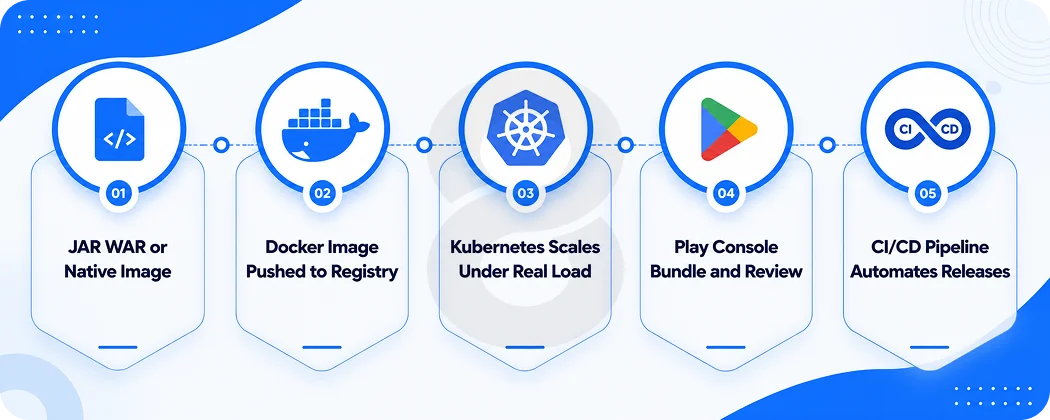
Most guides wave at deployment and move on, which is backwards. Nothing you built counts until it runs somewhere other than a developer’s laptop.
Packaging your app
Java apps ship in a few standard formats. A JAR file bundles your code and its dependencies into one executable package, and Spring Boot produces these by default. WAR files serve older setups that run on standalone application servers.
GraalVM offers a newer route by compiling your app into a native machine executable. Those binaries start in milliseconds and skip JVM warmup completely.
Deploying to the cloud
Containers are how most Java backends run now. You wrap the app in a Docker image, push that image to a registry, and run it on AWS or Azure or Google Cloud. Kubernetes enters later once you have enough load to justify the complexity it brings.
Smaller apps never need any of that and run fine on managed platforms that hide the servers from you. What actually eats the time is connecting the app to databases and queues and outside services, which is where system integration experience pays for itself.
Publishing an Android app to Google Play
Mobile deployment follows a different path. You build a signed release bundle, create a listing in the Google Play Console, pay the one time $25 registration fee, and submit for review. Reviews usually clear within a few days for a first release.
Plan a staged rollout that reaches a small percentage of users first, so a crash that testing missed hurts a handful of people instead of everyone.
Automation and monitoring after launch
Every step above gets automated once a team has been burned enough times. A CI/CD pipeline runs the test suite and pushes approved changes to production… so nobody is copying files onto a server at midnight.
Monitoring picks up where that stops. Good tooling watches error rates and slow endpoints and memory creep, and it tells your team about a problem before a user does it for you in a one star review.
Read More:
How Much Does Java App Development Cost
Nobody can quote a real number without knowing what you are building. Any figure that arrives before that conversation is a sales tactic. Scope and complexity set the baseline.
Then the team you hire moves that baseline by a factor of four or more. Offshore shops commonly bill $25 to $50 an hour. A US agency charges $100 to $200 or higher for the same work.
| Project size | What it usually includes | Typical budget | Timeline |
|---|---|---|---|
| Simple app | A few screens, basic backend, one platform | $15,000 to $40,000 | 2 to 3 months |
| Medium app | User accounts, payments, admin panel, API integrations | $40,000 to $120,000 | 3 to 6 months |
| Complex or enterprise app | Microservices, compliance, high load, many integrations | $120,000 to $400,000 and up | 6 to 12 months or more |
What drives the price up or down
Integrations are what quietly wreck budgets. Every outside system your app has to talk to means fresh design work and fresh testing, and it does not matter whether that system is a payment gateway or somebody’s legacy database from 2011.
Finance and healthcare add another layer, because compliance brings paperwork and process that has nothing to do with writing code. Team location moves the total more than any technical decision, and so does scope discipline, because features added mid project cost far more than features planned up front.
Ongoing maintenance costs
Budget 15 to 20 percent of the original build cost every year after launch. That covers dependency updates and security patches. It also takes care of the steady trickle of bug fixes and small improvements that any live app generates. Cloud hosting sits on top of that number and climbs as usage does.
Read More: Android App Development Cost in 2026: A Detailed Guide
Common Java App Development Challenges
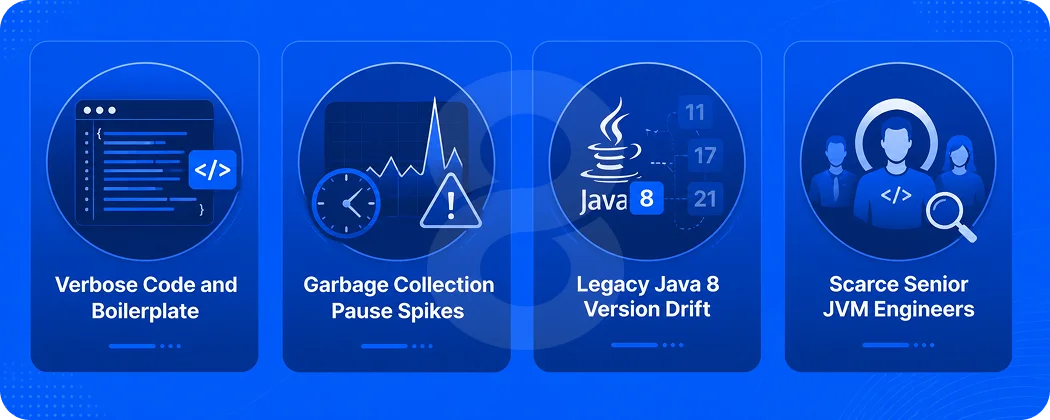
Java has real friction points, and pretending otherwise helps nobody. The first is verbosity. Java makes you write more code than modern languages to do the same thing, though recent versions have closed the gap with records, var declarations, and pattern matching. The fix is partly modern Java and partly tooling, since IDEs generate most of the boilerplate anyway.
Memory behavior comes second. The JVM’s garbage collector performs beautifully until it does not, and apps under heavy load can hit pause spikes that need real profiling work to diagnose. Teams that load test before launch catch these in staging, and teams that skip it meet them in production.
Version drift is the third problem and it costs the most. Plenty of companies are still on Java 8, and every year more libraries drop support for it, which turns a routine upgrade into a project nobody budgeted for. Put JDK upgrades on the maintenance calendar. Leaving them for the day something breaks means paying for the upgrade and the outage together.
The last problem is people. Senior engineers who actually understand what the JVM is doing under load are scarce, and their rates reflect that. Bringing in software consulting while the architecture is still on a whiteboard costs very little. Unwinding a bad foundation a year later is a different invoice entirely.
Read More: 11 Biggest Mobile App Development Challenges and Solutions
Build or Modernize Your Java App with 8ration
8ration builds and maintains the kinds of systems this guide describes. The team handles custom software development end to end, from the first architecture call through deployment and the years of maintenance that follow, and its mobile app work has shipped Android apps like TruckersKonnect and Be Line to Google Play.
Fintech is a core industry focus, which matters for Java work because financial systems are exactly where the language’s strengths in reliability and load handling earn their keep.
If you are weighing Java against other stacks, or you have an aging Java system that needs modernizing rather than replacing, the team will give you a straight answer about what the work involves and what it should cost. Reach out through the contact page and bring your requirements, rough or polished.