There’s something almost embarrassing about how much the world has shifted toward instant service. A few taps and a driver shows up. Dinner’s at your door. A stranger fixes your leaky pipe the same afternoon. It’s genuinely wild.
And yet, behind every Uber or DoorDash success story, hundreds of on-demand apps quietly died in the App Store with three reviews.
According to Statista, average 30-day retention sits at roughly 6–7%. That’s not a development problem. That’s a product problem.
The global on-demand services market hit nearly $200 billion in 2024, projected to reach $320 billion by 2033. That trajectory draws founders in fast. And then they rush the build.
On-demand services app development is complex, expensive, and hard to get right. But understanding the full picture before spending changes everything.
What an On-Demand App Actually Is (And What It’s Not)
On-demand app development connects users with services in real time. A user requests, a provider fulfills. Simple concept, brutally difficult execution.
What confuses most founders is the scope. You’re not building one app. You’re building three: a customer-facing app, a provider-facing app, and an admin dashboard. Each has its own UX requirements and user psychology.
The customer app covers search, booking, real-time tracking, payments, and reviews. The provider app handles job notifications, navigation, and earnings tracking. The admin panel manages disputes, payouts, analytics, and fraud signals.
Cut any of the three short and the whole system starts to break.
| App Component | Primary Users | Core Functions |
|---|---|---|
| Customer App | End users | Browse, book, pay, track, review |
| Provider App | Service providers | Receive jobs, navigate, manage availability, track earnings |
| Admin Panel | Internal team | Manage users, resolve disputes, view analytics, configure settings |
Models of on-demand platforms worth knowing:
| Model | Example | Description |
|---|---|---|
| B2C (Business to Consumer) | Starbucks app, Domino’s | Single brand delivering its own service directly |
| B2B (Business to Business) | Cargomatic | Connecting enterprise clients with logistics providers |
| C2C / P2P (Consumer to Consumer) | Airbnb, Etsy | Users transacting with other users through the platform |
| Marketplace Aggregator | DoorDash, TaskRabbit | Multiple providers competing on one platform |
Understanding which model you’re building before anything else shapes your entire feature set, your monetization strategy, and your go-to-market plan.
Step 1: Market Research and Idea Validation
Most people treat this step like a formality. It’s not.
Before committing any budget, confirm three things: real people have the problem your app solves, they’d pay for a solution, and current alternatives are genuinely failing them. “There’s no app for this” isn’t validation. It’s either an opportunity or proof others already tried and quit.
Start with interviews, not surveys or Reddit threads. Actual conversations with potential users and providers.
Then map the competitive landscape honestly. Find the wedge where you’re noticeably better at something that matters. Define your niche before scaling. Apps that tried to be everything on day one have almost all failed.
Questions worth answering in validation:
- Who is the supply side? How do you acquire providers and what makes them prefer your platform?
- What’s the unit economics model? Fee per transaction, subscription, commission?
- What geography makes sense to start in? Demand density matters enormously for on-demand.
- What’s the minimum serviceable area where your app actually works well?
Read More: Top Features Every Successful On-Demand App Must Have in 2026
Step 2: Define Your Feature Set Around Real User Behavior
There’s a specific kind of feature list creep that happens in on-demand app development where founders add things because competitors have them, not because users need them. That’s how you end up with a bloated MVP that takes 18 months to build and is already outdated by launch.
The features below aren’t optional. They’re the floor. Everything else is a negotiation.
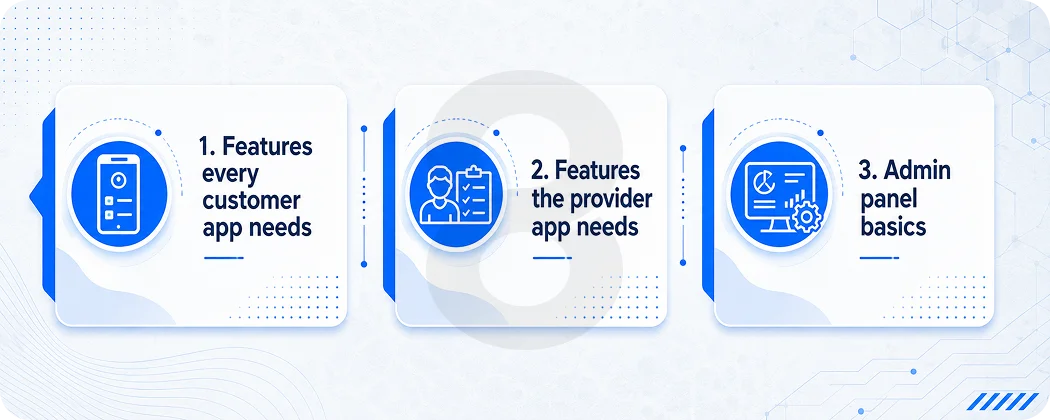
Features every customer app needs
- Registration and onboarding: Fast, friction-reduced sign-up. Social login cuts drop-off significantly. The faster a user gets to their first booking, the better.
- Service search and filtering: Smart search with location awareness, category filters, price filters, and provider ratings. Users shouldn’t need to scroll past irrelevant results.
- Booking and scheduling: Instant booking or scheduled appointments depending on service type. Clear confirmation flows with details the user can reference later.
- Real-time tracking: GPS-based tracking for provider location or delivery status. This single feature reduces support tickets about “where is my order” by a dramatic margin.
- In-app payments: Multiple payment methods. Stripe and PayPal remain the standard integrations for US-market apps. Cashless transactions are table stakes at this point.
- Ratings and reviews: Two-way review systems build trust and give you usable quality data. Providers who consistently underperform get flagged before they damage your brand.
- Push notifications: Used well, push notifications increase retention by around 20%. Used badly, they cause uninstalls. Behavioral triggers outperform generic broadcasts every time.
Features the provider app needs
Real-time job requests with accept/decline options, in-app navigation integration, earnings dashboard, availability management, and a simple communication channel with customers. The provider experience is where most on-demand apps underinvest and it shows. A provider who finds your app annoying to use will leave your platform for one that doesn’t.
Admin panel basics
User management, dispute resolution tools, analytics dashboards, payout management, real-time monitoring of active jobs, and configuration controls for pricing, geofences, and categories.
Step 3: UX and UI Design: The Part That Actually Converts
Treating design as the pretty layer you put on top of working code is backwards, and it costs real money.
Design is where you figure out whether your app actually makes sense to use. Wireframes and prototypes come before development, not alongside it. A solid design phase catches friction points that would otherwise become expensive rework cycles mid-engineering.
The process moves through three phases. Wireframing maps the structural logic of every screen. Prototyping turns those wireframes into something clickable you can test with real users. UI design is where visual identity, color, typography, and motion come together, shaping how trustworthy your app feels.
A professional UI/UX design process should produce a complete design system, documented component library, and developer-ready specs. That handoff quality determines whether your app ends up looking like the mockups.
Step 4: Choosing Your Tech Stack
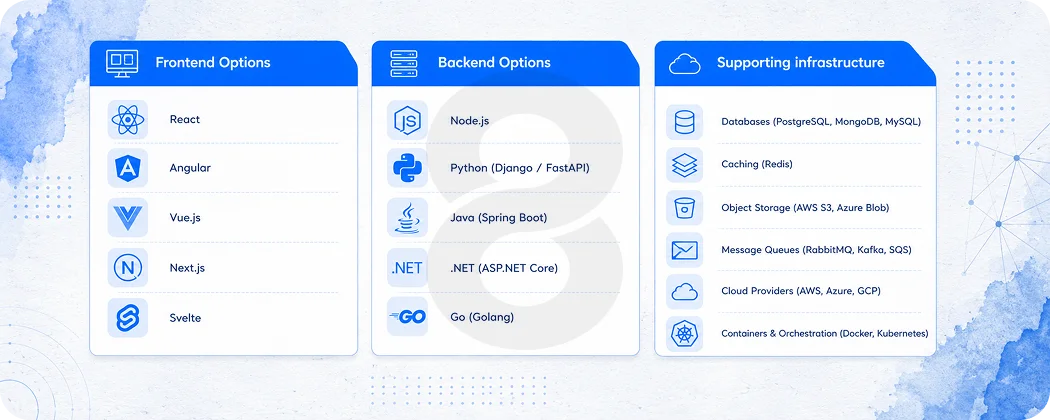
Tech stack decisions are consequential and they’re also where founders get sold on complexity they don’t need yet. Here’s an honest breakdown of what works for most on-demand apps at various stages.
Frontend Options
- React Native: JavaScript-based, works on both iOS and Android from a single codebase, large talent pool, good performance for most on-demand use cases. DoorDash and others use it in production.
- Flutter: Google’s framework, Dart-based, excellent UI performance, growing community. Good choice if your team has Flutter experience or you’re prioritizing visual fidelity across platforms.
- Native (Swift for iOS, Kotlin for Android): Best performance, highest cost, longer development time. Worth it when you have a large user base and platform-specific capabilities matter, not at MVP stage.
Backend Options
- Node.js: Fast, event-driven, handles real-time operations well. Good fit for apps with lots of concurrent connections like live tracking.
- Django / Python: Clean, opinionated framework, good for data-heavy applications and when machine learning integration is on the roadmap.
- Laravel / PHP: Mature ecosystem, good documentation, widely available talent.
Supporting infrastructure
| Layer | Options |
|---|---|
| Database (relational) | PostgreSQL, MySQL |
| Database (real-time / flexible) | MongoDB, Firebase |
| Cloud hosting | AWS, Google Cloud, Azure |
| Payment gateway | Stripe, PayPal, Razorpay |
| Maps / geolocation | Google Maps API, Mapbox |
| Push notifications | Firebase Cloud Messaging, Twilio |
| Real-time communication | Socket.io, Firebase Realtime DB |
| CI/CD and monitoring | GitHub Actions, New Relic, Firebase Crashlytics |
Cross-platform development with Flutter or React Native reduces cost by 30–40% compared to building separate native apps. For most early-stage on-demand platforms, that saving is better redirected to marketing, onboarding design, or provider acquisition.
For custom software development, the stack decision should follow the use case. Real-time tracking needs different infrastructure than appointment scheduling. Get architecture decisions from someone who’s built similar systems before making them, not from a blog post.
Read More: 40 Best Technology Stacks for Mobile App Development in 2026
Step 5: Development: How This Actually Works in Practice
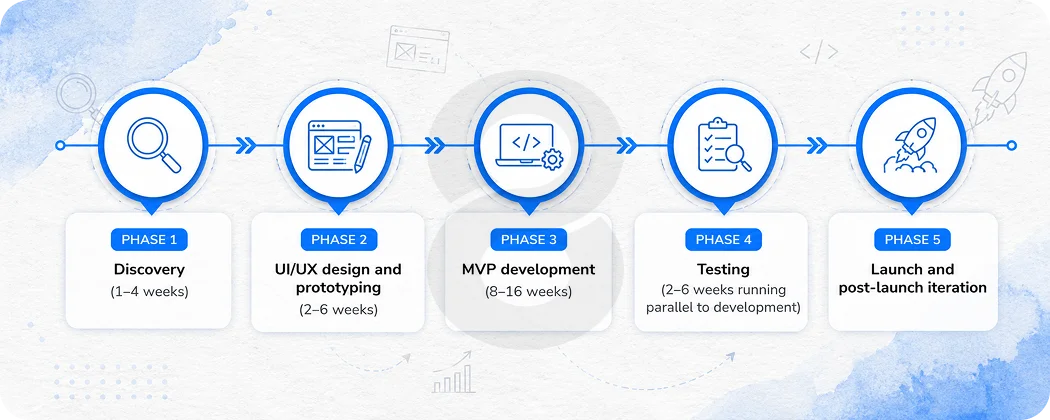
Professional on-demand services app development runs in structured phases. Skipping or compressing these phases doesn’t save time. It borrows it from later, at interest.
Phase 1: Discovery (1–4 weeks)
This is where requirements get turned into a technical spec. User stories, API contracts, database schema, third-party integration planning, and project timeline. The output of a good discovery phase is a document clear enough that a different dev team could pick it up and run with it.
Phase 2: UI/UX design and prototyping (2–6 weeks)
Wireframes to high-fidelity mockups to a clickable prototype. User testing happens here if time and budget allow. The design system produced here becomes the reference for all future development.
Phase 3: MVP development (8–16 weeks)
Core user flows only: sign-up, search, book, pay, track, review. The admin panel at minimum viable functionality. Provider app at minimum viable functionality. No advanced features, machine learning, or recommendation engines.
Phase 4: Testing (2–6 weeks running parallel to development)
Functional testing, performance testing, security testing, and device compatibility testing. A QA pass before launch is not optional. The app stores reject apps for accessibility and performance issues. Your users uninstall for crashes.
Phase 5: Launch and post-launch iteration
App store submission, go-live monitoring, crash reporting, performance analytics. Iteration based on real user behavior data, not assumptions.
The timeline from discovery to an MVP launch for most on-demand platforms is roughly 4 to 8 months when run at a professional pace. Claims of 6-week MVPs for complex platforms exist but they’re usually missing the provider app, have placeholder admin functionality, and require significant rework to scale.
For teams considering enterprise app development, the same phased approach applies but with additional requirements around security standards, compliance, internal integration, and scalability architecture from day one.
Step 6: Retention Is a Feature, Not a Marketing Problem
This is the part nobody wants to hear after they’ve spent six months building. Research from Plotline shows that average 30-day retention across all app categories is just 6%. That means 94% of users who download your app are gone within a month. For on-demand apps specifically, the competitive landscape makes this even harder.
There’s a real tendency in product teams to treat retention as something the marketing team solves with re-engagement campaigns. Those campaigns matter but they’re fighting a losing battle if the product itself isn’t designed for habit formation.
Here’s what actually moves retention in on-demand apps:
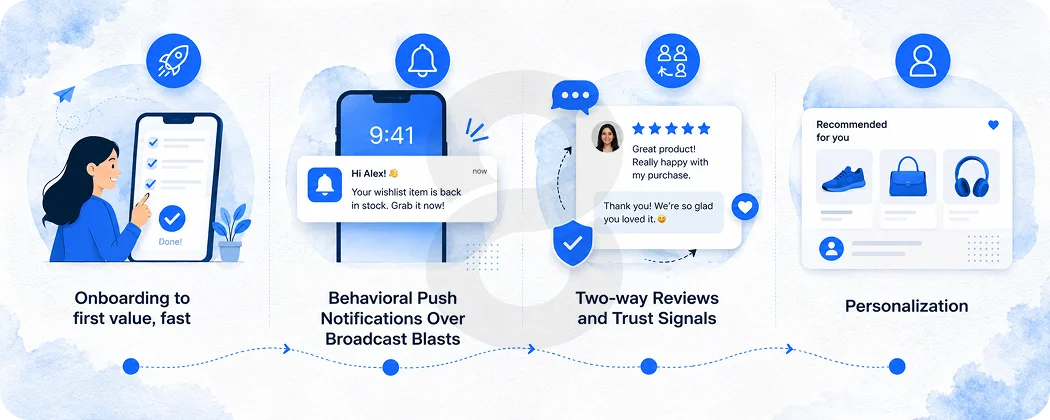
Onboarding to first value, fast
The research is clear: users who reach the core value of an app in the first session churn at 3–5 times lower rates than those who don’t. For a home services app, that might mean a user sees available providers in their area within 30 seconds of signing up. Every step between install and that moment is a potential drop-off point.
Behavioral Push Notifications Over Broadcast Blasts
Triggered notifications based on real user behavior reduce churn. Generic promotional notifications accelerate it. “Your booking is confirmed for Thursday at 2pm” keeps users engaged. “Check out our new services!” does almost nothing.
Two-way Reviews and Trust Signals
Users return to platforms they trust. Provider verification, visible ratings, profile photos, and response times visible in the UI – these all signal safety and reliability in ways that increase repeat bookings.
Personalization
According to McKinsey research, personalization drives 10–15% revenue increases. For an on-demand platform, this means surfacing the services a user has booked before, recommending providers based on prior ratings, and remembering preferences. Users shouldn’t have to start from scratch every session.
The AI development services that power recommendation engines and personalization loops used to be enterprise-only territory. They’re increasingly accessible to mid-sized platforms and they make a measurable difference in retention metrics.
Read More: MVP Vs Full Product On-Demand App Strategy: Which One Saves More Money?
How Much Does On-Demand Services App Development Actually Cost?
Honest answer: it depends, but here are real numbers to work with.
| Build Type | Estimated Cost | Timeline |
|---|---|---|
| Basic MVP (single platform, core flows only) | $30,000–$60,000 | 4–6 months |
| Mid-complexity (cross-platform, real-time tracking, payments) | $60,000–$150,000 | 6–9 months |
| Full-featured platform (all three apps, AI matching, advanced analytics) | $150,000–$300,000+ | 9–14 months |
| Enterprise-grade with compliance requirements | $300,000+ | 12–18+ months |
Annual maintenance runs 15–20% of initial development cost. Many founders forget this when projecting cash flow.
Geography affects rates significantly. US teams bill $100–200/hr. Eastern European and South Asian teams with equivalent skills deliver at $30–80/hr. Evaluate portfolios and references, not just location.
Read More: How Much Does It Cost to Build an On-Demand App?
Cross-platform frameworks like Flutter and React Native save 30–40% on frontend development. For most on-demand apps, the performance difference versus native is negligible.
Hidden costs worth planning for: App Store fees, Google Maps API billing, cloud hosting, and QA tooling.
For mobile app development planning, always get a detailed technical estimate with scope documentation before committing to any vendor.
The Role of AI in Modern On-Demand Apps
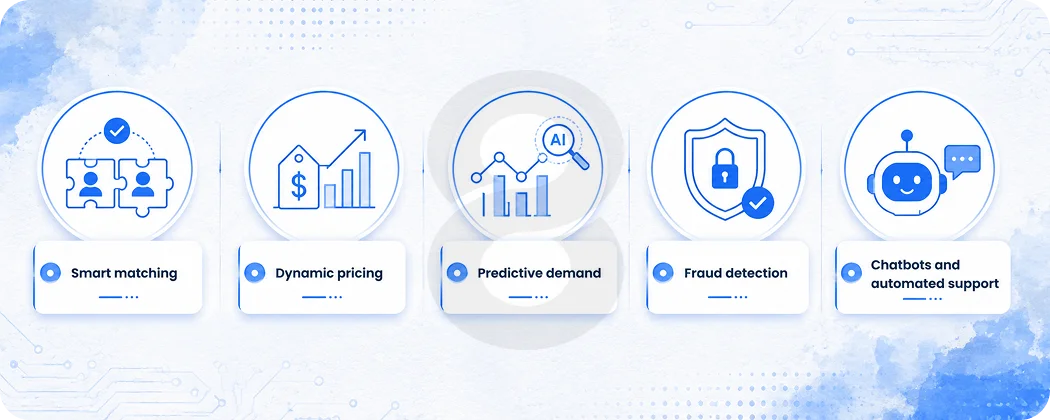
Calling something “AI-powered” has become a reflex for product teams who want to sound current. But there are genuine and meaningful ways AI changes what’s possible in on-demand app development, and it’s worth separating the real from the noise.
- Smart matching: Instead of showing all available providers, AI-driven matching surfaces the right provider for a given user based on history, ratings, proximity, and job type. This increases booking completion rates because the best match appears first.
- Dynamic pricing: Real-time demand data adjusts pricing automatically, similar to how Uber’s surge pricing works. This helps balance supply and demand without manual intervention.
- Predictive demand: Understanding when and where demand will spike lets platforms pre-position supply. A cleaning platform that knows demand spikes on Monday mornings can nudge providers to set availability accordingly.
- Fraud detection: Transaction patterns that look anomalous get flagged automatically. For platforms handling payments at scale, this is not optional.
- Chatbots and automated support: Resolving common queries without human support reduces operational cost significantly, especially as volume grows.
The integration of these capabilities is more accessible than it was three years ago. The challenge isn’t the technology; it’s having clean data and the right architecture to use it well. An app built without thinking about AI from the start often needs significant rework to add it later.
AI-powered mobile applications built for on-demand contexts should be designed with data collection in mind from day one, even if the AI features themselves come later. The models are only as good as the data they train on.
Read More: Why Your On-Demand App Failed and How to Fix It Before Launch
Why Teams Choose 8ration for On-Demand App Development
On-demand platforms fail at the product level long before they fail at the technology level. 8ration’s approach starts with understanding both sides of your marketplace, the user and the provider, before writing a single line of code.
From scoping and UX through backend architecture and post-launch iteration, the team brings hands-on experience across service categories and real delivery track records. No overselling timelines. No vague estimates. Just honest product thinking and builds that hold up when real users show up.
Read More: On-demand App Development: The Complete Guide for Startups and Enterprises