Choose Next.js for anything that needs to rank in search and plain React for the ones sitting behind a login. That covers most of the decision. Every Next.js app is a React app underneath, so what you are picking in a Next.js vs React comparison is whether Vercel makes your routing and rendering calls or you make them yourself.
React’s compiler went stable in October 2025. Create React App, the tool that introduced a generation of developers to the library, was retired in February 2025. Next.js swapped its bundler, rewrote how caching works, and moved to a formal monthly security release schedule. React itself left Meta’s sole custody for an independent foundation. Four changes in a year.
So it is worth running the question again from scratch. This guide compares the two on rendering, search visibility, build cost, hosting, hiring, and security. It also covers the option most comparisons skip entirely, which is React paired with a modern build tool and a standalone router. For a large share of production apps, that remains the correct answer.
What React Is and What It Deliberately Leaves Out
React does one job. It keeps what the user sees in sync with the data behind it, using components you compose into a tree. Everything else, from routing to data fetching to how you build the thing, is left to you on purpose.
How React renders an interface
You describe the UI as components that hold their own state. When state changes, React calculates the smallest set of DOM updates required and applies them. By default that work happens in the browser after the JavaScript bundle downloads and executes. The server sends a near-empty HTML shell, and the page fills itself in from there.
This is why React feels quick once it has loaded and sluggish before it does. Most of the optimization effort on a React development project goes into shrinking that opening gap.
What React does not ship with
No router, server rendering, data-fetching layer, build tooling, and position on folder structure, styling, or authentication. You assemble those yourself from an enormous ecosystem, which reads as freedom or homework depending on how big your team is.
None of that is an oversight. React stays small on purpose so it can sit inside a page that already exists, or run a native app through React Native, or drive a renderer nobody at Meta has heard of. Adding a router would close off the last two.
Where React stands in 2026
React 19 is the current major release with most teams running the 19.2.7 version. Worth knowing because a handful of mid-2026 posts discuss a “React 20 compiler.” The compiler is real. React 20 is not.
The compiler is real, though. React Compiler 1.0 reached stable in October 2025 and handles memoization at build time, which removes most hand-written useMemo and useCallback from a codebase.
React’s own write-up reports that the Meta Quest Store saw initial loads and cross-page navigations improve by up to 12 percent after adoption, with some interactions running more than 2.5 times faster and memory use holding flat.
Governance shifted as well. React now sits under an independent React Foundation hosted by the Linux Foundation, announced at React Conf in October 2025. That changes who stewards releases. It does not change a single line of the API.
Read More: React vs Vue: Which Framework Should You Choose for Your Next Product?
What Next.js Adds on Top of React
Next.js is a framework from Vercel that fills in everything React skipped. You still write React components. You just stop writing the scaffolding that surrounds them, because the framework has already made those decisions.
The App Router and Server Components
The App Router maps folders to URLs, so a file at app/pricing/page.tsx becomes /pricing without any route configuration. Components render on the server by default and arrive as HTML. Anything that needs browser APIs or interactivity gets marked with a “use client” directive.
React Server Components let you query a database directly inside a component, so read paths stop needing an API layer at all. That is a real reduction in moving parts and it is also where teams get stuck. Server Components and Server Functions both landed among the most disliked features in the State of React survey.
The most cited problem was Context incompatibility, which catches people out because the pattern they have used in every previous React project quietly stops working.
Rendering modes in one framework
React gives you client-side rendering. Next.js gives you five options and lets you mix them route by route inside one codebase.
| Rendering Mode | What It Does | Best Used For |
|---|---|---|
| CSR (Client-Side) | Browser downloads JavaScript, then renders | Dashboards and screens behind authentication |
| SSR (Server-Side) | HTML generated per request | Personalized pages and live inventory |
| SSG (Static) | HTML generated at build time | Blogs, documentation, and landing pages |
| ISR (Incremental) | Static pages regenerated on a schedule | Large catalogs that change occasionally |
| PPR (Partial Prerender) | Static shell served instantly, dynamic parts streamed in | Product pages with personalized sections |
What changed in Next.js 16
Next.js 16 was the release where Turbopack stopped being optional. It is now the default bundler for development and for production builds. The caching rewrite in the same release matters more for how you work day to day, because caching no longer happens on its own.
You opt into it with a “use cache” directive under the Cache Components model, which means nothing gets cached until you say so. Partial Prerendering also landed in full, letting one page serve a static shell with the dynamic parts streamed in behind it.
Version 16.3, released in August 2026, is largely about resource use. Long development sessions consume up to 90 percent less memory, repeat builds read unchanged artifacts from a filesystem cache, type checking can run on TypeScript 7, and the App Router handles up to 22 percent more requests under load after swapping web streams for native Node streams.
Next.js vs React: The Core Differences at a Glance
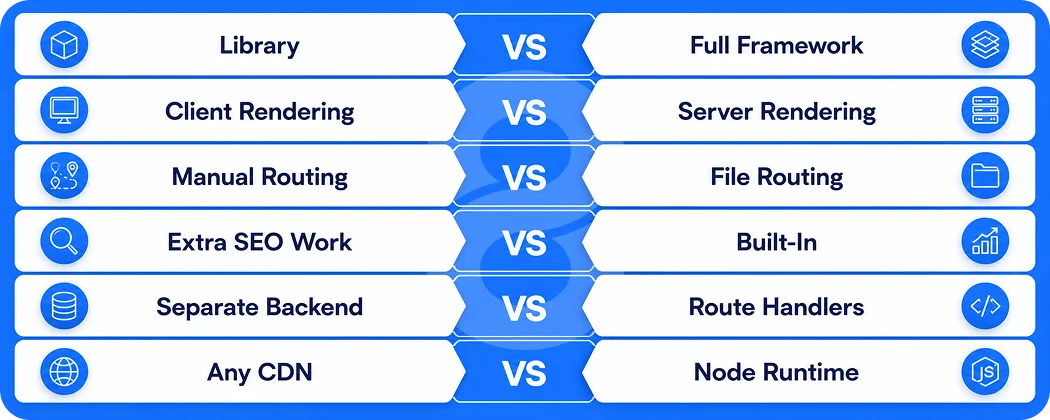
The table below covers the practical differences that affect a build decision. Keep in mind that Next.js can do everything in the React column, since it runs React underneath. The reverse is not true without additional libraries.
| Factor | React | Next.js |
|---|---|---|
| Type | UI library | Full-stack framework built on React |
| Default rendering | Client-side | Server-side, with static and hybrid options |
| Routing | Add a router yourself | File-based, built in |
| Data fetching | Your choice of library | Server Components, fetch, and Server Actions |
| SEO readiness | Requires extra work | Strong out of the box |
| API layer | Separate backend needed | Route Handlers and Server Actions included |
| Build tooling | Vite, Rsbuild, or Parcel | Turbopack, configured by default |
| Image and font handling | Manual | Optimized automatically |
| Hosting | Any static host or CDN | Node runtime or a supported adapter |
| Learning curve | Moderate | Steeper, mainly due to Server Components |
| Bundle control | Complete | Framework-managed with some overrides |
| Best fit | Apps behind a login | Public pages that need to rank |
Rendering and Performance Compared
Performance arguments about these two usually collapse into “Next.js is faster,” which is true only for a specific measurement at a specific moment. The honest version is that each one optimizes a different part of the session.
What each approach does to Core Web Vitals
Core Web Vitals are Google’s measurements for how a page behaves while it loads, and the two that matter here pull in opposite directions on a client-rendered React app. Time to First Byte looks great, because the server has almost nothing to send.
Largest Contentful Paint is where it falls apart. The visitor is looking at an empty shell until the JavaScript bundle downloads, parses, and runs, and only then does anything they came for appear on screen.
Next.js reverses that shape. TTFB rises because the server does work before responding. LCP usually improves sharply, since text and images are already present in the first HTML response.
On a fast laptop over fibre, the gap is a few hundred milliseconds and nobody notices. On a mid-range Android phone on a congested network, it is the difference between a page and a white screen.
Bundle size and hydration cost
Server rendering does not delete JavaScript. Interactive components still hydrate in the browser, and a poorly split Next.js app can ship more JavaScript than an equivalent SPA while also paying for the server render on every request. Server Components help by keeping component logic on the server, though only for the parts that never need interactivity.
This is the caveat missing from most comparisons. Next.js will not rescue a slow application. Misused Server Components and waterfall data fetching produce worse field data than a carefully built single-page app, and we have measured exactly that on client projects arriving for a rescue.
When client-side React wins on speed
For an app where somebody loads once and stays for forty minutes, first paint is a rounding error. A trading dashboard, a design canvas, a spreadsheet tool, or an internal admin panel spends its entire life in the client. Adding server rendering to those adds latency to every navigation in exchange for nothing the user can see.
Read More: React vs Angular: Which Framework Should You Choose for Your Next Web App?
SEO and AI Search Visibility
This is where the decision stops being an engineering preference and starts showing up in revenue. If the page needs to be found by strangers, rendering strategy is a growth question.
What crawlers receive
Googlebot executes JavaScript, so a React SPA can absolutely be indexed. The catch is that rendering gets queued and deferred, which means slower discovery of new URLs and patchy coverage on large sites. Other crawlers are less patient. Plenty of them read the raw HTML response and move on to the next URL.
With Next.js the content is already sitting in the HTML when a crawler asks for it. No render queue, no JavaScript step, no second visit needed before the page gets indexed.
Metadata, sitemaps, and structured data
Next.js handles metadata through a Metadata API that runs on the server. It helps titles, descriptions, and Open Graph data get generated per route rather than injected after the page loads. Sitemaps and robots files work the same way, as files the framework builds during your build step.
In a React SPA, you bolt this on with a head-management library. It works, and it works after the JavaScript runs, which is the part that matters. For an ecommerce store with thousands of product URLs, each needing unique metadata and product schema, the maintenance gap between the two approaches gets wide quickly.
Why AI answer engines raise the stakes
Search results are increasingly summarized before anyone clicks through. The crawlers feeding those systems mostly consume raw HTML and mostly do not run JavaScript. A page that renders entirely in the browser can be invisible to them while still ranking acceptably in classic blue-link search, which makes the problem easy to miss until traffic quietly stops converting.
Developer Experience, Build Speed, and Tooling
Day-to-day speed matters more than benchmark charts, because it compounds across every developer on the team for the entire life of the project. A ten-second feedback loop and a two-second one produce very different codebases.
Turbopack against Vite
Next.js 16 made Turbopack the default, and 16.3 added filesystem caching for builds along with the memory reductions noted earlier. Vite remains the standard outside Next.js. The State of React 2025 survey recorded Vite at 92 percent usage against Turbopack at 44 percent, which mostly reflects how many respondents build outside the framework.
Routing and data fetching in daily use
Next.js decides routing for you through the filesystem, which eliminates a whole category of configuration arguments. React does not decide anything, so you pick a router, wire it up, and own it. Teams who prefer that control often pair it with a TypeScript-first setup where route parameters get validated at compile time.
On the data side, plain React usually means TanStack Query or SWR against your own custom API. Next.js lets you fetch inside Server Components and mutate through Server Actions, which removes API boilerplate at the cost of a mental model your whole team has to learn.
Working alongside AI coding agents
React has become the default output when you prompt an AI tool for a user interface, so both stacks get reasonable generated code. Next.js 16.3 added version-matched documentation that coding agents read without any setup, meaning an agent upgrading your project reads the docs for your actual version rather than guessing from training data.
Cost, Timeline, and Hiring
Framework choice moves three numbers on a project… how long the first sprint takes, what the monthly infrastructure bill looks like, and how hard it is to staff the team. They do not move in the same direction.
Where build cost really differs
Next.js removes work from the opening weeks. Routing, server rendering, image optimization, and a basic API layer arrive already configured. On a typical marketing site plus product build, that saves two to four weeks of setup a plain React project has to either write by hand or inherit from a boilerplate somebody has to maintain.
Plain React costs less when the app is small or the requirements are unusual. If you already run a mature backend and only need a front end, a Vite SPA avoids paying for framework features you will never switch on. That is a common situation for internal SaaS application work where the API predates the interface by years.
Hosting and infrastructure bills
A static React SPA is a folder of files. Put it on a CDN and the monthly cost rounds to nothing. Next.js in server mode needs compute that stays warm and scales with traffic, priced accordingly. A fully static Next.js site is just as cheap as the SPA, but the moment you add per-request rendering, you have a real infrastructure line item and a scaling story to think about.
Hiring and ramp-up time
Every Next.js developer knows React. The reverse is not guaranteed. Hiring for React is easier and usually cheaper because the pool is larger. The Stack Overflow Developer Survey put React at around 45 percent usage among more than 49K respondents.
Ramp-up is the hidden cost. A React developer with no Server Components experience needs a few weeks before they stop fighting the framework, and mistakes during that period tend to be the expensive kind involving accidental client bundles and data leaking across boundaries.
| Project Type | Recommended Stack | Typical Build Time | Cost Profile |
|---|---|---|---|
| Marketing site with blog | Next.js (mostly static) | 4 to 8 weeks | Low build, low hosting |
| Ecommerce storefront | Next.js with ISR | 12 to 20 weeks | Medium build, medium hosting |
| SaaS with public pages | Next.js | 16 to 28 weeks | Medium build, medium hosting |
| Internal admin dashboard | React with Vite | 8 to 14 weeks | Low build, minimal hosting |
| Real-time collaboration tool | React with Vite | 16 to 30 weeks | High build, minimal hosting |
| Marketplace or directory | Next.js | 20 to 32 weeks | High build, higher hosting |
Hosting, Vendor Lock-In, and Security
Two topics the current top-ranking comparisons ignore almost completely, and both of them turn into procurement questions the moment a project gets signed off.
Running Next.js outside Vercel
Next.js is MIT licensed and self-hostable. Version 16 shipped a stable Build Adapters API so hosting providers can integrate without patching framework internals, and the OpenNext project maintains adapters for AWS, Cloudflare, and Netlify. Vercel collaborated with that team on a stable adapter as of 16.2.
Some features still behave differently depending on where you run them. Image optimization, incremental static regeneration, and middleware are the usual suspects. Verify your target platform supports what you plan to use before the architecture gets locked. A plain React SPA raises none of these questions, because static files run anywhere.
Patch cadence and known incidents
Both projects have shipped serious vulnerabilities. React Server Components carried an unauthenticated remote code execution flaw disclosed in December 2025 and patched in 19.0.1, 19.1.2, and 19.2.1, with two further related issues surfacing within days as researchers probed the fix. Next.js has since moved to a formal monthly security release schedule with an Active LTS line and a Maintenance LTS line.
For a business, the lesson is upgrade discipline rather than alarm. A server-rendered framework runs your code on a server, which is a larger attack surface than a static bundle by definition. Budget for patching from day one and treat the LTS schedule as part of the operating cost.
Read More: Node JS App Development: The Complete Hiring Guide
The Third Option Most Comparisons Skip
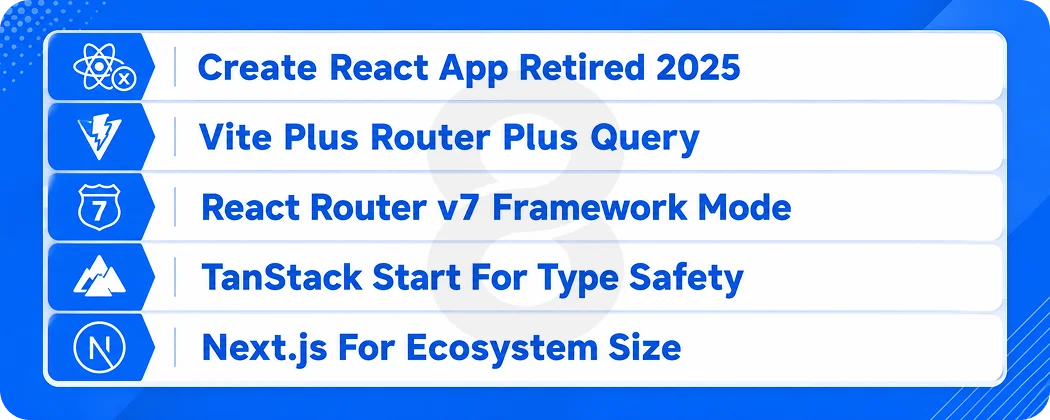
Treating this as Next.js or nothing is the most common error in the current crop of comparison articles. React formally sunset Create React App in February 2025 and pointed people toward a framework or toward a build tool like Vite, Parcel, or Rsbuild. Both halves of that sentence carry weight.
React with Vite and a standalone router
Vite plus React plus a router plus TanStack Query is a production stack, not a starter kit. It builds fast, deploys anywhere, and leaves you in charge of what ships to the browser. State of JS 2025 recorded Vite overtaking React itself to become the second most used item in the entire survey.
React Router v7 in framework mode
React Router v7 absorbed Remix and offers a framework mode with loaders, actions, and server rendering on top of Vite. For teams that want SSR without adopting Server Components, it is a credible middle path with a mature ecosystem behind it.
TanStack Start
TanStack Start is a newer full-stack React framework built on TanStack Router, offering end-to-end type safety across routes and per-route control over server rendering. State of React 2025 recorded its awareness jumping from 55 to 81 percent in a single year, which is unusual movement for a young project.
When none of these beat Next.js
If you want image optimization, incremental regeneration, and a large hiring pool without spending a week evaluating four libraries, Next.js is still the shortest path from decision to production. Ecosystem size is a feature, and for most commercial projects it is the deciding one.
Read More: Cross-Platform vs Native App Development: Which Should You Choose for Your Business App?
When to Choose Next.js

The pattern is consistent across every project type below: strangers arrive from search, the first impression happens in under two seconds, and content changes often enough that a static export alone will not cover it.
Ecommerce and product catalogs
Product pages need unique metadata, structured data, and fast loads on mobile. Incremental static regeneration lets a catalogue of fifty thousand SKUs stay static while individual pages refresh as prices and stock change. Teams building on ecommerce platforms get the SEO groundwork without hand-rolling it.
Marketing sites and content platforms
Blogs, documentation, and landing pages are the easiest case. Static generation gives near-instant loads, hosting costs almost nothing, and every page is fully readable by any crawler that asks for it.
SaaS products with a public front door
Most SaaS companies run a public marketing surface and an authenticated product. Next.js handles both in one codebase, rendering the marketing pages statically and the dashboard on the client, without maintaining two deployments and two design systems.
Marketplaces and directories
Listings pages live or die on organic discovery. A marketplace where every listing has to be indexable is close to the ideal Next.js use case, and Partial Prerendering suits it well since the shell is static while availability and pricing stay dynamic.
Read More: Ionic vs React Native: Which Is Better for Your Mobile App Project?
When to Choose Plain React

Flip every assumption above and the answer flips with it. When nobody outside the organization will ever load the page, server rendering buys you latency and complexity in exchange for benefits you cannot use.
Internal tools and admin dashboards
Nothing here needs indexing. Users log in once, keep the tab open all day, and care about interaction speed rather than first paint. A Vite build with a router and a query library ships faster and stays simpler to reason about.
Real-time and collaborative applications
Chat, whiteboards, live editors, and multiplayer tools maintain persistent connections and update constantly. Server rendering contributes almost nothing to that model, and the client-first architecture is easier to debug when state is flowing through websockets.
Embedded widgets and micro-frontends
A booking widget dropped into somebody else’s site, or one team’s slice of a larger application, needs to be small and independent. React on its own does that. A framework brings assumptions about routing and hosting that a widget cannot honour.
Products sharing code with a mobile app
When web and mobile share business logic, keeping the web app on plain React makes that code portable to React Native with far less friction. Server Components have no equivalent on the mobile side, so anything built around them stops being shareable.
Five Questions That Settle the Decision

Architecture debates run long because people argue about the tools instead of the requirements. These five questions usually end the conversation inside half an hour.
- Do these pages need to rank? If organic search brings customers, use Next.js. If the answer is no, the strongest argument for it just vanished.
- Is there already a backend? A mature API you are happy with removes most of the reason to adopt Server Actions and Route Handlers.
- Who maintains this in two years? For a small team with turnover, a framework’s conventions are worth more than flexibility, because conventions survive people leaving.
- Where will it be hosted? If you are committed to a specific cloud or an on-premise environment, confirm adapter support before anything else.
- How much of the app sits behind a login? If it is 90 percent of the screens, the SEO case evaporates and you are choosing on developer experience alone.
| If This Is True | Choose | Because |
|---|---|---|
| Organic traffic drives revenue | Next.js | Content is in the HTML from the first response |
| App is fully authenticated | React | Nothing to index, so rendering cost buys nothing |
| Existing mature backend | React | Framework API features would go unused |
| Small team, frequent turnover | Next.js | Conventions reduce onboarding time |
| Strict on-premise hosting | React | Static files avoid runtime and adapter issues |
| Large catalogue, frequent updates | Next.js | Incremental regeneration handles scale cleanly |
Three mistakes show up repeatedly. Teams pick Next.js for an application nobody can crawl and then pay for server rendering on every internal page load. Teams pick plain React for a content site and spend the next year explaining why nothing ranks. And teams treat the choice as permanent when both migration paths exist and neither is catastrophic.
Read More: Web App vs Native App: A Complete Comparison for Business Owners (2026 Guide)
How to Migrate Between React and Next.js
Neither direction requires starting over. The effort depends far more on how your data fetching is structured than on the framework boundary itself.
Moving a Vite SPA to Next.js
This is the easier direction. Your components mostly transfer unchanged. The work concentrates on converting router configuration into the app directory structure, adding “use client” to every component touching hooks or browser APIs, and deciding which data fetching moves to the server. Next.js publishes a step-by-step migration guide, and most mid-sized SPAs take three to six weeks.
Moving off Next.js to a plain React SPA
Harder, though not dramatic. Server Components have to become client components with a data-fetching layer, Route Handlers move into a standalone Node.js backend, and image and font optimization needs replacing. Teams usually do this when hosting constraints or vendor concerns force the issue.
Moving from Pages Router to App Router
The two routers can coexist during a migration, so this can happen page by page rather than in one release. Start with low-traffic routes, learn the Server Components model on something forgiving, and leave your highest-value pages until the team has confidence.
Read More: Progressive Web App vs Mobile App: Complete Comparison Guide for 2026
Building Production React and Next.js Applications With 8ration

8ration builds web applications on both stacks and picks between them per project rather than by default. Next.js development work goes to products where organic discovery matters, and React development covers the authenticated dashboards and internal tools where server rendering earns nothing.
Cinnamon supports patients navigating pharma-sponsored access programmes, and Integrale Safe USA turns insurance coverage options into something a non-expert can compare.
Family Plan and Munitora both run on Vercel infrastructure, which is visible from their live deployments.Both stacks stop at the browser, so the custom API development and Node.js backends behind them are part of the same conversation. So is progressive web app work for anything that has to keep functioning when the connection drops.