
There’s a moment every team building a learning platform eventually hits. You’ve launched the platform. The courses are live. The admin panel looks great in a demo. And then… nobody logs in.
Week one completion rates tank. Learners forget passwords and never reset them. The training team is manually following up with individuals who haven’t clicked a single module. The content is fine. The problem is everything around it.
That’s the real challenge of learning management system development. It’s not just building something functional. It’s building something people will actually use, consistently, on any device, without friction.
And in 2026, with AI-powered personalization raising the bar on what learners expect, the technical and UX decisions you make early compound into either a platform people trust or a system that generates compliance checkbox ticks and nothing else.
This guide is for the product managers, CTOs, and founders who want to get this right the first time.
What Learning Management System Development Actually Involves
The development of the LMS is treated as a single product by people. It isn’t. There are five or six systems that have to communicate clearly through one interface: course delivery, user management, assessment logic, analytics, notification workflows and integrations with whatever HR or CRM systems the organization already has.
An LMS is the workplace system that powers training. It provides content, monitors progress, enforces permissions, keeps compliance records, and lets you know if it’s working or not. If it’s poorly designed, none of those things occur consistently. If it’s designed correctly, that whole platform goes behind the learning and that’s what we want.
Interacting with an organized LMS are divided into four categories: administrators who control the system, instructors or trainers who teach content, content producers who create the content, and learners who use and consume content.
There should be different user interfaces, permissions and reporting visibility for each role. One of the most common errors teams make early on is to confuse these when planning.
| Role | Primary Function | Access Level |
|---|---|---|
| Administrator | System config, user management, compliance reporting | Full system access |
| Instructor / Trainer | Deliver sessions, manage groups, provide feedback | Course and learner-level access |
| Content Creator | Build, structure, and update learning materials | Content creation tools |
| Learner | Complete courses, assessments, track own progress | Personal dashboard only |
The industry context changes the digital product significantly. A corporate training platform for onboarding looks different from a university LMS managing thousands of students across departments.
A compliance training system in healthcare has audit trail requirements that a skills development platform for a SaaS company simply doesn’t need. Before writing a single line of code, defining the use case isn’t optional. It determines everything from the database schema to the notification logic.
Read More: How Custom SaaS Development Can Transform Your Business Operations
Core Features Every LMS Needs to Get Right
There is no limit to adding features! The actual crafty part is to make a distinction between what must work flawfully on day 1 and what can be postponed until a later sprint.
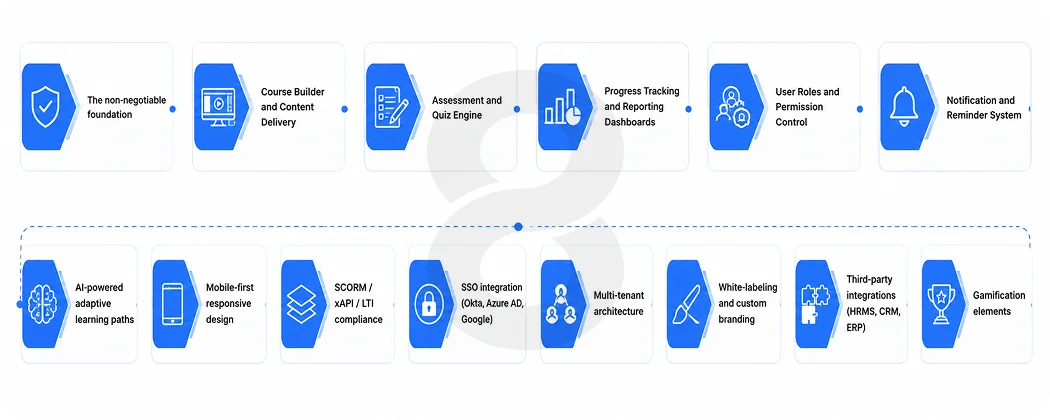
The non-negotiable foundation
Course Builder and Content Delivery
Table stakes are drag-and-drop course creation, the inclusion of video, PDFs, SCORM packages, quizzes and multimedia presentations. Instructors should not have to submit a support ticket to add a new module. The course builder will be the one your internal team use each week. If it’s awkward, there’s a bad taste in the water below.
Assessment and Quiz Engine
A range of question types, automatic marking, hand-in and response feeds for each learner’s profile. Your quiz needs to be integrated very simply into your compliance tracking system, too, because in regulated industries, a failed quiz is not a mere low grade. It’s a record that should be kept for an audit.
Progress Tracking and Reporting Dashboards
Live insight into completion rates, assessment scores, time on course, and certification status of learners and admin. But modern analytics take things a step further and can detect learning gaps, identify students who are at risk of falling behind, and identify content-induced confusion.
User Roles and Permission Control
Role-based access is not limited to being a security feature. This is what makes the platform usable. When an administrator is in the same view as a learner, it’s a UX failure.
Notification and Reminder System
Until you’re at 43% compliance with no one knowing something was due, all these features may sound like minor details: deadline alerts, reminder emails for certification renewals, and alerts about new courses.
Read More: Time Tracking Software Development Services: Features, Tech Stack & Timeline
Advanced features that scale the platform
| Feature | Why It Matters |
|---|---|
| AI-powered adaptive learning paths | Recommends next course based on performance, not just sequence |
| Mobile-first responsive design | Learners access training on phones. The experience must match |
| SCORM / xAPI / LTI compliance | Ensures content from third-party authoring tools works in your platform |
| SSO integration (Okta, Azure AD, Google) | Removes the password friction that kills early engagement |
| Multi-tenant architecture | Serves multiple orgs, business units, or client groups from one instance |
| White-labeling and custom branding | Branded portals increase perceived ownership and adoption |
| Third-party integrations (HRMS, CRM, ERP) | Syncs learner data with Workday, Salesforce, SAP, and similar systems |
| Gamification elements | Badges, leaderboards, and completion streaks improve engagement measurably |
Custom LMS vs. Off-the-Shelf: The Decision Most Teams Get Wrong
Here’s an honest take. Off-the-shelf LMS platforms like TalentLMS, Docebo, and SAP Litmos are genuinely good products for early-stage use. They’re fast to deploy, predictable to budget, and they’ll handle basic course delivery without any custom development. If you have 200 employees and need to run onboarding, start there.
The problem starts when you grow. Per-user licensing costs compound. Integrations that weren’t in the base plan require expensive add-ons. Compliance reporting that your legal team needs doesn’t exist without custom workarounds. And the branding, every platform that should feel like yours still has another company’s fingerprints on it.
The break-even point for custom LMS development typically hits when annual licensing costs reach $100,000 to $150,000. At that level, a custom build at $150,000 to $400,000 upfront pays for itself in 3 to 4 years, after which annual costs drop to maintenance and hosting. Organizations with over 5,000 users almost always cross this threshold with commercial platforms.
Beyond cost, there’s a more important consideration: data ownership. An off-the-shelf platform stores your learner data in its infrastructure, under its terms. A custom platform means your organization owns every completion record, every assessment result, every behavioral signal. For compliance-heavy industries like healthcare, finance, and pharmaceuticals, that distinction isn’t negotiable.
| Factor | Off-the-Shelf LMS | Custom LMS |
|---|---|---|
| Time to launch | Days to weeks | 4 to 14 months |
| Upfront cost | Low ($0 to $30K/year) | Higher ($70K to $400K+) |
| Long-term cost at scale | High (per-user fees compound) | Low (maintenance only) |
| Data ownership | Vendor’s infrastructure | Full ownership |
| Integration flexibility | Limited by vendor roadmap | Complete control |
| Branding and UX | Generic templates | Purpose-built |
| AI and advanced features | Depends on vendor updates | Built to your requirements |
Learning Management System Development Cost Breakdown
Before you commit to building, you need a realistic sense of where the money actually goes. Cost is one of the most misunderstood parts of the whole process. Teams often get quotes and don’t know how to compare them because they’re not comparing the same scope. A $70,000 estimate and a $300,000 estimate can both be correct for different versions of the same idea.
The variables that move the number most are the complexity of user roles, the depth of third-party integrations, whether AI personalization is in scope from day one, and the compliance architecture your industry requires. Mobile apps add cost. Multi-tenant infrastructure adds cost. White-labeling and custom branding design add cost. None of these are surprises if you plan for them.
Use the table below as a working reference. These are realistic ranges, not marketing numbers.
| Platform Type | Scope | Estimated Cost | Timeline |
|---|---|---|---|
| Basic LMS MVP | Core course delivery, 2 user roles, basic reporting | $30,000 to $70,000 | 2 to 4 months |
| Mid-Scope Platform | Full feature set, SSO, 3rd-party integrations, mobile-responsive | $70,000 to $160,000 | 4 to 7 months |
| Enterprise LMS | AI personalization, multi-tenant, deep HRMS/CRM/ERP integration | $160,000 to $400,000+ | 9 to 14 months |
| Annual Maintenance | Hosting, updates, security, feature additions | 15% to 20% of build cost/year | Ongoing |
| SCORM/xAPI Setup | Standards compliance and LRS integration | $5,000 to $15,000 | Included in build |
| SSO Integration | Per identity provider (Okta, Azure AD, Google) | $3,000 to $8,000 each | Included in build |
| Mobile App (iOS + Android) | Native or cross-platform | $25,000 to $60,000 | 2 to 4 months |
The honest version of this conversation is that most teams underbudget because they scope for the MVP and forget the integrations. The integrations are often 30 to 40 percent of total project cost. Plan for them upfront.
Read More: How Much Does It Cost to Make an Educational App?
The Tech Stack and Standards That Actually Matter
This is where a lot of planning documents go vague at exactly the wrong moment. The technology choices made during architecture determine whether your platform handles 500 concurrent users or 50,000, and whether your content library transfers cleanly if you ever need to migrate.
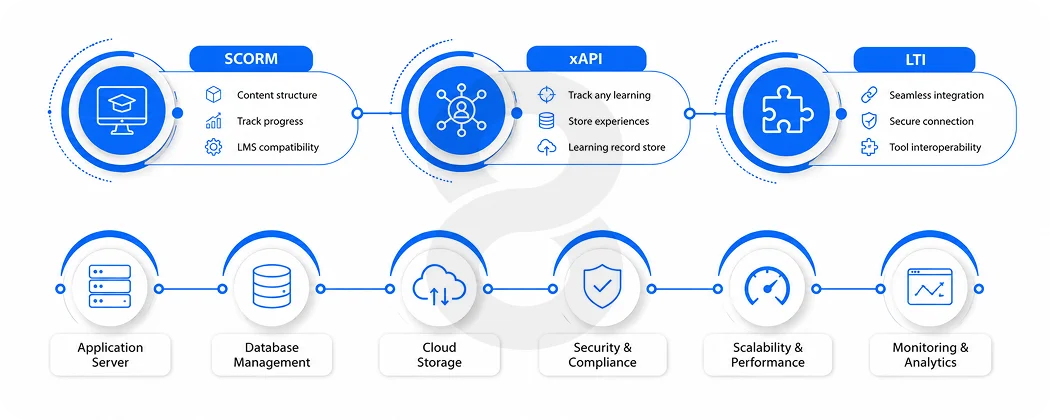
eLearning standards: SCORM, xAPI, and LTI
These three are not competing choices. They’re different layers of the same stack.
SCORM
The oldest and most widely-used standard is Shareable Content Object Reference Model. It bundles courses and monitors simple course completion statistics such as pass/fail, time spent, and score.
It’s supported by every major LMS. The limitation is that it can only monitor what occurs within the LMS and the data string size is limited to 4096 characters. If your learners are watching videos, doing work tasks, or learning on various platforms, nothing of this kind can be captured with SCORM.
xAPI
Experience API, also known as Tin Can, was designed to overcome just those types of limitations. It documents learning interactions from any source such as mobile apps, simulations, real world activities, and stores them in a Learning Record Store (LRS) outside the LMS.
Each interaction is documented as a plain statement, such as “Maya finished the compliance module” or “James earned 87% on the sales simulation.” Overall, the outcome is much more powerful analytics. The downside is a more complex setup and the extra LRS infrastructure.
LTI
Learning Tools Interoperability deals with another aspect altogether. It integrates 3rd party tools into your LMS using single sign-on and grade passback. Consider assessment technology, video conferencing, simulations that are interactive. LTI integrates them into your LMS without any customized development for each.
Most up-to-date LMS construction: SCORM for legacy content compatibility, xAPI for analytics-rich and cross-platform tracking, and LTI for connecting external tools. The majority of platforms created these days have all three.
Backend and infrastructure considerations
The web platform architecture decisions that are most critical to a scalable LMS have to do with concurrency and data isolation. If hundreds of students finish the same module at the same time, there will be no need to create a slowdown write-lock queue.
However, in a high-traffic system, use message brokers such as Kafka to handle this: acknowledging the learner’s event and processing the database write in the background.
For any platform that provides services to multiple organizations or client groups, multi-tenant architecture is important. Tenants each have their own branded portal, user base, and data, all from the same codebase. This is why white labeling is a viable business without the need to duplicate infrastructure.
It must be designed in, not designed on, the security architecture must be built in from the beginning with role-based access control, audit logging with 5 years of retention, AES-256 encryption at rest, TLS 1.3 in transit, and GDPR compliant data subject rights workflows for platforms that serve EU learners.
How AI Is Changing What Learners Expect
AI personalization is no longer a feature; it’s a standard. These are just some of the capabilities of a modern LMS that can recommend the next course based on performance, create questions from lecture slides, offer feedback on the course content following poor assessment scores, and alert managers that learners might need support before they realize it.
The World Economic Forum’s Future of Jobs report projects a considerably larger average skills gap for workers by the end of the decade, in the era of continuous learning infrastructure, as the nature of work is changing with automation.
The key is that the architecture of the AI development process is geared from the beginning to support these features. It’s much more costly to integrate AI into an existing platform that wasn’t designed with AI in mind than to incorporate the ability to be AI ready from the outset.
Read More: AI System Integration Services: What to Look for in a Development Partner
The LMS Development Process: What to Expect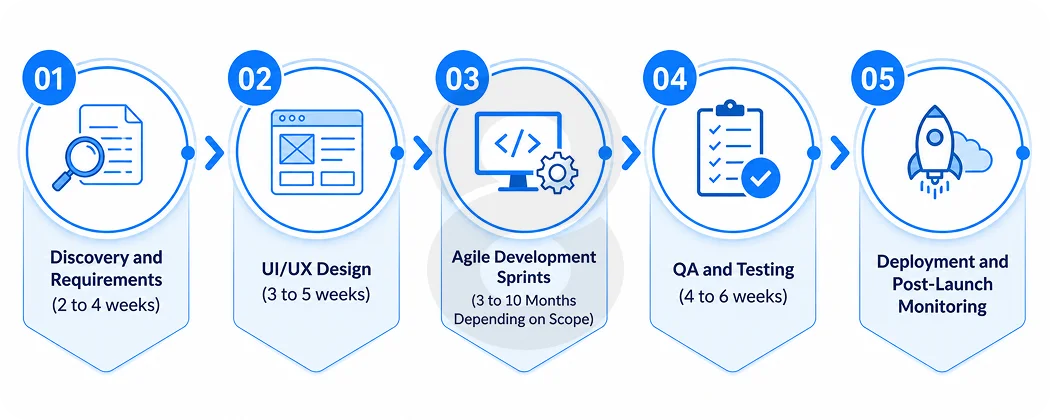
Teams that struggle with LMS projects typically underestimate how long the planning phase needs to be and how consequential the architecture decisions made in week two turn out to be in month twelve.
Here’s a realistic phase breakdown:
Discovery and Requirements (2 to 4 weeks)
Define user roles, compliance requirements, integration needs, and content standards before any design begins. This phase should produce a detailed requirements document that the development team and the client both agree on.
UI/UX Design (3 to 5 weeks)
The learner interface is the most important thing to get right. Design is not decoration here. It’s the primary driver of adoption. This phase produces wireframes, interactive prototypes, and a full design system. For enterprise platforms, accessibility audits (WCAG 2.1 AA compliance) need to happen in this phase, not after launch.
Agile Development Sprints (3 to 10 Months Depending on Scope)
Development runs in two-week sprints with working software demonstrated at the end of each cycle. A typical LMS development roadmap moves through: authentication and user management, course builder, content delivery engine, assessment module, reporting dashboard, notification system, payment integration (if applicable), and admin panel.
QA and Testing (4 to 6 weeks)
Every feature goes through both automated and manual testing. Load testing for concurrent user scenarios is especially important. The platform should be tested at 5 to 10 times normal expected traffic before launch.
Deployment and Post-Launch Monitoring
The launch isn’t the finish line. The first 90 days of usage will reveal behavior patterns that no requirements document predicted. Plan for ongoing feature refinement based on actual usage data.
Read More: Customer Service Management System: Complete Development Guide
Industries That Rely Most on Custom LMS Development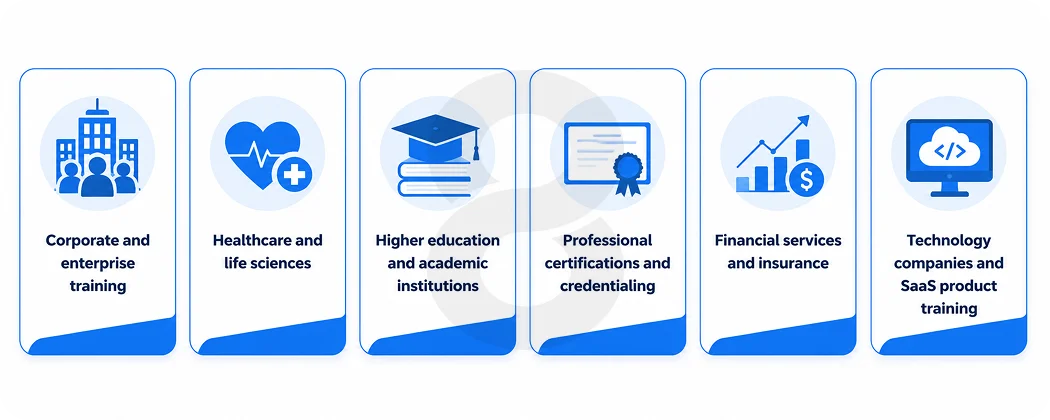
Not every sector builds an LMS for the same reasons. A hospital system and a fintech startup both need training platforms, but the compliance requirements, content formats, and learner behaviors are completely different. Understanding which industry patterns apply to your context helps you scope the right platform from the start, rather than discovering gaps six months after launch.
Corporate and enterprise training
Large organizations use LMS platforms to standardize onboarding, reduce time-to-productivity for new hires, and run compliance training at scale. The priority is integration with existing HRMS tools and reporting that maps back to business performance metrics. Learner count typically runs into the thousands, which makes per-user SaaS pricing unsustainable over time.
Healthcare and life sciences
Healthcare training carries regulatory weight that most other industries don’t. Audit-ready records, certification renewal workflows, and role-specific compliance courses aren’t optional. HIPAA-compliant data handling and long-term audit log retention are baseline requirements. Building a healthcare LMS without these baked into the architecture creates expensive rework later.
Higher education and academic institutions
Universities and colleges use LMS platforms to manage coursework, grading, and student engagement across departments. FERPA compliance governs how student data is stored and shared. Integration with Student Information Systems (SIS) and accessibility standards (WCAG 2.1 AA) are both non-negotiable. Canvas and Blackboard dominate this space, but institutions with specialized pedagogy increasingly move toward custom platforms.
Professional certifications and credentialing
Organizations issuing certifications, licenses, or continuing education credits need platforms that manage the full credential lifecycle: course completion, assessment, certificate issuance, expiration tracking, and renewal reminders. These platforms often serve external learners rather than internal employees, which changes the UX requirements and monetization model significantly.
Financial services and insurance
Compliance training in financial services runs on strict timelines. Regulators expect documented proof that employees completed specific training by specific dates. An LMS in this context isn’t just a training tool. It’s evidence management. Integration with HR systems and the ability to generate audit-ready reports on demand are mandatory capabilities.
Technology companies and SaaS product training
Tech companies use LMS platforms for both internal employee development and external customer education. Customer-facing training reduces support ticket volume, improves product adoption, and increases retention. The LMS in this context often doubles as a revenue-generating product, which means the learner experience, the payment gateway, and the content management system all need to work together cleanly.
Read More: Custom Web App Design for SaaS Startups: Our Process Explained
How 8ration Approaches LMS Projects
8ration brings a full-stack approach to EdTech. The team handles everything from the mobile app experience through to backend learning engines and AI recommendation systems, which matters because LMS platforms live or die on mobile. Learners access training on phones, often during commutes, and a platform not designed mobile-first will show it in completion data.
The software team handles SCORM, xAPI, and LTI compliance integrations that connect third-party content libraries and authoring tools to custom platforms. White-labeling capabilities mean the final product looks entirely like the client’s own product.
8ration works in focused sprints with transparent progress tracking. No surprises at launch, and a platform that ships with the compliance, performance, and UX standards a real learning ecosystem needs.
Read More: 10 Best Education App Development Companies (5-Star Rated on Clutch)
LMS Integrations Are Where Projects Get Complicated
Most LMS platforms don’t fail because the courses are bad. They fail because the platform doesn’t connect cleanly to the rest of the organization’s tools.
The integrations that matter most fall into a predictable set. HRMS platforms like Workday or BambooHR need to sync learner data so new employee onboarding triggers automatically and role changes update training assignments in real time.
CRM systems like Salesforce matter for customer education programs where course completion should update the customer record. ERP systems become relevant in manufacturing and supply chain contexts where compliance certification data needs to live alongside operational records.
According to a survey by Training Magazine, 75% of organizations now treat strong integration capabilities as a priority requirement when evaluating LMS platforms, not a nice-to-have. That number has been climbing steadily because organizations have learned the hard way what happens when training data sits in a silo.
Single sign-on is the integration that has the most direct impact on adoption. Requiring learners to manage separate credentials for the LMS is a friction point that kills engagement in the first week. SSO through Okta, Azure Active Directory, or Google Workspace removes that friction entirely.